Dynamics 365
 Power Platform
 Dynamics
 Cloud & Productivity
Microsoft Dynamics AX 2012 to Dynamics 365 Finance & Operations upgrade: process, timeline, and planning checklist

Every version of Dynamics AX is now outside Microsoft’s standard support lifecycle, increasing operational, compliance, and cybersecurity risk for organizations still using AX 2012. For most companies, the question is no longer whether to modernize, but how.
This blog explains how the upgrade to Dynamics 365 Finance & Operations actually works. It covers the process, the timeline, the cost drivers, and the planning steps that separate smooth projects from painful ones.
Microsoft now licenses the product as separate applications: Dynamics 365 Finance and Dynamics 365 Supply Chain Management. Most customers and partners still say “Finance and Operations” or “D365 F&O” as shorthand for the broader platform.
Quick answer: Can you upgrade Dynamics AX 2012 to Dynamics 365 Finance and Operations?
Yes. Microsoft provides a supported direct upgrade path from AX 2012 R2 and R3 to the current Dynamics 365 Finance and Operations applications, provided the source environment meets Microsoft’s version and cumulative-update requirements. The project usually takes between 6 and 18 months. It moves through seven phases: assessment, data preparation, code upgrade, integration and report updates, data upgrade, testing, and go-live. Companies with heavy customizations or outdated processes may be better served by a reimplementation instead.
Table of contents:
- How the direct upgrade path works
- Dynamics AX 2012 upgrade versus reimplementation
- What versions of Dynamics AX 2012 are supported?
- The Dynamics AX 2012 to Dynamics 365 Finance and Operations upgrade process
- Customer example: The Museum of Fine Arts, Houston
- Common Dynamics AX 2012 upgrade challenges
- How long does a Dynamics AX 2012 upgrade take?
- AI in Dynamics 365 Finance and Operations: what was not possible in AX 2012
- Life after the upgrade: continuous updates and One Version
- Dynamics AX 2012 upgrade checklist
- Why choose Rand Group for your Dynamics AX upgrade
- Key takeaways
- Frequently asked questions
How the direct upgrade path works
Microsoft provides a supported upgrade path from AX 2012 to Dynamics 365 Finance and Operations. The upgrade framework converts your database, brings your configurations forward, and migrates transaction history. Your X++ customizations pass through Microsoft’s code-upgrade tooling, but developers must resolve conflicts and may need to refactor, replace, or retire code to fit the Dynamics 365 extension model.
There is an important caveat. Microsoft describes its upgrade tools as a framework, not a turnkey solution. Every AX 2012 database contains unique data and code. No automated process can resolve every conflict on its own. Expect real effort in data cleanup, code remediation, and testing. The Microsoft upgrade overview sets this expectation clearly, and our project experience confirms it.
Dynamics AX 2012 upgrade versus reimplementation
Not every company should take the upgrade path, even when it is available. The alternative is a reimplementation. In that approach, you stand up a fresh Dynamics 365 Finance and Operations environment and selectively migrate data into it. Master data and opening balances come across. Historical transactions often stay behind in an archive or reporting database.
Here is how the two approaches compare:
The upgrade path preserves your investment in configuration and history. The reimplementation path lets you shed technical debt. Many AX customizations were built to fill gaps that Dynamics 365 Finance and Supply Chain Management now handles natively. A reimplementation gives you the chance to drop that code entirely rather than carry it forward.
A good rule of thumb: if your AX system is not heavily customized and still reflects how your business actually operates, upgrade. If your processes have drifted, or your customization layer has grown unmanageable, a legacy migration to Dynamics 365 Finance and Operations is usually the better investment.
Upgrade timeline versus reimplementation timeline
A reimplementation usually takes longer than a direct upgrade because the project adds time for process redesign, new configuration, data mapping, and change management. However, the gap is often smaller than organizations expect. Heavily customized environments slow the upgrade path down as well, since every layer of custom code needs conversion, remediation, and testing. In those cases, the two timelines can end up closer than the initial estimates suggest.
The more important difference is what each timeline delivers. An upgrade brings your existing processes onto a modern platform, while a reimplementation rebuilds those processes around how your business operates today. If your operations have outgrown your original AX design, the additional months of a reimplementation typically produce a system that fits the business you have become rather than the one you were a decade ago.
The assessment phase provides the information needed to develop a project-specific estimate for either path.
What versions of Dynamics AX 2012 are supported?
Microsoft supports direct upgrades from Dynamics AX 2012 R2 and AX 2012 R3 only. Companies on the original AX 2012 release must first move to R2 or R3 before starting the upgrade. Companies on AX 2009 or AX 4.0 cannot use the upgrade tools at all. For those versions, a reimplementation is almost always the practical choice.
If you are on Dynamics AX 2012 R2 or R3, you must apply the latest cumulative update before you begin.
The Dynamics AX 2012 to Dynamics 365 Finance and Operations upgrade process
A well-run upgrade moves through seven phases. Microsoft’s own training module on upgrading from AX follows a similar structure. Here is what each phase involves in practice.

Phase 1: Assess the current AX environment
Start with Microsoft’s upgrade analyzer tool. It scans your AX 2012 environment and produces an upgrade analysis report. The report flags deprecated features you use today, estimates data upgrade effort, and identifies SQL configuration issues. This phase can happen before you buy any licenses. It gives you the information you need to build a realistic budget and project plan.

Phase 2: Clean and prepare the data
AX databases grow large over a decade of use. Database size directly drives data upgrade time and cost. Purge or archive data you no longer need, such as old batch history, logs, and closed transactions. Complete the pre-upgrade checklist inside AX 2012, which includes mapping each user to a Microsoft Entra ID sign-in. Also decide how to handle attachments. Attachments only carry forward if they sit in the AX database before the upgrade runs.

Phase 3: Analyze and refactor custom code
Your X++ customizations run through Microsoft’s code upgrade tooling in Lifecycle Services. The tooling converts what it can and flags conflicts for developers to resolve. This phase is also your best chance to retire code. Compare each customization against standard Dynamics 365 Finance and Supply Chain Management functionality. Features that required custom development in 2012 often exist out of the box today, or as AppSource extensions. Every customization you drop reduces upgrade cost and future maintenance.

Phase 4: Upgrade integrations and reports
Integrations built for AX 2012 will not connect to Dynamics 365 Finance and Operations without rework. The platform uses different integration patterns, including OData, data entities, and event-based approaches. Inventory every integration point, from EDI to banking to third-party applications, and plan each one. The same applies to reports. SSRS reports need review, and many companies use the move to shift operational reporting into Power BI.

Phase 5: Run the development data upgrade
The first full data upgrade runs in a development environment. Your team downloads the data upgrade package that matches your target Dynamics 365 Finance and Operations version, restores the AX 2012 database alongside it, and executes the upgrade. This first pass surfaces data quality issues and custom table conflicts. Developers write and test any custom upgrade scripts against this environment before you touch a shared sandbox.

Phase 6: Complete testing and user validation
Functional testing validates that business processes work end to end in the upgraded system. Your users run their real workflows: order to cash, procure to pay, financial close, and production if applicable. This phase also includes performance testing and a review of the differences between the AX client and the new web interface. Budget real time here. Testing gaps are the most common cause of painful go-lives.

Phase 7: Prepare for cutover and go-live
Cutover testing rehearses the final production upgrade. You time each step, from the last AX backup through the data upgrade to system validation, so you know exactly how long the production window will take. Most companies schedule the final cutover over a weekend. After go-live, plan for a hypercare period with elevated support while users settle into the new system.
Customer example: The Museum of Fine Arts, Houston modernizes with Dynamics 365 F&O
The Museum of Fine Arts, Houston had relied on its legacy financial system for more than 20 years. Reports were printed on green-bar paper, purchase orders were routed manually, and limited financial visibility sometimes contributed to delayed vendor payments.
Rand Group initially implemented Dynamics AX to support the museum’s complex nonprofit accounting requirements and multi-year exhibitions. As the organization’s needs evolved, Rand Group transitioned MFAH from Dynamics AX to Dynamics 365 Finance and Operations in the cloud.
Results after moving to Dynamics 365 F&O
- 50% reduction in monthly close time
- Three-day financial close
- 67% faster purchase approvals
- Purchase approval time reduced from three days to one
- Financial reporting across six dimensions to support nonprofit functional classifications
The move gave MFAH a more efficient and transparent financial-management environment while preserving the processes and reporting capabilities required by a complex nonprofit organization.
“One of the biggest reasons we value Rand Group is the stability of the team. We work with the same people year after year, and that continuity matters. Their consistency and responsiveness have made a real difference for our organization.”
— Julia Petty, Controller, The Museum of Fine Arts, Houston
Read the full Museum of Fine Arts, Houston case study to learn more about the organization’s transition from Dynamics AX to Dynamics 365 Finance and Operations.
See how Dynamics 365 compares to Dynamics AX
Dynamics AX has been the backbone of many organizations for almost two decades. This whitepaper shows how it compares to Dynamics 365, so you can see exactly what the cloud platform adds before you plan your move.
Common Dynamics AX 2012 upgrade challenges
Most upgrade problems trace back to a few predictable sources. Knowing them in advance lets you plan around them.
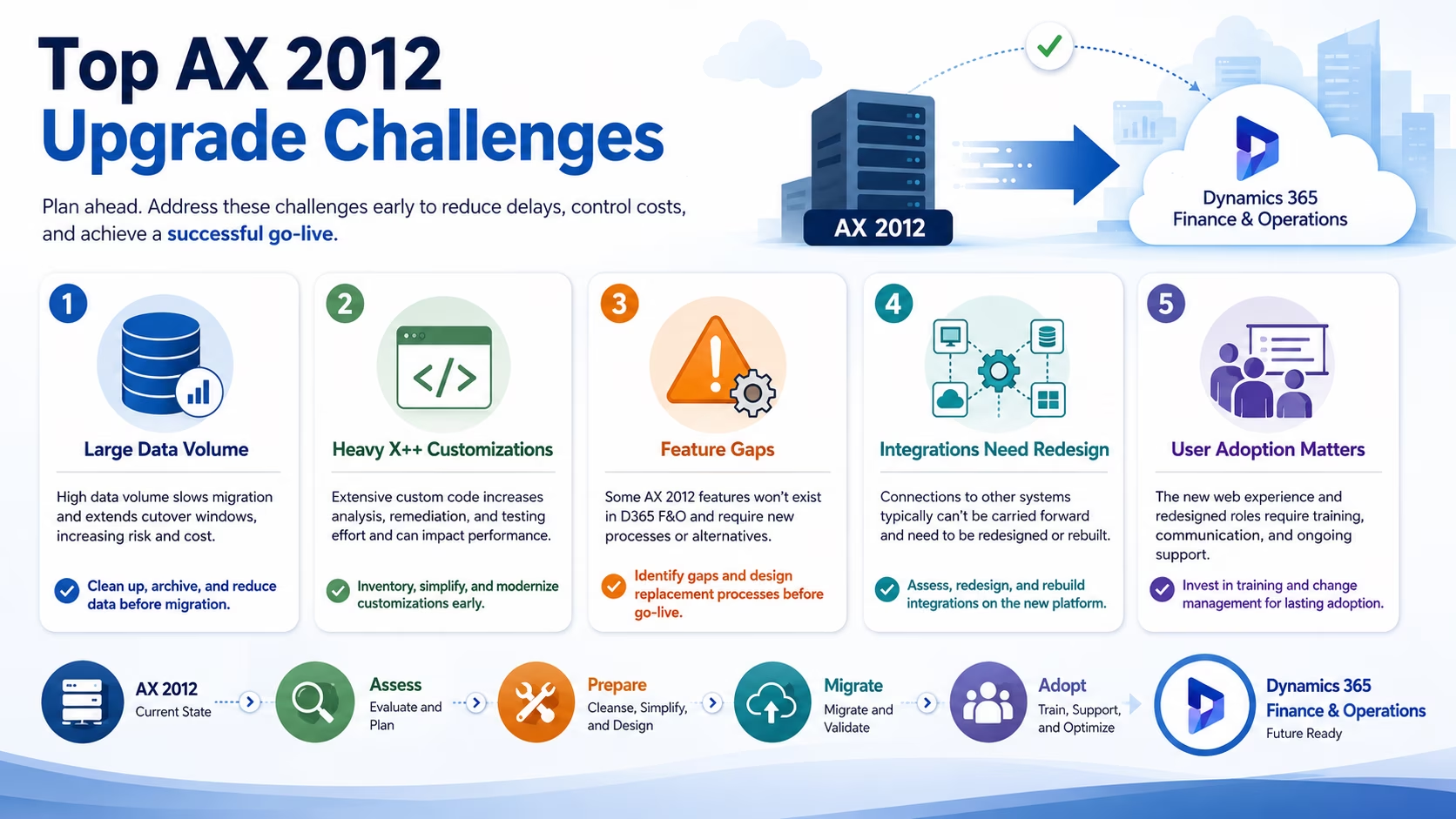
- Database size. Large databases stretch data upgrade windows and cutover timelines. Archiving or removing unnecessary data during Phase 2 can reduce upgrade and cutover time.
- Custom code volume. Every layer of X++ customization adds analysis and remediation work. The upgrade analyzer report tells you how much you face.
- Deprecated features. Some AX 2012 features do not exist in Dynamics 365 Finance and Operations. You need functional workarounds before go-live, not after.
- Integration rework. Most AX 2012 integrations require redesign or redevelopment using supported Dynamics 365 integration patterns.
- User adoption. The web interface differs from the AX client. Some users adjust quickly, but complex roles and redesigned processes may require structured training, role-based practice and post-go-live support.
How long does a Dynamics AX 2012 upgrade take?
Based on the size and complexity of the AX upgrade projects Rand Group typically encounters, organizations should often plan for approximately 6 to 18 months from kickoff to go-live. The exact timeline depends primarily on the volume of custom code, the size and condition of the database, the number of integrations, the complexity of the business processes, and the resources available for testing.
An organization with limited customizations, clean data, and relatively few integrations may complete the project near the lower end of that range. A heavily customized, multi-entity environment with complex integrations and extensive testing requirements should plan for a year or longer.
The assessment phase provides the information needed to develop a project-specific estimate. Skipping or compressing that work can lead to unrealistic timelines and unexpected effort later in the project.
What affects the cost of the upgrade?
There is no single price for an AX upgrade, but the cost drivers are consistent across projects:
- Custom code remediation. Usually the largest line item. Cost scales with the number of objects flagged in the code upgrade.
- Data volume and quality. Bigger, messier databases require more cleanup, more upgrade runs, and longer cutover windows.
- Integrations. Each integration point needs redesign, development, and testing.
- Licensing. Dynamics 365 Finance and Supply Chain Management uses subscription licensing that differs from AX perpetual licenses. Review current Dynamics 365 Finance & Operations pricing.
- Testing and training. Internal team time is a real cost. Plan for it explicitly rather than absorbing it silently.
One factor works in your favor: waiting costs more. Data debt compounds every quarter you stay on AX. The longer you wait, the more cleanup the project requires.
Upgrade cost versus reimplementation cost
A reimplementation typically costs more than a direct upgrade, since the investment covers process redesign, fresh configuration, and more extensive change management rather than a primarily technical conversion. For businesses whose AX system still fits well, the additional investment is hard to justify, and a direct upgrade is usually the better choice.
For most organizations, though, the math looks different. Businesses evolve considerably over 10 or more years, and the original AX design often no longer matches how the company actually operates. Carrying that design forward through an upgrade preserves inefficient workflows, workarounds, and technical debt, all of which carry ongoing maintenance costs for years to come. A reimplementation requires a higher upfront investment, but it typically returns that investment through improved business processes, less custom code to maintain, and a system designed the right way for how you operate now. In our experience, that ROI usually justifies the higher initial price.
AI in Dynamics 365 Finance and Operations: what was not possible in AX 2012
AI is one of the clearest reasons the move to Dynamics 365 Finance and Operations represents more than a version change. When AX 2012 launched, modern AI did not exist in business software, and Dynamics 365 Finance and Supply Chain Management now includes capabilities that were not even imaginable in the AX era:
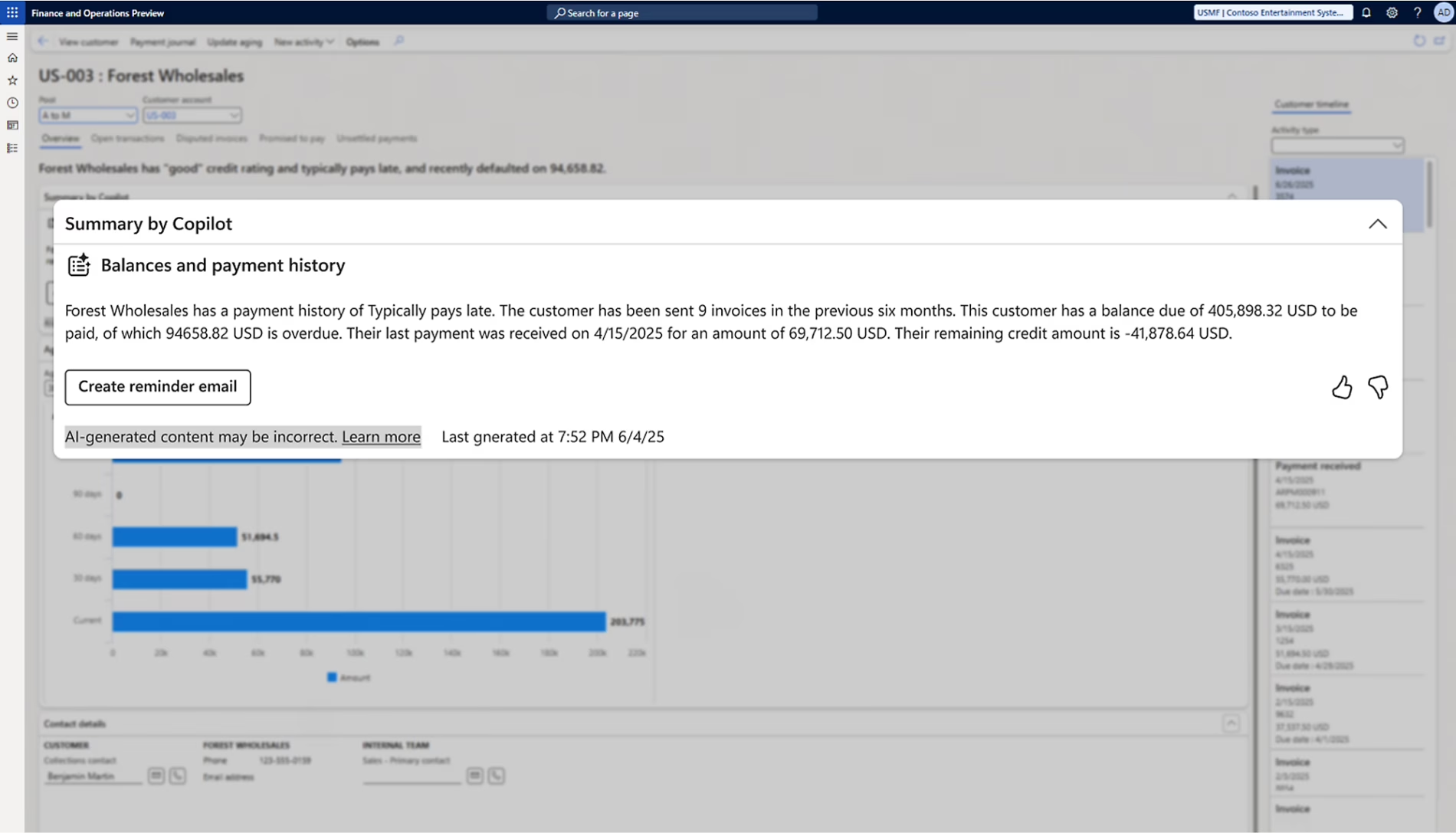
- Copilot across finance and supply chain. Users can ask questions in natural language, summarize records, and receive guided help inside their workflows instead of digging through forms.
- Predictive cash flow and payment insights. Dynamics 365 Finance uses AI to forecast cash flow and predict when customers are likely to pay, which helps collections teams focus their effort where it matters most.
- AI-powered demand forecasting. Supply Chain Management applies machine learning to historical data to produce more accurate demand plans than the manual forecasting AX users relied on.
- Intelligent purchase order management. Copilot summarizes changes to confirmed purchase orders, flags which changes carry downstream impact on production and customer deliveries, and drafts vendor communications, reducing the manual review work that once consumed AX procurement teams.
Because these capabilities arrive through Microsoft’s continuous update model, the AI toolset keeps expanding after you go live. On AX 2012, major new capabilities arrived only through infrequent version upgrades, while on Dynamics 365 Finance and Operations, the platform improves with every release. Learn more about AI in Dynamics 365 Finance and Operations.
Life after the upgrade: continuous updates and One Version
Moving to Dynamics 365 changes the traditional major-upgrade cycle. Under Microsoft’s One Version model, customers receive regular service updates instead of remaining on an increasingly outdated major release and eventually completing another AX-style version upgrade.
Under One Version, Microsoft currently releases four service updates each year, with self-update and automatic-update windows that allow organizations time for validation.
That changes the operating model your IT team knows from AX. There are no traditional version lock-ins or multi-year gaps between cumulative updates. Instead, organizations adopt an ongoing rhythm of sandbox validation, regression testing, and production updates. New capabilities, including Copilot features for finance and supply chain, arrive as part of the update process.
The practical takeaway for planning: budget for a light, recurring update validation process instead of a periodic upgrade project. Companies that build this rhythm early, often with help from a Finance & Operations support partner, keep their systems current without disruption.
Dynamics AX 2012 upgrade checklist
After guiding companies through AX implementations and upgrades for over two decades, our consultants see the same readiness gaps repeat across projects. This checklist reflects both Microsoft’s documented requirements and the preparation steps our project teams insist on before kickoff:
- Confirm your AX version is 2012 R2 or R3 with the latest cumulative update
- Run the upgrade analyzer tool and review the analysis report with a partner who has interpreted these reports before
- Inventory all customizations and mark candidates for retirement. In our experience, clients can often retire a meaningful share of their custom code because standard functionality now covers it
- Document every integration and assign a business owner to each. Unowned integrations are the ones that surface late and derail timelines
- Purge or archive unneeded data to reduce database size. Our project teams treat this as the single biggest lever for shortening the cutover window
- Migrate attachments into the AX database before the upgrade runs
- Map all users to Microsoft Entra ID accounts
- Identify deprecated features you rely on and plan alternatives with your functional consultants
- Define your testing scope and assign business process owners. The clients with the smoothest go-lives are the ones whose end users, not just IT, sign off on testing
- Build a cutover plan with a rehearsed timeline and rollback option

Ready to leave AX 2012 behind?
Rand Group has guided companies from Dynamics AX to Dynamics 365 Finance & Operations for years, including clients we have supported since their original AX implementations. Talk to our team about an upgrade assessment. We will review your environment, estimate your effort, and give you a clear path forward.
Why choose Rand Group for your Dynamics AX upgrade
Rand Group has worked with Dynamics AX and Dynamics 365 Finance & Operations across the full life of both platforms. We have implemented AX, supported it, and moved clients from AX to the cloud. That history matters. Our consultants know where AX customizations hide, which ones Dynamics 365 Finance and Supply Chain Management makes obsolete, and how to run a data upgrade without surprising the business.
We also stay with our clients after go-live. The Museum of Fine Arts, Houston has worked with the same Rand Group team for years, through both its original AX implementation and its move to Dynamics 365 Finance & Operations. That continuity shortens every project and every support call. Explore our Dynamics 365 upgrade services to see how we structure these projects.
Key takeaways
- Microsoft supports a direct upgrade path from Dynamics AX 2012 R2 and R3 to Dynamics 365 Finance and Operations, while older versions such as AX 2009 generally require a reimplementation.
- Microsoft’s upgrade tools provide a framework rather than a turnkey solution, so organizations should plan for meaningful effort in data cleanup, code remediation, and testing.
- A direct upgrade fits organizations whose processes still match how they operate, but most businesses have evolved considerably since implementing AX 2012, and a reimplementation often delivers stronger long-term ROI through improved processes, reduced custom code, and lower ongoing maintenance.
- Most projects take approximately 6 to 18 months, with custom code volume, database size and condition, and integration complexity driving both the timeline and the cost.
- Dynamics 365 Finance and Supply Chain Management includes AI capabilities, such as Copilot, predictive cash flow forecasting, and AI-powered demand planning, that were not possible in the AX 2012 era.
- Under Microsoft’s One Version model, organizations receive continuous service updates after go-live, which replaces the traditional cycle of large, disruptive version upgrades.
- Delaying the project tends to increase its eventual scope, since data debt and technical debt continue to accumulate on an unsupported platform.
Frequently asked questions
Is AX 2012 still supported by Microsoft?
No. Microsoft Dynamics AX 2012, AX 2012 R2, and AX 2012 R3 are outside their standard support lifecycles. Organizations may still operate the software, but they no longer receive routine product updates and standard support under the normal lifecycle.
Can AX 2009 be upgraded directly to Dynamics 365 Finance and Operations?
No. Microsoft’s direct upgrade tooling supports AX 2012 R2 and R3. Organizations using AX 2009 or earlier versions generally need to reimplement Dynamics 365 or first complete an intermediate technical upgrade, which is often not the most practical path.
Is moving from AX 2012 to Dynamics 365 an upgrade or a reimplementation?
It can be either. AX 2012 R2 and R3 support a true upgrade that converts your database and code. Companies with heavy customizations, or those on older AX versions, typically choose reimplementation instead.
What happens to AX 2012 customizations during the upgrade?
X++ code runs through Microsoft’s code upgrade tooling, which converts it for the new platform. Developers then resolve conflicts. Many customizations can be retired because Dynamics 365 Finance and Supply Chain Management now covers those needs natively.
Can historical AX 2012 data be moved to Dynamics 365 Finance and Operations?
Yes. The upgrade path converts your full database, including transaction history. In a reimplementation, history usually stays in an archive while master data and opening balances migrate.
What tools does Microsoft provide for an AX 2012 upgrade?
Microsoft provides the upgrade analyzer, the pre-upgrade checklist, code upgrade tooling, and data upgrade packages through Lifecycle Services. These tools frame the project but still require skilled hands to execute.
How long does an AX 2012 to Dynamics 365 upgrade take?
Plan for 6 to 18 months. Light customization and clean data shorten the timeline. Complex environments extend it.
How much does an AX 2012 upgrade cost?
Cost depends on custom code volume, database size, integrations, licensing, and testing effort. An upgrade assessment gives you a reliable estimate before you commit.
How should integrations and third-party applications be handled?
Inventory them early. AX integrations do not carry forward and must be rebuilt using Dynamics 365 patterns such as data entities and OData. Third-party ISV solutions need Dynamics 365 versions or replacements.
Next steps
Dynamics AX 2012 served your business well, but its time has passed. Every version of AX is now unsupported, and the path forward runs through Dynamics 365 Finance and Operations. Whether you take the direct upgrade route or opt for a reimplementation, the companies that plan early face smaller projects, cleaner data, and smoother go-lives.
Rand Group has guided organizations through every stage of the AX lifecycle, from original implementations to cloud transitions. Our team can assess your environment, recommend the right path, and deliver a project plan built around your business. Contact Rand Group to start the conversation.