Dynamics 365
 Power Platform
 Dynamics
 Cloud & Productivity
How nonprofits perform fund accounting in Microsoft Dynamics 365 Business Central

Nonprofit organizations operate with a mission-driven focus, which means every dollar raised and spent carries significance. Unlike for-profit organizations, nonprofits must carefully manage funds to ensure donations and grants are used according to donor restrictions and organizational priorities. Traditional accounting software often falls short in supporting these specialized requirements. Microsoft Dynamics 365 Business Central provides a solution designed to handle the complexities of nonprofit fund accounting while improving transparency, reporting, and operational efficiency.
Understanding fund accounting in Business Central
At the core of nonprofit finance is fund accounting, which tracks resources by purpose rather than profit. Nonprofits must differentiate between restricted and unrestricted funds, ensuring that every dollar is allocated correctly. Dynamics 365 Business Central supports this process with dimensions, user-defined categories that tag transactions with additional context, such as a specific program, project, or donor fund.
For instance, a donation can be linked to a particular program or fund, allowing organizations to track how that money is spent without creating an overly complex chart of accounts. By using dimensions instead of separate ledgers for each fund, nonprofits can maintain full accountability, simplify reporting, and comply with nonprofit accounting standards.
Dimensions also make it easier to categorize income and expenses by program, project, or cost center. This flexibility ensures nonprofits can easily report on multiple initiatives simultaneously and monitor the financial health of each fund independently.
Enhancing accountability and transparency
Nonprofits are accountable to boards, regulatory agencies, and donors who expect transparency and responsible stewardship. Business Central helps organizations achieve this by providing structured financial tracking and reporting capabilities.
Key ways Business Central supports accountability include:
- Grant Tracking: Ensures funds are spent according to donor restrictions and grant agreements.
- Program and Fund Reporting: Offers clear insights into how funds are allocated and spent across initiatives.
- Audit-Ready Records: Simplifies compliance with nonprofit accounting standards and regulatory requirements.
By tracking funds accurately and generating detailed reports, nonprofits can demonstrate to stakeholders that resources are used effectively to advance their mission. This level of transparency builds trust and strengthens donor confidence, which is critical for sustaining long-term support.

Using dimensions for deeper insights
Dimensions in Business Central allow nonprofits to analyze financial data from multiple perspectives. Organizations can track income and expenses by program, project, or donor fund. For example, a nonprofit could monitor the costs of a capital improvement project without disrupting overall reporting or compare program expenses against allocated grant funding. Restricted contributions can be tagged appropriately, and reporting can clearly distinguish these from general operating revenue.
By leveraging dimensions, nonprofits gain the ability to:
- Generate detailed reports at both high-level and granular views.
- Compare fund performance against budgets and program goals.
- Make informed decisions based on accurate, real-time financial data.
Dimensions also allow organizations to manage multi-year grants effectively. By tagging transactions with fiscal years, programs, and fund sources, nonprofits can maintain a clear record of spending and ensure compliance with donor or grantor requirements.

Workflow automation and donation management
In addition to fund accounting, Business Central streamlines operational workflows that are critical for nonprofits. Manual processes, such as approval routing, expense tracking, and grant management, can be automated to save time and reduce errors.
For example, donations received can be automatically assigned to the correct fund based on predefined rules, eliminating the need for manual coding. Automated approval workflows ensure that expenses are reviewed and authorized before being recorded, reducing the risk of misallocated funds.
Business Central also integrates with donation management systems, allowing organizations to track pledges, recurring contributions, and grant awards. These capabilities help nonprofits manage cash flow efficiently, plan budgets more accurately, and respond quickly to reporting requests from donors or regulators.

How to set up advanced workflows in Business Central
Download our step-by-step guide to learn how to effectively and efficiently set up advanced approval workflows in Business Central.
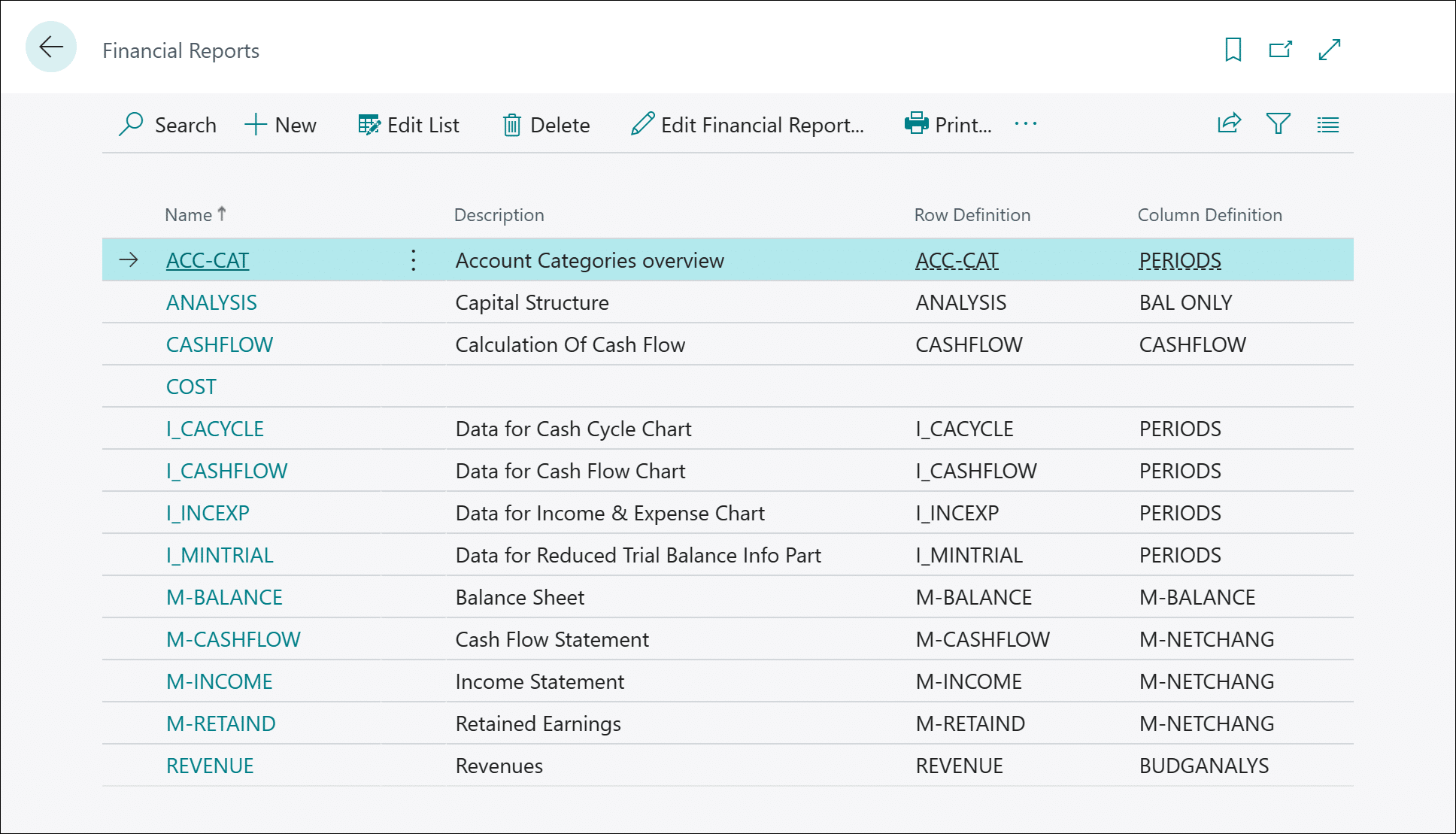
Financial reports in Dynamics 365 Business Central
Robust reporting is essential for nonprofits to monitor fund performance, support audits, and communicate impact to stakeholders. Microsoft Dynamics 365 Business Central offers powerful, flexible reporting tools that allow organizations to turn financial data into actionable insight.
Financial reports function like a built-in financial reporting engine. They let finance teams create custom income statements, balance sheets, and program-level reports without exporting data to Excel or relying on external systems. Reports can be configured to show results by fund, grant, program, or donor category, giving decision-makers instant access to the numbers that matter most.
With financial reports, nonprofits can:
- Design tailored reports to track restricted vs. unrestricted funds, program-specific budgets, or grant spending.
- Combine financial and operational data using dimensions, offering a complete picture of performance across programs or cost centers.
- Drill into details directly from summary reports to view the transactions that make up each figure.
- Compare budget-to-actual performance at multiple levels, helping leaders ensure funds are spent according to plan.
- Automate recurring reports so board packets, donor summaries, and grant updates are always up to date.
Business Central also integrates seamlessly with Power BI, allowing nonprofits to visualize their account schedule data through interactive dashboards and charts.
For example, finance leaders can create a dashboard showing:
- Total spending by program, broken out by restricted and unrestricted funds.
- Multi-year grant utilization and remaining balances.
- Trends in donation revenue and program expenses over time.
These visualizations help nonprofits quickly identify where funds are under- or over-utilized and communicate financial results clearly to boards, donors, and regulatory agencies.
By using financial reports and Power BI together, nonprofits can achieve both compliance and clarity meeting reporting obligations while gaining strategic insight into how financial decisions impact mission outcomes. This combination empowers leadership to make data-driven choices, prioritize programs effectively, and demonstrate responsible stewardship of every dollar entrusted to them.
Why Business Central works for nonprofits
Business Central is a scalable, cloud-based ERP system that addresses the specific needs of nonprofits. By providing a centralized platform for fund accounting, it helps organizations:
- Streamline tracking of restricted and unrestricted funds.
- Improve transparency and accountability with accurate reporting.
- Automate workflows, such as approvals, budgeting, and grant management.
- Adapt and scale as organizational needs grow, without added complexity.
By leveraging Business Central, nonprofits can reduce administrative overhead, maintain compliance, and focus on mission-driven work rather than manual accounting tasks. The platform’s scalability ensures that as a nonprofit grows and receives more complex funding, it can continue managing funds efficiently and transparently.

Partner with experts who understand nonprofits
At Rand Group, we specialize in helping nonprofit organizations streamline fund accounting, ensure compliance, and improve transparency using Microsoft Dynamics 365 Business Central. Our team will guide you from implementation through optimization to ensure you get the most value.
Real-world example: simplifying fund accounting for a large religious organization
Rand Group partnered with a large religious organization operating multiple campuses and ministries. Like many nonprofits, the organization’s accounting structure had become increasingly complex over time. Each new ministry, campus, and initiative required new accounts, resulting in a segmented chart of accounts with more than 1,500 accounts. This made financial management cumbersome, reporting difficult, and consolidation nearly impossible.
To streamline their accounting and improve visibility, Rand Group implemented Microsoft Dynamics 365 Business Central and restructured their financial framework using dimensions rather than excessive account segmentation. The result was a simplified chart of accounts reduced to just 150 accounts, paired with a robust dimensional reporting model.
The following dimensions were implemented to support flexible, accurate reporting:
- Fund Type: Differentiates between General, Restricted, and Designated funds, ensuring compliance with donor and board restrictions.
- Campus: Tracks income and expenses across the organization’s various locations, providing campus-level financial visibility.
- Events: Associates donations, registrations, and expenses with specific events for clearer financial performance tracking.
- Department: Enables departmental accountability and budget monitoring across ministries and administrative functions.
With this structure in place, the organization can now use Account Schedules in Business Central to report across any combination of dimensions. Finance staff can easily generate consolidated or segmented reports, such as viewing event expenses by campus or analyzing restricted fund activity by department without manual reconciliation or external spreadsheets.
To further enhance financial accuracy, Rand Group developed a Restricted Fund Posting Group in Business Central. This configuration automatically generates fund flushing entries when restricted funds are spent, ensuring that financial statements always reflect accurate fund balances and compliance with donor restrictions.
The result is a modern, efficient accounting environment that provides real-time insight, simplifies audits, and supports data-driven decision-making. By transitioning from a static, overgrown chart of accounts to a dynamic, dimension-based structure, the organization now enjoys both clarity and control, freeing more time and resources to focus on their mission.
Next steps
For nonprofits, managing funds responsibly and transparently is essential to building trust with donors, boards, and regulators. Microsoft Dynamics 365 Business Central provides a complete solution for fund accounting, combining dimensional tracking, customizable reporting, workflow automation, and real-time insights.
By partnering with Rand Group, nonprofits can ensure that every donation is accounted for, grants are managed accurately, and financial insights are readily available to support strategic decision-making. With the right technology and expert guidance, your organization can focus on advancing your mission while maintaining transparency and accountability.
Reach out to the Rand Group team today to discuss how we can help you implement or optimize Microsoft Dynamics 365 Business Central. Contact us here and start improving your fund accounting processes.