 Dynamics 365
 Power Platform
 Dynamics
 Cloud & Productivity
Dynamics 365 Business Central for oil and gas
Microsoft Dynamics 365 Business Central connects finance and operations for small and mid-sized oil and gas companies, oilfield services firms, equipment rental businesses, and project-based energy companies. Rand Group helps organizations implement, customize, integrate, and support Business Central around their financial and operational requirements.

Why choose Business Central for oil and gas?
Oil and gas companies often manage financial data, project costs, purchasing, inventory, equipment, and field activity across different systems. When these processes depend on spreadsheets and disconnected applications, it can be difficult to track costs, understand profitability, bill customers efficiently, and maintain a consistent view of the business.
Dynamics 365 Business Central brings core financial and operational processes into one ERP system. Built for small and mid-sized organizations, Business Central supports financial management, projects, purchasing, inventory, service, reporting, and other business processes. Flexible dimensions, workflows, reporting, integrations, and extensions allow companies to configure the system around how they operate.
Rand Group, headquartered in Houston, helps oil and gas companies determine where standard Business Central capabilities meet their requirements and where additional solutions are needed. Our team provides Business Central implementation, migration, integration, custom development, training, optimization, and ongoing support.

Connect field activity with financial operations
Connect accounting, projects, purchasing, inventory, equipment, and billing within the same ERP environment. Give finance and operations teams better visibility into how day-to-day activity affects costs and financial results.

Gain clearer visibility into profitability
Track costs and financial performance across projects, entities, locations, service lines, and other business dimensions. Give teams the data they need to understand project performance, control costs, and identify where the business is generating value.

Improve control across your operations
Use connected data, approval workflows, and standardized processes to create greater consistency across finance and operations. Reduce manual handoffs, strengthen internal controls, and give teams a more reliable way to manage day-to-day business activity.
Business Central for oil and gas capabilities
Dynamics 365 Business Central provides financial and operational capabilities for many oil and gas, energy services, and equipment-driven businesses. Companies can manage finance, projects, procurement, inventory, multiple entities, and workflows in one ERP while configuring the system around their specific operations.
Financials
Dimensional accounting
Track financial activity using dimensions such as basin, well, project, location, department, service line, and business unit. Dimensions let oil and gas companies analyze financial results by the areas that matter to their business without creating an overly complex chart of accounts. Apply dimensions across transactions and use them to filter financial reports or analyze data in Power BI. This provides more detailed visibility into costs and performance across the organization.
Accounts payable and receivable
Manage vendor invoices, customer billing, payments, collections, and receivables within Business Central. Accounts payable tools help finance teams process invoices, manage vendor payments, and use approval workflows. Accounts receivable connects invoicing, payment tracking, customer balances, and collections. Keeping these processes in the ERP gives finance teams a clearer view of cash coming into and going out of the business.
Cash management
Manage bank accounts, payments, cash flow forecasts, and bank reconciliations from Business Central. Finance teams can use data from payables, receivables, purchases, sales, projects, and service orders when forecasting cash flow. Copilot can also help reconcile bank accounts by identifying additional transaction matches and suggesting general ledger accounts for unmatched activity. This can reduce manual reconciliation work while helping teams maintain accurate cash records.
Fixed asset accounting
Track the financial lifecycle of machinery, vehicles, equipment, buildings, and other capital assets. Business Central supports acquisitions, depreciation, write-downs, appreciation, disposal, insurance, and maintenance costs. Companies can also allocate fixed asset transactions to projects or departments. This gives finance teams a structured way to account for valuable equipment and other assets throughout their lifecycle.
Budgeting and reporting
Create budgets, financial statements, management reports, and operational analysis using Business Central data. Teams can compare general ledger activity with budgets and analyze financial information using built-in reporting, Excel, or Power BI. Business Central also supports analysis directly within lists, allowing users to group, filter, pivot, and summarize data. This gives oil and gas leaders more timely insight without relying on manually combined spreadsheets.

Projects
Project costing
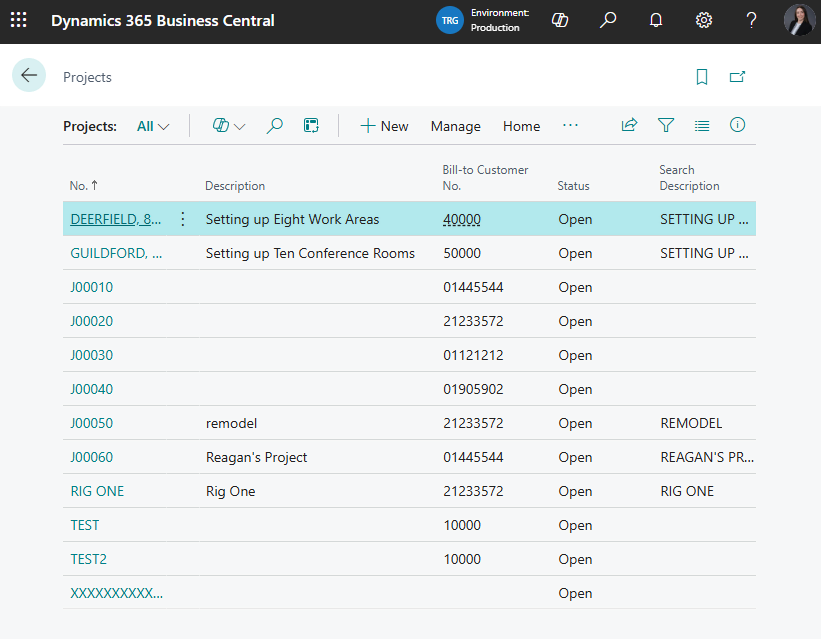
Track labor, materials, resources, purchases, and other costs against projects and individual project tasks. Business Central supports project-specific costs and prices for resources, items, and general ledger expenses. Teams can compare planned and actual activity as work progresses. This helps project-based oil and gas companies understand costs and protect project margins.
Project planning
Build project plans with tasks, budgets, resources, expected costs, and project-specific pricing. Projects can be structured into multiple tasks and task groups based on how work will be performed. Teams can plan resources and costs before work begins and monitor activity against that plan. This creates a stronger financial foundation for managing project-based work.
Work in process
Calculate and post work in process for projects that are still underway. Business Central can estimate the financial value of ongoing project activity and post that value to the general ledger. This helps finance teams account for work that spans reporting periods. It also keeps project activity connected with financial reporting during longer projects.
Project billing
Invoice customers based on project activity and the billing structure established for the work. Business Central supports full or partial project invoicing, scheduled billing, and billing for individual project planning lines. Multiple planning lines can also be combined into a single sales invoice. This helps connect project execution, customer billing, and financial records in one system.
Time and resources
Track employee, equipment, and other resources assigned to projects. Business Central supports resource planning, capacity management, time sheets, and manager approvals. Resources can be organized into groups or tracked individually, with usage and costs connected to project activity. This helps companies understand how labor and other resources contribute to project costs and profitability.
Procurement
Purchase orders
Create and manage purchase orders for materials, equipment, services, and other operational needs. Business Central supports expected receipt dates, prepayments, partial receiving, invoicing, quotes, and blanket orders. Purchasing activity stays connected with inventory and financial records as transactions move through the process. This gives procurement and finance teams better visibility from the initial order through payment.
Vendor management
Maintain vendor information, payment terms, purchasing details, lead times, prices, and discounts in one system. Companies can also manage alternative vendors for the same item and maintain different purchasing agreements. This gives purchasing teams better information when sourcing materials or services. Finance and procurement can work from the same vendor records instead of maintaining separate information.
Purchase approvals
Route purchases and other transactions through defined approval workflows. Business Central includes workflow templates for purchase orders, quotes, invoices, vendor changes, price changes, and other common events. Additional approval scenarios can be created with Power Automate when standard workflows do not cover the requirement. This can help oil and gas companies strengthen purchasing controls while reducing manual approval tracking.
Project purchasing
Connect procurement directly with project activity so purchased materials and services can become part of project costing. Business Central can create purchase orders directly from a project when materials or outside services are required. The related costs can then flow into project records and financial reporting. This helps teams see the financial impact of purchasing decisions at the project level.
Invoice processing
Connect purchase orders, receipts, vendor invoices, approvals, and financial posting within the accounts payable process. Business Central supports electronic documents and tools for reviewing incoming invoices before they are processed. Copilot can help match incoming vendor invoices with purchase orders when the information does not align exactly. This can reduce invoice research and manual data entry while keeping finance in control of final processing.

Inventory
Multi-location inventory
Manage inventory across warehouses, yards, service locations, vehicles, and other stocking locations. Business Central maintains inventory quantities and costs by location and can apply location-specific financial dimensions or posting rules. Teams can see where materials are stored and manage stock based on each location. This is useful for oil and gas businesses that distribute parts and materials across multiple operational sites.
Inventory costing
Maintain inventory costs and valuation while keeping inventory transactions connected with the general ledger. Business Central supports FIFO, LIFO, average, specific, and standard costing methods. It can also account for expected costs when goods have been received or shipped but not yet invoiced. This gives finance teams a more consistent view of inventory value and its effect on financial results.
Item tracking
Track inventory using serial, lot, and package numbers when greater traceability is required. Business Central can also maintain expiration and warranty details for tracked items. Users can trace the origin or destination of specific serial or lot numbers. This helps companies maintain clearer records for equipment, components, parts, and other controlled materials.
Inventory planning
Plan material requirements using current inventory, expected demand, incoming supply, and replenishment rules. Business Central can generate replenishment suggestions for purchases, transfers, assembly, or production based on demand and availability. Its Sales and Inventory Forecast extension can also use Azure AI to forecast potential sales and expected stockouts. These tools help teams maintain needed materials while reducing unnecessary inventory.
Location transfers
Track materials as they move between warehouses, yards, branches, and other inventory locations. Business Central records inventory in transit as well as inventory held at each location. This provides a clearer record of where materials are throughout the transfer process. For businesses with distributed operations, that visibility can help teams move inventory where it is needed while maintaining accurate financial records.

Multi-company
Multi-company accounting
Maintain separate Business Central companies for different legal entities or operating companies. Each company can maintain its own transactions and financial records while still participating in broader multi-company processes. This structure can support oil and gas organizations with multiple subsidiaries, business units, or operating entities. Finance teams can manage entity-level accounting without giving up organization-wide visibility.
Financial consolidation
Consolidate financial results across companies within the same Business Central tenant or across separate environments. Business Central supports multiple currencies, dimensions, and budgets during consolidation. Data from other business management applications can also be brought into the consolidation company. This gives finance teams a more structured process for producing consolidated financial results.
Intercompany transactions
Manage transactions between related companies through Business Central’s intercompany functionality. Sales documents, purchase documents, and journal transactions can flow between partner companies using mapped charts of accounts and dimensions. Inbox and Outbox functionality helps automate the exchange of intercompany documents. This can reduce duplicate entry and make intercompany activity easier to reconcile.
Company reporting
Give finance leaders a broader view of financial activity across multiple Business Central companies and environments. The Company Hub provides a landing page for users who work across companies, including financial information and assigned tasks. Combined with consolidation and reporting tools, this makes it easier to move between entity-level and organization-wide information. Leadership can gain visibility without manually gathering reports from each company.
Shared master data
Synchronize common master data across companies that operate within the same Business Central environment. Customers, vendors, items, employees, and other non-transactional information can flow from a source company to subsidiary companies. Updates to connected records can then be synchronized through scheduled job queue entries. This reduces duplicate setup and helps maintain more consistent data across related entities.

Automation
Approval workflows
Automate approvals for purchase documents, sales documents, vendor changes, customer changes, price changes, and other transactions that require review. Business Central includes preconfigured workflow templates that companies can adapt to their processes. Approvals can also be extended through Power Automate for scenarios outside the standard templates. This helps strengthen controls without relying on email chains or manual follow-up.
Process automation
Use Business Central workflows, Power Automate, and background processing to automate repetitive business processes. Flows can respond to events such as creating or changing a record, run on a schedule, or connect Business Central with other applications. Job queues can also run recurring reports, integrations, data updates, and processing in the background. This reduces routine administrative work and helps keep processes moving consistently.
Service management
Manage service orders, service items, contracts, warranties, parts, labor, and service pricing with Business Central Premium. Teams can assign personnel, track service history, manage customer agreements, and record parts and labor used during service. Service activity remains connected with inventory and financial processes in Business Central. This can support oil and gas companies with equipment service and after-sales requirements.
Field service integration
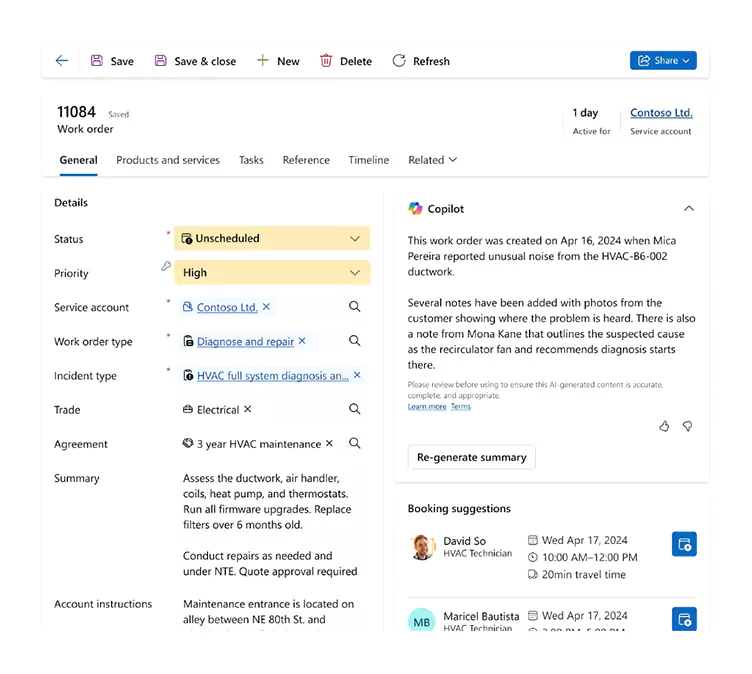
Connect Business Central with Dynamics 365 Field Service when operations require more advanced field service capabilities. D365 Field Service can manage work orders, field resources, service tasks, and consumption details, while completed activity can flow back to Business Central for financial processing and invoicing. This helps connect field execution with inventory, procurement, and finance while reducing duplicate data entry. We can cover the oilfield-specific use cases for this integration in greater detail later on the page.
System integrations
Connect Business Central with Microsoft 365, Power Platform, other Dynamics 365 applications, and third-party systems. Business Central provides built-in APIs and web services for exchanging data with external applications, while Dataverse can connect data across Dynamics 365 and Power Platform. This allows oil and gas companies to build a connected technology environment around the ERP rather than forcing every process into one application. Rand Group can also develop custom integrations when standard connectors do not meet the requirement.
Real clients
Real results
%
Faster month-end close
Faster financial reporting
%
Improvement across accounting functions

Case Study

Optimizing operations and financial visibility
Sapphire Gas Solutions, a leader in turnkey natural gas solutions, struggled with an outdated, non-cloud ERP system as their business grew. Rand Group’s Business Central implementation services helped Sapphire migrate to a tailored cloud-based solution. By working closely with Sapphire to understand their project-based workflows, Rand Group customized Dynamics 365 Business Central to streamline operations, integrate processes, and provide real-time financial visibility. The result? More efficient, data-driven operations and a scalable foundation for future growth.
Extend Business Central for oil and gas operations
Business Central can serve as the core ERP for finance and operations, but many oil and gas companies need industry-specific processes beyond standard functionality. Rand Group has decades of experience supporting oil and gas companies and has extended Business Central with custom data structures, workflows, integrations, and reporting designed around real energy-sector requirements.
- Track activity and profitability by well, property, rig, owner, investment, or operating entity
- Build AFE workflows for budgeting, approvals, cost tracking, and project profitability
- Support owner allocations, revenue distribution, and EnergyLink data integration
- Create custom well cards, property records, requisition processes, and industry-specific data structures
- Connect Business Central with Dynamics 365 Field Service, Power Platform, and other operational systems
- Extend reporting for multi-entity, rig-based, project-based, and ownership-driven operations

Manage equipment rentals inside Business Central
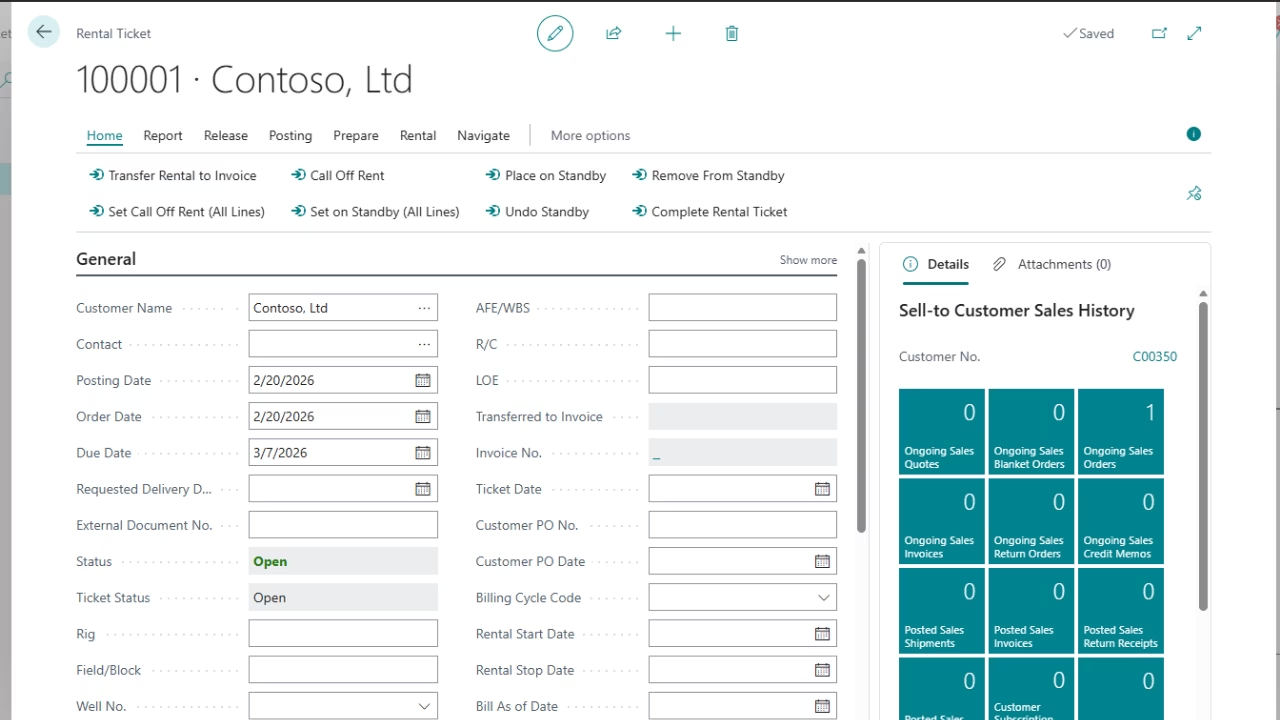
Rand Group developed Rentals Management for Dynamics 365 Business Central for oilfield services companies, equipment rental businesses, and other equipment-driven organizations. The app extends Business Central with rental-specific workflows for tickets, billing, asset status, wells, facilities, and rental history.
- Manage rental tickets: Track start and stop dates, wells, facilities, rates, standby status, and completion.
- Support flexible billing: Use daily, weekly, bi-weekly, monthly, partial-month, standby, and custom billing cycles.
- Track equipment status: See whether equipment is available, rented, on standby, out of service, or returned.
- Manage equipment swaps: Replace equipment while maintaining rental history and billing continuity.
- Streamline invoicing: Generate rental invoices individually or in bulk.
- Maintain rental history: Keep usage, billing, locations, and completed rental activity connected for easier review.
Connect finance and field operations with Dynamics 365 Field Service
Dynamics 365 Field Service can extend Business Central when oilfield service operations need more advanced work order, scheduling, dispatch, and mobile capabilities. The integration helps connect field activity with inventory, projects, invoicing, and financial processing so teams can reduce duplicate entry between the field and back office.
- Manage work orders and field service activity
- Schedule and dispatch field resources
- Give technicians mobile access to assigned work
- Track customer assets and service history
- Connect parts and inventory with field activity
- Capture service consumption for financial processing
- Invoice completed service activity through Business Central

Put AI to work across oil and gas operations
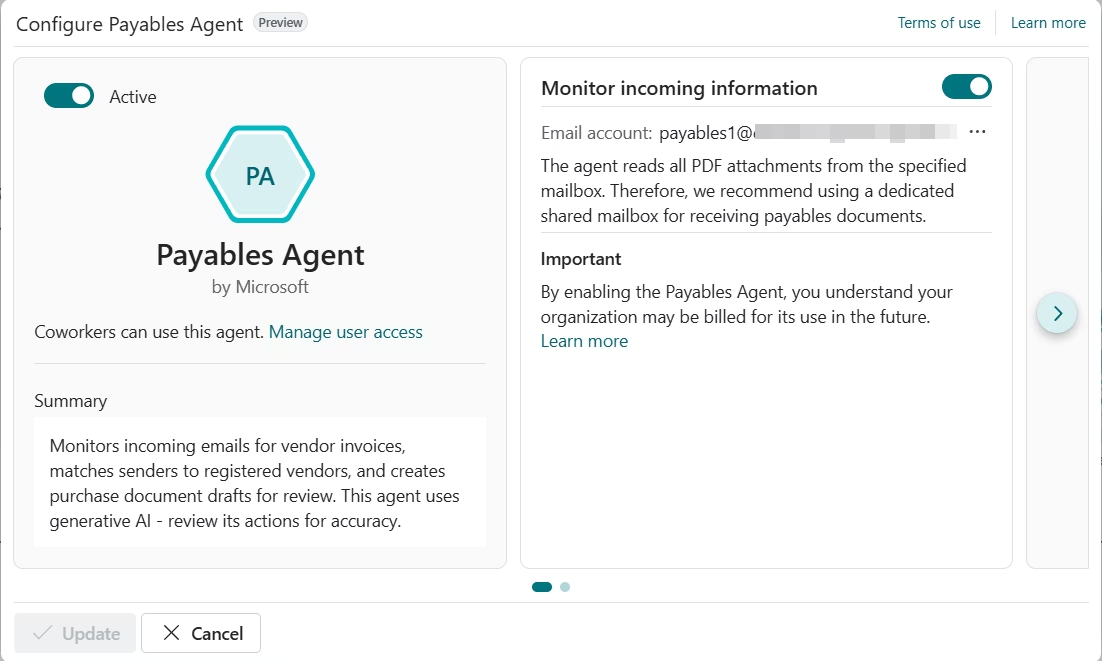
Business Central includes Microsoft Copilot and AI capabilities that can assist with finance, sales, data analysis, and routine ERP work. AI agents can also carry out defined business processes, helping teams reduce repetitive administrative tasks while keeping users in control of review and approval.
- Automate accounts payable: Use AI to support vendor invoice processing, matching, and review.
- Improve bank reconciliation: Let Copilot identify additional transaction matches and suggest general ledger accounts for unmatched activity.
- Automate sales order intake: Use the Sales Order Agent to process customer requests, check availability, and prepare sales documents.
- Analyze business data: Ask Copilot to find, summarize, and analyze Business Central records using natural language. Business-Central-Capability-Gui…
- Extend AI with Microsoft tools: Build additional AI-driven workflows with Copilot Studio and Power Platform when standard Business Central capabilities are not enough.
Why oil and gas companies partner with Rand Group
Business Central tailored for oil and gas
Rand Group delivers Business Central solutions tailored to oil and gas companies, oilfield services firms, equipment rental businesses, and project-based energy companies. We configure Business Central around financial management, project accounting, purchasing, inventory, equipment, reporting, and other operational requirements.
Proven results with Microsoft
Rand Group has a 90% client retention rate and experience helping oil and gas companies modernize financial and operational systems with Microsoft Dynamics 365. Our Business Central projects have helped energy companies improve financial reporting, project visibility, purchasing processes, and access to business data.
Oil and gas industry experience
Rand Group understands the technology needs of oil and gas companies with project-based work, field operations, equipment, multiple entities, and complex financial reporting requirements. We help determine where standard Business Central capabilities fit and where integrations, industry applications, or custom development are needed to support specialized processes.
Microsoft Partner of the Year
Rand Group is a Microsoft Partner of the Year in North America, recognized for our work with Microsoft Business Applications. Our U.S. and Canada-based teams provide Business Central implementation, integration, custom development, optimization, and support services in-house.
Frequently Asked Questions (FAQs)
What is Dynamics 365 Business Central for oil and gas?
Dynamics 365 Business Central is a Microsoft ERP that oil and gas companies can use to manage financial and operational processes in one system. It includes capabilities for financial management, projects, purchasing, inventory, fixed assets, reporting, workflows, and other business functions, and it can be extended with other Microsoft and industry solutions.
Is Business Central a good ERP for oil and gas companies?
Business Central can be a good fit for small and mid-sized oil and gas companies that need strong financial management with connected project, purchasing, inventory, and reporting capabilities. It is particularly relevant to oilfield services, equipment rental, energy services, and project-based businesses that want to build around the Microsoft technology ecosystem.
What types of oil and gas companies are a good fit for Business Central?
Business Central can support oilfield services firms, equipment rental companies, project-based energy businesses, engineering and consulting firms, manufacturers that serve the oil and gas industry, and other small to mid-sized organizations in the sector. It can also be an option for growing companies moving beyond QuickBooks, spreadsheets, Dynamics GP, Dynamics NAV, Dynamics SL, or another legacy accounting system.
Does Business Central support oil and gas project accounting?
Yes. Business Central includes project management and accounting capabilities for planning projects, tracking resources and costs, managing work in process, recording time, purchasing against projects, and billing customers. These capabilities can help project-driven oil and gas businesses track project financial performance.
Can Business Central manage multiple oil and gas entities?
Yes. Business Central supports separate companies, financial consolidation, intercompany transactions, multiple currencies, and dimensions. These capabilities can help organizations manage distinct legal entities or operating companies while providing consolidated financial reporting.
Can Business Central track equipment and rental assets?
Business Central includes fixed asset accounting for tracking the financial lifecycle of company-owned equipment. For companies that rent equipment to customers, Rand Group’s Rentals Management app extends Business Central with rental tickets, flexible billing cycles, asset availability, equipment swaps, location tracking, and rental history.
Does Business Central integrate with Dynamics 365 Field Service?
Yes. Microsoft provides an integration between Business Central and Dynamics 365 Field Service. Depending on the configuration, the integration can connect work orders, projects, resources, service activity, customer assets, inventory, and financial processing across the two applications. Some service management integration capabilities require Business Central Premium.
Can Business Central handle specialized upstream oil and gas accounting?
Standard Business Central does not provide every specialized upstream oil and gas accounting function out of the box. Requirements such as joint interest billing, revenue distribution, division order management, land and lease management, or production accounting may require an industry application, integration, configuration, or custom development.
Rand Group can evaluate these requirements during solution design to determine which should be handled within Business Central and which need an additional solution.
What AI capabilities are available in Business Central?
Business Central online includes Microsoft Copilot capabilities for tasks such as analysis, bank reconciliation, content generation, and working with business data. Microsoft also offers AI agents, including the Sales Order Agent and Payables Agent, that can automate parts of sales order and accounts payable processes. Feature availability and requirements vary.
Can Rand Group customize Business Central for oil and gas requirements?
Yes. Rand Group can configure and extend Business Central with custom applications, extensions, integrations, workflows, Power Platform solutions, reporting, and other Microsoft technologies. Our team also develops industry-specific solutions such as Rentals Management for equipment-driven organizations.
Related Insights

Dynamics 365 Business Central fall 2026 update: What’s new
Microsoft Dynamics 365 Business Central is adding new capabilities across finance, reporting, and manufacturing for Fall 2026. Explore important updates to Payables Agent, Expense Agent, Word report layouts, and subcontracting.

Excise Tax in Dynamics 365 Business Central: Setup, calculation, and reporting
Dynamics 365 Business Central can calculate, register, and track excise taxes for eligible items and fixed assets. Learn how the functionality works, what needs to be configured, and what businesses should consider before using it.

Field Service ERP software: How to connect dispatch, parts, job costs, and billing
Field service ERP software connects field operations with inventory, job costing, billing, and financial reporting. Learn how the process works, what needs to connect, and which ERP and field service combinations may fit your business.