Dynamics 365
 Power Platform
 Dynamics
 Cloud & Productivity
Excise Tax in Dynamics 365 Business Central: Setup, calculation, and reporting

The Dynamics 365 Business Central excise tax functionality gives businesses a way to calculate, register, and track taxes tied to specific goods and activities. For organizations that sell, purchase, or produce excise-taxable goods, it can help track taxable quantities, units of measure, changing duty rates, inventory movements, and supporting data for tax reporting.
Microsoft Dynamics 365 Business Central supports configurable excise tax types, multiple calculation bases, transaction rules, effective-dated duty rates, excise journals, and transaction history. Excise tax functionality became generally available as part of Business Central 2026 release wave 1. For businesses subject to excise taxes, this functionality can bring tax calculations closer to the inventory and operational transactions that create the tax obligation. However, there are important limitations to understand, particularly around financial posting and statutory reporting.
At a glance
Dynamics 365 Business Central provides a configurable framework for calculating and tracking excise taxes on eligible items and fixed assets. Organizations define the applicable tax, determine which transactions contribute to the taxable quantity, establish duty rates, and assign the appropriate setup to items or fixed assets. After business transactions are posted, finance teams can generate excise tax entries, review the calculated amounts in an excise journal, and register them. Business Central stores the information in the Excise Taxes Transaction Logs page. Registration does not create general ledger entries, and the standard excise tax framework does not provide statutory or compliance reports.
What is Dynamics 365 Business Central?
Microsoft Dynamics 365 Business Central is an enterprise resource planning (ERP) system for small and midsize organizations that connects financial management with purchasing, sales, inventory, warehousing, projects, manufacturing, service management, and other operational processes.
Because these transactions share a connected ERP environment, Business Central can use information such as inventory movements, quantities, units of measure, and fixed asset activity when calculating excise taxes. For a broader look at the ERP system and its capabilities, read our complete guide to Microsoft Dynamics 365 Business Central.

What are excise taxes?
Excise taxes apply to specific goods, services, or activities rather than to most purchases in the same way as a general sales tax. Fuel, alcohol, and tobacco are common examples of products that may be subject to excise duties. The products, rates, exemptions, calculation methods, and reporting requirements depend on the applicable jurisdiction.
This can make excise tax management more complex than applying a percentage to the value of an invoice. A tax may depend on quantity, weight, volume, alcohol content, or another product characteristic.
How is excise tax different from sales tax?
Sales tax generally applies to a broad range of taxable goods and services and is often calculated using the transaction value. Excise taxes usually target specific products or activities and may instead use a characteristic such as quantity or volume to determine the tax.
Inside an ERP system, businesses may therefore need to track not only how much a product costs but also how much was purchased, sold, produced, or adjusted and which measurement should drive the calculation.
Businesses should confirm their tax obligations, rates, exemptions, and filing requirements with their tax professionals or the appropriate tax authority before configuring an ERP system around those requirements.
What can Business Central calculate for excise taxes?
Business Central lets organizations create excise tax types and choose the measurement that determines the taxable amount.
This flexibility is important because excise tax rules are not uniform. A fuel distributor may calculate tax by volume, while another organization may need to use weight, product content, or unit quantity.
Business Central can also use unit-of-measure information associated with an item when calculating excise-liable quantities, helping connect tax calculations with the inventory measurements already used in day-to-day operations.
How do you set up excise taxes in Business Central?
Excise tax setup starts by translating the organization’s tax requirements into rules that Business Central can apply to transactions. Rather than manually calculating the tax for every eligible transaction, administrators configure the tax logic in advance.
Business Central can include purchases, sales, positive adjustments, negative adjustments, production output, and assembly output as transaction types that contribute to an excise tax calculation.
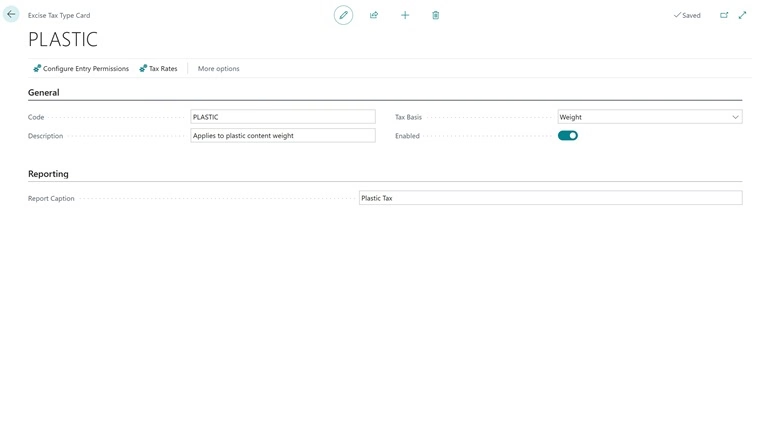
Excise tax types define how the tax is calculated
The excise tax type establishes the basis of the calculation. For example, a business may create a tax type that calculates duty based on the volume of a particular product. The organization then determines which transaction types should contribute to that calculation, allowing Business Central to distinguish activity that creates an excise liability from activity that should not be included.
Effective-dated duty rates help manage tax changes
Excise duty rates include an effective date. When a rate changes, businesses can establish when the new rate begins rather than replacing the rate used for earlier periods. This structure also helps finance teams understand why transactions from different periods were calculated using different rates.
Items and fixed assets can be included in the calculation
Business Central can calculate excise taxes for configured items and fixed assets. However, the standard functionality limits an item or fixed asset to one excise tax type. Multiple excise tax types cannot be assigned to the same record. Organizations with products subject to several separate excise obligations should evaluate this limitation before relying on the standard functionality for their complete tax process.
How does the excise tax process work during normal transactions?
Users can continue processing standard purchasing, sales, inventory, production, and assembly transactions without creating a separate workflow solely because an item is subject to excise tax.
The process generally follows this flow:
Business transaction → Ledger entry → Excise journal → Calculation and review → Registration → Excise Taxes Transaction Log
Business Central uses configured excise entry rules to identify eligible transactions. Finance teams can then generate entries in the appropriate excise journal, review the calculations, and register them. This separates normal operational processing from the finance team’s excise tax review while allowing the underlying transactions to drive the calculation.
See excise taxes in Business Central in action
Seeing the setup and transaction process together can make the functionality easier to understand. In this Business Central demonstration, Johnathan Moore from Rand Group walks through excise tax types, entry permissions, duty rates, item setup, excise journals, and the Excise Taxes Transaction Logs page. He also shows how Business Central generates excise tax entries from posted transactions.
What happens when you register excise taxes?
After eligible transactions are posted, users can open the Excise Journal and generate excise tax entries. Business Central uses the applicable configuration, duty rate, filters, and underlying ledger entries to calculate the tax information.
Users can review journal lines before registration, including details such as the source transaction, item or fixed asset, quantity, unit of measure, duty rate, and associated dimensions.
Once registered, the entries are available from the Excise Taxes Transaction Logs page, where users can also drill into related item ledger or fixed asset ledger entries.
Registering excise tax does not post to the general ledger
Registering excise taxes in Business Central does not create general ledger entries. Registration calculates and records the excise tax information for reporting purposes. Organizations should therefore determine how excise tax amounts need to flow into their financial statements and whether additional processes, configuration, or development are required.
How does excise tax reporting work in Business Central?
The Excise Taxes Transaction Logs page provides a historical record of registered excise tax activity, including information about the source transaction and calculated tax amount.
Users can also use Business Central’s standard analysis capabilities, including Analysis Mode and Excel, to examine transaction data. For a broader look at reporting options throughout the ERP, see our guide to Microsoft Dynamics 365 Business Central reporting.
However, tracking excise taxes is not the same as filing statutory excise tax reports. The standard Business Central functionality does not include statutory or compliance reports. Depending on the jurisdiction, businesses may need a custom report, integration, external tax solution, or another process to transform Business Central data into the format required by the applicable tax authority.
What should businesses consider before using Business Central excise taxes?
Before configuring excise taxes in Business Central, finance, operations, and IT teams should understand how their tax requirements connect to business processes. Key areas to evaluate include:
- Taxable products: Identify which items or fixed assets are subject to excise tax.
- Taxable transactions: Determine which supported purchases, sales, adjustments, production output, or assembly output should contribute to the taxable quantity.
- Calculation basis: Confirm whether the tax depends on quantity, volume, weight, alcohol volume, sugar content, or active content.
- Units of measure: Test how different purchasing, inventory, production, and sales units affect calculations.
- Rate changes: Establish a process for maintaining effective-dated duty rates.
- Reporting requirements: Determine whether transaction logs and standard analysis tools provide enough information or whether additional reporting is required.
- Accounting requirements: Decide how excise tax amounts should be reflected in the general ledger.
- Testing: Validate representative transactions, fixed asset activity, units of measure, and rate changes before relying on the configuration in production.
Understanding these requirements before configuration can help businesses avoid creating tax logic that does not match their actual transactions, accounting, or reporting needs.

Configure Business Central around your excise tax requirements
Excise taxes can involve more than setting a rate. Products, transaction types, measurements, rate changes, accounting processes, and reporting requirements all need to work together. Rand Group can help you evaluate the native Business Central excise tax functionality, configure it around your business processes, test transaction scenarios, and determine whether additional reporting or development is required.
Why work with Rand Group for Dynamics 365 Business Central?
Rand Group works with organizations throughout the Business Central lifecycle. Our services include Business Central implementation, configuration, reporting, optimization, Business Central custom development, and ongoing Business Central support. Our team combines technical Business Central expertise with accounting and business process knowledge. This experience is particularly valuable when functionality affects both operational transactions and financial reporting.
Rand Group has completed more than 3,000 engagements and works with more than 1,200 clients. We also maintain a 90% client retention rate. Our consultants help organizations determine where standard Microsoft functionality meets their requirements. They can also identify where additional configuration, reporting, integration, or development may be needed. Learn more about Rand Group’s Dynamics 365 Business Central consulting services.
Hear what our clients say
“Rand Group has been top-notch—professional, responsive, and very proactive. You can tell their internal processes are really sound, especially in how they manage and follow up on support requests. We come up with ideas, and they help us figure out what will actually work in the system, whether it’s configuration, reporting, or technical support.” – Derek Atwood, Subs for Pools
“Rand Group didn’t just implement a system—they helped us rethink our business processes. The team went beyond a ‘canned solution’ and worked closely with us to develop practical, customized solutions. We now have real-time visibility into our financials and can make data-driven decisions with confidence.” – Jeff Nelson, Director, Sapphire Gas Solutions
Key takeaways
- Dynamics 365 Business Central provides native functionality for calculating and tracking excise taxes on configured items and fixed assets.
- Businesses can define excise tax types, calculation bases, eligible transactions, effective-dated duty rates, and excise journal processes.
- Supported calculation bases include weight, volume, quantity, sugar content, alcohol volume, and active content.
- Registering excise tax records the calculated information but does not create general ledger entries.
- An item or fixed asset can currently have only one excise tax type assigned.
- Business Central does not provide statutory or compliance reports for the standard excise tax framework, so additional reporting may be required.
Frequently asked questions about excise taxes in Business Central
What is excise tax in Dynamics 365 Business Central?
Excise tax functionality in Business Central provides a configurable way to calculate, register, and track taxes that apply to specific goods or activities. Businesses can configure tax types, transaction rules, duty rates, items or fixed assets, and excise journals.
How does Business Central calculate excise tax?
Business Central uses the configured excise tax type, tax basis, excise-liable quantity, applicable duty rate, and eligible ledger activity. Together, these elements determine the calculated amount. Supported tax bases include weight, volume, quantity, sugar content, alcohol volume, and active content.
What transactions can Business Central include in excise tax calculations?
The excise tax framework can include purchases, sales, positive adjustments, negative adjustments, production output, and assembly output. Administrators determine which entry types contribute to the excise-liable quantity.
Can Business Central calculate excise taxes based on volume or weight?
Yes. Business Central supports weight, volume, quantity, sugar content, alcohol volume (ABV), and active content as excise tax calculation bases.
Does registering an excise tax create general ledger entries?
No. Registering excise tax records the calculated amount for reporting purposes but does not create G/L entries. Organizations should separately determine how excise tax amounts need to be reflected in their financial accounting.
Can one item have multiple excise tax types in Business Central?
No. Only one excise tax type can currently be assigned to an item or fixed asset. Businesses that need several excise taxes applied to the same item should evaluate whether additional configuration, development, or another solution is required.
Does Business Central include excise tax compliance reports?
The standard excise tax framework does not include statutory or compliance reports. Organizations may need additional reporting to meet the filing requirements of their jurisdiction.
Put excise tax functionality to work in Business Central
Business Central gives organizations a structured way to connect excise tax calculations with transactions and product information already managed in their ERP. Effective configuration requires an understanding of what creates tax liability and how the tax should be calculated. Businesses also need to determine how amounts should be accounted for and what information is required for reporting.
If you are evaluating excise tax functionality or need help aligning Business Central with your financial and operational processes, contact Rand Group to discuss your requirements.