Dynamics 365
 Power Platform
 Dynamics
 Cloud & Productivity
Business Central security: A complete guide to identity, permissions, and governance

Business Central security protects the financial and operational data stored within the ERP system. Because Microsoft Dynamics 365 Business Central centralizes general ledger activity, payables, receivables, inventory, payroll, and reporting, it requires strong identity controls, role-based access, encryption, and monitoring to reduce risk.
Microsoft Dynamics 365 Business Central includes layered, cloud-based security capabilities built on Microsoft’s secure infrastructure. These capabilities span identity management, permissions, data protection, auditing, and network security. This guide explains how the Business Central security model works and what organizations should understand to protect their ERP environment effectively.
What is Microsoft Dynamics 365 Business Central?
Microsoft Dynamics 365 Business Central is a cloud-based enterprise resource planning (ERP) system designed for small to mid-sized organizations. It centralizes financial management, supply chain operations, inventory, purchasing, sales, and reporting within a single platform. Because Business Central stores core financial and operational data in one system, strong security controls are essential to protect sensitive information and maintain system integrity.
Business Central enables users to enter transactions, approve documents, post financial entries, manage vendors and customers, and generate reports from a shared environment. While this unified access improves efficiency and visibility, it also increases risk if identity, permissions, and monitoring controls are not properly configured. A structured Business Central security model helps organizations reduce exposure, protect financial data, and support compliance requirements as system usage expands.

Why Business Central security is important
Business Central security is important because a cloud ERP system centralizes your organization’s most sensitive financial and operational data in one platform. Microsoft Dynamics 365 Business Central manages general ledger activity, vendor payments, customer balances, payroll information, inventory, and reporting. If access is not properly controlled, a single compromised account or misconfigured role can affect the entire system. Strong security is essential to protect financial integrity, maintain compliance, and ensure business data remains accurate and trustworthy.
Business Central offers robust security capabilities designed to protect ERP data, control user access, and reduce operational risk. Built on Microsoft’s secure cloud infrastructure, it combines identity management, role-based permissions, encryption, monitoring, and governance tools to safeguard sensitive information and support internal control frameworks.
These capabilities help organizations:
- Protect centralized financial and operational data
- Reduce cybersecurity and ransomware risk
- Support regulatory, audit, and compliance requirements
- Secure remote and hybrid workforce access
- Control third-party integrations and API exposure
- Maintain internal controls and prevent unauthorized activity

Need help with Business Central security?
Designing roles, permissions, and governance controls in Microsoft Dynamics 365 Business Central can be complex. Rand Group helps organizations strengthen and optimize their Business Central security model.
How the Business Central security model works
Business Central security is built on a layered security model designed to protect ERP data at multiple levels. The Business Central security model starts with identity and authentication, then enforces role-based access and permissions within the application. Additional layers provide data protection, monitoring, and integration security to create a comprehensive, defense-in-depth approach.
Identity and authentication
Identity and authentication form the primary security boundary in Microsoft Dynamics 365 Business Central. Access to the system is governed through Microsoft Entra ID, Microsoft’s enterprise-grade cloud identity platform. Only verified users can sign in and interact with ERP data. Business Central does not store local credentials. All identities, authentication methods, and access policies are managed centrally. This enables single sign-on (SSO) across Microsoft 365, Azure, and Business Central while enforcing modern controls such as multi-factor authentication and conditional access.
Core identity and authentication capabilities include:
- Microsoft Entra ID: Microsoft Entra ID acts as the centralized identity provider for Business Central. It manages user accounts, authentication methods, security policies, and lifecycle events such as onboarding and offboarding. Entra ID enables single sign-on across Microsoft services, allowing users to authenticate once and securely access approved applications. Because credentials are not stored inside the ERP, identity governance is centralized and easier to manage.
- Multi-factor authentication (MFA): Multi-factor authentication adds a second verification factor to the sign-in process, significantly reducing the risk of credential theft and unauthorized access. Verification methods can include a phone call, text message, mobile app notification, or one-time password. MFA is enforced through Entra ID and applies to Business Central automatically. Organizations can configure policies based on user role, device, location, or risk level to meet security requirements.
- Modern authentication methods support: Business Central supports modern authentication protocols through Entra ID, including secure token-based authentication and OAuth standards. This eliminates reliance on legacy authentication methods that are more vulnerable to attack. Modern authentication also supports passwordless sign-in options and conditional access policies that continuously evaluate risk signals. These controls strengthen identity protection while maintaining a streamlined user experience.

Access control and permissions
Once a user is authenticated, Business Central uses a role-based security model to determine what they can do inside the system. Profiles define what users see in the interface, while permission sets define what users can actually do. This separation is essential to effective Business Central security. It ensures consistent access control, reduces excessive privileges, and supports strong internal governance.
User profiles
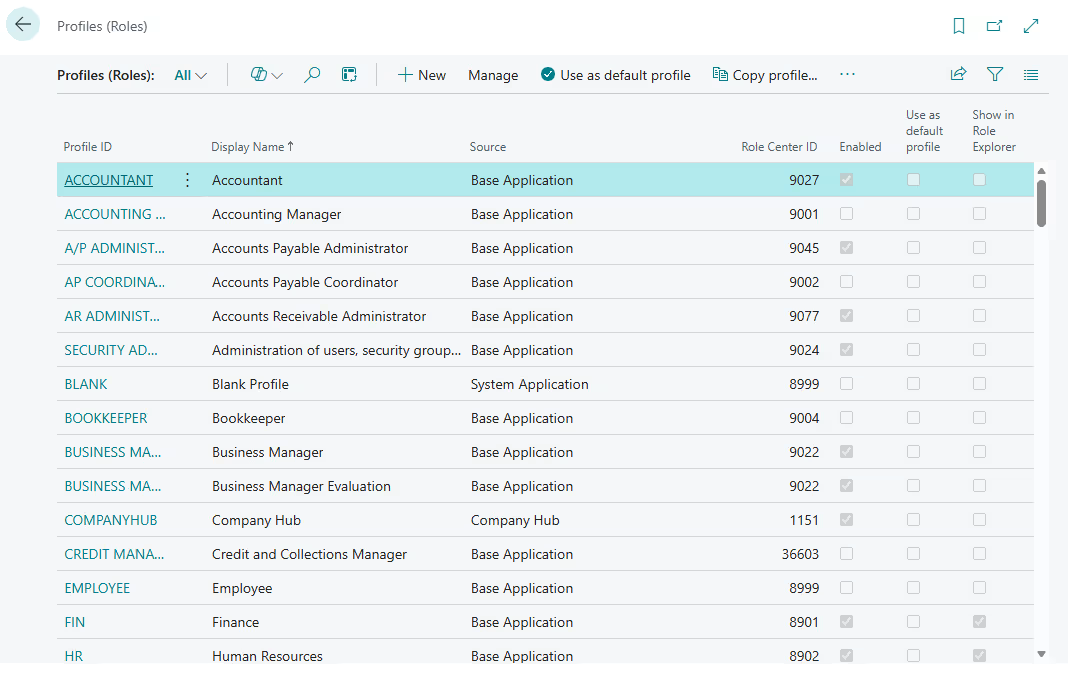
User profiles, sometimes referred to as roles, determine the Role Center assigned to a user. The Role Center controls the dashboard layout, navigation menus, and which pages and reports are visible by default. Profiles are designed to align the interface with specific job functions such as accounting, purchasing, or sales. From a security perspective, profiles affect the user experience only. Assigning a profile does not grant or restrict access to data, posting rights, or processing actions.
Key points about user profiles:
- Define the Role Center and default user interface
- Control which pages, menus, and reports are visible
- Improve navigation and efficiency by job function
- Do not grant permissions or control data-level security
Permission sets
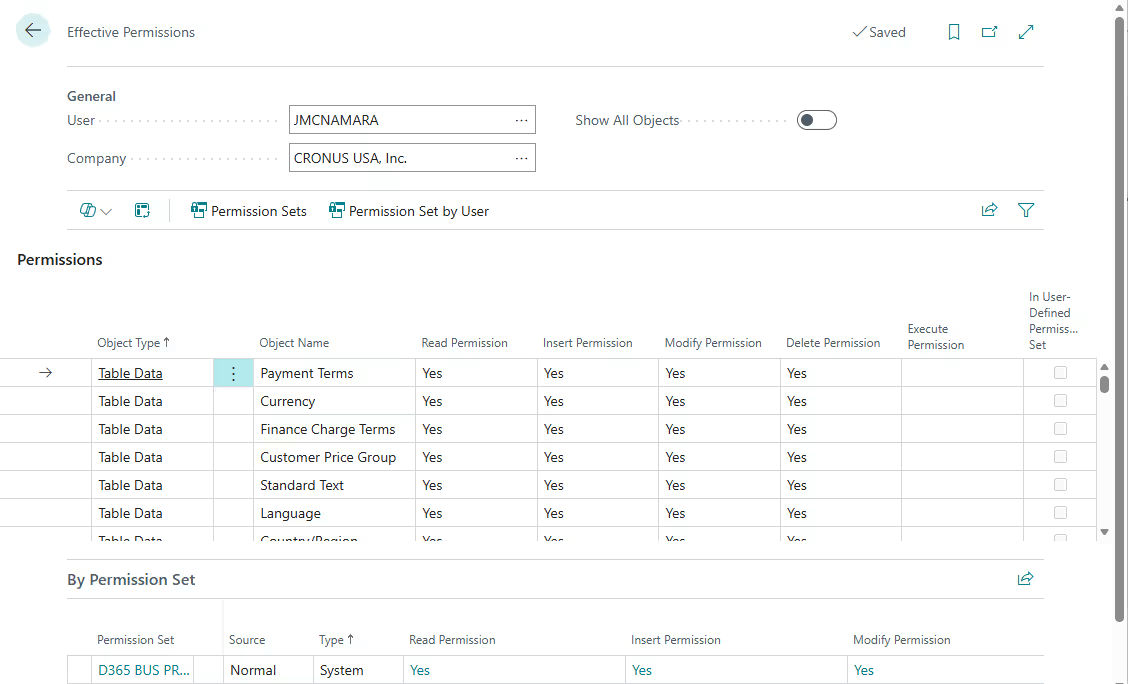
Permission sets define what users can actually do in Business Central. They control access at the data and process level by specifying whether a user can Read, Insert, Modify, Delete, or Execute actions. Users can be assigned multiple permission sets. Their effective access is determined by the combined permissions across all assigned sets. Because permissions accumulate, total access should be reviewed regularly to prevent unintended exposure.
Business Central security supports both standard and custom permission sets. Standard permission sets are maintained by Microsoft and updated with new releases. Custom permission sets can be layered on top of standard ones to address extensions, specialized workflows, or stricter internal control requirements. Assigning permissions by job function rather than by individual user simplifies onboarding, reduces access creep, and supports a least-privilege security strategy.
Key components of the permission framework include:
- Standard vs custom permission sets: Standard permission sets are provided and maintained by Microsoft and are updated with new releases to align with system functionality. Custom permission sets are created to address extensions, specialized workflows, or tighter internal control requirements. Best practice is to layer custom permission sets on top of standard ones rather than replacing them to maintain upgrade safety and audit clarity.
- Assigning permissions by job function: Permissions should align with defined business roles such as accounts payable, inventory management, or sales processing. Granting access based on job function improves consistency, simplifies onboarding, and reduces long-term access creep. This structured approach also makes access decisions easier to explain during audits.
- Least-privilege access strategy: A least-privilege strategy ensures users receive only the permissions necessary to perform their responsibilities. Limiting access reduces exposure to sensitive data and high-risk actions such as posting or configuration changes. Regular access reviews help maintain this posture as roles evolve over time.
Security groups
Business Central security groups simplify access management by allowing administrators to assign permission sets to groups instead of individual users. In Business Central online, security groups are linked to Microsoft Entra ID groups. This allows access to be reused across Dynamics 365 applications and other Microsoft services. When a permission set is assigned to a group, all members automatically inherit that access.
Using security groups strengthens governance and improves lifecycle management. When a user is added to or removed from an Entra group, their Business Central access updates automatically. This reduces the risk of orphaned accounts, inconsistent permissions, or delays during onboarding and offboarding. Group-based access also improves audit clarity because permissions are aligned to defined organizational roles rather than assigned individually.
Data protection
Data protection in Business Central is built on multiple layers of encryption, infrastructure security, and governance controls. Financial and operational data must be protected both at rest and in transit, while also remaining recoverable in the event of system failure, accidental deletion, or cyberattack. Microsoft’s cloud architecture, combined with application-level controls, helps organizations safeguard sensitive business and personal information while meeting compliance and data residency requirements.
- Encryption and secure storage: Business Central uses strong encryption standards to protect stored data and TLS encryption to secure data in transit. Cloud deployments are hosted in Microsoft-managed datacenters with layered physical and logical security controls, and access to infrastructure is tightly restricted, monitored, and audited.
- Backup and disaster recovery: Data backups are performed automatically on a regular schedule, and point-in-time restoration is supported. These capabilities protect against accidental data loss, corruption, and ransomware events while supporting business continuity planning.
- Data residency and regional hosting: Organizations can select hosting regions to comply with legal and regulatory data residency requirements. This is especially important for multinational companies that must align with regional data sovereignty laws and governance frameworks.
- Protecting sensitive business and personal data: Encryption, permissions, record-level security, and auditing controls work together to safeguard customer, employee, and financial information. These layered protections help organizations meet internal control standards and external compliance expectations.
Auditing and monitoring
Auditing and monitoring are critical components of Business Central security because they provide visibility into system activity and data changes. While identity and access controls prevent unauthorized access, monitoring ensures accountability and traceability. Built-in logging and integration with Microsoft security tools help organizations detect risk, support compliance, and investigate issues when needed.
- Change log functionality: Business Central includes a configurable change log that tracks updates to selected tables and fields. Organizations can see what was changed, when it was changed, and by whom.
- Tracking user activity and data changes: User actions such as posting transactions or modifying records can be monitored within the system. This visibility strengthens internal oversight and helps detect unauthorized activity.
- Audit trails for compliance and investigations: Detailed audit records support financial audits and regulatory requirements. These logs help demonstrate control effectiveness and governance.
- Integration with Microsoft security and monitoring tools: Business Central integrates with Microsoft Entra sign-in logs and other monitoring tools. This enhances centralized visibility across the Microsoft security ecosystem.
- Proactive monitoring and alerting strategies: Organizations can review logs regularly and configure alerts for high-risk activity. Early detection reduces the impact of potential security incidents.

Network, integration, and API security
Network, integration, and API security are essential layers of Business Central security because modern ERP systems are connected to other applications, services, and external partners. Business Central communicates with Microsoft services, third-party applications, and custom extensions through secure network channels and authenticated APIs. Protecting these data flows helps prevent unauthorized access, credential misuse, and exposure of sensitive financial or operational information.
- Enterprise-grade encryption of network traffic: All data transmitted between users, services, and integrations is protected using secure TLS encryption. This ensures sensitive ERP data cannot be intercepted or read in transit.
- Secure APIs and web services: Business Central exposes APIs and web services that are secured using modern authentication standards. Access is controlled through defined permissions and identity validation.
- OAuth-based authentication for integrations: Integrations use token-based OAuth authentication rather than basic credentials. This reduces the risk of credential compromise and strengthens access control for connected systems.
- Managing permissions for external apps: External applications must be granted explicit permissions to access Business Central data. Administrators can restrict scopes and review access to limit exposure.
- Security for extensions and custom integrations: Extensions and ISV solutions operate within the Business Central security model and respect assigned permissions. Proper governance ensures custom code does not bypass role-based access controls.
Security operations in Business Central
Security operations in Business Central extend beyond initial configuration. Protecting ERP data requires ongoing monitoring, updates, and governance. Business Central security operates under a shared responsibility model. Microsoft secures the cloud infrastructure and platform services, while organizations and their partners are responsible for configuring access, monitoring activity, and maintaining internal controls.
Microsoft-managed security operations
Microsoft is responsible for securing the underlying cloud infrastructure that powers Business Central. This includes protecting datacenters, maintaining platform availability, and continuously strengthening the security posture of the service. These controls operate at the infrastructure and application service layer and are designed to reduce risk at scale.
- Continuous security monitoring and updates: Microsoft continuously monitors the platform for threats and deploys security updates and patches as part of the cloud service model.
- Regular vulnerability assessments and remediation: The platform undergoes ongoing vulnerability scanning and remediation processes to identify and address potential risks.
- Compliance with industry security standards: Microsoft maintains certifications and compliance with widely recognized security frameworks to support enterprise and regulatory requirements.
Customer and partner responsibilities
Organizations and their implementation partners are responsible for how Business Central is configured and governed. This includes managing user access, reviewing permissions, and ensuring that internal security policies are enforced within the system. Strong operational discipline is essential to maintaining an effective security posture over time.
- Audit logging and activity tracking: Organizations must enable and review logging capabilities to monitor user actions and data changes.
- Access reviews and permission validation: Regular reviews of roles and permission sets help prevent excessive access and maintain a least-privilege model.
- Incident response planning: Businesses should have defined procedures for investigating and responding to suspected security incidents.
- Security governance processes: Ongoing governance ensures policies, access models, and controls remain aligned with business and compliance requirements.
Common Business Central security scenarios
Even with strong controls in place, real-world risks often emerge from configuration gaps, credential misuse, or process weaknesses. Understanding common Business Central security scenarios helps organizations apply security controls where they matter most. The examples below highlight high-impact risks and the practical controls that reduce exposure.
Enforcing multi-factor authentication for all users
Password-only sign-ins are vulnerable to phishing and account takeover. If an attacker compromises a user account, they can gain access to financial data and operational workflows. This risk is higher in cloud ERP environments where access is available from many locations and devices.
Solution: Enforce multi-factor authentication using Microsoft Entra Conditional Access policies for Business Central access. Require modern authentication and reduce or eliminate legacy sign-in methods where possible. Monitor sign-in activity so suspicious patterns are detected early.
Benefits:
- Reduces the risk of account compromise and unauthorized access
- Supports compliance expectations for strong authentication controls
- Creates a foundation for passwordless sign-in over time
Preventing excessive permissions in financial processes
A common ERP risk is when one user has too much end-to-end access, such as creating and posting transactions without oversight. Over time, access creep can happen as users accumulate extra permission sets that are never removed. This increases fraud risk, error risk, and audit exposure.
Solution: Design permission sets around job functions and follow a least-privilege model. Use approval workflows for high-risk actions such as vendor changes and payment processing. Perform regular access reviews to confirm users still need the permissions they have.
Benefits:
- Reduces the risk of unauthorized transactions and master data changes
- Improves internal controls and audit readiness
- Limits long-term access creep as roles evolve
Monitoring suspicious sign-in attempts and unusual activity
Attackers often test ERP user accounts using password spraying or repeated failed sign-ins. Integration accounts can also fail due to expired credentials, creating noise that hides real threats. Without visibility into authentication events, organizations may miss early warning signs.
Solution: Use Microsoft Entra sign-in logs to monitor authentication activity related to Business Central. Configure alerting for repeated failures, sign-ins from unfamiliar regions, or other unusual patterns. Where appropriate, use telemetry to identify authorization failures and integration authentication issues.
Benefits:
- Detects threats early before business impact occurs
- Provides evidence and traceability for investigations and audits
- Helps identify operational issues such as failing integrations or expiring credentials
Business Central security best practices
Strong Business Central security requires more than initial setup. Ongoing governance, regular reviews, and disciplined access management are essential to maintaining a secure ERP environment. The following best practices help reduce risk and strengthen long-term control.
- Enforce multi-factor authentication (MFA): Require MFA for all users accessing Business Central to reduce the risk of credential compromise. Use Conditional Access policies to apply consistent authentication standards across the organization.
- Apply least-privilege access: Grant users only the permissions required to perform their job responsibilities. Review and adjust access as roles change to prevent privilege accumulation over time.
- Enforce segregation of duties: Enforce segregation of duties in Business Central and separate high-risk responsibilities such as transaction creation, approval, and posting. Use structured permission sets and approval workflows to prevent a single user from controlling an entire financial process.
- Review permission sets quarterly: Conduct periodic access reviews to confirm users still require their assigned roles and permissions. Remove unnecessary access promptly to reduce risk exposure.
- Monitor change logs and user activity: Enable change logging for sensitive tables and review activity regularly. Monitoring helps detect unauthorized changes and supports audit and compliance requirements.
- Review third-party extensions regularly: Evaluate marketplace apps and custom extensions to ensure they align with your security standards. Confirm that integrations and extensions respect the Business Central permission model and do not introduce unnecessary risk.
Enhance Business Central security with Rand Group
Business Central security is most effective when it is designed intentionally and reviewed regularly. Rand Group helps organizations strengthen their security posture by aligning system configuration, access controls, and governance processes with industry best practices. Whether you are implementing Business Central, migrating from a legacy ERP, or improving an existing environment, our team provides practical guidance to reduce risk and support compliance.
- Security-first implementation design: We design Business Central environments with security built into the foundation, including structured role design, least-privilege access, and strong authentication controls. This ensures governance is embedded from day one.
- Role and permission architecture reviews: Our consultants evaluate existing permission sets, security groups, and role assignments to identify excessive access or structural weaknesses. We provide clear remediation recommendations to strengthen control.
- Segregation of duties alignment: We assess high-risk financial and operational processes and align permission sets and approval workflows to reduce fraud and error risk. This improves internal control readiness and audit confidence.
- Migration security planning: During ERP migrations to Business Central, we evaluate legacy access models and redesign them using modern security principles. This prevents inherited risks from carrying into the new system.
- Ongoing governance and advisory support: Security is not a one-time event. Rand Group provides ongoing reviews, advisory services, and security health checks to help organizations maintain strong Business Central security over time.
Frequently asked questions (FAQs)
What is Business Central security?
Business Central security is the set of identity, access, encryption, monitoring, and governance controls built into Microsoft Dynamics 365 Business Central to protect ERP data and manage user access.
Is Business Central secure?
Yes. Business Central security is built on Microsoft’s cloud infrastructure and includes identity management through Microsoft Entra ID, role-based permissions, encryption at rest and in transit, and built-in auditing tools. Security operates under a shared responsibility model between Microsoft and the customer.
How does Business Central protect data?
Business Central protects data using enterprise-grade encryption for data at rest and in transit. It also includes automatic backups, point-in-time restore capabilities, role-based access controls, and monitoring tools to safeguard financial and operational information.
Does Business Central support multi-factor authentication (MFA)?
Yes. Business Central supports multi-factor authentication through Microsoft Entra ID. Organizations can enforce MFA using Conditional Access policies to reduce the risk of account compromise and unauthorized access.
What is the Business Central security model?
The Business Central security model is layered and role-based. It combines identity authentication, permission sets, security groups, encryption, auditing, and monitoring controls to protect ERP data and enforce governance.
How are permissions managed in Business Central?
Permissions in Business Central are managed using permission sets and security groups. Users can be assigned multiple permission sets, and their effective access is determined by the combined permissions assigned to them.
Who is responsible for Business Central security?
Business Central security follows a shared responsibility model. Microsoft secures the cloud infrastructure and platform services, while customers and partners are responsible for configuring user access, permissions, monitoring, and governance processes.
Next steps
Business Central includes robust, built-in security capabilities across identity management, role-based permissions, encryption, monitoring, and cloud infrastructure protection. When properly configured and governed, these layered controls help protect sensitive financial data, reduce cybersecurity risk, and support compliance requirements.
If you want to evaluate how your Business Central environment is configured or strengthen your current security model, Rand Group can help. Our team can assess access design, review permissions, and align your security framework with best practices. Contact us to start the conversation.