Dynamics 365
 Power Platform
 Dynamics
 Cloud & Productivity
Dynamics 365 Business Central and Dynamics 365 CRM integration: connecting sales, service, and finance

Many growing organizations reach a familiar inflection point. Sales teams adopt a CRM to manage pipeline and customer relationships. Finance and operations implement an ERP to control transactions, inventory, and reporting. Both systems work well on their own, but they do not always work well together.
The result is friction across the customer lifecycle. Sales cannot see order status or credit exposure. Service lacks visibility into billing history. Finance rekeys quote data into the ERP. Leadership struggles to align forecasts with actual financial performance.
Integrating Dynamics 365 Business Central and Dynamics 365 CRM addresses this disconnect. Together, these platforms connect customer engagement processes with financial and operational execution. When properly designed, integration creates a single, coordinated flow from lead to invoice to ongoing service.
This article explains what Dynamics 365 CRM includes, how it complements Business Central, how each CRM application integrates at a high level, and what organizations should consider when developing an integration strategy.
What is Dynamics 365 CRM?
“Dynamics 365 CRM” refers to the Dynamics 365 Customer Engagement family of applications built on the Microsoft Dataverse platform.
While Microsoft’s technical name for the suite is Dynamics 365 Customer Engagement, the term Dynamics 365 CRM is more widely recognized. It represents a set of modular applications that support customer-facing processes across sales, service, marketing, field operations, and project delivery.
These applications share a common data model, security framework, and integration foundation within Dataverse. Organizations can deploy the apps they need while maintaining a unified customer record.
The core Dynamics 365 CRM applications include:
- Dynamics 365 Sales for lead management, opportunity tracking, forecasting, and quote creation
- Dynamics 365 Customer Service for case management across channels, service level agreements, and performance metrics
- Dynamics 365 Field Service for scheduling, work orders, and on-site service operations
- Dynamics 365 Project Operations for managing customer projects, resources, and delivery milestones
- Dynamics 365 Customer Insights for segmentation, journeys, personalization, and analytics
Collectively, these tools provide visibility into the customer lifecycle. However, they are not designed to serve as a general ledger, inventory management system, or financial reporting engine. That responsibility belongs to an ERP system such as Dynamics 365 Business Central. Understanding that division of responsibility is foundational to designing an effective integration.
What is Dynamics 365 Business Central?
Dynamics 365 Business Central is Microsoft’s cloud-based ERP solution for small and midsize organizations. It manages the financial and operational backbone of the business with control and accuracy.
Business Central centralizes transactional data and supports the processes that keep the organization running. Its core capabilities include:
- Financial management, including general ledger, accounts payable, accounts receivable, bank reconciliation, and budgeting
- Sales and purchasing, from quotes and orders through invoicing and vendor payments
- Inventory and warehouse management, including item tracking and replenishment
- Manufacturing and assembly, with bills of materials and capacity planning
- Project accounting, with detailed costing, billing, and margin analysis
Where Dynamics 365 CRM focuses on engagement and relationship management, Business Central focuses on financial integrity and operational execution. It is optimized for transactional accuracy, compliance, and performance reporting.
When these systems operate independently, data must be transferred manually or through informal processes. Integration eliminates that gap and allows both systems to perform their intended roles more effectively.

Build a smarter, connected Dynamics 365 solution
Gain real-time visibility, streamline processes, eliminate data silos, and deliver a more connected, consistent customer experience across your organization. Schedule a conversation with Rand Group to leverage Dynamics 365 Business Central and Customer Engagement.
Why integrate Dynamics 365 CRM with Business Central?
Deploying Dynamics 365 CRM and Dynamics 365 Business Central separately often creates blind spots between departments. Integration closes those gaps and aligns front-office and back-office processes around shared, reliable data.
When designed thoughtfully, integration can deliver several tangible benefits:
- End-to-end visibility, from lead and opportunity in Dynamics 365 CRM through order, invoice, and payment in Dynamics 365 Business Central
- Streamlined quote-to-cash, with quotes created in Dynamics 365 CRM flowing directly into Dynamics 365 Business Central for fulfillment and invoicing
- Reduced manual data entry, minimizing errors and rework
- Improved service resolution, with financial and order data from Dynamics 365 Business Central accessible within Dynamics 365 CRM
- More accurate forecasting, aligning sales projections in Dynamics 365 CRM with financial reality in Dynamics 365 Business Central
These benefits are not purely technical. They directly impact customer experience, operational efficiency, and executive decision-making. For a deeper look at how connecting Dynamics 365 CRM and Business Central creates unified data and end-to-end visibility across the customer lifecycle, explore our guide to Dynamics 365 Business Central and CRM integration creating end-to-end visibility.
Instead of functioning as two separate systems connected by spreadsheets and manual workarounds, Dynamics 365 CRM and Dynamics 365 Business Central operate as a connected platform that supports the full customer and financial lifecycle.
Dynamics 365 Sales and Dynamics 365 Business Central integration
Dynamics 365 Sales manages the pipeline. Dynamics 365 Business Central manages the transaction.
When integrated, the relationship between the two systems becomes structured and predictable. Opportunities and quotes in Sales can be converted into orders in Dynamics 365 Business Central. Financial and fulfillment data can be surfaced back into CRM.
At a high level, integration enables:
- Synchronization of accounts and contacts between systems
- Conversion of accepted quotes into sales orders in Business Central
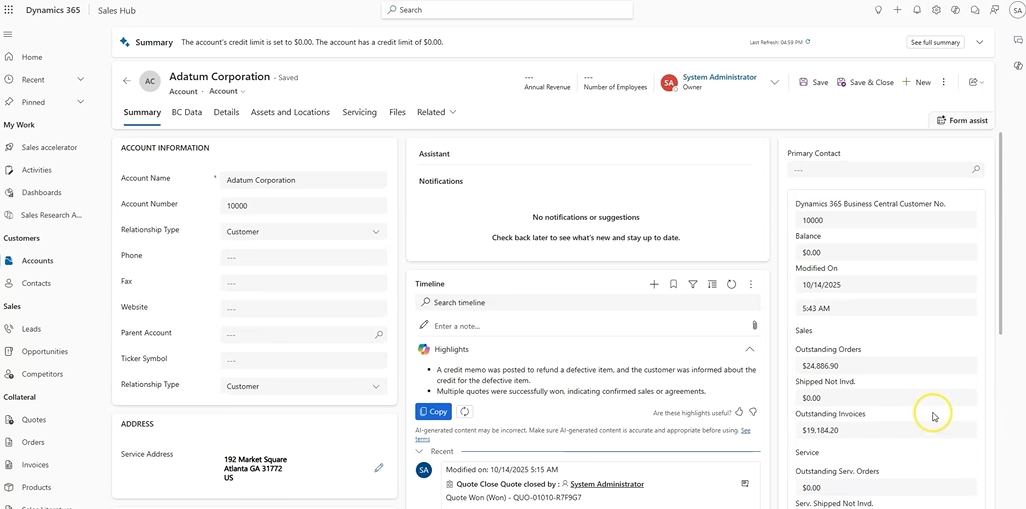
- Visibility into credit limits, order status, and invoice history within CRM
- Alignment between pipeline forecasts and financial planning
For sales teams, this means working with accurate financial context. For finance teams, it means reducing duplicate data entry and maintaining control over transactional posting. Organizations evaluating this scenario can explore further details in our guide to Business Central & Dynamics 365 Sales Integration.
Dynamics 365 Customer Service and Business Central integration
Customer Service teams often need financial and operational data to resolve issues efficiently. Without integration, they rely on internal emails or ERP access requests to retrieve order or invoice information. Integration changes that workflow.
When Dynamics 365 Business Central and Dynamics 365 Customer Service are connected, service representatives can view relevant ERP data directly within the customer record in CRM. This may include:
- Order and shipment history
- Invoice status and payment details
- Credit exposure or account holds
- Product or item information tied to a case
This visibility reduces handoffs between departments and shortens case resolution time. It also improves the quality of communication with customers.
Rather than navigating multiple systems, service teams operate within Dynamics 365 CRM while referencing trusted financial data from Dynamics 365 Business Central.
Dynamics 365 Field Service and Business Central integration
Field Service adds another layer of operational complexity. Technicians perform on-site work, consume inventory, and complete service orders that often trigger billing events.
Integration between Dynamics 365 Field Service and Dynamics 365 Business Central ensures that operational activity translates accurately into financial results.
At a high level, integration supports:
- Synchronization of customer and asset records
- Visibility into parts inventory across warehouse and field locations
- Automatic generation of invoices in Dynamics 365 Business Central from completed work orders
- Accurate costing of labor and materials for service profitability analysis
Without integration, organizations risk disconnects between work performed in the field and revenue recognized in the financial system—leading to billing delays, reporting inconsistencies, and margin leakage. With integration in place, field operations and finance teams work from a shared data foundation, improving accuracy, accelerating billing cycles, and providing clearer insight into service profitability.
For a deeper look at how this works in practice, explore our guide to Dynamics 365 Field Service and Business Central integration, where we break down the architecture options, benefits, and key considerations for a successful deployment.
Dynamics 365 Project Operations and Business Central integration
Project-driven organizations require coordination between delivery teams and finance. Project managers need insight into costs and billing. Finance needs accurate time, expense, and revenue data.
Dynamics 365 Project Operations manages planning, resourcing, and project execution. Dynamics 365 Business Central manages project accounting, billing, and financial reporting.
When integrated, organizations gain:
- Real-time visibility into project financial performance
- Alignment between project milestones and invoicing
- Improved revenue recognition accuracy
- Reduced month-end reconciliation effort
This integration is particularly important for professional services firms, construction companies, and other project-based businesses. For a deeper look at integration architecture, data flows, and implementation considerations, explore our overview of Business Central and Dynamics 365 Project Operations integration.
Better together: Dynamics 365 Business Central and Customer Engagement
Watch this video to explore real-world integration examples, key benefits, and practical approaches to connecting Dynamics 365 Business Central and Dynamics 365 Customer Engagement.
Dynamics 365 Customer Insights and Business Central integration
Dynamics 365 Customer Insights enhances segmentation and engagement by analyzing behavioral, demographic, and interaction data. When combined with financial and transactional data from Business Central, customer segmentation becomes significantly more strategic and revenue-focused.
Integration enables marketing and customer experience teams to:
- Segment customers based on revenue, purchasing frequency, or payment patterns
- Target campaigns using actual profitability and margin data
- Align engagement strategies with customer lifecycle value
By incorporating financial data into segmentation models, organizations move beyond pipeline activity and engagement metrics alone. Marketing decisions are grounded not just in who is interacting—but in who is contributing meaningfully to revenue and long-term value. The result is more precise targeting, improved campaign ROI, and stronger alignment between marketing strategy and financial performance.
A real-world example of Business Central and CRM integration
Sapphire Gas Solutions, a provider of turnkey natural gas systems, illustrates the impact of connecting CRM and ERP on a unified Microsoft platform.
Prior to modernization, Sapphire relied on disconnected legacy systems and spreadsheets to manage sales and financial operations. Reporting cycles were slow, collaboration between departments was limited, and leadership lacked timely visibility into performance metrics.
Working with Rand Group, Sapphire implemented Dynamics 365 Sales to improve pipeline management and customer visibility, alongside Dynamics 365 Business Central to modernize financial operations.
The results were measurable:
- Month-end close time was reduced from 45 days to 9 days.
- Manual data entry decreased by more than 50 percent.
- Sales onboarding accelerated by 40 percent.
- Leadership gained real-time visibility into financial and operational performance.
By aligning sales and finance on a connected Microsoft platform, Sapphire replaced fragmented processes with structured workflows and shared data. Sales teams gained better insight into customer activity, while finance operated with improved control and accuracy.
This transformation demonstrates a practical outcome of Business Central and Dynamics 365 CRM integration: stronger cross-functional alignment, faster reporting, and a scalable operational foundation for growth. For more detail, read the following Sapphire Gas Solutions – Dynamics 365 Sales case study.
Integration strategy considerations for Dynamics 365 Business Central and Dynamics 365 CRM
Integration is not a single feature. It is an architectural decision that must align with business processes and long-term goals.
Microsoft provides several integration approaches. The appropriate model depends on transaction volume, data criticality, reporting needs, and error tolerance.
Common options include:
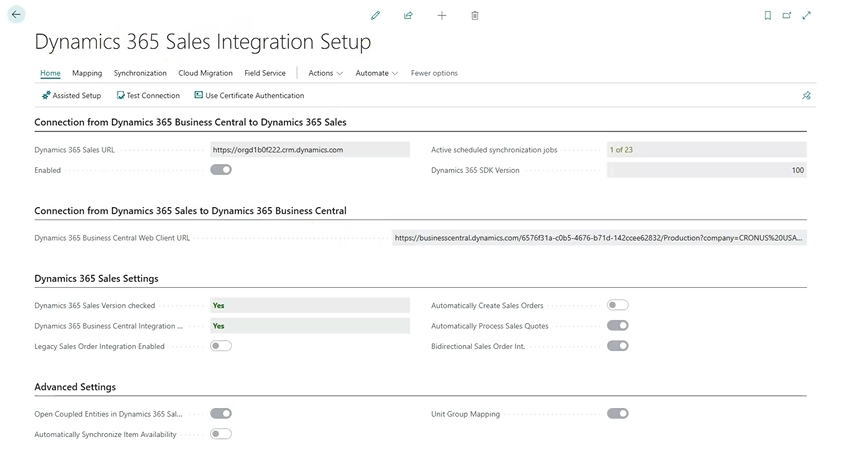
- Native integration with record coupling, suitable for standard synchronization scenarios
- Power Automate workflows, for event-driven or complex business logic
- Virtual tables, which surface Dynamics 365 Business Central data within Dynamics 365 CRM without duplicating it in Dataverse
When designing an integration strategy, organizations should evaluate:
- Which system is the system of record for each data element
- How errors will be monitored and resolved
- How reporting will combine CRM and ERP data
- How the integration will scale as the business grows
A thoughtful strategy reduces technical debt and ensures the integration supports both operational execution and strategic reporting.
Why partner with Rand Group?
Integration requires more than technical configuration. It demands a clear understanding of how sales, service, finance, and operations work together in the real world. Rand Group brings that perspective to every case.
Our consultants have deep experience across both Dynamics 365 Business Central and Dynamics 365 CRM allowing us to design integrations that align with business processes, data ownership, and long-term growth goals. We focus on practical, scalable solutions that reduce manual effort, improve visibility, and support adoption across teams.
Whether you are implementing new Dynamics solutions or optimizing an existing environment, Rand Group helps ensure your front-office and back-office systems work together as a cohesive platform—delivering measurable value today and flexibility for the future.
Frequently asked questions about D365 Business Central and D365 CRM integration
What is Dynamics 365 CRM, and what does it cover?
Dynamics 365 CRM is a collection of applications designed to support customer-facing processes, including Sales, Customer Service, Field Service, Project Operations, and Marketing. Organizations can deploy one or multiple modules based on their needs, enabling capabilities such as lead and opportunity management, case handling with SLAs, project scheduling, and marketing automation without requiring every user to be licensed for every function.
What types of business processes does Dynamics 365 Business Central support?
Dynamics 365 Business Central is an ERP platform built primarily for small to midsize organizations, focusing on back-office operations. It supports core financials such as general ledger, accounts payable and receivable, purchasing, inventory, fixed assets, manufacturing, and warehouse management. While it includes basic sales functionality, it does not provide advanced lead management, marketing automation, or service case management.
Why is it important to integrate Dynamics 365 Business Central and Dynamics 365 CRM?
Each platform is designed to excel in different areas of the business. Dynamics 365 CRM manages front-office activities like sales, service, and customer interactions, while Business Central handles financial transactions and operational processes. Integrating the two eliminates data silos, provides a complete view of the customer journey, and enables teams to work with accurate, real-time information across departments.
How does integrating Dynamics 365 Business Central and Dynamics 365 CRM improve sales, service, and customer experience?
Integration allows sales and service teams to access financial data such as order history, invoice status, and credit limits directly within Dynamics 365 CRM. This reduces dependency on back-office teams, speeds up response times, and enables more informed, personalized customer interactions. It also streamlines processes like quote-to-cash by reducing manual data entry and errors.
What are the main ways Dynamics 365 Business Central and Dynamics 365 CRM can be integrated?
Common integration methods include Power Automate, virtual tables, and native integration with record coupling. Power Automate is well suited for complex or business-critical workflows that require control and error handling. Virtual tables allow read-only Business Central data to be displayed in Dynamics 365 CRM without increasing data storage. Native integration supports simpler synchronization scenarios for selected data sets.
Next steps
Integrating Dynamics 365 Business Central and Dynamics 365 CRM is more than a technical exercise. It is a strategic investment in how your organization operates, collaborates, and serves customers.
By unifying front-office and back-office processes, organizations can improve efficiency, enhance customer experiences, and gain clearer insight into performance across the business.
Rand Group helps organizations evaluate, design, and implement Dynamics 365 Business Central and Dynamics 365 CRM solutions that align with real-world business needs. Whether you are exploring integration options, planning a new deployment, or optimizing an existing environment, our consultants bring deep Microsoft expertise and practical experience.
If you are considering how Dynamics 365 Business Central and Dynamics 365 CRM can work better together in your organization, contact Rand Group today.