Dynamics 365
 Power Platform
 Dynamics
 Cloud & Productivity
Microsoft Dynamics 365 Business Central forecasting & planning

Accurate demand forecasting and inventory planning are critical for manufacturing success. Without proper planning, businesses may overstock materials, leading to cash flow issues, or run out of essential components, delaying production and causing missed deadlines.
Microsoft Dynamics 365 Business Central helps manufacturers automate inventory management, reduce waste, and improve production efficiency. With powerful Material Requirements Planning (MRP) and Master Production Scheduling (MPS) capabilities, businesses can make smarter, data-driven decisions about inventory and supply chain operations.
In this blog, we’ll explore Business Central’s forecasting and planning tools and how manufacturers can leverage these features to optimize their operations.
Understanding demand forecasting in Business Central
Demand forecasting in Business Central allows organizations to plan future demand based on historical data such as previous consumption, sales orders, shipment history, and seasonal trends. Forecasts can be created at the item or SKU level and assigned to specific locations or variants—making it easy to manage complex manufacturing environments.
Business Central supports:
- Forecasting by item or product family to anticipate demand at multiple levels
- Forecasting by location to manage geographically distributed supply
- Manual or calculated forecasts using historical patterns
- Sales and production forecasting views to evaluate demand across the business
- Forecast adjustments, enabling teams to refine expectations based on market changes
Forecasting models can also incorporate seasonal cycles, growth trends, or unexpected demand spikes. Once forecasts are updated, they immediately influence planning outcomes—ensuring procurement and production recommendations reflect the most accurate demand picture.

How demand forecasting works in Business Central
Forecasting is an essential part of manufacturing and supply chain management. Without accurate demand predictions, businesses risk either stockouts or excess inventory. Business Central helps manufacturers avoid these issues by allowing them to forecast demand based on historical sales data and expected sales trends.
Types of demand in Business Central
- Independent demand: Demand for finished goods, typically driven by customer sales orders and forecasts.
- Dependent demand: Demand for raw materials and components, which is calculated based on Bill of Materials (BOM) requirements.
Steps to enter a demand forecast
- Navigate to the Demand Forecast Page in Business Central.
- Select the forecast period (daily, weekly, monthly, quarterly, or yearly).
- Manually enter expected demand per item based on sales trends or business knowledge.
- Use historical data from previous sales periods to refine forecasts.
Once forecasts are entered, Business Central automatically integrates them into the planning process, allowing manufacturers to generate production and purchasing recommendations based on demand.

Ready to transform your inventory planning?
Discover how Microsoft Dynamics 365 Business Central can streamline your forecasting and planning processes. Contact Rand Group today for a personalized demo and see how data-driven planning can transform your manufacturing operations.
Net change calculations: Keeping forecasts up to date
Forecasts in Business Central are dynamic, not static. As sales activity occurs, the system automatically updates planning recommendations.
How net change forecasting works:
- New sales orders adjust forecasted demand
- Cancelled or rescheduled orders update planning requirements
- Planning worksheets reflect the latest demand picture
This real-time recalculation allows manufacturers to react quickly to demand fluctuations.
Forecasting by location: Managing demand across multiple warehouses
For manufacturers operating multiple warehouses or fulfillment centers, Business Central enables forecasting at the regional or warehouse level.
Key capabilities include:
- Entering separate forecasts for each warehouse
- Adjusting forecast quantities based on regional buying patterns
- Transferring inventory between locations based on local demand
This prevents stock shortages in high-demand regions and reduces excess inventory in low-demand areas.
Understanding SKUs vs. Item Cards in Business Central
Many manufacturers struggle to determine when to use Stockkeeping Units (SKUs) instead of Item Cards. While both track inventory, they serve different purposes.
- Item Card: Used when a company has one primary inventory location and does not require location-specific inventory planning.
- Stockkeeping unit (SKU): Required when a company operates multiple warehouses and needs to set different inventory policies per location, such as lead times, reorder points, or safety stock levels.
If your business has multiple warehouses or fulfillment centers, SKUs allow for better control over inventory by enabling separate tracking per location.

How forecasting connects to inventory planning in Business Central
Once demand forecasts are created, they flow directly into Business Central’s inventory planning engine, shaping how and when items need to be replenished. Forecasting and planning work hand in hand: forecasts determine future demand expectations, while planning tools translate those expectations into actionable purchasing and production recommendations.
Business Central uses your forecast data to calculate upcoming inventory needs, generate planning worksheet suggestions, and ensure that materials and finished goods are available at the right time. Planners can review, adjust, and refine these forecasts before finalizing purchase or production orders—allowing for flexible, real-world decision-making.
To support this process, Business Central offers several reordering policy options that define how each item should be replenished. These policies help manufacturers manage steady-demand items, fluctuating demand patterns, or make-to-order workflows.
Together, forecasting and planning ensure that manufacturers maintain optimal stock levels, reduce carrying costs, avoid shortages, and keep production running smoothly.

MPS vs. MRP: How they work together
One of the most common inventory planning mistakes manufacturers make is confusing MPS with MRP. While they are related, they serve different purposes.
Key differences:
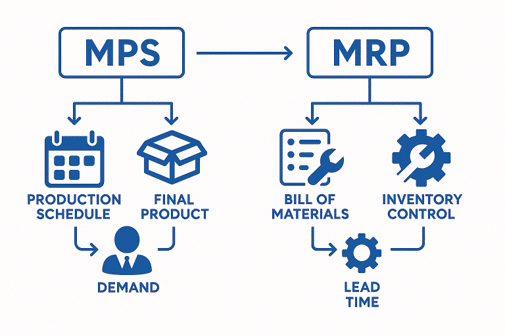
- Master Production Scheduling (MPS): Plans finished goods production based on forecasted demand.
- Material Requirements Planning (MRP): Calculates the raw materials and components needed to fulfill production orders.
When to Use MPS?
- To plan finished goods production before determining material requirements.
- To align production schedules with customer demand and avoid overproduction.
When to Use MRP?
- To ensure raw materials and components are available when needed.
- To automate purchasing decisions based on BOM dependencies.
Most manufacturers run MPS first to finalize their production plan and then run MRP to determine what materials need to be ordered.
Best practices for forecasting and planning in Business Central
To maximize the benefits of Business Central’s planning tools, manufacturers should follow these best practices:
- Analyze historical sales data: Look at previous demand trends to make data-backed forecasts and refine forecast accuracy.
- Update forecasts regularly: Adjust demand predictions based on current market conditions and real-time sales trends.
- Use location-based forecasting: Ensure that each warehouse has an accurate forecast to prevent stock imbalances.
- Set a planning time fence: Establish a period (e.g., two weeks) to prevent last-minute order changes.
- Monitor Item Availability by Event: Track how forecasts impact inventory replenishment.
- Review planning worksheets frequently: Examine the system’s replenishment recommendations to adjust stock levels as needed.
Featured Video:
Forecasting and planning in Business Central
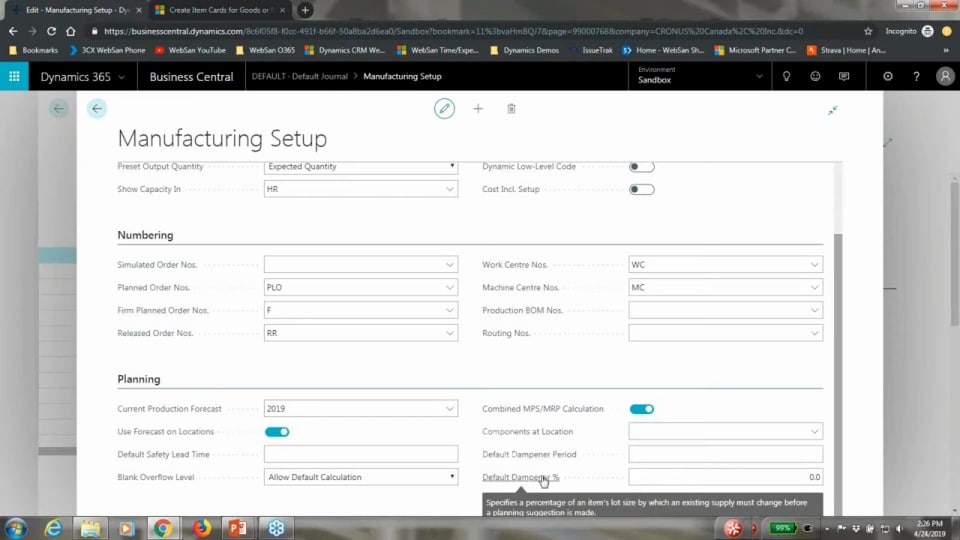
This video from our Manufacturing Series walks through the forecasting engine, planning worksheet, order tracking, planning parameters, and best practices for building a scalable forecasting model. It provides a deeper, more technical understanding of how forecasting drives planning in manufacturing environments.
Next steps
If you’re ready to improve planning accuracy, reduce inventory risk, and modernize your manufacturing operations, Rand Group is here to help. Accurate forecasting and planning are essential to manufacturing success—but maximizing Business Central’s capabilities often requires expert guidance. Rand Group helps manufacturers configure forecasting models, streamline planning setups, and align their systems with real-world operations.
With hands-on implementation, support, and training, Rand Group ensures your organization gets the most out of Business Central’s manufacturing capabilities and builds processes that scale as your business grows. If you’re ready to improve planning accuracy, reduce inventory risk, and modernize your manufacturing operations, Rand Group is here to help. Contact us today to start your journey toward manufacturing excellence.



Subscribe to our Insights