Dynamics 365
 Power Platform
 Dynamics
 Cloud & Productivity
Microsoft Dynamics 365 Business Central vs. QuickBooks

Business Central vs QuickBooks is a common comparison for businesses evaluating accounting software versus a full ERP system. Microsoft Dynamics 365 Business Central and Intuit QuickBooks are both financial management solutions, but they differ greatly in scope and capabilities. This blog post provides an in-depth look at how the two systems compare, including what each platform offers, where they differ, and why Business Central may be the better long-term choice for businesses scaling beyond basic accounting.
What is Business Central?
Microsoft Dynamics 365 Business Central is a cloud-based enterprise resource planning (ERP) solution designed for small and midsize businesses. It’s essentially an all-in-one business management platform that goes beyond bookkeeping. Business Central can be deployed in the cloud or on-premises and includes modules for financials, sales, purchasing, inventory, project management, and more. In other words, it integrates multiple business processes into a single system, helping companies increase financial visibility, optimize supply chain operations, improve sales and service, and deliver projects on time. Being part of the Microsoft Dynamics 365 family, it also offers a consistent, intuitive experience across devices and tight integration with other Microsoft tools like Office 365.
Business Central is built to support growing organizations with more complex needs. It streamlines operations by automating tasks (e.g., bank reconciliation, invoicing, and reporting) and supports advanced capabilities like multi-currency and multi-company accounting out of the box. The solution also incorporates modern features such as AI-driven insights and Microsoft’s Copilot for predictive analytics and automation of routine tasks. Business Central acts as a full ERP system that can manage end-to-end business processes.
To learn more, explore Business Central’s capabilities.

What is QuickBooks?
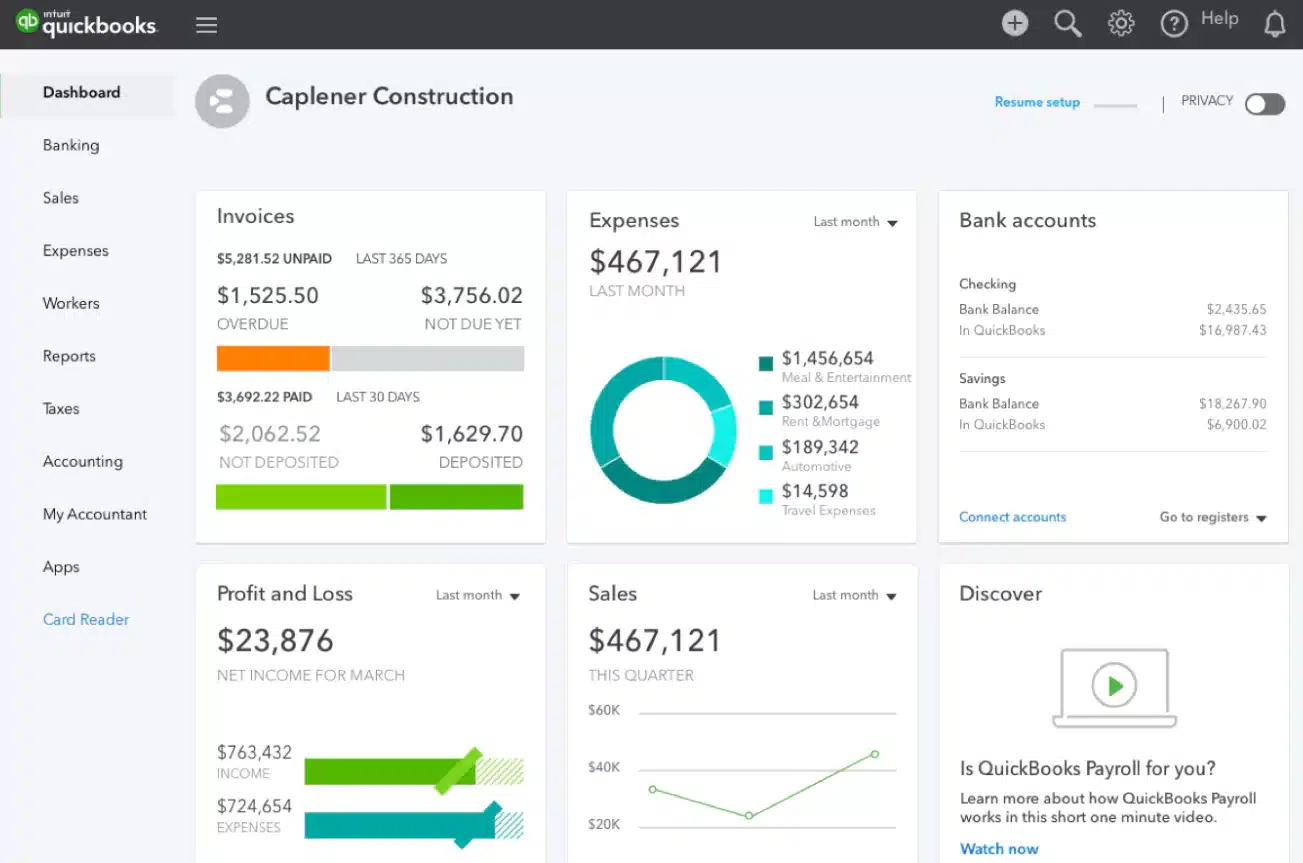
QuickBooks is a popular accounting software package, available in desktop and online versions, developed by Intuit. It is widely used by small businesses and entrepreneurs to manage core financial tasks. QuickBooks is best known for handling bookkeeping functions such as general ledger, accounts payable/receivable, invoicing, expense tracking, and payroll processing. The software’s appeal comes from its simplicity and affordability. It’s easy to get started with little accounting knowledge, and the cost is relatively low for a small company.
As an entry-level solution, QuickBooks focuses on basic accounting and financial management. It provides ready-to-use templates for financial statements, a simple interface for bank transactions, and tools for tasks like check printing and tax preparation. For a new or very small business, QuickBooks can cover essentials like sending invoices, paying bills, running basic reports, and even processing payroll in certain editions. However, it’s important to note that QuickBooks is not a full ERP system and its functionality is mostly limited to accounting and related areas, with some add-ons for inventory or time tracking. This simplicity is a strength for companies with straightforward needs, but it becomes a limitation as a business grows more complex.

Get the full comparison guide
Want a deeper dive into the differences between Microsoft Dynamics 365 Business Central vs QuickBooks? Download our complete comparison guide for a more detailed breakdown of features, use cases, pricing scenarios, and implementation tips.
Business Central vs QuickBooks: Key differences
Business Central and QuickBooks serve different purposes in terms of scale and functionality. QuickBooks is a solid entry-level accounting solution, ideal for basic bookkeeping at a small business. Business Central is a comprehensive, integrated ERP system designed to scale with a growing company’s needs. While both offer core accounting features, Business Central goes much further by connecting finance, operations, sales, inventory, and other departments in one platform.
QuickBooks works well for businesses that need simplicity and low cost. It handles tasks like invoicing, payroll, and basic financial reporting. However, it starts to show limitations when businesses grow. Things like advanced inventory, multiple entities, automated workflows, and customizable reports often require external add-ons or workarounds. QuickBooks is not built to handle these complexities natively.
Business Central offers a broader feature set out of the box. It includes finance, inventory, supply chain, service, manufacturing, and project management modules. It also supports automation, multi-company and multi-currency operations, AI-powered tools, and native integration with Microsoft 365. For companies looking to scale or centralize operations, Business Central provides a stronger long-term foundation.
Pricing reflects this difference. QuickBooks is more affordable upfront, with lower monthly fees and little setup effort. Business Central involves a higher initial investment due to per-user licensing and implementation, but it often pays off overtime by eliminating the need for multiple disconnected systems.
QuickBooks is best suited for small businesses that need basic accounting features at a low cost. Business Central, on the other hand, is a full ERP platform that supports finance, operations, inventory, and growth needs with advanced automation, scalability, and integration.
Pricing comparison: QuickBooks vs Business Central
Price is a key factor for any business evaluating accounting or ERP software. While QuickBooks has a lower entry cost, Business Central offers broader functionality that may reduce long-term costs by replacing disconnected systems. Below is a breakdown of pricing models for both platforms.
QuickBooks pricing
QuickBooks offers four pricing tiers with fixed monthly fees. Each plan includes a set user limit and a progressively richer feature set. The entry-level Simple Start plan supports just one user, while the Advanced plan allows up to 25 users. Each higher tier includes more automation, AI assistance, and customization features. Pricing is billed monthly and does not include optional services like bookkeeping help or integrations with third-party tools.
Business Central pricing
Business Central comes in two editions: Essentials and Premium. It uses a per-user licensing model, with no minimum or maximum user count. Essentials includes core financial and operational modules, while Premium adds manufacturing and service management. There is also a Team Members license for light users who need read access and limited data entry. Pricing is billed yearly.
To learn more, read our Business Central pricing guide.
Business Central vs QuickBooks: Which one should you choose?
Choosing between QuickBooks and Business Central comes down to your company’s size, complexity, and future plans. Below are common scenarios that help determine which solution fits best.
When QuickBooks is a good fit
QuickBooks, given its simplicity and low cost, is the right choice in many scenarios particularly for very small businesses or those just starting out. In fact, many businesses start with QuickBooks because it’s simple and affordable. If your operations are straightforward and you primarily need to manage basic finances, QuickBooks can be an excellent fit. Here are some situations where QuickBooks is a good choice:
- Small, simple business needs: Best for sole proprietors or very small teams handling basic accounting tasks like invoicing, bill pay, and expense tracking.
- Tight budgets: With entry-level plans starting under $40 per month, QuickBooks is cost-effective for businesses that need to manage finances without a large investment.
- No advanced functionality required: If you don’t need inventory tracking, manufacturing, job costing, or multi-entity support, QuickBooks keeps things simple.
- Small user base: Most QuickBooks plans are built for 1–5 users. If you only need access for a bookkeeper and owner, it fits well.
When Business Central is the better fit
If your business needs go beyond basic bookkeeping, whether today or in the near future, Microsoft Dynamics 365 Business Central may be the stronger fit. While QuickBooks is good for straightforward accounting, Business Central offers an integrated ERP system that supports more advanced operations out of the box. Businesses evaluating both platforms should consider not just current needs, but how well each system will support future growth, complexity, and automation. Business Central is designed to serve organizations that require greater flexibility, deeper functionality, or the ability to scale seamlessly.
Whether you’re migrating from QuickBooks or choosing your first system, Business Central equips teams with tools to centralize operations, eliminate manual processes, and gain real-time insight across departments. It’s especially valuable if you need features like inventory control, multi-entity consolidation, project accounting, or workflow automation. With its robust architecture, AI-powered tools, and tight integration with the Microsoft ecosystem, Business Central supports long-term digital transformation.
Key advantages of Business Central for a growing business:
- Unified solution: Manage finance, operations, sales, and more in one system. This leads to better collaboration and reduces the risk of data errors.
- Scalability and global readiness: Easily support more users, higher transaction volumes, and multi-entity operations. Business Central handles international growth with multi-currency and consolidation features out of the box.
- Advanced reporting and analytics: Built-in tools like Power BI and Jet Reports help you visualize performance in real time. This enables faster, data-driven decisions at every level of the organization.
- Customization and flexibility: Adapt the system to your workflows or industry requirements. You can configure fields, processes, and even extend capabilities through Microsoft’s AppSource.
- Process automation and AI: Automate approvals, recurring tasks, and system alerts to boost efficiency. Built-in AI capabilities like Copilot provide intelligent recommendations to help teams stay proactive.
- Enhanced reliability and security: With Microsoft Azure hosting, you get high uptime, regular backups, and strong compliance controls. Business Central includes user permissions and audit logs to support internal control and accountability.

Not sure which system is right for you?
Rand Group offers a personalized software selection engagement to help you evaluate Business Central vs QuickBooks and other ERP options. Get expert guidance to choose the best-fit solution for your business—backed by ROI analysis, feature mapping, and a tailored roadmap.
Choosing the right solution with Rand Group
Whether you’re comparing Business Central vs QuickBooks or exploring ERP systems for the first time, selecting the right solution is a critical decision. Rand Group brings over 20 years of experience helping businesses evaluate, select, and implement financial and operational systems that align with their growth strategy and evolving needs. Our team of ERP consultants, CPAs, and industry specialists understand both the technology and the business context behind it. We work closely with you to ensure your chosen solution not only fits today’s requirements but supports your long-term goals and scalability.
- Software evaluation and planning: We assess your business processes, reporting needs, and growth plans to determine whether Business Central or another system is the best fit. Our software evaluations include feature comparisons, ROI analysis, and implementation roadmaps.
- QuickBooks to Business Central migrations: If Business Central is the right choice, we help you migrate off QuickBooks with minimal disruption. Our proven methodology ensures a smooth transition and clean, accurate data migration.
- Customization and configuration: We tailor ERP systems to your unique workflows and reporting needs. Whether you need custom fields, approval flows, or industry-specific logic, we build it to fit.
- System integration: We connect your ERP to your other systems—CRM, e-commerce, payroll, and more. This ensures data flows seamlessly and reduces manual work across departments.
- Training and support: Our team provides hands-on training and post-go-live support to ensure adoption and user success. You’ll have access to experts who know your system and can help you get the most out of it.
Frequently asked questions (FAQs)
What is the difference between Business Central and QuickBooks?
QuickBooks is accounting software built for small businesses with basic financial needs. Business Central is a full ERP platform that includes accounting but also manages operations, inventory, sales, service, and more. Business Central is built to scale with growing businesses, while QuickBooks is focused on core bookkeeping.
Is Business Central only for large companies?
No, Business Central is designed for small to mid-sized businesses. It’s a good fit for companies that have outgrown QuickBooks or need more than basic accounting—such as inventory tracking, workflow automation, or multi-company support.
How does Business Central pricing compare to QuickBooks?
QuickBooks uses tiered plans with fixed pricing—for example, $115/month for up to 5 users or $275/month for up to 25 users. Business Central charges per named user—$80/month for Essentials and $110/month for Premium. While QuickBooks is more affordable upfront, Business Central includes more advanced features and scales better as your organization grows.
When should I switch from QuickBooks to Business Central?
Switch when QuickBooks becomes a bottleneck—if you rely on spreadsheets, hit user or data limits, or need features like inventory control or consolidated reporting. Business Central removes these limitations and supports more complex operations.
Can I move my data from QuickBooks to Business Central?
Yes, data migration is possible and commonly done. Tools exist to move customers, vendors, items, and transactions—and partners like Rand Group ensure your history and setup migrate correctly.
What can Business Central do that QuickBooks can’t?
Business Central includes inventory management, manufacturing, project accounting, and advanced automation. It also connects natively to Microsoft 365 apps and supports multi-currency, multi-company, and deeper reporting. QuickBooks focuses mainly on core accounting.
Next steps
Choosing between Microsoft Dynamics 365 Business Central and Intuit QuickBooks depends on your business’s size, complexity, and growth plans. If you need basic bookkeeping, QuickBooks is a solid starting point. But if your business is growing, or already relying on spreadsheets and disconnected tools, it may be time to move to a more integrated, scalable platform like Business Central.
Contact us today to speak with a Business Central expert at Rand Group. We’ll help you assess whether a QuickBooks to Business Central transition makes sense for your business and how to move forward with confidence.