Dynamics 365
 Power Platform
 Dynamics
 Cloud & Productivity
How to create a world-class support team with Dynamics 365 Customer Service and AI

Customer service organizations are under increasing pressure to do more with less. Customers expect faster resolutions, consistent experiences across channels, and accurate answers the first time they reach out. At the same time, support teams are navigating higher case volumes, complex products, and growing concerns about burnout and knowledge loss.
AI has become a central part of the conversation, particularly within the Microsoft ecosystem. Capabilities like Copilot, AI agents, and Dynamics 365 Customer Service promise efficiency and scale. But successful adoption requires more than turning on features. Organizations that see meaningful results focus on how AI supports people, processes, and outcomes—not how quickly it replaces human involvement.
This article explores how organizations can build a modern, scalable support organization using Dynamics 365 Customer Service, Copilot, and AI agents, while keeping service delivery grounded in human-centered design, trusted knowledge, and measurable business outcomes.
What is Dynamics 365 Customer Service?
Dynamics 365 Customer Service is Microsoft’s enterprise platform for managing and delivering customer support across digital and assisted channels. It provides a centralized system for case management, customer interactions, knowledge, and service performance, all within the broader Dynamics 365 and Microsoft cloud ecosystem.
The platform is designed to support end-to-end service operations rather than isolated ticket handling. Service teams can manage cases from email, chat, voice, and self-service portals in a single interface, while maintaining full visibility into customer history, related records, and prior interactions. Built-in workflows, routing rules, and service-level agreements help enforce consistency and accountability across the support organization.
Because Dynamics 365 Customer Service is built on Microsoft Dataverse, it shares a common data model with other Dynamics 365 applications such as Sales and Field Service. This allows service interactions to connect naturally with upstream and downstream processes, including sales engagements, billing, fulfillment, and asset management, without duplicating data or fragmenting systems.
Together, these capabilities position Dynamics 365 Customer Service as a foundation for scalable, connected service operations—supporting both frontline agents and service leaders as they balance efficiency, quality, and customer experience.
Why human-centered support still matters in an AI-driven world
One of the most common mistakes organizations make when introducing AI into customer service is treating it as a replacement for human support. In practice, AI works best when it accelerates routine, transactional tasks and enhances agents’ ability to resolve more complex issues.
Customers are already conditioned to expect quick answers for simple requests. Checking an order status, updating account details, or requesting documentation are natural starting points for AI-driven self-service. These interactions benefit from speed and consistency more than deep contextual understanding.
Complex issues are different. When a customer reaches out frustrated, confused, or impacted by a service failure, routing them into an automated experience can quickly erode trust. In these moments, human empathy, judgment, and problem-solving remain essential.
A human-centered approach to AI adoption starts with a clear division of responsibilities:
- AI handles low-friction, repeatable tasks where speed is expected.
- Human agents focus on nuanced, emotionally charged, or high-impact scenarios.
- AI supports agents in the background with insights, recommendations, and automation.
This balance reduces customer frustration while allowing support teams to scale without sacrificing service quality.
Supporting employees during AI adoption in Dynamics 365 Customer Service
AI adoption does not only affect customers. Support staff often approach new AI tools with hesitation or concern, particularly when messaging around automation is unclear. Fear of job displacement or loss of control can slow adoption and undermine results.
Successful organizations address this directly by involving agents in the design and rollout process. When support teams help identify which tasks should be automated, where knowledge gaps exist, and how AI should assist them, adoption improves significantly.
Leadership plays a critical role here. Transparency about goals, limitations, and expectations helps shift AI from a perceived threat to a practical tool that improves daily work. When agents see AI reducing repetitive tasks and helping them find answers faster, confidence grows and resistance fades.
Knowledge as the foundation for AI-enabled service
AI in customer service is only as effective as the knowledge it can access. Many organizations invest heavily in creating knowledge articles, documentation, and guides, but struggle with discoverability and governance.
Creating knowledge is only the first step. Knowledge must be structured, reviewed, and exposed in ways that make it usable for both agents and customers. Without clear policies around publishing, ownership, and validation, AI-driven recommendations quickly lose credibility.
Dynamics 365 Customer Service addresses this challenge by embedding knowledge directly into the service workflow. When agents resolve cases, AI can identify opportunities to generate or update knowledge articles automatically. This creates a continuous feedback loop where real-world resolutions fuel future self-service and agent guidance.
Over time, this approach reduces repetitive work, shortens onboarding for new agents, and ensures customers receive consistent answers regardless of channel.
Fostering collaboration alongside automation
While AI can surface answers and suggest next steps, it cannot replace peer collaboration. Complex cases often require input from multiple team members with different expertise. Encouraging collaboration remains a critical responsibility for service leaders.
AI should complement—not replace—this dynamic. When agents have access to accurate knowledge and AI-driven insights, collaboration becomes more focused and effective. Instead of spending time searching for information, teams can concentrate on problem-solving and knowledge sharing.
Leaders who view themselves as facilitators of collaboration, rather than enforcers of automation, are better positioned to build resilient support teams.
How customer expectations and service outcomes are evolving
Customer expectations have increased dramatically in recent years, but satisfaction scores have not kept pace. In many cases, this gap can be traced back to poorly implemented AI experiences.
When organizations attempt to automate everything at once, customers encounter fragmented experiences across chatbots, portals, and assisted service channels. Internally, agents juggle multiple tools and inboxes, reducing productivity and increasing frustration.
A unified service architecture is essential. Dynamics 365 Customer Service enables organizations to consolidate channels, data, and workflows into a single platform. Customers can enter through self-service, chat, or assisted channels while maintaining continuity of context. Agents see the full history of interactions and AI-generated insights in one place.
This unified approach supports consistency, improves resolution times, and reduces the operational chaos that often accompanies rapid AI adoption.

Transform your customer support with Dynamics 365 Customer Service
Empower your support team to deliver faster, smarter, and more consistent service across all channels. Explore how Dynamics 365 Customer Service can streamline operations, enhance agent productivity, and improve customer satisfaction today.
The AI learning loop in Dynamics 365 Customer Service
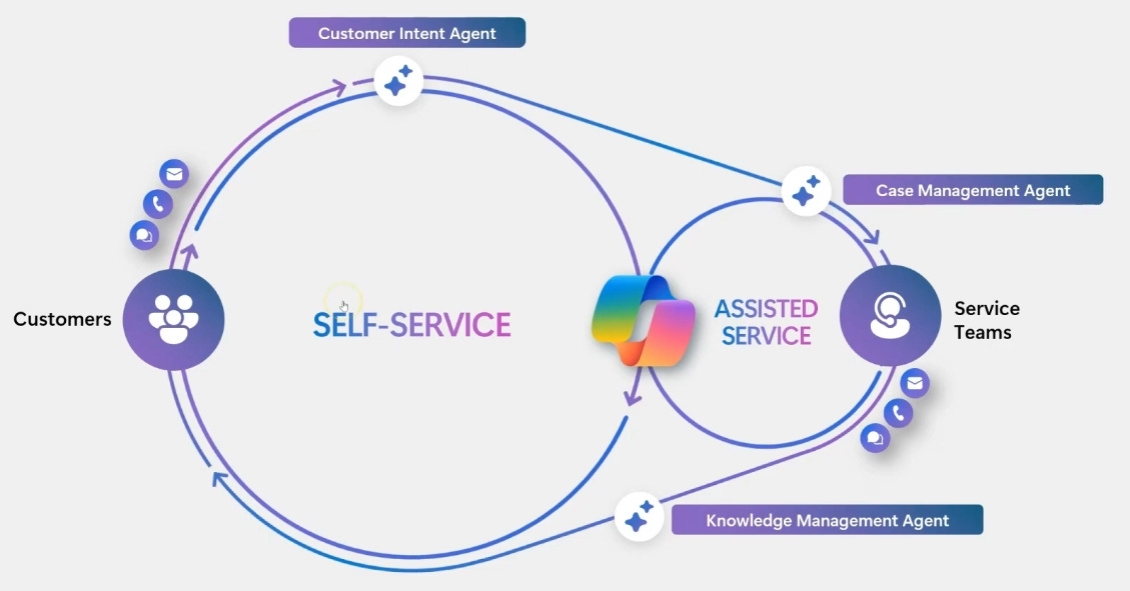
At the center of Microsoft’s customer service strategy is a continuous learning loop that connects assisted service, self-service, and analytics.
The loop typically follows this pattern:
- A customer issue is resolved by an agent using AI-assisted recommendations.
- The resolution is captured as structured knowledge.
- That knowledge becomes available for future self-service interactions.
- AI analyzes new customer requests and routes them appropriately.
- Supervisors review performance data and refine processes and models.
Each interaction strengthens the system. Accurate knowledge leads to better AI recommendations, which lead to faster resolutions and higher confidence among agents and customers.
This loop only works when knowledge quality is maintained and outcomes are actively monitored. Without governance and reporting, organizations risk scaling errors instead of value.
Levels of AI interaction in Dynamics 365 Customer Service
AI interactions in customer service are not one-size-fits-all. Organizations can implement Dynamics 365 Customer Service AI across three levels of engagement, depending on risk tolerance, workflow complexity, and adoption readiness:
- Level 1- Human with assistants: Every agent has an AI assistant that helps them work faster and smarter. The AI can draft responses, summarize cases, retrieve relevant knowledge, and highlight next steps, while the human remains fully in control. This level is ideal for building confidence in AI tools and reducing repetitive tasks without changing core workflows.
- Level 2 – Human-led agents: Agents collaborate with AI “digital colleagues” that take on specific tasks under human direction. AI may suggest follow-ups, provide decision guidance, or automate routine steps, but the agent decides when and how to act. This level improves efficiency, supports complex issue handling, and allows teams to scale while keeping oversight intact.
- Level 3 – Human-led, agent-operated: Humans set strategy, rules, and guardrails, while AI executes full business processes and workflows autonomously. The AI can handle case updates, follow-ups, and routine resolutions, with humans checking in as needed. This level maximizes productivity and allows support teams to focus on high-impact, nuanced customer interactions, while AI manages consistent, repeatable processes.
Organizations often start at Level 1 to build familiarity and trust, then progressively move to Level 2 and Level 3 as adoption and confidence in AI capabilities grow. This staged approach ensures AI enhances service quality without overwhelming teams or disrupting operations.

The Microsoft ecosystem supporting Dynamics 365 Customer Service
Microsoft’s strength lies in the integration of AI across its broader platform. Dynamics 365 Customer Service does not operate in isolation. It connects with Microsoft 365 Copilot, Teams, SharePoint, Power Platform, and Azure services.
For example, support agents can use Microsoft 365 Copilot to search emails, meeting notes, and documents to quickly understand a customer’s history. SharePoint agents can analyze large collections of guides or technical documentation. Copilot Studio enables low-code development of customer-facing and internal agents tailored to specific scenarios.
Within Dynamics 365 Customer Service, purpose-built agents support key functions:
- Case management and follow-up
- Knowledge discovery and generation
- Intent detection and intelligent routing
- Conversation summaries and recommendations
All of this operates on a secure Azure foundation with enterprise-grade identity, compliance, and data governance.

Create a world-class support team with AI agents, copilot & Dynamics 365 Customer Service
This video explores strategies for combining human-centered support with AI tools. Discover how to streamline routine tasks, equip staff with real-time knowledge, and deliver fast, accurate, personalized service while fostering team collaboration.

Real-world scenarios using Dynamics 365 Customer Service
Dynamics 365 Customer Service brings together powerful capabilities to create seamless, end-to-end support experiences for both customers and agents. A typical interaction may start with a customer using self-service powered by Copilot Studio. For routine requests—like checking an order status, resetting a password, or accessing documentation—AI can quickly surface relevant knowledge articles, step-by-step guides, or recommended next steps. These low-friction interactions free agents to focus on more complex issues without slowing response times.
When a customer issue requires deeper attention, intent analysis evaluates the inquiry and routes it to the most suitable agent. The agent receives full context, including prior interactions, relevant cases, and associated product information. AI also provides recommendations such as suggested questions, knowledge articles, and process steps, helping agents resolve issues efficiently while keeping the experience personalized.
After the interaction, AI can suggest draft knowledge articles or updates, reducing manual documentation work and capturing insights from real cases. Over time, this creates a self-reinforcing knowledge loop: resolutions feed AI and self-service, which improves accuracy, reduces repeat inquiries, and enhances first-contact resolution.
For example, in a manufacturing scenario, a support agent handling a product assembly question might receive dynamically generated instructions and safety checks tailored to the customer’s region and product configuration. AI tracks which steps resolved the issue and recommends updates to knowledge articles, ensuring future agents and customers benefit from the same guidance. Over weeks or months, this process helps support teams scale efficiently while maintaining high service quality and consistency across channels.
Measuring service quality and outcomes in Dynamics 365 Customer Service
Traditional metrics such as handle time, case volume, and first-response time remain relevant, but AI introduces new dimensions that require modern measurement approaches. Service organizations now focus on outcomes that reflect both operational efficiency and the quality of the customer experience. Key areas of focus include:
- Resolution quality and accuracy: How well issues are resolved on the first attempt, including whether AI recommendations supported the correct solution.
- Customer trust and confidence: Measured through satisfaction surveys, follow-up interactions, and repeat contacts for the same issue.
- Agent confidence and adoption: How effectively agents leverage AI tools, including Copilot suggestions, intent routing, and knowledge recommendations.
- Depth of issue resolution: The ability to address complex cases thoroughly without unnecessary escalation.
- Effectiveness of AI-generated responses: How often AI assistance contributes positively to case outcomes, and whether it reduces rework or manual effort.
Dynamics 365 Customer Service provides built-in reporting that tracks Copilot usage, AI agent adoption, and comparisons between AI-assisted and human-only interactions. Advanced features, such as quality evaluation agents, can automatically score responses, identify gaps, and suggest improvements to AI models and knowledge content.
These insights allow service leaders to move beyond efficiency metrics and evaluate outcomes that truly matter: improved customer trust, reduced repeat contacts, faster resolution of complex issues, and higher agent satisfaction. By integrating these measures into regular reporting and performance reviews, organizations can continuously refine their AI-assisted workflows, maintain consistency across channels, and ensure that both technology and human expertise contribute meaningfully to service excellence.
Frequently asked questions
What makes Dynamics 365 Customer Service different from other support platforms?
Dynamics 365 Customer Service centralizes all customer interactions—email, chat, voice, and self-service—into one platform. It connects service operations with sales, billing, and asset management, providing a full view of the customer journey while streamlining workflows and ensuring consistent service delivery.
How can AI assist support teams without replacing human agents?
AI accelerates routine tasks such as answering common questions or suggesting relevant knowledge articles, freeing agents to handle more complex or sensitive customer issues. By working alongside agents, AI enhances efficiency, provides real-time recommendations, and improves accuracy without removing the human touch.
Why is knowledge management critical for AI-driven support?
AI relies on accurate, up-to-date knowledge to provide relevant guidance. Well-structured and governed knowledge ensures AI can suggest correct solutions, automate routine tasks, and create new knowledge from resolved cases, helping both customers and agents find answers faster and reducing repeated inquiries.
What metrics should organizations track to evaluate AI in customer service?
Beyond traditional metrics like response time or case volume, organizations should track resolution accuracy, customer trust, agent adoption of AI tools, depth of issue resolution, and the effectiveness of AI-assisted actions. These insights help leaders measure real impact, not just operational speed.
How does Dynamics 365 Customer Service support complex, real-world interactions?
The platform combines AI-driven self-service with human-assisted support. Simple requests can be handled automatically, while more complex issues are routed to the right agent with full context. Agents receive AI-generated guidance, and post-interaction, knowledge updates ensure future interactions are faster and more consistent.
Next steps
AI-powered customer service is not about removing people from the equation. It is about enabling support teams to deliver consistent, high-quality service at scale while reducing friction for both customers and agents.
Dynamics 365 Customer Service, combined with Copilot and Microsoft’s AI ecosystem, provides the tools needed to build this kind of organization. The real differentiator lies in how those tools are implemented, governed, and aligned with business goals.
Rand Group works with organizations to design and implement human-centered, AI-enabled service strategies using Microsoft technologies. From architecture and governance to adoption and optimization, our consultants help ensure AI investments translate into measurable service improvements.
If you are evaluating or expanding AI within Dynamics 365 Customer Service, the next step is a focused conversation about your current service model, knowledge maturity, and readiness for AI-driven workflows. Reach out to Rand Group to start that discussion and build a support organization designed for the future.