Dynamics 365
 Power Platform
 Dynamics
 Cloud & Productivity
Navigating the Dynamics 365 Customer Service and Dynamics 365 Field Service 2025 release wave 2

The 2025 Release Wave 2 for Microsoft Dynamics 365 service applications introduces a new era of intelligent, proactive, and personalized service experiences. With continued investments in generative AI, agent productivity, and operational efficiency, this wave delivers powerful updates across Dynamics 365 Customer Service and Dynamics 365 Field Service. From enriched AI extensibility and agentic workflows to smarter field operations and real-time supervisor tools, these enhancements are built to empower service teams, anticipate customer needs, and streamline end-to-end service delivery. In this blog, we’ll explore the latest capabilities in D365 Customer Service and D365 Field Service, and how these innovations can help your organization exceed customer expectations and elevate service outcomes.
Dynamics 365 Customer Service
Copilot and boosted AI in D365 Customer Service
The 2025 Release Wave 2 for Dynamics 365 Customer Service introduces a new generation of AI-powered capabilities that streamline service delivery, empower agents, and strengthen customer satisfaction. At the center of this innovation is Microsoft Copilot, now enhanced with deeper intelligence, broader extensibility, and greater automation across the support journey.
Customer Knowledge Management Agent: AI-driven knowledge at scale
The new Customer Knowledge Management Agent automatically transforms live and historical case data into actionable knowledge articles, significantly reducing time-to-value for your support content. These enhancements enable support organizations to respond faster to emerging issues, boost Copilot’s effectiveness, and continuously improve the quality of their knowledge base.
- Real-time article creation: As agents close cases, the agent analyzes notes, emails, and conversations to draft knowledge articles that address knowledge gaps.
- Historical case mining: Quickly turns archived case data into publish-ready articles, avoiding duplicates and enforcing compliance standards.
- Tailored insights for supervisors: Dashboards provide visibility into article quality, usage, and lifecycle. Supervisors can monitor Copilot’s usage of the content and prioritize reviews for aging or underperforming articles.
- Configurable publishing: Articles can be automatically published to Copilot, agent interfaces, or self-service portals depending on organizational settings.
- Custom compliance integration: Supports automated checks to remove sensitive data or meet organizational policies.
Copilot-powered email automation and recommendations
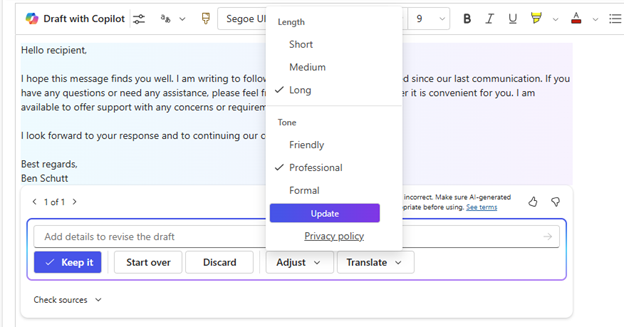
Copilot Email Assist significantly streamlines agent workflows and improves consistency in customer communication. These tools accelerate response times, ensure messaging consistency, and reduce administrative overhead for agents.
Highlights include:
- Contextual email template suggestions: Copilot automatically recommends the most relevant templates based on the email thread, reducing search time and improving accuracy.
- Prompt-driven template autofill: Templates can now include embedded prompts that allow Copilot to fill in dynamic content automatically, reducing agent effort and manual edits.
- Inline custom prompts: Agents can enter custom prompts while composing emails, and Copilot will match and insert the most appropriate prebuilt template.
Model Context Protocol (MCP) Server: Connect to any AI agent
Developers and teams can now integrate third-party AI agents, such as ChatGPT or Claude, into the Dynamics 365 Customer Service environment using the new MCP server. This flexibility allows organizations to design intelligent, AI-enhanced service workflows tailored to their specific ecosystem with features that include:
- Seamless integration with external AI agents via the MCP protocol.
- Support for operations such as creating or updating cases, drafting and sending emails, listing accounts, and more.
- Interoperability with other business systems that also use MCP (e.g., Dynamics 365 Sales or Business Central), enabling end-to-end automation across departments.
- Extensibility using Microsoft Copilot Studio to build and connect custom agents to the Customer Service MCP server.
Case Management Agent: Automating the service lifecycle
The Case Management Agent introduces intelligent automation for routine and repetitive case-handling tasks, allowing agents to focus on higher-value interactions. The agent helps reduce case resolution times, eliminates manual steps, and improves overall user experience.
- Automatic case creation and updates during live chat and email interactions.
- Email classification using AI to sort incoming emails by relevance, skipping unnecessary case creation for non-actionable messages.
- Follow-up automation based on SLA criteria, including automated resolution or escalation triggers.
- Collaboration assistance by identifying internal experts and generating real-time case summaries for seamless teamwork.
- Integrated collaboration records that enhance the knowledge base and streamline future resolutions.
Custom multisession apps for tailored agent workspaces
With this release, Microsoft introduces support for multisession capabilities within custom model-driven apps, giving organizations greater flexibility in how they design service experiences. This enhancement allows businesses to create distinct, purpose-built workspace applications for different lines of business, ensuring each team operates within a tailored environment that reflects their specific needs. Agents can now manage multiple customer interactions, such as cases, chats, and emails, simultaneously within a single app, without needing to switch between applications. By combining the efficiency of a browser-like, tabbed interface with the customization of model-driven apps, this feature boosts agent productivity while preserving the integrity of unique business processes.
Streamline supervision with bulk action on filtered conversations
Managing high volumes of conversations in busy contact centers can be challenging, especially when swift action is needed across multiple threads. With the 2025 Release Wave 2, Dynamics 365 Customer Service introduces a powerful new capability that allows supervisors to perform bulk actions on filtered conversations directly from the Omnichannel real-time analytics dashboard.
This feature enables supervisors to quickly filter conversations based on attributes such as intent, queue, status, or time frame, and then take coordinated actions in just a few clicks. Whether it’s rebalancing workloads, sending closure messages, or cleaning up inactive sessions, supervisors gain the tools to act decisively and efficiently.
Bulk actions include:
- Assign to queue – Reassign conversations based on agent availability or skillsets.
- Customer messaging (C2) – Send wrap-up or follow-up messages outside the primary channel to drive resolution.
- Agent notifications – Deliver real-time guidance or alerts to agents handling specific cases.
- Bulk close – Close multiple conversations simultaneously to reduce clutter or manage inactive threads.
This enhancement not only reduces administrative overhead for supervisors but also improves response times, balances agent workloads, and helps maintain a clean and efficient service environment.

Want to boost your customer service with the new features from 2025 release wave 2?
Let Rand Group’s experts help you navigate the latest enhancements in Dynamics 365 Customer Service and D365 Field Service, ensuring they align seamlessly with your business objectives.
Dynamics 365 Field Service
Outlook and Teams integration for D365 Field Service bookings
Microsoft’s 2025 Release Wave 2 introduces a seamless integration between Dynamics 365 Field Service and Outlook and Teams, making it easier for frontline workers to manage their schedules. Bookings for work orders now appear directly in the calendars of assigned technicians, allowing them to access critical information within the familiar platforms they already use daily, without the need to switch between applications.
This integration delivers a more user-friendly experience, minimizing training time and streamlining adoption. Calendar events include booking details and a direct link back to the Field Service application, giving workers instant access to relevant job information. Updates to bookings are reflected in calendars in near real-time, ensuring technicians always have the most current assignment data at their fingertips. By unifying personal and work schedules in a single view, this enhancement reduces friction, lowers the chance of missed appointments, and helps workers stay organized and productive throughout their day.

Efficient resource scheduling enhancements
Users now have powerful new capabilities to help dispatchers and technicians optimize their schedules, improve efficiency, and respond dynamically to changing conditions throughout the workday.
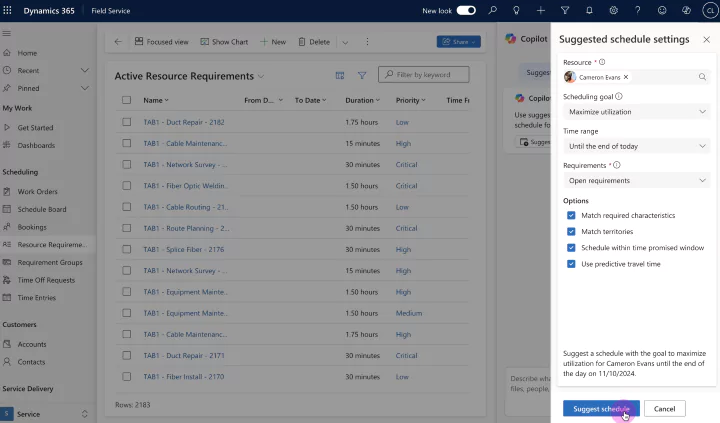
One of the flagship features is the Scheduling Operations Agent, which leverages AI-powered Copilot assistance to transform how dispatchers manage technician schedules. Traditionally, dispatchers manually review and adjust bookings to handle common challenges like cancellations, delays, and priority shifts. This can be time-consuming and complex, requiring constant assessment of business goals, technician skillsets, territory constraints, and promised service windows.
With the Scheduling Operations Agent, dispatchers can now instruct Copilot to optimize a technician’s schedule in seconds, addressing real-time challenges such as:
- Filling open slots caused by cancellations with high-priority work near the technician’s location while honoring promised time windows.
- Adjusting subsequent bookings when a technician is delayed to minimize cascading effects.
- Efficiently scheduling newly available technicians returning from unexpected absences.
- Replacing low-priority work with urgent jobs to better meet business objectives.
- Reducing travel time by rearranging bookings for greater route efficiency.
Copilot provides suggested schedules for dispatcher review, enabling quick application of optimized plans tailored to specific goals like maximizing technician utilization or prioritizing critical work orders. This functionality is accessible through a dedicated side pane in the Field Service application, making schedule optimization a seamless part of daily operations.
In addition to smarter scheduling, the release includes significant improvements to schedule board performance. An upgraded architecture enhances responsiveness when creating bookings, running schedule assistant recommendations, and loading the schedule board. Both dispatchers and technicians benefit from a faster, more intuitive interface, supporting higher productivity and better user satisfaction.
Plus, admins gain a streamlined way to input organizational unit locations through a new address field. Instead of manually entering latitude and longitude, often a slow and error-prone process, admins can now specify an address, which the system automatically geocodes into precise coordinates if connected to mapping services. This enhancement simplifies setup and ensures accurate location data to support scheduling and routing.
These enhancements empower organizations to optimize resource scheduling with greater agility and precision, ensuring frontline teams can deliver exceptional service efficiently and effectively.
Enhanced work order management with other Microsoft systems
Dynamics 365 Field Service now offers deep integration with Dynamics 365 Project Operations and Dynamics 365 Finance and Operations (F&O) modules, streamlining the connection between field service activities and enterprise financial systems. This integration enables seamless flow of labor, materials, and cost data from work orders directly into D365 F&O. This improves financial accuracy, reduces manual effort, and accelerates billing, all without disrupting technicians’ workflows.
Benefits and capabilities include:
- Unified financial flow: Work orders and agreements in D365 Field Service can be linked directly to projects in D365 Project Operations, creating a shared financial framework that connects service delivery with project billing and cost tracking.
- Automatic data flow: Estimates and actual labor and material usage recorded on work orders flow automatically into D365 Project Operations as estimate and actual lines. This ensures that financial data remains consistent and up-to-date across systems without manual reconciliation.
- Accurate forecasting and margin visibility: Products and services marked as estimated generate project estimates, while used items generate material usage actuals. This visibility into costs and usage helps organizations forecast more accurately and track real-time margins.
- Centralized billing and invoicing: D365 Project Operations handles billing and invoicing using data directly from D365 Field Service, reducing administrative overhead, minimizing errors, and providing service and finance teams with a reliable, unified view of financial performance.
- Customizable integration: The integration supports schema extensibility, allowing organizations to add custom fields or entities in D365 Field Service that flow through D365 Project Operations and into D365 F&O, enabling tailored reporting and operational flexibility across all systems.
- Supply chain alignment: The connection respects company and legal entity boundaries and aligns with Master Planning in D365 Supply Chain Management to support planning for raw materials in service scenarios.
This seamless connection between D365 Field Service and other platforms ensures that operational data captured in the field translates quickly and accurately into financial records. This helps organizations run smarter, more connected operations with greater insight into costs, billing, and profitability.


Want to see these and other D365 Field Service features in action?
Connect with one our D365 Field Service experts today for a custom demo of these enhanced features. Plus, we can assess your current system and recommend key enhancements to optimize your field service processes.
Next steps
The 2025 release wave 2 introduces significant enhancements across both Dynamics 365 Customer Service and Field Service, designed to improve operational efficiency, boost productivity, and deliver a more seamless user experience. From enabling multisession apps and bulk conversation management in Customer Service to integrating bookings with Outlook and Teams, optimizing resource scheduling, and connecting work orders to finance and operations in Field Service, these updates empower organizations to streamline workflows and gain deeper financial and operational insights.
Rand Group is your trusted partner for Dynamics 365 Customer Service and D365 Field Service. We are ready to help your organization unlock the full potential of these new features. We provide expert guidance on adoption, user training, and system optimization to maximize your software investment. Need help leveraging these enhancements? Contact our team today to schedule a consultation and take the next step toward smarter service management.