Dynamics 365
 Power Platform
 Dynamics
 Cloud & Productivity
Prompt engineering best practices for Microsoft Copilot Sales users

AI is quickly reshaping how sales organizations operate, especially for teams using Dynamics 365 Sales. Tools like Microsoft Copilot for Sales can automate manual tasks, surface meaningful insights, and help sellers engage customers more effectively. But the real differentiator in how useful Copilot becomes is not the technology itself—it’s how you communicate with it.
That’s where prompt engineering comes in. While often described as a technical concept, prompt engineering is simply the practice of asking better questions so AI can provide better answers. For sales teams working in fast-paced environments, this skill has become a competitive advantage. When you know how to craft well-structured prompts, Copilot becomes more than a productivity tool—it becomes a strategic partner in your daily workflow.

What is prompt engineering?
Prompt engineering is the process of writing clear, intentional instructions that guide AI tools like Microsoft Copilot to produce accurate, relevant, and actionable outputs. The clearer the guidance, the more effective the results.
A vague prompt:
❌ “Show me some customer info.”
A strong prompt:
✅ “List all opportunities from my top 5 accounts with open deals over $50,000 closing this quarter.”
The second example tells Copilot exactly what data to retrieve, in what context, and for what purpose—resulting in a much more useful response.
Why prompt engineering matters in sales
Sales teams are already leveraging Copilot to save time, automate admin tasks, and uncover trends hidden in CRM data. But without well-crafted prompts, you’re only scratching the surface of what’s possible.
Here’s how prompt engineering enhances your use of Microsoft Copilot for Sales:
Sharper insights, faster
Copilot can analyze thousands of data points from Dynamics 365 Sales in seconds, but it needs direction. Prompt engineering ensures you ask the right questions, yielding more focused insights. For example:
“Which accounts had reduced engagement in the last 30 days compared to the previous quarter?”
This level of detail helps managers spot declining activity, forecast risks, and prioritize follow-up before deals stall.
Better forecasting
With clear prompts, Copilot can support more accurate pipeline reviews and sales forecasting. Instead of manually skimming dashboards, you can prompt:
“Summarize deals over $100,000 that slipped last quarter and identify the most common reason.”
This shifts forecasting from reactive reporting to proactive analysis—empowering leaders to adjust strategy earlier in the cycle.
Hyper-personalized customer interactions
Prompt engineering enables tailored email responses, meeting summaries, and follow-ups. You can even ask Copilot to adjust tone and format for specific audiences:
“Draft a follow-up email in a consultative tone for a CFO at a manufacturing company, summarizing our last call showing interest in XYZ.”
This not only boosts customer experience but also frees your sales team to focus on closing deals.
Training new reps more efficiently
Prompt engineering turns Copilot into a real-time training resource:
“What are the most common objections in the healthcare industry, and how have top-performing reps addressed them?”
New hires gain immediate access to institutional knowledge—no lengthy documentation required.

How to write better prompts for sales teams
Here are five practical tips to get the most from Microsoft Copilot for Sales:
- Be specific: Vague prompts confuse Copilot. Include filters like dates, values, or customer segments.
“Show me stalled opportunities with healthcare clients over $50,000 from the last 60 days.” - Include intent: Tell Copilot what you want to accomplish—summarize, compare, list, flag, analyze, etc.
“Summarize key points from today’s discovery call with ABC Corp and highlight action items.” - Context is king: Mention roles, departments, or personas for more targeted content.
“Create a one-pager highlighting ROI for a CIO in the retail sector.” - Refine iteratively: Start broad, then narrow your focus based on results.
“List my open deals.” → “Now filter by those in the decision stage closing this month.” - Use natural language: Copilot understands conversational speech. Don’t use overly technical language—write prompts as if you’re speaking to an assistant.
Common sales scenarios enhanced by prompt engineering
Prompt engineering can improve nearly every aspect of the sales cycle. Below are examples your teams can start using immediately:
- Pipeline review: “Which deals are at risk due to lack of recent communication, and what’s the average deal size of those opportunities?”
- Performance coaching: “Compare win rates of top 3 reps over the last 6 months, and list their most commonly used sales activities.”
- Email follow-up: “Generate a follow-up email to a prospect who missed our demo, including proposed times for rescheduling.”
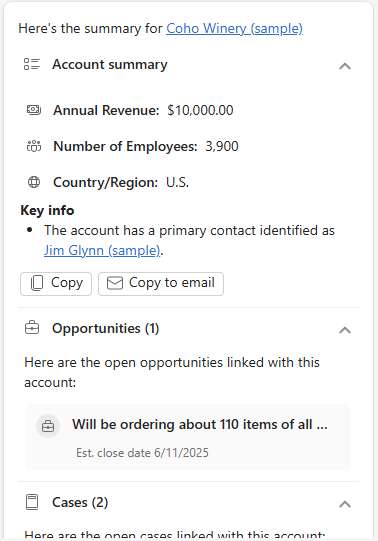
- Account planning: “Create a quarterly review summary for ABC Corp including opportunities won, open support tickets, and any product usage trends.”
These examples demonstrate how targeted prompts help streamline reviews, deepen customer understanding, and strengthen internal coaching programs.
What’s at stake if you don’t learn prompt engineering?
Without prompt engineering, even the best AI tools underperform. Risks include:
- Wasting time interpreting vague outputs
- Missing valuable trends or sales triggers
- Frustrating team members who expect quick answers
- Falling behind competitors who optimize their AI usage
Think of Copilot as a high-performance engine. Prompt engineering is the steering wheel that helps you control direction and speed.
Next steps
Don’t just adopt AI—master it. Rand Group helps organizations fully leverage Microsoft Copilot for Sales by developing tailored prompt strategies, leadership workshops, and hands-on training for sales teams. Our experts work directly with your organization to improve forecasting, automate workflows, enhance customer interactions, and strengthen your Dynamics 365 Sales processes.
If your organization is ready to increase productivity, unlock intelligent insights, and improve sales performance, our team can guide you every step of the way. Contact Rand Group today to discover how prompt engineering can help you get more from Microsoft Copilot for Sales.