Dynamics 365
 Power Platform
 Dynamics
 Cloud & Productivity
What is Microsoft Dynamics 365 Sales?

Microsoft Dynamics 365 Sales is a cloud-based CRM designed to help sales teams manage customer relationships, opportunities, pipeline activity, and sales performance. It brings sales data and processes into one connected platform while integrating with Microsoft 365, Power Platform, other Dynamics 365 applications, Copilot, and AI agents.
Choosing a CRM involves more than comparing features. In this guide, we explain how Dynamics 365 Sales works, its benefits and capabilities, AI features, deployment, pricing, licensing editions, implementation timelines, and how to determine whether it is the right fit for your organization.
At a glance
Dynamics 365 Sales is Microsoft’s cloud CRM for managing the sales lifecycle from lead qualification through opportunity management, quoting, closing, and follow-up. The platform includes pipeline management, forecasting, sales automation, reporting, relationship intelligence, Microsoft 365 integration, Copilot, and AI agents. Dynamics 365 Sales is available in Professional, Enterprise, Premium, and Microsoft Relationship Sales options.
What is Microsoft Dynamics 365 Sales?
Microsoft Dynamics 365 Sales is a cloud-based customer relationship management (CRM) application designed to help organizations manage sales activities and customer relationships. It gives sales teams one place to manage leads, accounts, contacts, opportunities, communications, and sales performance throughout the sales cycle.
Dynamics 365 Sales is part of Microsoft’s broader family of Dynamics 365 Customer Engagement applications. These include Dynamics 365 Customer Service, Dynamics 365 Contact Center, Dynamics 365 Customer Insights, and Dynamics 365 Field Service. Together, these applications can connect sales, marketing, service, and customer data to provide a more complete view of the customer relationship.
What does Dynamics 365 Sales do?
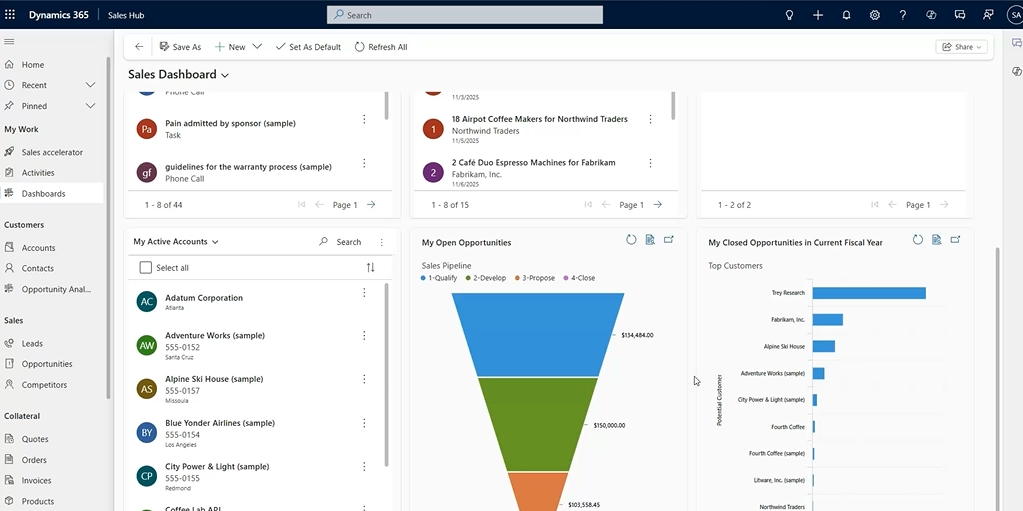
Dynamics 365 Sales supports the sales process from initial lead through opportunity and deal close. Sales teams can qualify leads, manage accounts and contacts, track opportunities through the pipeline, record customer activities, create forecasts, and monitor performance.
The platform also gives sellers and managers shared visibility into customer information and sales activity. Sellers can see communication history, open opportunities, upcoming tasks, and other information they need to manage relationships, while managers can monitor pipelines, forecasts, conversion rates, and team performance.
Dynamics 365 Sales also uses automation, Copilot, and AI agents to help sellers research leads, prepare for customer interactions, identify recommended actions, and keep opportunities moving forward. We will explore these AI capabilities in more detail later in this guide.
Who uses Dynamics 365 Sales?
Dynamics 365 Sales is designed for organizations that need a structured way to manage customer relationships and sales opportunities. It can support sales teams across industries such as professional services, manufacturing, distribution, and healthcare, especially when multiple people are involved in managing accounts, opportunities, and customer interactions.
Different roles use Dynamics 365 Sales in different ways. Sales representatives manage leads, activities, accounts, and opportunities as part of their daily work. Sales managers use forecasts, dashboards, and pipeline data to monitor performance and coach their teams. Revenue operations teams and CRM administrators can manage workflows, data quality, security, and system configuration to support consistent sales processes across the organization.
How does the Dynamics 365 Sales process work?
Dynamics 365 Sales provides a structured process for moving a potential customer from an initial lead to a completed sale. Sales teams can track the customer, activities, products, pricing, and deal status as the opportunity progresses, creating a consistent process and shared view of the pipeline.
Microsoft’s standard opportunity process follows four stages: Qualify, Develop, Propose, and Close. Once a customer accepts a quote, the sales transaction can continue into order fulfillment and invoicing. This creates an end-to-end process from lead management through the completed sale.
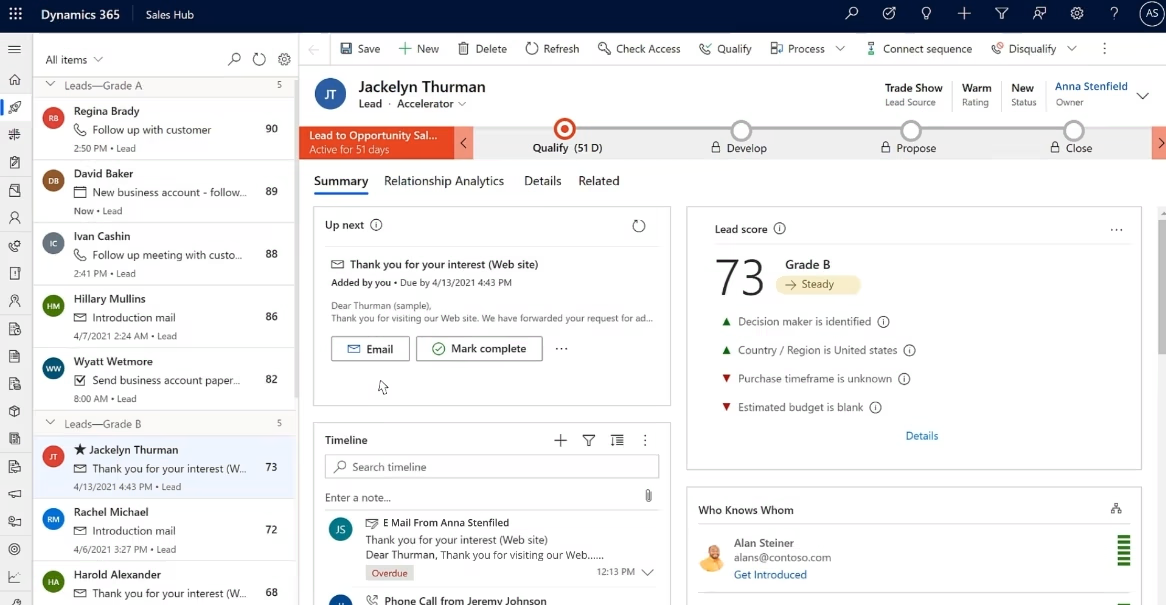
- Qualify – lead management: The process starts by identifying whether a lead is a good fit based on factors such as customer needs, budget, purchase timeframe, and other qualification criteria. When a lead is qualified, Dynamics 365 Sales can create an opportunity and carry relevant lead information forward.
- Develop – opportunity management: The seller develops the opportunity by gathering more information about the customer, stakeholders, products or services, estimated revenue, competitors, and expected close date. Sales activities and customer interactions can be tracked as the deal progresses.
- Propose – quote management: Once the opportunity is developed, the seller can create a quote with the proposed products or services, quantities, pricing, discounts, and terms. Quotes can be revised as the seller and customer work toward an agreement.
- Close – win the deal and create the order: When the customer accepts the proposal, the opportunity can be closed as won and the accepted quote can be converted into a sales order. If the customer does not move forward, the opportunity can instead be closed as lost so the final outcome is recorded.
- Fulfill – complete the order and invoice: The order represents the customer’s accepted purchase and can be tracked through fulfillment. After the goods or services are delivered, an invoice can be generated to bill the customer and complete the sales transaction.

Benefits of using Dynamics 365 Sales
Dynamics 365 Sales helps organizations create a more consistent and connected sales process. By bringing customer data, sales activity, pipeline information, forecasting, and reporting into one CRM, teams can spend less time managing disconnected information and more time moving opportunities forward.
Key benefits of Dynamics 365 Sales include:
- Increased seller productivity: Sellers can manage leads, contacts, activities, and opportunities from one workspace. Connections with Outlook and Microsoft Teams also help reduce time spent switching between applications and manually updating CRM records.
- Improved pipeline visibility: Sales managers can see opportunities, sales stages, estimated values, expected close dates, and activities across the team. This gives leaders a clearer view of pipeline health and where deals may need attention.
- More consistent sales execution: Sales sequences, business process flows, and recommended actions help guide sellers through defined steps. This makes it easier to follow a consistent sales process across teams and territories.
- Better forecasting: Dynamics 365 Sales brings opportunity and pipeline data into configurable forecasts. Managers can compare expected revenue with quotas, review forecast categories, and monitor performance by seller, team, or territory.
- Stronger customer relationships: Sellers can access account details, communication history, activities, contacts, and open opportunities in one place. This context helps teams prepare for conversations and maintain continuity throughout the customer relationship.
- Connected Microsoft tools: Dynamics 365 Sales works with Microsoft 365 applications such as Outlook, Teams, Excel, and SharePoint. Sellers can use familiar tools while keeping customer and sales information connected to the CRM.
- AI-assisted selling: Copilot and AI agents can help reduce repetitive work, surface relevant information, and support sellers throughout the sales cycle. We will explore these capabilities in more detail in the next section.
- Scalability for growing sales teams: Dynamics 365 Sales can support organizations as sales processes become more complex. Teams can expand users, territories, products, workflows, reporting, and integrations as business requirements change.

Ready to get Dynamics 365 Sales?
Give your sales team a connected CRM to manage leads, opportunities, customer relationships, and pipeline performance. Rand Group can help you select, implement, and optimize Dynamics 365 Sales around your sales process.
Key capabilities of Dynamics 365 Sales
Dynamics 365 Sales provides tools for customer relationship management and sales force automation throughout the sales lifecycle. Teams can manage leads and opportunities, monitor pipelines, forecast revenue, automate sales activities, analyze performance, and collaborate through Microsoft 365. For a deeper look at the platform, explore our Dynamics 365 Sales capabilities page.
Lead and opportunity management
Dynamics 365 Sales gives sellers a structured way to manage prospects from initial lead through qualified opportunity and closed deal. Lead and opportunity records bring together customer details, communications, activities, products, pricing, and next steps so sellers can see the full context of each potential sale.
Key capabilities include:
- Capture, track, and qualify leads using guided sales processes.
- Manage opportunities, activities, products, quotes, and deal information in one record.
- Scan business cards from a mobile device to quickly create leads or contacts.
- Use visual opportunity views to prioritize deals and track follow-up activities.

Pipeline management, forecasting, and sales automation
Sales teams can use Dynamics 365 Sales to create a more consistent sales process and maintain visibility into deals as they move through the pipeline. Managers can monitor expected revenue and performance, while sellers use sequences and automated guidance to stay focused on the activities most likely to move opportunities forward.
Key capabilities include:
- View and manage opportunities across different pipeline stages.
- Create sales forecasts and track performance against quotas and goals.
- Build sales sequences that organize calls, emails, tasks, and follow-ups.
- Use guided sales processes and playbooks to standardize common sales activities.

Account management and relationship intelligence
Dynamics 365 Sales centralizes information about accounts, contacts, communications, and relationships. Sellers can understand who is involved in a buying decision, review past interactions, and identify where stronger engagement may be needed before reaching out.
Key capabilities include:
- Maintain centralized account and contact records with activity histories.
- Build organization charts to identify decision-makers, influencers, and other stakeholders.
- Analyze communication activity and relationship health.
- Connect with LinkedIn Sales Navigator for additional buyer and relationship insights.
Reporting and performance insights
Dynamics 365 Sales turns CRM data into reports and dashboards that help sellers and managers understand sales performance. Teams can track pipeline health, forecasts, conversion rates, win rates, activities, and other sales KPIs without relying on disconnected spreadsheets.
Key capabilities include:
- Monitor sales KPIs through configurable dashboards and charts.
- Analyze pipeline, conversion, win rates, and seller performance.
- Review forecast trends and performance against sales goals.
- Extend reporting and analytics with Power BI when deeper analysis is needed.

Microsoft 365 integration and mobile sales
Dynamics 365 Sales connects with the Microsoft tools sellers already use throughout the day. Outlook and Teams integrations help keep communications and CRM activity connected, while mobile access allows sellers to work with customer and opportunity information when they are away from their desks.
Key capabilities include:
- Track emails, appointments, and customer information through Outlook.
- Collaborate on leads, accounts, and opportunities through Microsoft Teams.
- Work with sales data through Excel, Word, SharePoint, and OneDrive.
- Access leads, opportunities, activities, and customer records through the Dynamics 365 Sales mobile experience.
Copilot and AI-assisted selling
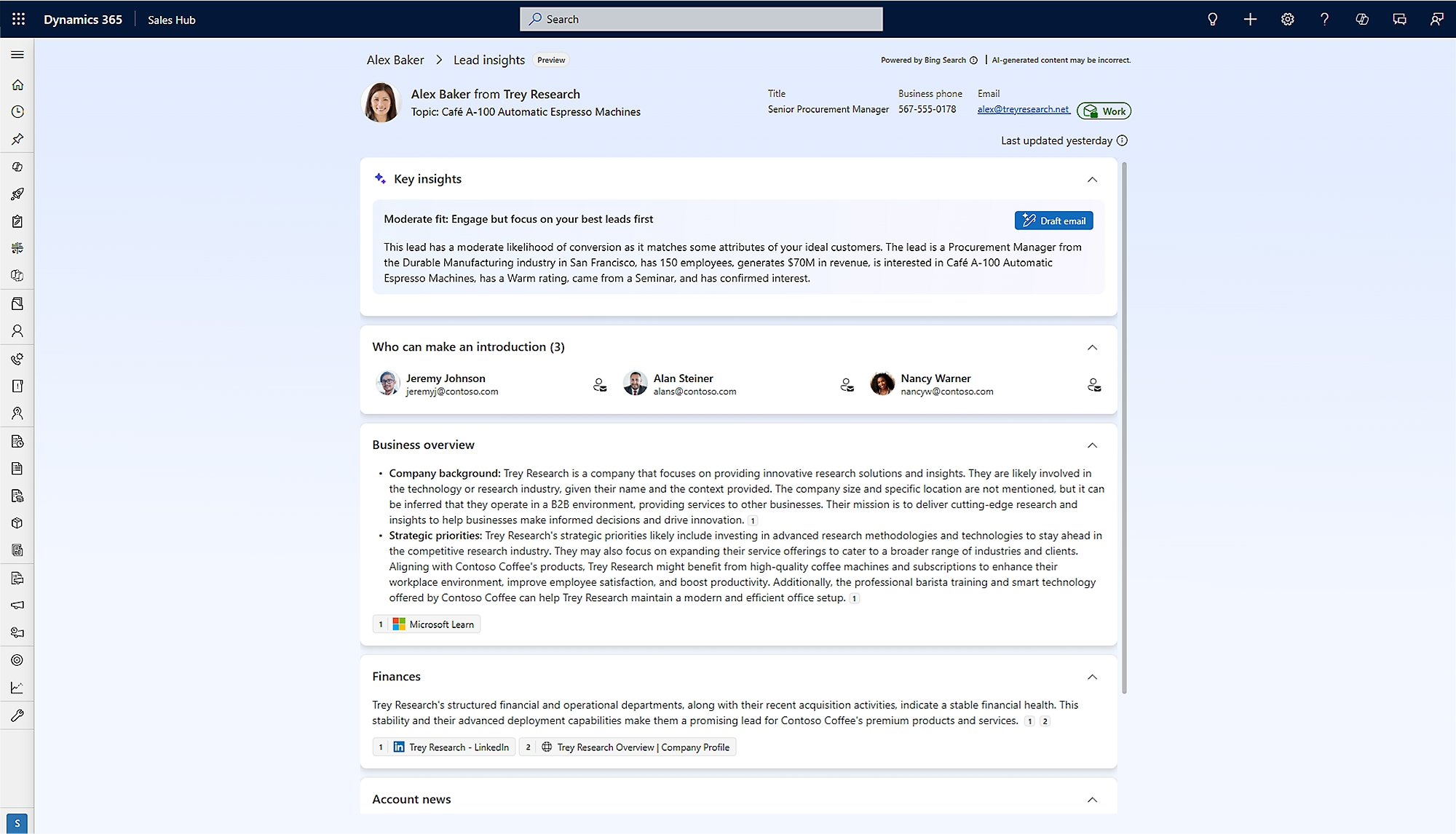
Dynamics 365 Sales also uses Copilot and AI agents to help sellers work more efficiently and make better use of CRM data. AI can research prospects, summarize information, prioritize opportunities, recommend actions, assist with customer communications, and help keep CRM data current.
Key capabilities include:
- Research and qualify leads using AI-assisted and autonomous processes.
- Generate opportunity summaries, meeting preparation notes, emails, and call summaries.
- Prioritize leads and opportunities using AI-based signals and scoring.
- Receive recommended actions that can help progress sales opportunities.
We will explore Copilot, AI agents, and their role in the Dynamics 365 Sales process in more detail in the next section.

Copilot and AI agents in Dynamics 365 Sales
Dynamics 365 Sales uses Copilot and AI agents to help sales teams reduce manual work, understand customer and pipeline data, and take action more quickly. Copilot works alongside sellers by providing AI-generated insights and assistance, while AI agents can research, analyze, and complete defined sales activities with greater autonomy.
Copilot in Dynamics 365 Sales
Copilot in Dynamics 365 Sales gives sellers an AI assistant that works with CRM data and sales activity. Sellers can use natural language to catch up on opportunities, prepare for customer conversations, draft communications, and identify where attention is needed across the pipeline.
Copilot and AI capabilities include:
- Pipeline summaries: Review open tasks, new assignments, opportunity updates, and other pipeline activity using natural language.
- Lead and opportunity summaries: Quickly understand key customer information, recent activities, deal status, and important changes.
- Meeting preparation: Generate summaries of relevant opportunity details, previous interactions, notes, and customer information before a meeting.
- Email and call assistance: Draft customer emails, summarize conversations, and identify suggested follow-up activities.
- AI-powered prioritization: Use AI signals and scoring to identify leads and opportunities that may deserve attention first.
- Recommended actions: Surface next steps that can help sellers advance opportunities and respond to changes in the sales process.
- Sales performance insights: Ask questions about forecasts, pipeline performance, conversion rates, and other sales metrics using conversational prompts.
AI agents in Dynamics 365 Sales
AI agents extend Dynamics 365 Sales beyond traditional AI assistance by performing ongoing research, analysis, outreach, and other sales activities within defined rules. Microsoft provides prebuilt agents for common sales scenarios, while organizations can also create custom agents for their own processes and data.
Available Dynamics 365 Sales AI agents include:
- Sales Opportunity Agent: Continuously researches open opportunities using CRM activity, communications, meeting information, and external research. It helps sellers identify risks, understand changes, and determine actions that may move a deal forward.
- Sales Qualification Agent: Researches incoming leads and evaluates their fit based on defined criteria. Depending on the configuration, it can also engage prospects, follow up, and hand qualified leads to sellers.
- Sales Research Agent: Analyzes sales and operational data to answer complex business questions. Sales leaders can use it to explore pipeline, revenue, territory performance, and other sales trends.
- Sales Development agent: Automates prospect research, personalized outreach, follow-up, and lead management. The agent can integrate with Dynamics 365 Sales to track activity and transfer qualified prospects to sellers.
- Custom AI agents: Organizations can use Microsoft Copilot Studio to build agents around their own sales workflows, business rules, data sources, and automation requirements.

How is Dynamics 365 Sales deployed?
Dynamics 365 Sales is a cloud-based CRM application hosted within Microsoft’s cloud environment. Organizations access the system through web and mobile applications without maintaining on-premises CRM servers or infrastructure. Microsoft manages the underlying platform, security updates, and ongoing product releases.
Dynamics 365 Sales is built on Microsoft Dataverse and the Power Platform, which allows it to connect with other Dynamics 365 applications, Microsoft 365, Power BI, and third-party systems. Organizations can deploy D365 Sales as a standalone CRM or as part of a broader Dynamics 365 environment that connects sales with service, marketing, finance, and other business processes.
How much does Dynamics 365 Sales cost?
Dynamics 365 Sales uses a per-user, per-month subscription model. Each user needs a named license. Licenses cannot be shared between users. Microsoft offers several tiers to support different team sizes and capability needs.
There are three main editions: Sales Professional, Sales Enterprise, and Sales Premium. Sales Professional includes core CRM functionality and works well for smaller teams with simple sales processes. Sales Enterprise adds guided selling, relationship intelligence, and Copilot capabilities. Sales Premium targets mature sales organizations that require conversation intelligence, advanced analytics, and premium forecasting.
Microsoft also offers Microsoft Relationship Sales. This bundle includes Dynamics 365 Sales Enterprise and LinkedIn Sales Navigator for organizations focused on social selling. To learn more about licensing, read our blog on Dynamics 365 Sales pricing.
Compare Dynamics 365 Sales editions
The right Dynamics 365 Sales edition depends on the complexity of your sales process and the level of automation, intelligence, and AI your team needs. Dynamics 365 Sales Professional covers core CRM requirements, while Dynamics 365 Sales Enterprise and Premium add more advanced sales capabilities. Microsoft Relationship Sales combines Dynamics 365 Sales Enterprise with LinkedIn Sales Navigator.
For a closer look at the differences between the two most common editions, read our Dynamics 365 Sales Professional vs. Enterprise comparison.

Get the full D365 Sales pricing and licensing guide
Dynamics 365 Sales offers multiple editions, user types, and licensing options that can affect your total cost. Download our guide for a deeper look at pricing, edition differences, user licensing, and how to choose the right option for your organization.
Dynamics 365 Sales implementation process and timeline
A Dynamics 365 Sales implementation involves tailoring the platform to fit your organization’s sales process and then deploying it for use. Teams define pipeline stages, configure workflows, migrate historical data, integrate systems, and train users.
Implementation timelines vary by complexity. Factors include integrations, customization, and organizational size. Rand Group offers Dynamics 365 Sales Rapid Implementation plans that can take as little as 2 to 8 weeks for organizations with defined sales processes and minimal customization. More complex deployments may take 3 to 9 months.
A structured implementation reduces risk and accelerates adoption. It also ensures the platform aligns with your sales methodology from day one. Organizations that invest in proper implementation often achieve shorter sales cycles, stronger productivity, and better forecast accuracy.
To learn more, read our Dynamics 365 Sales implementation guide.
Is Dynamics 365 Sales right for your business?
Dynamics 365 Sales is a strong fit for organizations that need more structure, visibility, and automation across the sales process. It is especially useful for teams that manage multiple opportunities, follow defined pipeline stages, track quotas or territories, and need reliable sales data for forecasting and decision-making.
Many organizations consider Dynamics 365 Sales after outgrowing spreadsheets, shared inboxes, or basic CRM systems. As sales operations become more complex, these tools can make it harder to maintain accurate data, coordinate activities, and understand pipeline performance.
Dynamics 365 Sales may be right for your business if:
- You manage a sales team with defined pipeline stages, territories, or quotas.
- You need better visibility into opportunities, forecasts, and sales performance.
- Your current CRM does not integrate well with Outlook, Teams, or other Microsoft 365 tools.
- Sellers spend too much time on manual data entry and administrative work.
- You want to standardize sales activities with sequences, workflows, and guided processes.
- You want to use Copilot and AI agents to support sellers and automate sales tasks.
- Your organization needs a CRM that can scale as users, products, territories, or sales processes grow.
- You need to connect sales data with ERP, marketing, customer service, or other business systems.
How does Dynamics 365 Sales compare to other CRM systems?
Dynamics 365 Sales competes with CRM platforms such as Salesforce, HubSpot, Zoho CRM, and monday CRM. These platforms all support core sales activities, but they differ in areas such as ease of use, customization, scalability, integration, automation, governance, and cost. The right choice often depends on the complexity of the sales process, the organization’s existing technology environment, and how much flexibility and scalability it will need over time.
Dynamics 365 Sales is particularly well suited to organizations that want a highly configurable CRM connected to Microsoft 365, Power Platform, Power BI, other Dynamics 365 applications, and Microsoft’s broader AI ecosystem. Because Dynamics 365 Sales is built on Microsoft Dataverse and Power Platform, organizations can also extend the system with custom workflows, applications, integrations, and AI agents as their requirements evolve.
- Dynamics 365 Sales vs. Salesforce: Both are highly configurable CRM platforms designed to support complex sales processes, automation, analytics, AI, and large-scale CRM requirements.
- Dynamics 365 Sales vs. HubSpot: HubSpot is often considered by organizations that prioritize ease of use, fast adoption, and strong marketing capabilities, while Dynamics 365 Sales offers deeper customization and broader Microsoft ecosystem integration.
- Dynamics 365 Sales vs. Zoho CRM: Zoho CRM is often evaluated for its lower entry cost and ease of use, while Dynamics 365 Sales is typically considered when scalability, governance, advanced automation, and integration become more important.
- Dynamics 365 Sales vs. monday CRM: monday CRM appeals to teams looking for a visual, flexible, easy-to-configure sales tool, while Dynamics 365 Sales is better suited to more structured or complex CRM processes.
Partner with Rand Group for Dynamics 365 Sales success
Choosing the right Dynamics 365 Sales partner can have a major impact on implementation success and long-term CRM value. An experienced partner can help align the technology with your sales process, migrate and connect data, configure workflows, prepare users, and establish a foundation that can evolve as your sales organization changes.
Rand Group has more than two decades of experience with Microsoft business applications, including Dynamics CRM and Dynamics 365 Sales. We were named the 2025 Microsoft Americas Channel Emerging Partner of the Year and maintain a 90% client retention rate. Our Dynamics 365 team includes experienced consultants, architects, developers, and technical specialists across the U.S. and Canada who support clients from initial implementation through ongoing optimization.
Our Dynamics 365 Sales services include:
- Tailored implementation: We provide carefully planned Dynamics 365 implementations aligned with your sales processes and business requirements. Our team supports configuration, data migration, testing, deployment, and other activities required for a successful launch.
- Customization and integration: When standard functionality is not enough, our team can customize Dynamics 365 Sales and connect it with ERP systems, third-party applications, reporting tools, and other business systems.
- Role-based training and adoption: We provide Dynamics 365 training for sellers, managers, administrators, and other users. Training helps teams understand both the system and the sales processes they are expected to follow.
- Continuous support and optimization: After go-live, Rand Group provides ongoing Dynamics 365 Sales support for troubleshooting, enhancements, new feature adoption, reporting, automation, and continued system improvement.
Dynamics 365 Sales case studies
Sapphire Gas Solutions
Rand Group helped Sapphire replace Salesforce with Dynamics 365 Sales and integrated the CRM with Dynamics 365 Business Central to connect sales, operations, and accounting. We also configured workflows and automation around Sapphire’s project-based sales process. The implementation reduced manual data entry by 50%, accelerated sales representative onboarding by 40%, and eliminated more than 200 back-and-forth emails between departments. To learn more, read the full Sapphire Gas Solutions case study.
Patlon Aircraft Industries
Rand Group helped Patlon implement Dynamics 365 Sales with Outlook integration, automated workflows, dashboards, and customized sales reporting. The new CRM gave sellers and leadership faster access to pipeline information and reduced the manual effort required to prepare for sales reviews. Patlon achieved 98% faster sales reporting and 75% faster pipeline reviews. To learn more, read the full Patlon Aircraft Industries case study.
What our Dynamics 365 Sales clients say
“Dynamics 365 Sales is a complete game-changer for us. It’s so much easier to use than our previous CRM.”
– Preston McDonald, Sales Director, Sapphire Gas Solutions
“They worked with us every step of the way, walking alongside our team to define and execute the right CRM solution.”
– Patrick Mann, Director of Commercial Sales, Patlon Aircraft Industries Ltd.
Key takeaways
- Dynamics 365 Sales is a cloud-based CRM for managing leads, accounts, opportunities, sales activity, forecasting, and customer relationships.
- The Dynamics 365 Sales process moves from lead qualification through opportunity development, quoting, closing, order management, and invoicing.
- Dynamics 365 Sales improves pipeline visibility, sales forecasting, seller productivity, customer engagement, and sales process consistency.
- Copilot and AI agents support lead qualification, opportunity research, meeting preparation, recommended actions, sales analysis, and automated sales activities.
- Dynamics 365 Sales is available in Professional, Enterprise, Premium, and Microsoft Relationship Sales licensing options with different levels of automation, AI, and sales intelligence.
- Dynamics 365 Sales integrates with Microsoft 365, Power Platform, other Dynamics 365 applications, and third-party systems to connect sales with broader business processes.
Frequently asked questions about D365 Sales (FAQs)
What is Dynamics 365 Sales?
Dynamics 365 Sales is Microsoft’s cloud-based CRM application for managing leads, accounts, contacts, opportunities, sales activities, forecasting, and customer relationships. It helps sales teams manage the full sales process in one connected system.
How does the Dynamics 365 Sales process work?
The Dynamics 365 Sales process moves prospects from lead qualification through opportunity development, proposal, closing, order management, and invoicing. Microsoft’s standard opportunity stages are Qualify, Develop, Propose, and Close.
How much does Dynamics 365 Sales cost?
Dynamics 365 Sales starts at $65 per user, per month in the U.S. for Dynamics 365 Sales Professional with annual billing. Dynamics 365 Sales Enterprise costs $105 per user/month, Dynamics 365 Sales Premium costs $150 per user/month, and Microsoft Relationship Sales uses variable pricing.
What is the difference between Dynamics 365 Sales and Microsoft Dynamics CRM?
Dynamics 365 Sales is the evolution of Microsoft Dynamics CRM. When Microsoft modernized its CRM platform under the Dynamics 365 umbrella, Dynamics CRM became Dynamics 365 Sales. Read more on our blog, Is Dynamics 365 Sales the Same as Dynamics CRM?
What is the difference between Dynamics 365 Sales Professional, Enterprise, and Premium?
Dynamics 365 Sales Professional provides core CRM and sales force automation, while Dynamics 365 Sales Enterprise adds advanced automation, customization, Copilot, and sales intelligence. Dynamics 365 Sales Premium builds on Enterprise with advanced sales engagement and 1,000 Copilot Credits per user each month.
Does Dynamics 365 Sales include Copilot and AI agents?
Yes, Dynamics 365 Sales supports Copilot and AI agents for lead qualification, opportunity research, meeting preparation, sales summaries, recommended actions, and other sales activities. Available AI capabilities depend on the Dynamics 365 Sales license and Copilot Credit requirements.
Does Dynamics 365 Sales integrate with Outlook and Microsoft Teams?
Yes, Dynamics 365 Sales integrates with Outlook and Microsoft Teams to connect CRM data with email, meetings, collaboration, and sales activities. It also integrates with Excel, Word, SharePoint, Power BI, Power Platform, and other Dynamics 365 applications.
How long does it take to implement Dynamics 365 Sales?
A Dynamics 365 Sales implementation can take as little as 2 to 8 weeks for organizations with defined processes and limited customization. More complex implementations involving extensive integrations, customization, or larger organizations may take 3 to 9 months.
What types of businesses should use Dynamics 365 Sales?
Dynamics 365 Sales is best suited for organizations that need a structured, scalable CRM for managing opportunities, forecasting, customer relationships, and sales performance. It is especially useful for growing sales teams that have outgrown spreadsheets, basic CRM systems, or disconnected sales tools.
Get started with Dynamics 365 Sales
Dynamics 365 Sales can give your team a more connected way to manage leads, opportunities, customer relationships, forecasting, and sales performance. The right edition and implementation approach will depend on your sales processes, users, integrations, reporting requirements, and plans for AI and automation.
Rand Group can help you evaluate Dynamics 365 Sales, select the right licensing approach, implement and integrate the platform, train your users, and support your CRM after go-live. Contact us to discuss how Dynamics 365 Sales can support your sales organization.