Dynamics 365
 Power Platform
 Dynamics
 Cloud & Productivity
Dynamics 365 Sales implementation guide: Steps, cost, timeline, and planning

Implementing a new CRM can change how your sales team manages leads, tracks opportunities, shares customer information, and reports on the pipeline. But getting value from Microsoft Dynamics 365 Sales takes more than configuring software. A successful Dynamics 365 Sales implementation starts with clear business goals and a realistic plan. Your organization needs to decide how sales processes should work and what data should move. You also need to identify required integrations, plan user training, and decide who will manage the CRM after go-live. This blog covers the major decisions and steps involved in a Dynamics 365 Sales implementation. It also explains how to choose an implementation approach and estimate your timeline and budget.
At a glance: Dynamics 365 Sales implementation
A Dynamics 365 Sales implementation is the process of planning, configuring, testing, deploying, and adopting Microsoft Dynamics 365 Sales around your sales processes and business requirements. A successful implementation goes beyond CRM configuration. It also addresses data, integrations, security, reporting, training, and user adoption.
- Implementation can be self-led or partner-led. The right choice depends on your internal Dynamics 365 knowledge, available resources, project complexity, and timeline.
- Preparation matters. Defined sales processes, clean data, clear goals, and available decision-makers can reduce delays and rework.
- Most implementations follow several core phases. These include envisioning and design, build, testing, deployment, and user adoption.
- Data needs early attention. Duplicate, incomplete, or outdated CRM records can make migration harder and reduce user trust after go-live.
- Implementation timelines vary. Rand Group's fixed-scope Rapid Activation plans currently range from two to eight weeks. More complex implementations may take several months.
Table of contents
- What is Microsoft Dynamics 365 Sales?
- What is a Dynamics 365 Sales implementation?
- What is typically included in a Dynamics 365 Sales implementation?
- What are my Dynamics 365 Sales implementation options?
- How do I choose the right Dynamics 365 Sales implementation approach?
- What should I prepare before a Dynamics 365 Sales implementation?
- What are the steps for a successful Dynamics 365 Sales implementation?
- Dynamics 365 Sales implementation in action: Sapphire Gas Solutions
- How long does it take to implement Dynamics 365 Sales?
- Rapid Activation vs. traditional Dynamics 365 Sales implementation
- How much does it cost to implement Dynamics 365 Sales?
- Common Dynamics 365 Sales implementation issues
- Benefits of working with a Dynamics 365 Sales implementation partner
- Why organizations work with Rand Group for Dynamics 365 Sales implementation
- Key takeaways
- Dynamics 365 Sales implementation FAQs
What is Microsoft Dynamics 365 Sales?
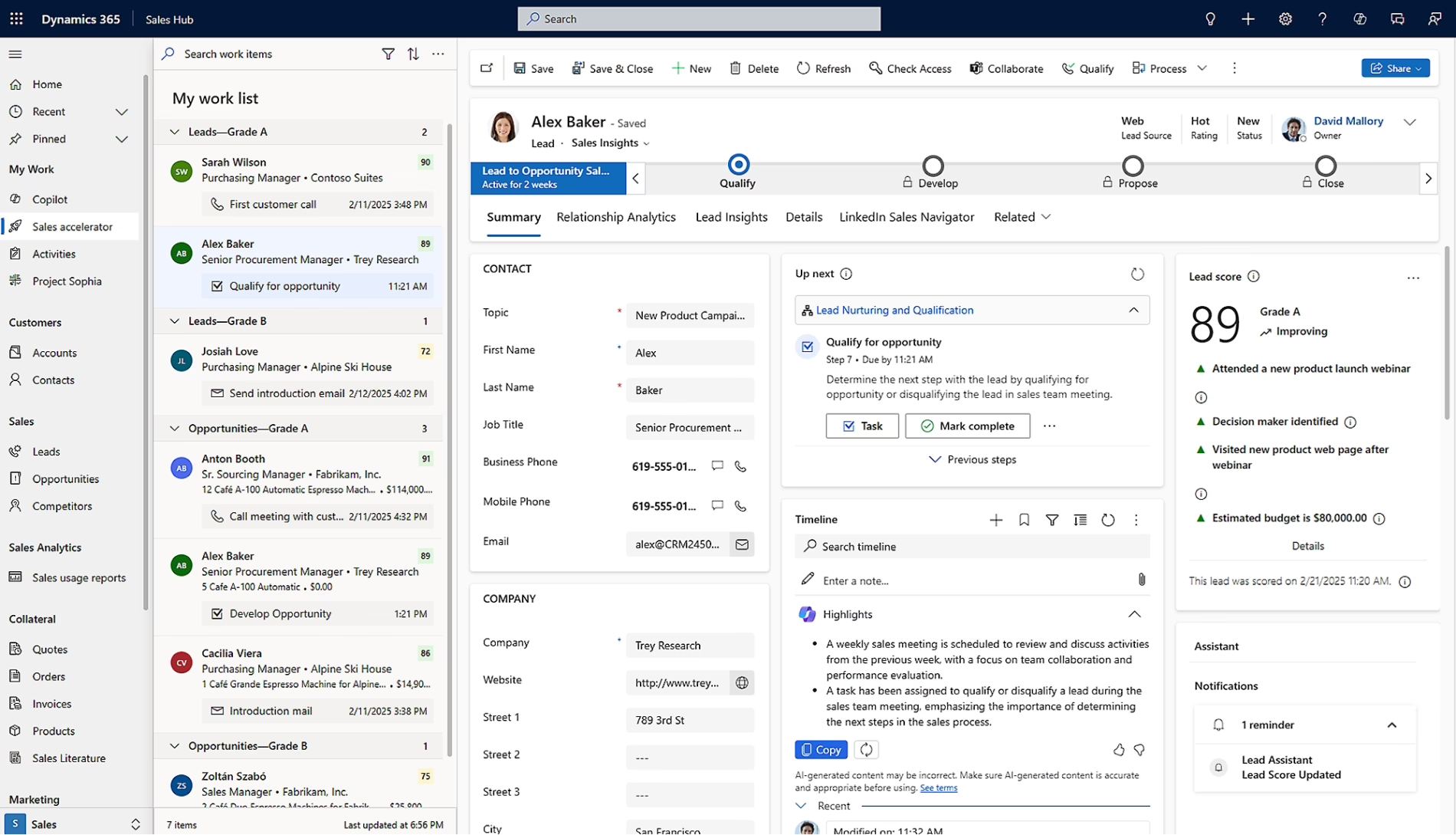
Dynamics 365 Sales is Microsoft’s CRM application for managing sales processes and customer relationships. It gives sales teams a central place to manage leads, accounts, contacts, opportunities, activities, pipeline information, forecasts, and other sales data.
Key Dynamics 365 Sales features include:
- Lead and opportunity management
- Account and contact management
- Sales pipeline tracking
- Activity and relationship tracking
- Dashboards and reporting
- Sales process automation
Sales representatives can use the system to manage customer interactions and opportunities. Sales leaders can use shared CRM data to monitor pipeline, forecasting, and team activity.
AI in Dynamics 365 Sales
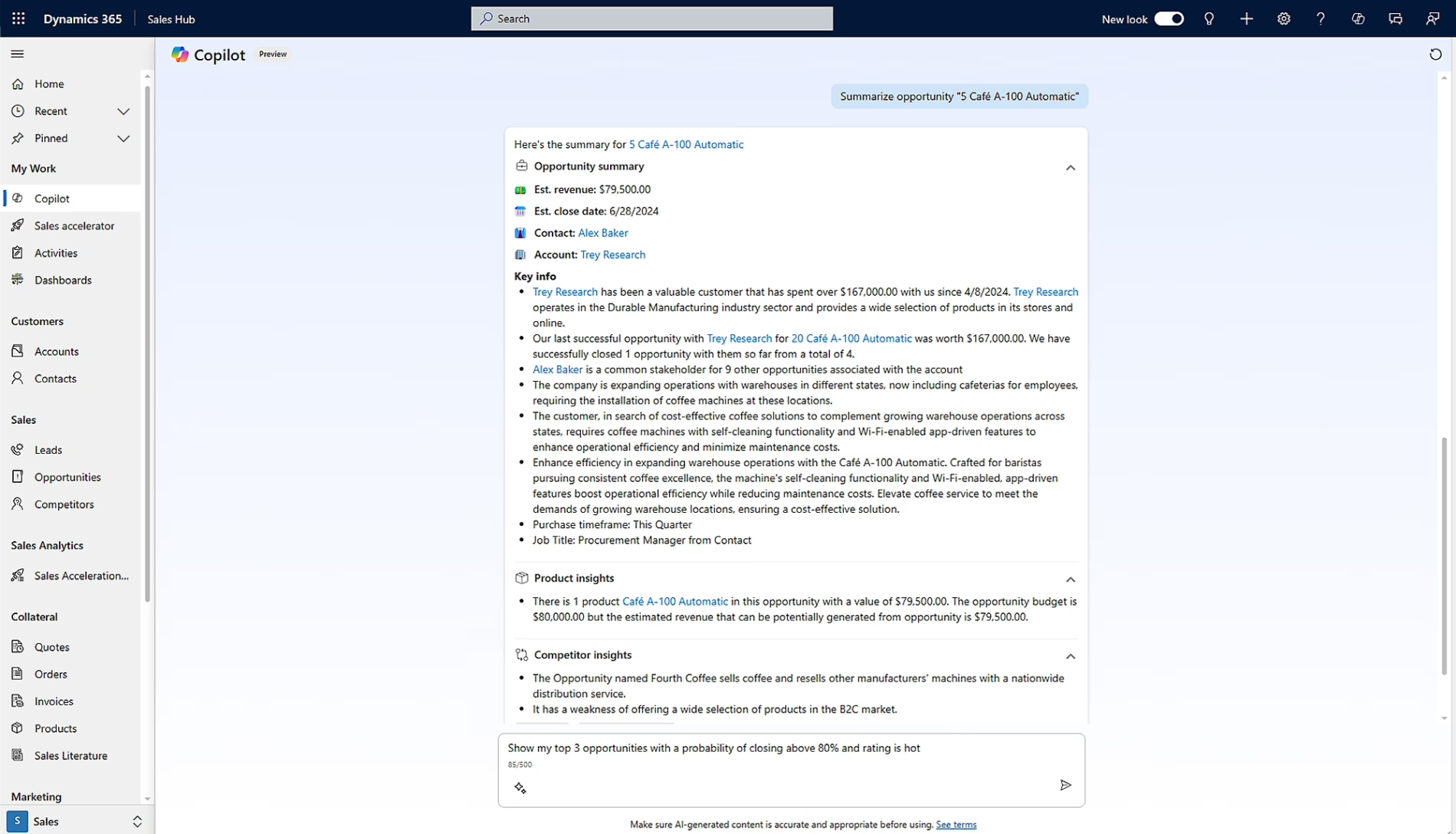
AI has become an important part of Dynamics 365 Sales. Microsoft is embedding Copilot and AI agents into sales workflows to help sellers work more efficiently, use CRM insights, and reduce manual effort. Copilot can help sellers summarize leads, opportunities, and accounts, identify recent changes, prepare for meetings, draft or summarize emails, and find relevant information using natural language prompts.
Microsoft is also introducing AI agents that can support more autonomous sales activities. Depending on the agent and configuration, these capabilities can help research and qualify leads, identify risks and opportunities within active deals, recommend next actions, and support portions of the sales cycle. This expands Dynamics 365 Sales beyond AI-assisted tasks by giving organizations opportunities to automate parts of the sales process while keeping people involved in important decisions.
These capabilities make AI an important consideration during implementation rather than something to address only after go-live. Organizations should determine which Copilot and AI agent scenarios support their sales processes, which users need access, what data AI can use, and how permissions, security, governance, and human oversight should be managed. AI capabilities will continue to evolve, so organizations should also consider how they fit into their longer-term Dynamics 365 Sales roadmap.
What is a Dynamics 365 Sales implementation?
A Dynamics 365 Sales implementation is the process of turning the software into a working CRM that supports your sales organization.
The project starts by defining what the business needs. Your team then configures Dynamics 365 Sales, prepares and migrates data, and connects required systems. Testing, training, and deployment follow. Rand Group’s implementation methodology covers these areas from initial design through post-go-live user adoption.
During implementation, you will need to answer practical questions such as:
- How should leads be qualified, assigned, and routed to the right sales representatives?
- What lead routing rules should determine who receives each lead?
- What stages should an opportunity move through?
- What customer information should sales representatives capture?
- Which sales activities need to be tracked?
- Who should have access to customer and sales data?
- What information do managers need in reports and dashboards?
- Which systems need to exchange information with Dynamics 365 Sales?
A strong implementation should not simply copy every field and workflow from an older CRM. The project is also an opportunity to review your sales process and remove steps that no longer add value.
What is typically included in a Dynamics 365 Sales implementation?
Every Dynamics 365 Sales implementation has a different scope, but most projects include several common areas of work.
Typical implementation activities include:
- Requirements and sales process design: Define business requirements and review current sales processes. Then design how leads, opportunities, accounts, contacts, and other sales activities should work in Dynamics 365 Sales.
- System configuration: Configure forms, views, business process flows, workflows, automation, security roles, permissions, and other core CRM settings.
- Data migration: Prepare, map, clean, migrate, and validate the customer and sales data that needs to move into Dynamics 365 Sales.
- Integrations: Plan and develop connections between Dynamics 365 Sales and ERP, marketing, reporting, Microsoft 365, or other business applications.
- Reporting and dashboards: Configure the reports, dashboards, and views that sales representatives and leaders need to monitor activity, pipeline, and performance.
- Testing: Complete system testing and user acceptance testing. Confirm that processes, permissions, data, integrations, and other requirements work as expected.
- Training and deployment: Prepare users and administrators, plan go-live activities, and deploy the approved solution into production.
- User adoption and post-go-live support: Help users adjust to the new CRM, address early issues, and support continued system improvement after launch.
Rand Group’s Dynamics 365 Sales implementation services cover configuration, data migration, testing, deployment, training, and user adoption. Data migration and user adoption should not be left until the end of the project. Both can affect the entire implementation, so they should be addressed during planning and design.
What are my Dynamics 365 Sales implementation options?
Most organizations have two broad choices: manage the implementation internally or work with a Dynamics 365 implementation partner. Neither option removes the need for business involvement. Even with an experienced partner, your sales leaders and end users still need to explain requirements and make decisions. They also need to test the system and support adoption.
Self-implementation
A self-implementation means your internal team takes primary responsibility for the project. That includes requirements, configuration, data migration, testing, user training, deployment, and ongoing system management.
This approach may work for organizations with employees who already have strong Dynamics 365 or Power Platform experience. It is also better suited to organizations with relatively simple CRM requirements.
A self-implementation can work, but organizations should be realistic about the time and skills required. CRM projects involve business process design, software configuration, data management, technical work, and change management.
Partner-led implementation
Organizations can also work with a Microsoft partner to implement Dynamics 365 Sales. A partner-led implementation gives your team access to professionals who understand CRM strategy, Dynamics 365 configuration, data migration, integrations, testing, training, and deployment.
An experienced partner can help translate your sales requirements into a practical CRM design. They can also apply lessons from previous implementations to identify risks early, improve project structure, and avoid unnecessary customization or rework. This can be especially valuable for organizations with complex sales processes, multiple integrations, large data migrations, or limited internal Dynamics 365 expertise.
Working with a partner does add professional services costs, and your internal team still needs to stay involved. Sales leaders, IT, and end users must provide requirements, make decisions, test the system, and support adoption. Choosing a partner that understands both Dynamics 365 Sales and your business requirements is therefore an important part of the implementation process.
Partner involvement can also extend beyond go-live. A Dynamics 365 Sales partner can provide ongoing support, administrator guidance, training, system enhancements, integration maintenance, and help with future process changes. This gives organizations access to specialized expertise without needing to build every Dynamics 365 skill internally.
How do I choose the right Dynamics 365 Sales implementation approach?
Choosing between a self-led and partner-led implementation should not be based on cost alone. The larger question is whether your organization has the people, skills, and time needed to complete the work successfully.
Consider these factors:
- Internal Dynamics 365 expertise: Do you have employees who understand Dynamics 365 Sales configuration, security, data, and administration?
- Available resources: Can those employees dedicate meaningful time to the project?
- Sales process complexity: Is your process straightforward, or does it include specialized stages, approvals, workflows, or business rules?
- Data quality: Where is your sales and customer data stored today? How much cleanup does it require?
- Integration requirements: Does Dynamics 365 Sales need to connect with ERP, marketing, reporting, project management, or other systems?
- Customization needs: Can standard configuration support your sales process, or will you need custom development?
- Training requirements: How many users need training? How different will the new CRM be from their current process?
- Timeline: Is there a firm date by which the new CRM needs to be operational?
- Long-term ownership: Who will administer and improve Dynamics 365 Sales after go-live?
Organizations with straightforward requirements and experienced Dynamics resources may be comfortable completing more work internally. Companies with complex data, integrations, customization, or limited CRM expertise may benefit from a partner-led approach.
What should I prepare before a Dynamics 365 Sales implementation?
Before starting a Dynamics 365 Sales implementation, define the business goals you want the CRM to support and document how your sales process works today. Identify the people who will participate in the project, including sales leadership, IT, administrators, and end users. You should also define how success will be measured, such as improved pipeline visibility, better forecasting, stronger CRM adoption, or less reliance on spreadsheets and manual work.
Data and integrations also need early attention. Decide which accounts, contacts, leads, opportunities, activities, and historical records should move into Dynamics 365 Sales, then clean and validate that information before migration. Rand Group’s guide to cleaning CRM data before a Microsoft Dynamics 365 Sales implementation provides a more detailed approach. You should also identify systems that need to connect with Dynamics 365 Sales, such as Microsoft 365, ERP, marketing, reporting, or project management applications, so those requirements can be included in the project scope from the beginning.
Organizations should also think about how sales teams will use AI and Copilot capabilities. Consider which users need access, what information sellers should be able to surface through AI-assisted experiences, and whether existing data and security practices are ready to support those use cases. AI should be part of the implementation conversation rather than treated as an add-on after go-live.

Ready to build your Dynamics 365 Sales implementation plan?
A successful CRM project starts with a clear understanding of your sales processes, data, integrations, users, and goals. Rand Group can help you assess your requirements and build an implementation strategy around your organization.
What are the steps for a successful Dynamics 365 Sales implementation?
A successful Dynamics 365 Sales implementation follows a structured process that aligns the CRM with your sales goals, data, users, and business requirements. While implementation methods can vary by partner, Rand Group uses five core phases: Envision and design, Build, Test, Deploy, and User adoption. This approach is based on implementation experience and is designed to keep the project organized, reduce risk, and support long-term adoption.
Each phase builds on the one before it, helping the project move from requirements and solution design to configuration, testing, go-live, and continued user enablement.

Envision and design
Start by understanding how the sales organization works today and what needs to change. Gather requirements, review processes, and define the future-state CRM. Include data, security, integrations, and reporting needs in the design.

Build
Configure Dynamics 365 Sales based on the approved design. This phase can include sales processes, forms, views, security, automation, integrations, approved customizations, and business data.

Test
Validate the CRM through realistic, end-to-end business scenarios. Test the sales process, integrations, permissions, migrated data, system performance, and overall user experience before deployment.

Deploy
Move the approved solution into production using a defined go-live plan. Complete final deployment activities, migrate production data, and validate the environment. Provide resources to help users through the transition.

User adoption
Help employees build confidence with the new CRM through training and continued support. Reinforce the new sales processes, gather feedback, and address adoption challenges after go-live.
Dynamics 365 Sales implementation in action: Sapphire Gas Solutions
Implementation planning becomes more meaningful when you can see how CRM decisions affect real business processes.
Sapphire Gas Solutions had a project-driven sales process. However, disconnected systems made it difficult to share information across sales, operations, and accounting. Rand Group worked with Sapphire to implement Dynamics 365 Sales around its sales process and improve how information moved between teams.
The results included:
- 50% reduction in manual data entry
- 40% faster sales representative onboarding
- More than 200 back-and-forth emails eliminated
The lesson goes beyond the technology. Sapphire improved its results by treating CRM as part of a connected business process rather than as a standalone database.
Read the full story to learn how Sapphire Gas Solutions transformed sales and customer management with Dynamics 365 Sales.
How long does it take to implement Dynamics 365 Sales?
A Dynamics 365 Sales implementation can take weeks to months, depending on the approach you choose and the amount of work required from both the implementation team and your organization. At a high level, there are two options: Rapid Activation for straightforward, defined-scope deployments and a traditional implementation for organizations with more complex requirements.
Key factors that influence the timeline include:
- Implementation approach: Rapid Activation is designed for a narrower, predefined scope, while traditional implementations allow more time for complex requirements and broader project needs.
- Solution complexity: Sales process design, customization, integrations, reporting, and data migration all impact duration.
- Data readiness: Organizations moving existing CRM data may need significant time to clean, prepare, validate, and make decisions about their data before migration.
- Project readiness: Stakeholder availability, decision-making speed, testing capacity, and internal resource availability can significantly affect the overall schedule.
Rapid Activation implementation
Organizations with straightforward requirements may be able to use Rand Group’s Dynamics 365 Sales Rapid Activation implementation plans. These plans are designed around a defined scope and currently provide implementation timelines of two to eight weeks.
A two-week implementation is most realistic when an organization has straightforward CRM requirements, requires no customization, has minimal integration needs, and has limited data to migrate. This can be a particularly good fit for organizations implementing a CRM for the first time.
The Rand Group implementation timeline does not necessarily represent the full amount of calendar time an organization will spend preparing for go-live. For example, a customer migrating existing CRM data may need additional time before or during the project to clean, deduplicate, organize, and prepare that data. Customer availability and decision-making can also affect the overall schedule.
Traditional implementation
A traditional implementation is better suited to organizations with more complex sales processes, existing CRM data, integrations, customization, reporting requirements, or broader change management needs. These projects typically take three to nine months or longer, depending on scope.
The ranges below illustrate typical phase durations based on project experience. Actual timelines can vary based on scope, complexity, data, integrations, stakeholder availability, and other requirements.
Envisioning and design
Build
Test
Deploy
User adoption
These phases can overlap, so you should not simply add each range together to calculate the total implementation timeline. More complex projects may take longer because they require additional process design, customization, integration work, data preparation, testing, or organizational change.
Rapid Activation vs. traditional Dynamics 365 Sales implementation
The right implementation approach depends on more than how quickly you want to go live. Your existing data, integration requirements, customization needs, training expectations, and internal resources can all affect which approach is the better fit. The table below compares Rand Group’s Rapid Activation plans with a traditional Dynamics 365 Sales implementation.
How much does it cost to implement Dynamics 365 Sales?
The total cost of adopting Dynamics 365 Sales has two main parts: software licensing and implementation services. Dynamics 365 Sales licensing currently ranges from $65 to $150 per named user per month, depending on the license selected and annual billing terms. For more information about software license costs and licensing options, see our complete guide to Dynamics 365 Sales pricing and licensing.
Implementation costs vary substantially based on the implementation approach and scope. Organizations whose requirements fit Rand Group’s defined-scope Rapid Activation plans may spend approximately $15,000 to $35,000 on implementation services. These plans are designed for straightforward CRM requirements with limited customization, integrations, and migration support.
A traditional Dynamics 365 Sales implementation typically requires a larger investment. For planning purposes, these projects may range from approximately $35,000 to $100,000+, depending on sales process complexity, data migration, integrations, customization, reporting, training, testing, and change management requirements.
The lowest-cost implementation is therefore not representative of every Dynamics 365 Sales project. Organizations moving from an existing CRM, migrating significant amounts of data, integrating multiple systems, or designing more specialized sales processes should generally plan for a broader timeline and budget.
Common Dynamics 365 Sales implementation issues
Dynamics 365 Sales projects can run into problems even when the technology works as expected. Many issues come from weak planning, poor data, limited user involvement, or decisions made too late.
Addressing these areas early can reduce rework and make go-live easier for the sales team.
- Recreating the old CRM instead of improving the process. Moving every field, workflow, and rule into Dynamics 365 Sales can carry old problems into the new system. Review what still serves a business purpose before rebuilding it.
- Configuring Dynamics 365 Sales before defining the sales process. The business process should guide the CRM configuration, not the other way around. Unclear requirements often lead to unnecessary fields, workflows, or rework.
- Not involving frontline sellers in envisioning and design. Sales representatives understand how opportunities are managed day to day and where current processes create friction. Involving one or more frontline sellers early gives them a voice in the solution, helps the project team capture practical requirements, and can support change management and user adoption.
- Migrating poor-quality data. Duplicate accounts, outdated contacts, inconsistent values, and incomplete records can reduce user confidence in the CRM immediately after launch.
- Not considering marketing and lead handoff. If marketing generates leads or campaigns, define how leads enter Dynamics 365 Sales, how source and campaign data are tracked, how duplicates are handled, and when leads should be assigned to sales.
- Over-customizing Dynamics 365 Sales. Custom development can address real business needs. However, unnecessary customization increases testing, maintenance, and future change requirements. Start with standard configuration when it meets the requirement.
- Underestimating integrations and testing. Sales data may need to move between CRM, ERP, Microsoft 365, marketing, reporting, and other applications. Identify integrations early and test complete business scenarios before go-live.
- Underestimating training, adoption, and post-go-live ownership. Salespeople need to understand how and why they should use the CRM. Organizations also need clear ownership for security, data quality, user support, reports, and future improvements.
Benefits of working with a Dynamics 365 Sales implementation partner
Implementing a CRM requires several types of expertise. Teams need sales process knowledge, product expertise, data planning, integration skills, testing, and user adoption support. An experienced Dynamics 365 Sales implementation partner can provide specialized resources and help identify risks earlier.
Benefits can include:
- Dynamics 365 expertise. Functional and technical specialists can support configuration, migration, integrations, testing, and deployment.
- Stronger process design. An experienced partner can help translate sales requirements into a practical CRM design instead of simply recreating an older system.
- Faster time to value. A partner can help move the project from planning to deployment more efficiently by providing the resources and experience needed to configure the solution. This allows sellers to stay focused on prospects, customers, and revenue-generating activities while the CRM is being implemented.
- Additional technical capacity. Organizations can access solution architects, developers, integration specialists, and other expertise without building every capability internally.
- Training and adoption support. A partner can help users understand both the CRM and the processes they are expected to follow.
- Ongoing support. The relationship can continue after go-live as processes, integrations, users, and reporting requirements evolve.

Build a CRM around the way your sales team works
Dynamics 365 Sales should help your team manage relationships and opportunities with less friction. It should not create another administrative burden. Rand Group can help you plan, implement, integrate, and support Dynamics 365 Sales around your business requirements.
Why organizations work with Rand Group for Dynamics 365 Sales implementation
Rand Group has experience implementing Microsoft Dynamics solutions since 2003 and maintains a 90% client retention rate. Rand Group was also recognized as a best Microsoft Dynamics 365 CRM partner for 2026, further reflecting our experience helping organizations implement, customize, and support Microsoft CRM solutions. Organizations can work with one partner across the Dynamics 365 Sales lifecycle, from implementation and data migration to integrations, training, customization, and ongoing support.
Rand Group can support Dynamics 365 Sales projects through:
- Dynamics 365 Sales implementation services: Planning, configuration, testing, deployment, and user adoption.
- Dynamics 365 data migration services: Data mapping, transformation, migration, and validation.
- Dynamics 365 integration services: Connections between Dynamics 365 Sales and other business systems.
- Dynamics 365 development and customization: Custom development when standard configuration does not meet business requirements.
- Dynamics 365 training services: Training for sales teams, managers, administrators, and other users.
- Dynamics 365 Sales support: Ongoing assistance with system issues, changes, maintenance, and improvements.
This breadth of services provides continuity beyond go-live as users, processes, integrations, and reporting needs change.
Key takeaways
- A successful Dynamics 365 Sales implementation starts with clear business goals, defined sales processes, reliable data, and early planning for integrations, AI capabilities, and user adoption.
- Organizations can choose a self-led or partner-led approach based on their internal expertise, resources, project complexity, and timeline.
- Implementation scope has the greatest impact on cost and timing. Data migration, integrations, customization, testing, and training can all increase project effort.
- Rand Group's Rapid Activation plans provide a defined-scope option for organizations with straightforward requirements. More complex projects may require a broader implementation approach.
- Long-term success depends on more than go-live. Organizations should plan for user adoption, data quality, support, system ownership, and ongoing improvement from the beginning.
Dynamics 365 Sales implementation FAQs
How long does it take to implement Dynamics 365 Sales?
A Dynamics 365 Sales implementation can take weeks to months, depending on scope. Rand Group’s fixed-scope Rapid Activation implementation activities range from two to eight weeks. These plans are best suited to organizations with straightforward requirements, limited customization and integrations, and minimal or clean data. Traditional implementations typically take three to nine months or longer when projects involve existing CRM data, more complex sales processes, multiple integrations, customization, reporting, training, or broader organizational change.
How much does a Dynamics 365 Sales implementation cost?
Implementation cost depends heavily on the approach and scope. Rand Group’s defined-scope Rapid Activation packages range from approximately $15,000 to $35,000. Traditional Dynamics 365 Sales implementations may range from approximately $35,000 to $100,000+, depending on process complexity, data migration, integrations, customization, testing, training, reporting, and project scope.
Can I implement Dynamics 365 Sales myself?
Yes. A self-implementation may be practical if your organization has experienced Dynamics 365 resources and straightforward requirements, but it is generally not recommended for organizations without strong internal Dynamics 365 expertise.
What are the phases of a Dynamics 365 Sales implementation?
Rand Group’s implementation methodology includes five phases: envision and design, build, test, deploy, and user adoption. These phases move the project from requirements and solution design through go-live and ongoing user enablement.
What is included in a Dynamics 365 Sales implementation?
Typical work includes requirements gathering, sales process design, configuration, data migration, integrations, security, automation, reporting, testing, training, deployment, and post-go-live support. Organizations should also consider how AI and Copilot capabilities fit their sales processes, data, security, and adoption plans.
What data should I migrate to Dynamics 365 Sales?
Organizations commonly migrate accounts, contacts, leads, opportunities, activities, open quotes, and other information needed for future sales activity. Historical data should be migrated when there is a clear business, service, compliance, or reporting need.
What happens after Dynamics 365 Sales goes live?
After go-live, organizations should monitor CRM adoption, data quality, integrations, reporting, and support requests. Additional training and ongoing optimization can help Dynamics 365 Sales continue to support changing sales processes and business requirements.
Make your Dynamics 365 Sales implementation a long-term success
A successful Dynamics 365 Sales implementation starts before configuration begins. Clear goals, reliable data, realistic scope, user involvement, and a structured implementation process can help turn CRM technology into a system your sales team can use every day.
Whether you are considering a focused implementation or a larger CRM transformation, an experienced partner can help you understand the tradeoffs. They can also help you build a plan around your business. Contact Rand Group to discuss your Dynamics 365 Sales implementation goals.