Dynamics 365
 Power Platform
 Dynamics
 Cloud & Productivity
Microsoft Dynamics 365 implementation guide: Everything you need to know

Implementing Microsoft Dynamics 365 can be a transformative step for your business, offering a suite of cloud-based applications that integrate everything from customer relationship management (CRM) to enterprise resource planning (ERP). Whether you’re looking to improve financial processes, streamline supply chain operations, or enhance customer interactions, Dynamics 365 equips your organization with the tools to drive efficiency and growth.
A successful implementation of Microsoft Dynamics 365 is crucial to realizing the full potential of this powerful platform. A well-planned and executed deployment ensures that your business processes are optimized, data is properly migrated, and teams are fully equipped to leverage the system’s capabilities. Poor implementation, on the other hand, can lead to delays, higher costs, and missed opportunities for business growth. By following best practices and partnering with experts, your organization can ensure Dynamics 365 delivers innovation, efficiency, and long-term success.
In this guide, we will explore the following topics:
- What is Dynamics 365?
- What is a Dynamics 365 implementation?
- What are my Dynamics 365 licensing & implementation options?
- What are the steps for a successful Dynamics 365 implementation?
- How long does it take to implement Dynamics 365?
- How much does it cost to implement Dynamics 365?
- Common Dynamics 365 implementation issues
- Benefits of working with an implementation partner
- Dynamics 365 implementation FAQs
What is Dynamics 365?
Microsoft Dynamics 365 is a cloud-based platform that consists of enterprise resource planning (ERP) and customer relationship management (CRM) solutions. It allows businesses to streamline their operations, improve efficiency, and enhance customer engagement by providing a unified set of applications. Dynamics 365 offers a range of specialized tools for various business functions, including finance, sales, marketing, customer service, and supply chain management, all accessible through a single platform. Its modular structure enables organizations to tailor their solution by selecting only the applications they need, making it highly customizable and scalable.
One of the key advantages of Dynamics 365 is its seamless integration with other Microsoft products such as Office 365, Power BI, and the Power Platform. This integration allows businesses to automate processes, gain real-time insights, and drive better decision-making through data-driven analytics. Whether your company is looking to enhance productivity, improve financial reporting, or optimize customer interactions, Dynamics 365 offers a versatile, modern solution that evolves with your business.
- Dynamics 365 CRM apps:
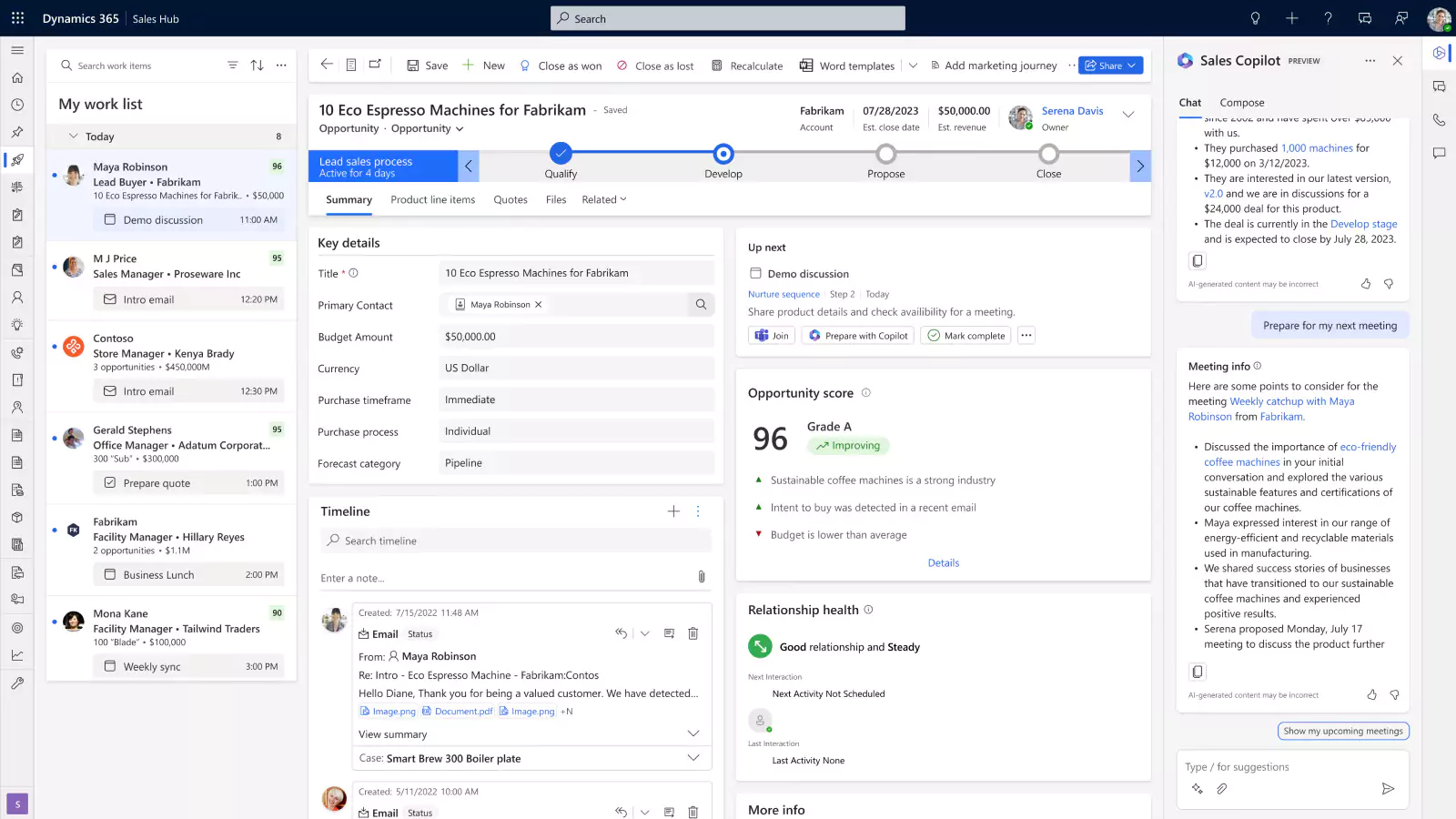
- Dynamics 365 Sales – A robust sales solution that leverages AI, Office 365, and LinkedIn to streamline repetitive tasks and help sales teams implement winning strategies to increase sales success.
- Dynamics 365 Customer Insights – A marketing automation tool (formerly Dynamics 365 Marketing) that helps create targeted campaigns, nurture leads, and smoothly transition qualified prospects to sales.
- Dynamics 365 Field Service – A connected field service solution using IoT, mixed reality, and machine learning to boost technician productivity and improve customer satisfaction.
- Dynamics 365 Customer Service – A comprehensive customer service tool that combines AI and IoT to deliver personalized, omnichannel experiences, fostering customer loyalty and long-term relationships.
- Dynamics 365 ERP applications:
- Dynamics 365 Business Central – A complete business management solution for small to mid-size companies, covering everything from finance and sales to manufacturing and project management.
- Dynamics 365 Finance – A financial management app for medium to large enterprises that automates global finance operations, drives visibility, and optimizes business processes.
- Dynamics 365 Supply Chain Management – An intelligent solution that automates and optimizes supply chain activities using AI, machine learning, and mixed reality to manage production, inventory, and logistics.
- Dynamics 365 Project Operations – A project management tool designed for project-centric businesses, connecting sales, project execution, and financials to unify operations across the organization.
If you are interested in Dynamics 365 Business Central, read our in-depth Business Central Implementation guide. For a comprehensive guide on D365 Finance or D365 Supply Chain Management, explore our comprehensive Dynamics 365 F&O implementation guide. The remainder of this article will focus on the implementation of the Dynamics 365 CRM applications.

Unlock the power of Dynamics 365
Request a demo or consultation to explore how this powerful platform can elevate your operations and lead your business to greater success.
What is a Dynamics 365 implementation?
A Dynamics 365 implementation refers to the process of deploying and configuring Microsoft Dynamics 365 applications to align with a company’s specific business needs and processes. This involves integrating the Dynamics 365 application—whether for finance, sales, customer service, or supply chain management—into an organization’s existing operations. The primary goal of a successful implementation is to ensure that Dynamics 365 not only works seamlessly within the company’s ecosystem but also optimizes workflows, enhances productivity, and drives long-term business growth.
Achieving these goals requires a strategic and well-planned approach. Every business is unique, so a tailored implementation is critical to address individual company requirements, industry challenges, and operational nuances. Implementations generally follow a structured methodology with several key phases. These phases include Envisioning and Design, Building, Testing, Deployment, and User Adoption. By following a strategic and phased methodology, companies can ensure that their Dynamics 365 implementation is efficient, tailored to their specific needs, and set up for success.
What are my Dynamics 365 licensing & implementation options?
When planning your Dynamics 365 deployment, you’ll need to consider both your licensing options and implementation strategy. Microsoft offers flexible licensing models tailored to your business needs, along with two main approaches for implementation: Self-Implementation and Implementation with a Microsoft Partner. Each option has its own set of advantages and challenges, allowing businesses to choose the approach that best aligns with their resources and goals.
Licensing options for Dynamics 365
Microsoft Dynamics 365 is sold through the Microsoft partner network. Additionally, Microsoft offers the flexibility to license individual applications or combine multiple solutions to meet broader business requirements. For organizations that need more than one application, Microsoft’s Base and Attach Licensing Model provides a cost-effective way to license multiple Dynamics 365 products.
- Base License: Your starting point is purchasing a full-price license for one Dynamics 365 application. This base license covers the core functionality needed for your business.
- Attach License: After purchasing a base license, you can add licenses for other Dynamics 365 products at a discounted rate. This allows you to integrate additional solutions while optimizing costs.
The base and attach model is ideal for organizations that need a combination of CRM and ERP capabilities, as it enables you to scale across different business functions without incurring the full cost of multiple full-price licenses. This licensing approach helps ensure that you maximize the value of your investment while expanding the scope of your Dynamics 365 environment.
It is important to note that there are specific requirements on which applications qualify as base products and which can be added as attach licenses. Not every Dynamics 365 product can serve as a base for every other, and a certified Microsoft Partner can help you navigate these rules to optimize your licensing strategy.
Self-implementation
Self-implementation involves managing the entire Dynamics 365 deployment in-house without external consulting support. This approach entails configuring the system, migrating data, and training users internally. While self-implementation may seem appealing, it is generally not recommended unless an organization possesses significant technical expertise and a clear understanding of Dynamics 365 functionalities. The main benefit of self-implementation is potential cost savings by avoiding partner fees. However, this option can be highly resource-intensive and time-consuming, often stretching internal teams thin and diverting attention from core business activities.
While there may be initial cost savings, businesses should consider the risks involved. The cost of a delayed or failed implementation can be substantial, often far exceeding initial consulting fees. A poorly executed deployment may lead to lost productivity, operational disruptions, and ultimately, a failure to realize the benefits of Dynamics 365. For more insights on the financial impact of a failed implementation, refer to our blog on how much a failed implementation costs. In most cases, the complexity of a Dynamics 365 deployment makes self-implementation a less viable option for many organizations.
Implementation with a Microsoft Partner
Partnering with a Microsoft implementation partner involves working with consultants who specialize in Dynamics 365 deployments. This approach ensures that organizations benefit from industry best practices, tailored strategies, and expert guidance throughout the implementation process. Implementation partners bring a wealth of knowledge to the table, helping businesses define their requirements, configure the system, and ensure seamless data migration. Their experience can significantly reduce the time and resources required for a successful deployment, enabling organizations to focus on their core operations.
In addition to saving time, working with a Microsoft partner can lead to a more successful implementation overall. These partners often provide ongoing support, training, and resources to help organizations fully leverage Dynamics 365’s capabilities post-deployment. Their expertise can help avoid common pitfalls, optimize workflows, and ensure a smoother user adoption process. By investing in an implementation partner, businesses not only enhance the likelihood of a successful implementation but also position themselves for long-term success and growth with Dynamics 365.
What are the steps for Dynamics 365 implementation?
A successful Microsoft Dynamics 365 implementation follows well-defined steps aimed at aligning the solution with your business needs and ensuring seamless adoption across your organization. The methodology used by Rand Group includes five key phases: Envisioning & Design, Build, Test, Deploy, and User Adoption. While not all Microsoft partners follow the same steps, we have built and refined this approach based on decades of experience and best practices to deliver high-quality results.

Envisioning & Design
The implementation process begins with Rand Group meeting your team to identify and refine business requirements. We map out process scenarios and develop a conceptual design of Dynamics 365 tailored to your business. This foundational step ensures the project aligns with your strategic objectives.

Build
During this phase, our software engineers configure Dynamics 365 based on the approved design. They implement necessary settings, customizations, and data specific to your workflows, ensuring the solution is built to meet your business needs.

Test
Rand Group works closely with clients during the testing phase to ensure the system performs as expected. This includes end-to-end business testing, performance evaluations, and validating data migration, ensuring the solution is ready for production use without disruptions.

Deploy
Once testing is complete and the system is approved, the deployment phase begins. Rand Group coordinates a seamless go-live process, supporting your team during the transition to minimize business disruptions and ensure a smooth rollout.

User Adoption
After deployment, Rand Group focuses on user adoption to ensure your team is fully trained and comfortable with the new system. We offer comprehensive training and post-go-live support, ensuring users can maximize the system’s capabilities and drive business success.
How long does it take to implement Dynamics 365?
The duration of a Dynamics 365 implementation can vary significantly based on several factors, making it essential to understand these variables to set a realistic timeline. Factors like the complexity of your business processes, the number of integrations, and the scope of customizations all play a role in determining how long the implementation will take. It’s also important to account for unforeseen challenges, which may add additional time to the project.
Here are some of the factors that could influence the duration of your implementation:
- Business complexity: More complex operations or multiple business units can extend the timeline.
- Level of customization: Heavily customized implementations require more time for development and testing.
- Data migration needs: The volume and complexity of data to be migrated can impact the timeline.
- Integration requirements: Integrating Dynamics 365 with other business systems or third-party apps adds additional time.
- User training: The number of users needing training can impact the duration of the final phase of implementation.
- Resource availability: The availability of both internal and external resources can speed up or slow down the project.
There are two primary implementation options: traditional implementation and rapid activation. A traditional implementation generally takes 3 to 6 months, while a rapid activation approach can be completed in 6 to 12 weeks.
Traditional implementation
A traditional Dynamics 365 implementation is best suited for organizations with more complex business needs, significant customization requirements, or the need for comprehensive integration with other systems. This approach typically takes between 3 to 6 months and follows a structured methodology based on best practices to ensure a thorough, well-planned deployment.
Envisioning & Design
2 – 4 weeks
Build
3 – 6 weeks
Test
3 – 6 weeks
Deploy
1 – 3 weeks
User Adoption
4 – 8 weeks
Rapid activation implementation
Rand Group offers rapid activation services tailored for organizations that need to deploy Dynamics 365 quickly, with minimal customization or integration. This approach focuses on streamlining the implementation process and getting the solution live in 6 to 12 weeks.
The rapid activation methodology differs from the traditional implementation process, reflecting the reduced need for custom configurations and complex integrations, while still providing a solid, functional solution.
Pre-configuration
1 – 2 weeks
Configuration
2 – 5 weeks
Train and Test
2 – 4 weeks
Production cutover
1 week
How much does it cost to implement Dynamics 365?
The cost to implement Dynamics 365 typically ranges from $25,000 to $250,000, depending on the scope of the project, the application chosen, customizations, and integrations. This is a one-time cost that covers activities like system configuration, data migration, user training, and other essential services.
Several factors contribute to the total cost of implementing Microsoft Dynamics 365. These include the number of users, the complexity of your business processes, the degree of customization required, the need for data migration, and how many third-party applications need to be integrated. The following table outlines the key components of a typical Dynamics 365 implementation:
While it is possible to find cheaper implementation options, these implementations often involving offshore resources. However, these frequently lead to failed implementations due to communication gaps, lower quality control, or lack of in-depth expertise. Correcting a failed or subpar implementation can result in costs that are twice as much as doing it right the first time. Therefore, it is crucial to invest in a well-executed implementation from the start.

Get a Dynamics 365 implementation estimate
Every company is unique—get a free consultation with one of our Microsoft Dynamics 365 experts to determine your Dynamics 365 needs and receive an implementation estimate.
Common Dynamics 365 implementation issues
Implementing Dynamics 365 can be complex, and organizations often encounter various challenges during the process. Studies have shown that approximately 55-75% of software projects fail to meet their objectives, often due to a combination of factors that disrupt the implementation process. Common issues include inadequate planning, misalignment between business needs and system capabilities, lack of user adoption, and unforeseen technical hurdles. Without proper oversight and management, these challenges can result in delays, cost overruns, and even failed implementations that do not deliver the intended business value.
Here are some common reasons why Dynamics 365 implementations may fail:
- Insufficient project planning and scope definition
- Lack of stakeholder alignment or executive sponsorship
- Poorly defined business processes or requirements
- Inadequate data migration or integration strategy
- Limited user training and change management
- Over-customization leading to increased complexity
- Miscommunication between IT and business teams
The implementation process requires substantial investments in both resources and time, but the business impacts are significant. With failure rates as high as 75%, partnering with the right implementation team is crucial to mitigate these risks and ensure project success. A trusted partner brings deep expertise, best practices, and a proven methodology that maximizes the benefits of Dynamics 365, leading to improved operational efficiency, data-driven decision-making, and a solid foundation for long-term growth.
Benefits of working with the right implementation partner
Partnering with a Microsoft implementation partner brings several advantages that can significantly enhance the success of your Dynamics 365 project. Implementation partners offer specialized expertise, a deep understanding of Dynamics 365 products, and proven methodologies to guide you through every phase of the process. They help reduce the complexity of deployment, minimize disruptions, and ensure that your system is tailored to meet your unique business needs. By leveraging their experience, you gain access to best practices, technical support, and strategic guidance that result in a smoother implementation and long-term business value.
Rand Group is your strategic ally throughout the Dynamics 365 implementation journey. With decades of experience and industry-specific knowledge, we go beyond the technical aspects to ensure your technology solutions align with your business strategy. As a Microsoft Gold Partner with a deep focus on ERP and CRM systems, we bring expertise in a variety of industries and a strong track record of delivering successful implementations. Our approach is comprehensive, ensuring that every phase—from envisioning and design to post-go-live support—fosters long-term success. We don’t just implement solutions; we work alongside you to solve complex business challenges, optimize processes, and drive sustainable growth.
Services we offer:
- Comprehensive implementation services: Rand Group offers end-to-end implementation services that cover every phase of your Dynamics 365 journey. From initial planning and design to deployment and user adoption, we ensure your solution is tailored to meet your business goals while minimizing disruption.
- Expert guidance and support: Our team of certified consultants provides expert guidance every step of the way. We help you navigate complex challenges, optimize your system, and ensure your technology investments deliver the highest value for your business.
- Proven methodology based on best practices: We follow a structured implementation approach rooted in industry best practices. Our methodology ensures efficient project management, timely delivery, and minimized risks, enabling a smooth transition to Dynamics 365.
- Post go-live support and continuous optimization: Our commitment doesn’t end after deployment. We provide ongoing support to help you maximize the value of your Dynamics 365 investment. Whether it’s troubleshooting, system enhancements, or process optimization, we’re here to ensure continued success.
Dynamics 365 implementation FAQs
Get answers to common questions about implementing Microsoft Dynamics 365:
- Can I implement D365 by myself?
Yes, but self-implementation is generally not recommended unless you have deep internal expertise. It can be risky, time-consuming, and lead to costly mistakes, which is why many choose to work with a Microsoft partner. - How much does a D365 implementation cost?
Costs typically range from $25,000 to $250,000, depending on factors like customization, integrations, and business complexity. This covers licensing, configuration, data migration, training, and more. - Is D365 easy to implement?
While Dynamics 365 is user-friendly, implementing it to meet business needs can be complex. Expert support is often necessary to ensure a smooth and successful process. - What are the stages of a D365 implementation?
The main stages are envisioning and design, build, test, deployment, and user adoption. Each phase ensures alignment with your business needs and prepares the system for successful use. - How long does it take to implement D365?
Traditional implementations take 3 to 6 months, depending on complexity. Rand Group also offers a rapid activation option, which can be completed in 6 to 12 weeks for simpler projects.
Next steps
Implementing Microsoft Dynamics 365 offers a unified platform to streamline processes and drive operational efficiency. At Rand Group, we are committed to guiding you through every phase of your implementation journey, ensuring that your Dynamics 365 solution is tailored to meet your business objectives. With our comprehensive services, expert support, and proven methodologies, we help you unlock the full potential of your investment in Dynamics 365, driving long-term success. Contact us today to learn more about how we can support your Dynamics 365 implementation.
Subscribe to our Insights
Follow Us
Related Insights

Dynamics 365 Finance & Operations Tip of the Month: Enable Immersive Home as your default homepage
Tip of the Month Dynamics 365 Finance & Operations Tip of the Month: Enable Immersive Home as your default homepage By Jordan Lutz on January 7, 2026 In Dynamics 365 Finance & Supply Chain Management (F&SCM), productivity often comes down to how quickly...

Your ultimate guide to reporting in Microsoft Dynamics 365 Finance and Operations
In an enterprise ERP, reporting supports day-to-day decisions and long-term planning. Teams need clear, timely information to monitor performance, spot issues, and take action. Dynamics 365 Finance and Operations (D365 F&O) supports this with multiple reporting...

How Dynamics 365 Customer Service helps teams close cases faster
Organizations today handle more service requests, across more channels, with higher expectations than ever before. Customers want clear answers, visibility into what’s happening with their case, and confidence that the person helping them understands their history and...