Dynamics 365
 Power Platform
 Dynamics
 Cloud & Productivity
Manufacturing reporting and analytics in Business Central

Effective manufacturing leadership depends on having accurate, timely, and actionable insights—whether you’re evaluating production schedules, understanding capacity constraints, or monitoring overall operational health. Microsoft Dynamics 365 Business Central provides manufacturers with a comprehensive suite of built-in reporting tools that deliver deep analytics and support proactive decision-making across the organization.
This blog explores the essential built-in manufacturing reporting within Dynamics 365 Business Central, from real-time production-floor visibility to detailed cost analysis and capacity planning.
Real-time visibility on the production floor
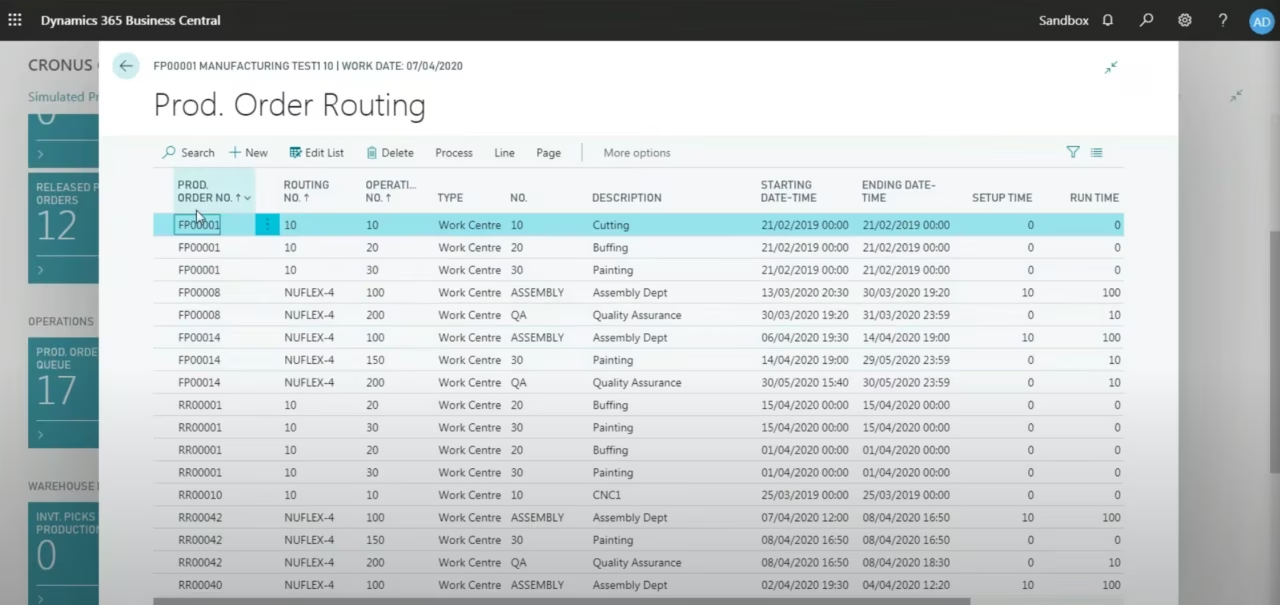
A core strength of Business Central is its ability to give manufacturers a clear view of what is happening on the production floor. Tools like the Production Order Queue allow users to see firm planned and released production orders, including routing steps and operation details, all from the Role Center.
This visibility helps production supervisors and planners understand exactly what is on the floor and what work is coming next. With drag-and-drop scheduling, users can quickly adjust operation dates—such as pushing back an operation scheduled for a specific day—and Business Central automatically recalculates downstream operations. This not only keeps schedules accurate but also helps maintain balanced resource utilization across the shop floor.
In addition to queue visibility, the Active Operations widget shows released production orders currently in progress, providing a real-time snapshot of what is being worked on. Although this view is limited to operations already started, it helps supervisors stay aligned on active workloads and ensure work centers are progressing as expected.
Both views can be filtered and sorted by department, work center, or other criteria, ensuring that teams always have quick access to the information they need.
Built-in production reports
Business Central provides a range of reports to help you track production orders, monitor costs and progress, and proactively manage potential issues.
- Order – Job Card – This report explores the details of components and operations needed to complete a production order. It serves as a comprehensive work instruction document.
- Order – Precalc. Time – This report helps plan and schedule production activities. It estimates the time needed to complete each production order based on work centers, machine centers, and routing information.
- Order – Calculation – Get a list of your production orders and their costs. This provides a quick overview of ongoing manufacturing expenses.
- Order Detailed Calc – This report provides a comprehensive analysis of costs associated with production orders. Costs are broken down by material, capacity, overhead, and other cost components.
- Production Order Statistics – Analyze your actual costs and variance from expected cost for production orders. This analysis helps you make key decisions about production and costs. It identifies where operations are running over or under budget.
Understanding capacity and detecting bottlenecks
Business Central also supports capacity analysis at the work center level. Manufacturers can view total available hours, scheduled demand, and the operations consuming that capacity. This enables teams to identify bottlenecks before they affect production timelines.
By drilling into a specific work center, planners can see how firm planned and released orders are occupying capacity. If a high-priority job needs to be inserted into the schedule, they can quickly assess where workload adjustments are required. This level of transparency helps ensure that production schedules remain achievable and that critical jobs move through the shop efficiently.
Built-in capacity reports
Business Central offers several dedicated capacity analysis reports:
- Capacity task list – This report analyzes the capacity of work centers or machine centers, providing planners with a comprehensive view of how resources are allocated across production activities.
- Work center load – These reports analyze the load on individual work centers. Report 99000785 specifically identifies work centers that are overloaded according to the plan, enabling proactive rebalancing of workloads.
- Machine Center Load – Similar to work center reports, these analyze the load on machine centers, with Report 99000786 highlighting machine centers that are overloaded, helping prevent equipment bottlenecks.


Ready to optimize your manufacturing operations?
A comprehensive reporting strategy requires specialized knowledge of manufacturing workflows and data structures within Dynamics 365 Business Central. Speak with an expert to design a reporting environment that provides true, actionable insight for your production and financial teams.
Preventing material shortages before they slow production
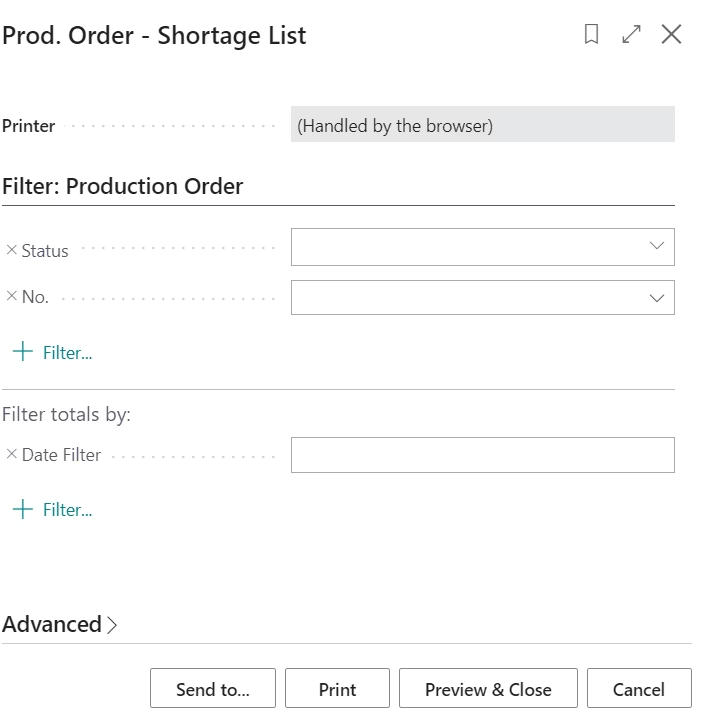
Managing materials is another essential part of keeping production on track. Built-in reports like the Shortage List allow users to evaluate whether upcoming production orders have the required components. While this report is most effective when reviewing single orders or only released and firm planned orders, it gives planners a fast way to detect potential disruptions.
Prod. Order Shortage List – This report examines component requirements and assesses the availability of stock on projected due dates. It identifies discrepancies between required components and inventory levels, ensuring all materials are available for consumption when needed. This proactive approach helps address potential shortages and avoid delays in production processes.
For broader material availability planning—especially across multiple orders or longer planning horizons—the Planning Worksheet offers the most comprehensive evaluation. Together, these tools help manufacturers stay proactive and avoid costly delays caused by missing materials.
Bill of Materials (BOM) analysis and costing
Understanding the structure and cost of your products is critical for manufacturing profitability. Business Central provides several specialized BOM reports that break down product composition, analyze cost components, and help you make informed decisions about suppliers, materials, and manufacturing methods.
- Quantity Explosion of BOM – This report provides an in-depth analysis of bills of materials for selected manufacturing items. It offers a clear hierarchy of components. Subcomponents are indented below their parent items, making it easy to understand product structure at a glance.
- BOM Cost Share Distribution – This report helps you decide whether to change component suppliers or replace internal resources with outsourced labor, or vice versa. It can also assist in reviewing and modifying an item’s bill of materials.
- Rolled-up Cost Shares – Get a comprehensive view of the costs associated with manufactured items. Costs are broken down into different components: material, capacity, capacity overhead, subcontracting, and manufacturing overhead.
- Single-Level Cost Shares – This report provides a detailed breakdown of costs at each level of the bill of materials. It shows the cost of materials, labor, and overhead for each component.
- Detailed Calculation – Analyze the manufacturing costs for an item, including production bill of materials details, routing operations, and associated expenses. Scrap costs are accounted for, providing an accurate total cost for producing items.
- Where-Used (Top Level) – Get an overview of where you use items in the product structures of other items. This report shows quantities as well. It’s valuable for impact analysis when considering changes to components.
- Item BOM Compare List – Compare the costs of similar final products. This enables informed decisions about product line profitability and potential cost reduction opportunities.

Additional production management reports
Business Central provides several other essential reports that support various aspects of manufacturing operations. These reports cover routing details, subcontracting coordination, work in process tracking, and production feasibility analysis. Together, they ensure smooth coordination across all manufacturing activities.
- Routing Sheet – Get an overview of the operations required to build an item, including information about the work center, machine center, personnel, and tools involved. This report is essential for understanding and communicating the manufacturing process.
- Subcontractor Dispatch List – This report helps you manage and track subcontracting activities efficiently, ensuring that external operations are coordinated properly with your internal production schedule.
- Production Order – WIP – This report helps track cost in the production process, providing visibility into work in process values and helping ensure accurate financial reporting.
- Item – Able to Make (Time) – This report ensures that you can fulfill sales orders for assembly and production on time. It shows key availability figures for supply and demand that support decisions about when, and how many, orders you can fulfill. This analysis helps maintain a smooth production flow, meet delivery deadlines, and optimize inventory levels.

Moving from reactive to proactive decision-making
The true advantage of Business Central’s built-in manufacturing reports is the shift toward proactive operations. Instead of reacting to floor issues, material shortages, or capacity overloads after they occur, manufacturers can anticipate challenges based on data patterns.
For example, the Work Center Load reports may reveal that a specific work center consistently exceeds its planned capacity. This insight enables manufacturers to re-evaluate routing steps, adjust shift strategies, or plan for future equipment investments.
Similarly, reviewing Production Order Statistics can uncover components or processes that regularly generate cost overruns. Identifying these trends early gives manufacturers time to renegotiate supplier contracts, adjust scheduling, or refine production steps.
Together, these reports give decision-makers the insights needed to improve efficiency, reduce waste, and maintain healthy margins.
Why reporting matters for manufacturers
For manufacturers, visibility drives performance. With Dynamics 365 Business Central’s comprehensive built-in reporting:
- Supervisors can reschedule operations quickly without opening every production order
- Managers gain real-time capacity insights to avoid bottlenecks before they impact delivery
- Planners stay proactive with shortage and availability reporting
- Cost accountants can analyze variances and identify improvement opportunities
- Executives benefit from detailed cost and performance analysis for strategic decision-making
This comprehensive suite of reporting tools creates a foundation for continuous improvement—helping manufacturers reduce waste, improve on-time delivery, and make confident decisions backed by data.
See the manufacturing reporting process in action
This video provides an in-depth walkthrough of reporting tools, capacity dashboards, production order visibility, within Business Central. It offers a clear, practical demonstration of how manufacturers can use these features to enhance daily operations.

Next steps
Whether you’re looking to strengthen your analytics, streamline shop floor reporting, or improve operational visibility, Rand Group can help. Our team provides comprehensive implementation, support, and training to ensure your Business Central environment delivers the insights your manufacturing teams rely on. If you’re ready to enhance your reporting capabilities, contact us today—we’re here to guide you.