Dynamics 365
 Power Platform
 Dynamics
 Cloud & Productivity
Dynamics 365 Field Service inspections: Templates, mobile checklists, and assets

Field inspections often require technicians to document more than whether a job was completed. They may need to record equipment conditions, complete safety checks, capture measurements, verify installation steps, or provide evidence of what they found onsite. Paper forms and disconnected checklists can make this information difficult to standardize, review, and use across the business.
Dynamics 365 Field Service inspections bring these activities into the same system used to manage work orders, technicians, and customer assets. This guide explains how D365 Field Service inspections work and explores templates, mobile checklists, common use cases, asset history, reporting, automation, and how inspections compare with work order service tasks and Power Apps.
At a glance:
Dynamics 365 Field Service inspections are digital forms that help technicians collect structured information during field work. Organizations can create reusable inspection templates, complete mobile checklists online or offline, connect inspections to customer assets, capture photos and other evidence, and use inspection responses for reporting and automated follow-up. D365 Field Service inspections are best suited to processes that require detailed and repeatable data collection, while work order service tasks are better for simple completion tracking.
What is Dynamics 365 Field Service?
Microsoft Dynamics 365 Field Service is a cloud-based field service management application for organizations that deliver service at customer locations. It manages the service lifecycle from work order creation through scheduling, dispatch, technician execution, and completion. Core capabilities include work order management, resource scheduling, customer asset tracking, inventory management, mobile technician tools, reporting, automation, and AI-powered capabilities.
Dynamics 365 Field Service connects office teams with technicians working in the field. Dispatchers can assign work based on factors such as availability, location, and skills, while technicians use the D365 Field Service mobile app to access work orders, asset information, service tasks, and other information needed to complete the job. Customer assets provide a record of the equipment an organization installs, services, or maintains.
Inspections fit directly into this workflow. They give technicians a structured way to collect information while completing service tasks, so inspection results remain connected to the work order, customer asset, and broader service process. To learn more about the complete platform, read our blog, What is Microsoft Dynamics 365 Field Service?

What are Dynamics 365 Field Service inspections?
Dynamics 365 Field Service inspections are digital forms that technicians use to collect structured information while performing work in the field. They can support equipment checks, safety procedures, pass/fail tests, audits, customer assessments, and other processes that require consistent responses. Organizations can use inspections to digitize or replace paper forms and manual checklists while improving the consistency of field data.
Dynamics 365 Field Service inspections are built from reusable inspection templates and are typically connected to work order service tasks. They can also be associated with customer assets, allowing inspection activity to become part of an asset’s service history. D365 Field Service also supports inspections created directly against customer assets without a work order.
Inspection responses are stored in Microsoft Dataverse, creating structured data that can be reviewed and used across the organization. This gives service teams a foundation for reporting, automation, and follow-up processes based on what technicians find in the field.
How do Dynamics 365 Field Service inspections work?
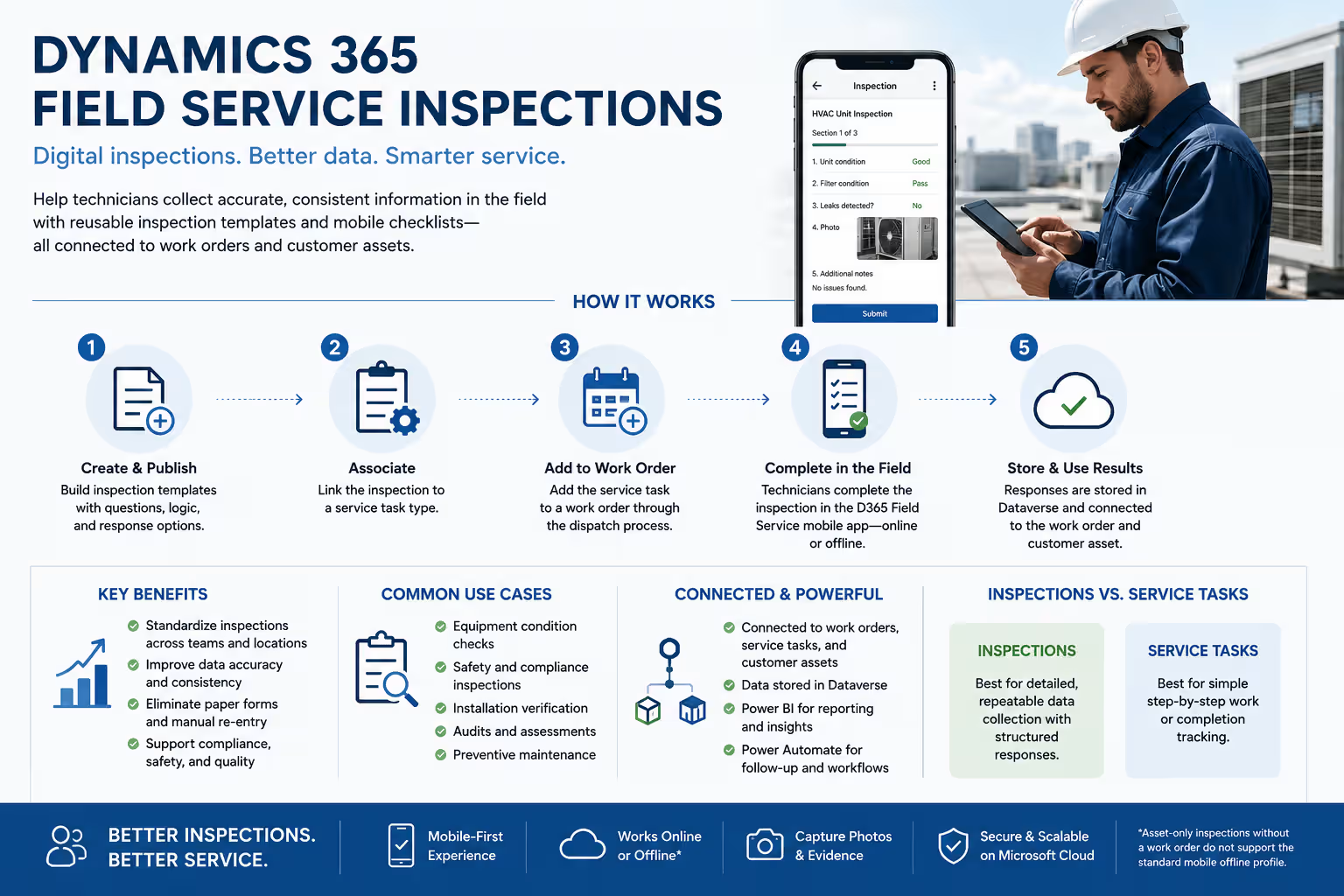
Dynamics 365 Field Service inspections connect reusable templates with service tasks, work orders, technicians, and inspection results. The standard process includes five main steps.
- Create and publish an inspection template. An administrator builds the inspection using the drag-and-drop designer. Questions, required fields, pages, response options, and conditional logic can be configured based on what technicians need to capture.
- Associate the inspection with a service task type. Inspections are not added directly to standard work orders. A published inspection is associated with a service task type, which connects the inspection to the work-order process.
- Add the service task to a work order. A dispatcher can add the service task directly to a work order. Service tasks can also be added through incident types when the same group of tasks is used repeatedly. For recurring service, agreements can generate work orders that contain the appropriate tasks.
- Complete the inspection in D365 Field Service mobile. The technician opens the assigned work order and selects the inspection service task. They enter required responses, record findings, take photos or upload files when needed, save the inspection, and complete the task.
- Review, report on, and act on the results. Dispatchers and other authorized users can review completed inspection responses from the work order. Organizations can also analyze inspection data or use Power Automate to start follow-up processes based on the technician’s answers.
This structure keeps inspections connected to the work technicians are already performing instead of requiring a separate process for collecting and re-entering inspection data.
What are the benefits of Dynamics 365 Field Service inspections?
Dynamics 365 Field Service inspections help organizations make field procedures more consistent while collecting information in a form that can be used throughout the business. Microsoft specifically highlights offline access, customer asset association, and the ability to update inspection templates as processes change.
Key benefits include:
- Standardize recurring inspection procedures: Give technicians the same questions and requirements each time a specific inspection is performed.
- Digitize paper forms and technician checklists: Capture inspection information directly in D365 Field Service rather than transferring paper results into another system later.
- Improve field data consistency: Use predefined response types and required questions to reduce missing or inconsistent information.
- Enforce critical inspection requirements: Required questions can prevent technicians from completing an inspection task without providing necessary information.
- Support mobile and offline field work: Technicians can complete standard work-order inspections from phones or tablets without an active internet connection and synchronize their responses when connectivity returns.
- Build customer asset inspection history: Link inspection service tasks to customer assets so previous inspections can become part of the equipment’s service history.
- Support reporting and automation: Use structured inspection responses to analyze results, identify patterns, and trigger follow-up workflows.
Together, these capabilities make inspections useful for more than documenting that a technician visited a site. They create structured operational data that can improve future service, asset maintenance, and decision-making.
Dynamics 365 Field Service inspection examples and use cases
Dynamics 365 Field Service inspections can support a wide range of field activities that require technicians to follow a defined process and record consistent information. Common use cases range from recurring equipment inspections to safety checks, installation verification, and onsite assessments.
Common Dynamics 365 Field Service inspection examples include:
- Preventive maintenance inspections: Complete recurring checks on customer assets to record condition, readings, wear, and maintenance needs.
- Equipment condition assessments: Document measurements, damage, operating condition, and pass/fail results for equipment being serviced.
- Safety and compliance inspections: Guide technicians through required safety procedures, regulatory checks, and other documented requirements.
- Installation and commissioning checklists: Verify that installation steps, equipment settings, tests, and final checks are complete before an asset is placed into service.
- Quality assurance inspections: Confirm that completed work, repairs, or equipment meet defined quality standards before the service visit is closed.
- Site and customer assessments: Capture site conditions, technician observations, customer responses, and other structured information needed to evaluate requirements or plan future work.

Need help improving your field service processes?
Rand Group can help you implement, configure, and optimize Dynamics 365 Field Service around your work orders, inspections, mobile workflows, customer assets, reporting, and broader service requirements. Talk with our team to determine the right approach for your technicians and field service operation.
Dynamics 365 Field Service inspection capabilities
Dynamics 365 Field Service inspections go beyond basic digital checklists. Organizations can create reusable templates, adapt questions based on technician responses, complete inspections from mobile devices, connect results to customer assets, and use inspection data for reporting and automation.
Inspection templates and flexible data collection
Dynamics 365 Field Service inspection templates provide a reusable structure for collecting consistent information across service visits. Administrators can use a drag-and-drop designer to build forms around the information technicians need without developing a separate custom application for every inspection.
Key capabilities include:
- Create reusable templates with required questions, multiple pages, and different response formats.
- Capture information such as measurements, selections, dates, barcodes, photos, files, and technician notes.
- Preview and test an inspection before publishing it for technicians to use.
Microsoft also offers a preview Copilot inspection builder. Administrators can upload a PDF or image of an existing inspection form, and Copilot converts the content into a draft D365 Field Service inspection template. The draft must still be reviewed and edited before it is published. Because this feature remains in preview, organizations should evaluate its limitations before relying on it for production processes.

Branching and conditional logic
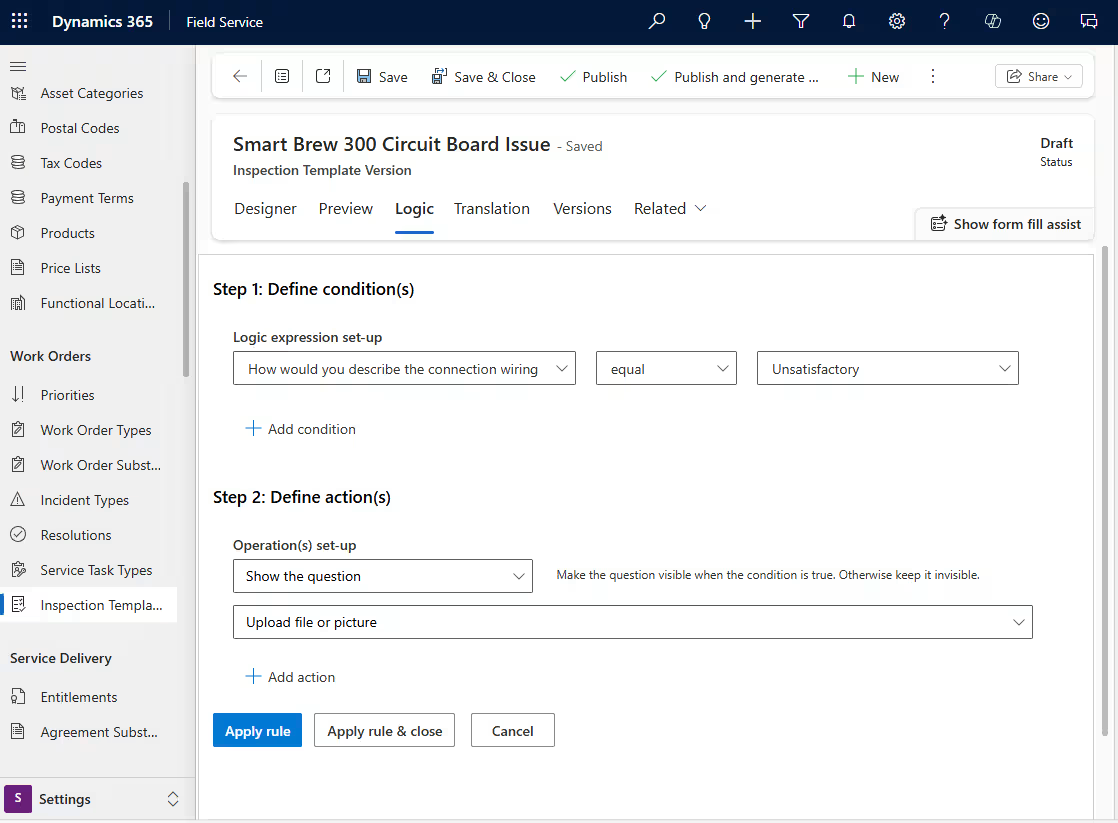
Dynamics 365 Field Service inspections can adapt as technicians move through a checklist. Conditional logic helps keep inspections focused by displaying additional questions only when they are relevant to what the technician finds.
Organizations can:
- Show follow-up questions based on an earlier response.
- Make additional information required when certain conditions are met.
- Skip irrelevant questions or direct technicians to another part of the inspection.
For example, if a technician identifies damage during an equipment inspection, D365 Field Service can display additional questions about the problem and require supporting information before the inspection continues.
Mobile checklists and offline inspections
Technicians can complete Dynamics 365 Field Service inspections through the D365 Field Service mobile app while working at a customer site. This gives them a structured checklist within the same mobile experience they use to access work orders and other service information.
Technicians can:
- Complete inspection questions and record readings from a phone or tablet.
- Capture photos, files, and other supporting evidence while onsite.
- Complete standard work-order inspections offline and synchronize responses when connectivity returns.
Offline inspections are especially valuable when technicians work in locations with unreliable cellular or Wi-Fi access.

Customer assets and inspection history
Dynamics 365 Field Service inspections can be associated with customer assets so inspection results remain connected to the equipment being serviced. This gives technicians and service teams more context about an asset’s condition and previous inspection activity.
Organizations can:
- Identify the specific customer asset being inspected.
- Build inspection and service history around individual equipment.
- Use previous findings to support future maintenance and service decisions.
When multiple assets need to be inspected at the same location, organizations can structure inspections based on how detailed the asset history needs to be. Separate service tasks and inspections can provide a clearer history for each individual asset.

Reporting and automated follow-up
Inspection data does not have to remain inside the completed checklist. Dynamics 365 Field Service can make inspection responses available in Microsoft Dataverse, where organizations can analyze results and connect them to other business processes.
Organizations can:
- Analyze inspection results and trends with Power BI.
- Identify recurring failures, asset issues, or patterns across inspections.
- Use Power Automate to trigger follow-up actions based on technician responses.
For example, a failed inspection or a response indicating that additional service is required can trigger a workflow to create a follow-up task. This helps connect what technicians find onsite with the next action the business needs to take.

Inspection reuse and administration
Dynamics 365 Field Service includes tools for maintaining inspection templates as procedures and requirements change. Administrators can reuse existing work rather than rebuilding similar inspections each time a new requirement is introduced.
Administrators can:
- Copy, revise, and republish inspection templates.
- Add translations for technicians who work in different supported languages.
- Export inspection templates or completed responses for reuse and sharing.
One limitation is important to understand: when a revised inspection is published, the previous published template is no longer retained. Existing service tasks continue using the inspection version that was assigned when they were created.
Dynamics 365 Field Service inspections vs. work order service tasks
Dynamics 365 Field Service inspections and work order service tasks both guide technicians through required work, but they serve different purposes. Work order service tasks are best for tracking simple steps that need to be completed. D365 Field Service inspections are better when technicians need to answer structured questions, record findings, capture evidence, or complete a detailed checklist.
Power Apps can also support inspection processes when requirements extend beyond the standard D365 Field Service inspection framework. The right option depends on how much information technicians need to capture and how customized the process needs to be.
For most structured inspection processes that already fit within Dynamics 365 Field Service, native inspections provide a simpler option because they are built into work orders, service tasks, customer assets, and the D365 Field Service mobile experience. Power Apps becomes more relevant when the inspection requires specialized functionality or a custom process.
Rand Group used this approach with Petroplex Acidizing. As part of its Dynamics 365 Field Service implementation, Rand Group developed a custom Power Apps mobile inspection application for truck inspections that supported offline use and captured mileage and job information for preventive maintenance. This illustrates why the best inspection approach should be based on the process rather than assuming one option fits every requirement.
Who benefits most from Dynamics 365 Field Service inspections?
Dynamics 365 Field Service inspections are most valuable for organizations that need field employees to follow repeatable processes and collect reliable information while servicing customer locations or physical assets.
Organizations are strong candidates when they:
- Maintain customer equipment or other physical assets.
- Perform recurring maintenance, testing, or inspection work.
- Require consistent procedures across technicians and locations.
- Have safety, quality, audit, or compliance processes that must be documented.
- Need structured technician data instead of free-form notes.
- Want inspection history associated with individual assets.
- Operate distributed field service teams that rely on mobile devices.
- Need field inspection results to support reporting or downstream automation.
These requirements are common in industries such as energy, manufacturing, utilities, equipment service, facilities management, construction, and other asset-intensive operations. The deciding factor is less about the industry and more about whether field teams need a consistent way to inspect, document, and act on information from the job site.
Optimize Dynamics 365 Field Service inspections with Rand Group
Dynamics 365 Field Service inspections work best when they are part of a well-designed service operation. The inspection process should connect with work orders, technician workflows, customer assets, reporting, automation, and the other systems that support field service delivery.
Rand Group helps organizations implement, optimize, and support Dynamics 365 Field Service based on their operational needs. Our team brings decades of experience across Dynamics 365, Microsoft Power Platform, integrations, reporting, and business process improvement, helping organizations build a connected system that can evolve over time.
Rand Group can help you:
- Implement and configure Dynamics 365 Field Service.
- Customize D365 Field Service around your service processes and business requirements.
- Configure inspections, work orders, scheduling, customer assets, and mobile workflows.
- Integrate Dynamics 365 Field Service with ERP, CRM, and other business systems.
- Extend the platform with Power Apps, Power Automate, reporting, and custom development.
- Train dispatchers, technicians, administrators, and other users.
- Provide ongoing Dynamics 365 Field Service support, optimization, and enhancements.
Rand Group maintains a 90% client retention rate, reflecting our focus on long-term partnerships that continue beyond the initial implementation.
What clients say about Rand Group
Our Dynamics 365 Field Service clients have used the platform to replace manual processes, improve technician workflows, and create more connected service operations.
“Implementing Dynamics 365 Field Service with Rand Group was a lifesaving, game-changing event. We have had an 80% gain in efficiency and it’s crazy to think of how we used to do things.”
– Christa Curette, VP of Engineering & Technology, Conquest Completion Services, LLC
“Rand Group has consistently thought outside of the box in ways I haven’t experienced with other providers. They’ve always offered multiple workable options to address our unique challenges, going beyond what we initially requested.”
– Erin Underwood, VP & CFO, Petroplex Acidizing Inc.
Key takeaways
- Dynamics 365 Field Service inspections are digital forms that help technicians collect structured information during field work.
- Reusable inspection templates can include required questions, conditional logic, photos, files, measurements, and other field data.
- Technicians can complete D365 Field Service inspections from mobile devices, including offline for standard work-order inspections.
- Inspections can be linked to customer assets to build a history of equipment condition, findings, and service activity.
- D365 Field Service inspections are best for structured data collection, while work order service tasks are better for simple completion tracking.
- Inspection responses stored in Microsoft Dataverse can support Power BI reporting, Power Automate workflows, and follow-up service actions.
Frequently asked questions about Dynamics 365 Field Service inspections
What are Dynamics 365 Field Service inspections used for?
Dynamics 365 Field Service inspections are used to collect structured information from technicians during field work. Common uses include preventive maintenance, equipment assessments, safety checks, installation checklists, quality inspections, and customer or site assessments.
How do you create an inspection template in Dynamics 365 Field Service?
Administrators create Dynamics 365 Field Service inspection templates with a drag-and-drop designer. Templates can include required questions, different response formats, multiple pages, conditional logic, photos, files, and other information technicians need to capture.
Can technicians complete Dynamics 365 Field Service inspections offline?
Yes, technicians can complete standard work-order inspections offline through the D365 Field Service mobile app. Responses are stored on the mobile device and synchronized when an internet connection becomes available.
Can Dynamics 365 Field Service inspections be linked to customer assets?
Yes, Dynamics 365 Field Service inspections can be associated with customer assets. This connects inspection results to specific equipment and helps build a history of condition, findings, maintenance, and service activity.
Can you use Dynamics 365 Field Service inspections without a work order?
Yes, Dynamics 365 Field Service inspections can be created directly against customer assets without a work order. However, these inspections do not support the standard D365 Field Service mobile offline profile and have some limitations compared with work-order inspections.
What is the difference between Dynamics 365 Field Service inspections and work order service tasks?
Dynamics 365 Field Service inspections collect structured responses, while work order service tasks primarily track whether a required step was completed. Inspections are better for detailed checklists, tests, assessments, and evidence collection.
Can Dynamics 365 Field Service inspections include photos and files?
Yes, Dynamics 365 Field Service inspections can capture photos, images, files, and other supporting evidence. This allows technicians to document equipment damage, site conditions, completed work, or other findings directly from a mobile device.
Can Dynamics 365 Field Service inspection results be used in Power BI and Power Automate?
Yes, Dynamics 365 Field Service inspection results can support Power BI reporting and Power Automate workflows. Organizations can analyze inspection trends, identify recurring issues, and trigger follow-up actions based on technician responses.
Standardize field inspections with Dynamics 365 Field Service
Dynamics 365 Field Service inspections give organizations a more consistent way to guide technicians through inspections and capture reliable information at the point of service. Reusable templates, mobile checklists, customer asset connections, offline access, reporting, and automation can help turn inspection results into useful data for future maintenance and service decisions.
The right inspection process should reflect how your technicians work, what information your organization needs, and how inspection results connect with the rest of your service operation. Contact us to learn how Rand Group can help you implement, configure, and optimize Dynamics 365 Field Service for your inspection and broader field service requirements.