Dynamics 365
 Power Platform
 Dynamics
 Cloud & Productivity
How much does Dynamics 365 Finance and Operations cost?

Understanding the cost of implementing and maintaining Dynamics 365 Finance & Operations is crucial for any business considering this solution. In this blog, we’ll break down the key components of D365 F&O pricing, covering user types, implementation costs, and additional applications. By understanding these factors, organizations can effectively plan and budget for their ERP investment, ensuring they maximize the value and efficiency D365 F&O brings to their operations.
- What is Dynamics 365 Finance & Operations?
- How is Dynamics 365 Finance & Operations licensed?
- How is Dynamics 365 Finance priced?
- How is Dynamics 365 Supply Chain Management priced?
- Additional license types
- Add-on applications
- How much does a D365 Finance & Operations implementation cost?
- D365 F&O Total cost of ownership (TCO)
- How to purchase D365 Finance & Operations
- Licensing tips and best practices
- D365 Finance & Operations pricing FAQs
What is Dynamics 365 Finance & Operations?
Dynamics 365 Finance and Operations (D365 F&O) is a cloud-based enterprise resource planning (ERP) solution designed to unify key operational processes including supply chain, financials, sales, purchase orders, inventory, production, and distribution. It comprises two main ERP applications: Dynamics 365 Finance and Dynamics 365 Supply Chain Management. These applications can be used individually or together, providing organizations with the flexibility to tailor their ERP solution to their specific needs. Many organizations opt to utilize both applications simultaneously, creating a comprehensive and unified ERP system.
Dynamics 365 Finance focuses on financial management and helps organizations modernize and automate key financial processes, leveraging AI capabilities to drive efficiency and growth. On the other hand, Dynamics 365 Supply Chain Management is designed to optimize supply chain operations, utilizing AI, machine learning, and mixed reality to streamline production, transportation, and asset management.
Microsoft offers two versions of each Dynamics 365 Finance and Operations application: D365 Finance and D365 Finance Premium, as well as D365 Supply Chain Management and D365 Supply Chain Management Premium. These versions cater to different business needs and offer varying levels of functionality.
To explore this topic in greater detail, check out our What is Dynamics 365 F&O? blog post, where we dive deeper into its capabilities and applications.
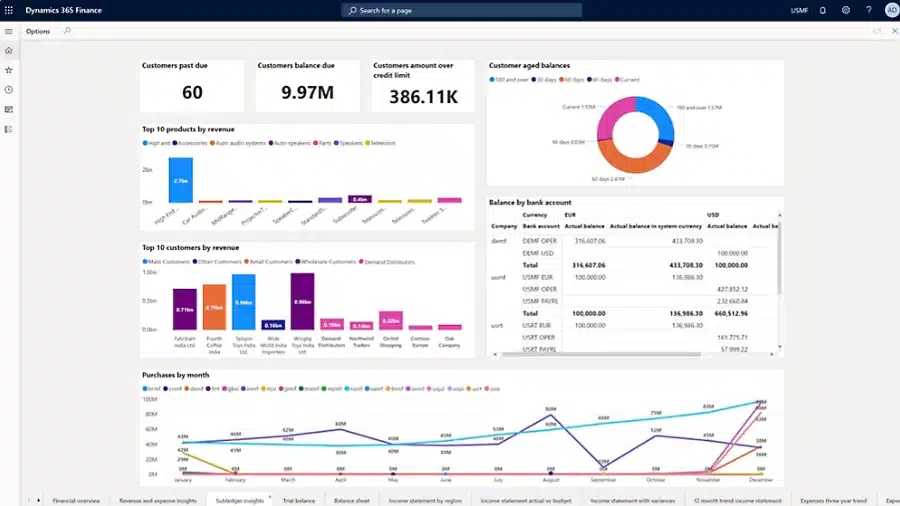

See Dynamics 365 Finance & Operations in action
Discover how Dynamics 365 Finance & Operations can help streamline your financial and supply chain processes. Our experts will walk you through the platform’s features, licensing structure, and business value.
How is Dynamics 365 Finance & Operations licensed?
Dynamics 365 Finance & Operations (D365 F&O) is licensed as a software-as-a-service (SaaS) solution. This means there are no upfront licensing fees or hardware costs. Instead, companies pay an annual licensing fee along with a one-time implementation fee. The pricing structure for D365 F&O is based on several factors:
- Regular vs. Premium SKU
- User licenses
- Additional applications
All companies begin by selecting a version, either standard or premium SKU, of D365 Finance or D365 Supply Chain Management and then purchasing the necessary user licenses. From there, they can choose to any add-ons or additional apps to tailor the system to their specific requirements. Beyond these choices, other costs to consider include implementation fees and ongoing maintenance and support.
Licensing is user-based. Each named user must have their own license. These cannot be shared between employees, although they can be reassigned if someone leaves your organization. Microsoft does not offer concurrent user licensing for D365 F&O.
Microsoft provides three subscription term options, giving you flexibility based on your staffing model and budget:
- Monthly term: This option allows you to adjust license counts month to month. It’s ideal for businesses with seasonal workers or fluctuating headcount. However, it typically comes at a higher cost, about 20% more than longer-term commitments.
- Annual term: Most organizations choose this model for its balance of pricing and flexibility. You can add licenses mid-term at a prorated rate, but reductions or downgrades generally need to wait until renewal.
- Multi-year term: For long-term stability, Microsoft offers multi-year agreements, often spanning three years. These lock in pricing and protect you from future increases. While less flexible, they offer better cost control over time.
Choosing the right mix of application SKUs, user types, and subscription term can significantly affect your total cost of ownership. Each decision should reflect how your team uses the platform, what capabilities you need, and how your business is expected to scale.
How is Dynamics 365 Finance priced?
D365 Finance provides an intelligent and automated core financial management solution. It integrates with Dynamics 365, Office 365, and partner applications, offering a centralized source of information for faster, data-driven decisions. It supports read-only tasks in business performance planning and includes default capacities for electronic invoicing and AI Builder credits.
D365 Finance Premium enhances decision-making with advanced business performance management capabilities. It includes everything in D365 Finance, plus tools for creating plans, budgets, forecasts, and financial analysis reports. This version offers increased default capacities for electronic invoicing and AI Builder credits.

White Paper
D365 Finance pricing & licensing guide
Download our exclusive guide to understand the details of Dynamics 365 Finance pricing, including user and device-based options. Gain valuable insights into licensing structures and how they can be tailored to your organization’s needs.
How is Dynamics 365 Supply Chain Management priced?
D365 Supply Chain Management offers a scalable and streamlined solution for an intelligent supply chain. It unifies data and uses predictive insights from AI and IoT across various processes to maximize operational efficiency, product quality, and profitability.
D365 Supply Chain Management Premium enhances supply chain adaptability and performance with advanced planning, analytics, and insights. It includes all functionalities of the standard version, plus Demand Planning capabilities for creating detailed plans, budgets, forecasts, and demand analysis reports.

White Paper
D365 SCM pricing & licensing guide
Get our exclusive guide to delve into the flexible subscription-based pricing of Dynamics 365 Supply Chain Management. Discover how pricing works for users and devices, and explore the licensing options that support your organization’s agility and growth.
Additional license types
In addition to full Finance and Supply Chain Management licenses, Microsoft offers several user license types to fit different roles and responsibilities. These options help reduce costs while ensuring users have access to the functionality they need.
- Team members: These users complete light tasks such as creating maintenance requests, responding to inventory needs on the production floor, documenting quality control events, entering time or expenses, viewing data, and contributing to the budget. Team Members might include cost object controllers or quality control clerks.
- Activity users: These users require more capabilities than Team Members but do not need full user access. They might respond to maintenance requests, customer inquiries, and warehouse operation inquiries. Examples include field technicians, shop supervisors, vendor account managers, and users who review financial performance or contribute to the budget.
- Device: Devices shared by multiple users, such as point of sale, shop floor, and warehouse devices. Any number of users can access a licensed device with individual logins without needing separate user licenses.
- External users: Customers, vendors, and third-party users such as external auditors.
Add-on applications
To meet specific business requirements, Microsoft offers additional add-ons or additional applications that can be added to the D365 F&O implementation.
D365 Intelligent Order Management
Manage orders from capture to fulfillment using real-time inventory and AI. Intelligent Order Management is an intelligent multi-tenant standalone service that allows customers to adapt quickly and fulfill orders efficiently at the fastest speed and lowest possible cost. It provides intelligent fulfillment with event-driven orchestration and AI rules-based fulfillment, including anomaly detection and inventory reallocation.
D365 Intelligent Order Management is licensed at $300 per month.
Integration with other Dynamics 365 applications
Both Dynamics 365 Finance and Supply Chain Management can be integrated with other Dynamics 365 applications, such as Customer Service, Field Service, Project Operations, and Sales. This integration allows for a unified system that streamlines processes and improves data flow across departments. Full user licenses of either D365 Finance or D365 SCM can be purchased as a base license at full price. Then, you can attach additional Dynamics 365 products at a significantly lower price.
Dynamics 365 Finance and Supply Chain Management also leverage Microsoft’s Power Platform to enhance their capabilities. Microsoft Power BI provides interactive visual intelligence and analytics, offering a user-friendly interface for creating dashboards and reports specifically tailored for Finance and Supply Chain Management. Meanwhile, Microsoft Power Automate enables workflow automation between apps and services, streamlining repetitive tasks, synchronizing files, and improving overall efficiency by automating complex processes.
How much does a D365 Finance & Operations implementation cost?
Implementing Dynamics 365 Finance & Operations involves several key steps, including system configuration, data migration, and user training. The cost of implementation can vary widely based on the complexity of your business processes, the level of customization required, and the scope of integrations with other systems. Typically, implementation costs range from $250,000 to $1,000,000 or more. This estimate includes evaluating your specific business needs, configuring and customizing the system, integrating with third-party applications, providing user training, and assisting with data migration and go-live support. The cost of implementation is generally 1.5-2 times the annual subscription fee for the software, with higher costs associated with more modules and users.
While lower-cost implementation options are available, they often involve offshore resources that may not fully understand U.S. accounting practices or business processes and may face challenges such as language barriers and different time zones. Such implementations can lead to incomplete or failed deployments, which may end up costing twice as much to correct compared to a well-executed implementation from the beginning. Investing in a comprehensive and properly managed implementation can save significant costs and ensure the system meets your business needs effectively.
D365 F&O Total cost of ownership (TCO)
When evaluating Dynamics 365 Finance & Operations, it’s important to look beyond the monthly subscription fees. Total cost of ownership (TCO) gives a fuller picture by including all the direct and indirect costs tied to running the system over time. Understanding TCO helps you build a more accurate budget and align your investment with long-term business goals.
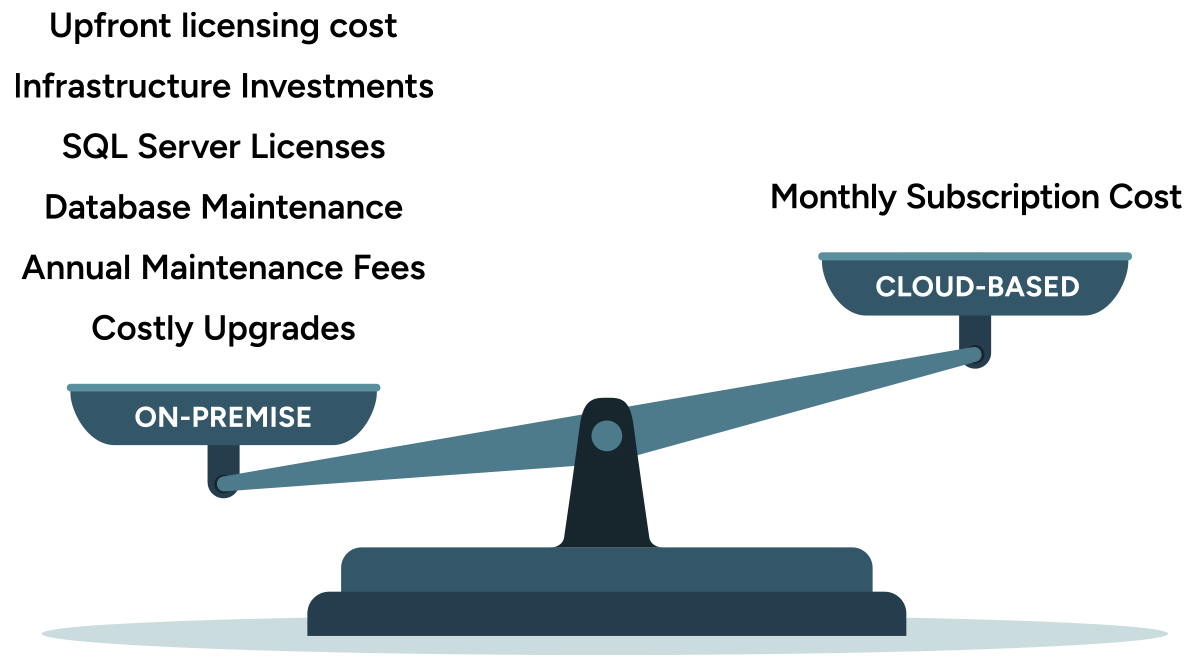
D365 F&O follows a cloud-based software-as-a-service (SaaS) model, which significantly lowers TCO compared to traditional on-premises ERP systems. With on-prem, you’re responsible for buying and maintaining servers, networking gear, storage backups, security tools, and often an internal IT team to manage it all. Those costs add up quickly and can outpace the software license itself.
In contrast, D365 F&O runs entirely in the cloud. Microsoft takes care of system hosting, updates, patches, and performance monitoring. There’s no need for a server room or database administrators, and you don’t need to purchase separate tools for backups or uptime. This model reduces infrastructure and labor costs while giving your IT team more time to focus on strategic work.
The subscription model also makes D365 F&O more flexible. You can scale your system up or down without needing a large upfront investment. Adding or removing users is straightforward, and software updates happen automatically, with no costly upgrade projects or downtime. Over time, this flexibility can help reduce unexpected costs and make long-term planning easier.
How to purchase D365 Finance & Operations
Microsoft offers Dynamics 365 Finance & Operations exclusively through its certified partner network. These partners aren’t just resellers, they’re experienced consultants who specialize in ERP implementation. They bring deep product knowledge, industry experience, and practical guidance to help you get the most from your investment.
Choosing the right partner is critical. Whether you’re in manufacturing, energy, distribution, or professional services, a qualified partner can assess your business processes, identify key requirements, and tailor D365 F&O to meet your operational needs. With the right support, you can avoid delays, reduce implementation risks, and achieve results faster.
A Microsoft partner also supports you beyond go-live. From user training and system configuration to compliance checks and process optimization, your partner plays a key role in maintaining long-term system success. Their expertise helps you scale efficiently, handle upgrades smoothly, and make the most of new features as Microsoft rolls them out.
At Rand Group, we are a Microsoft-certified partner with decades of experience implementing Finance & Operations solutions for mid-market and enterprise clients. We work closely with your team to define business goals, build a smart implementation roadmap, and deliver a system that supports growth, compliance, and operational agility.
Interested in Dynamics 365 Finance & Operations? Contact us to learn how we can support your ERP journey.

Get Dynamics 365 Finance & Operations today
Whether you’re upgrading from a legacy system or starting fresh, our team can help you implement D365 F&O with confidence. We’ll tailor the solution to your needs and support your team from planning to go-live.
Licensing tips and best practices
Licensing Dynamics 365 Finance & Operations isn’t just about picking a plan, it’s about making smart choices that save money and support long-term growth. Below are key tips to help you get the most value from your licenses:
- Define user roles before you buy: Not everyone needs a full D365 Finance or D365 Supply Chain license. Identify who needs full access for transactions and workflows versus those who just need to view reports, enter time, or approve tasks. Use Team Member, Activity, or Device licenses where appropriate. This avoids overpaying for unused functionality.
- Think long-term and plan for scale: Your business will change. If you expect to add users, new legal entities, or advanced capabilities, plan for it upfront. Choose a licensing structure that’s flexible and scalable. A longer-term subscription or modular approach can help control future costs.
- Choose your subscription term wisely: Microsoft offers monthly, annual, and multi-year license options. Monthly terms provide flexibility but cost more. Annual and multi-year terms lock in lower rates and are ideal for businesses with stable user counts. Pick the term that matches your hiring plans, budget, and growth outlook.
- Review license usage regularly: Job roles evolve, people leave, and new needs emerge. Check your license assignments at least once a year, preferably before renewal. Reassign unused licenses, adjust user roles, and make sure you’re still aligned with how the system is being used.
- Partner with an experienced Microsoft advisor: Licensing for D365 Finance & Operations can get complex. A qualified Microsoft partner can help you choose the right user mix, avoid compliance issues, and make sure you’re not leaving money on the table. They’ll also guide you through system changes, upgrades, and license adjustments as your needs evolve.
D365 Finance & Operations pricing FAQs
Below are answers to common questions businesses ask when evaluating Dynamics 365 Finance & Operations pricing.
How much does Dynamics 365 Finance & Operations cost per user?
Dynamics 365 Finance & SCM starts at $210 per user/month. Premium versions are priced at $300 per user/month. Team Member licenses are $8 per user/month, Activity licenses are $50 per user/month, and Device licenses are $75 per device/month. These prices are based on an annual subscription.
What’s the difference between standard and premium versions?
The standard versions of D365 Finance and Supply Chain Management include all core functionality. Premium versions add advanced capabilities: D365 Finance Premium includes tools for budgeting, forecasting, and financial analysis, while D365 SCM Premium includes Demand Planning and enhanced analytics.
Can I mix and match standard and premium licenses?
All full users within a single Finance or Supply Chain environment must be licensed under the same SKU, either standard or premium, not a combination.
What should I budget for implementation?
Implementation costs vary widely depending on complexity. Smaller projects may start around $250,000, while large-scale deployments can exceed $1 million. Key cost drivers include the number of legal entities, integrations, data migration, custom development, and industry-specific configurations.
How do I purchase Dynamics 365 Finance & Operations?
You can only purchase D365 F&O through a Microsoft-certified partner. Partners manage licensing, guide implementation, and provide ongoing support. They also help tailor the solution to your business processes and ensure a successful rollout.
Next steps
Ready to start using Dynamics 365 Finance & Operations for your business? Rand Group is an experienced Microsoft Dynamics 365 partner that has helped numerous clients across industries implement D365 F&O to transform their operations. Contact Rand Group today to determine the cost of Dynamics 365 F&O for your business.