Dynamics 365
 Power Platform
 Dynamics
 Cloud & Productivity
Inventory Visibility Add-in for Dynamics 365 Supply Chain Management

Businesses rarely manage inventory in one place, which is why the Inventory Visibility Add-in can become valuable as supply chains grow more complex. Products may sit across several warehouses, legal entities, sales channels, and connected systems, yet sales, operations, and customer service teams still need a reliable answer to a basic question: What inventory do we have available right now?
The Inventory Visibility Add-in for Microsoft Dynamics 365 Supply Chain Management provides a scalable way to track and query inventory across data sources and channels. Instead of relying only on transactional screens or moving from company to company to check availability, organizations can create a broader, more current view of inventory across their supply chain.
At a glance
The Inventory Visibility Add-in extends Dynamics 365 Supply Chain Management with a centralized service for tracking inventory across warehouses, channels, and connected systems. It supports real-time on-hand queries, soft reservations, inventory allocation, available-to-promise calculations, and advanced warehouse inventory scenarios. Businesses can use this information in the Inventory Visibility app and make it available to other applications that need current inventory data.
What is the Inventory Visibility Add-in for Dynamics 365 Supply Chain Management?
The Inventory Visibility Add-in, also called the Inventory Visibility service, is a Microsoft microservice that works with Dynamics 365 Supply Chain Management to provide near real-time inventory information across multiple data sources and channels.
The service can track different inventory measures, including on-hand, purchased, ordered, and sold quantities. Organizations can also create calculated measures based on those values to answer questions such as how much inventory is currently available.
Inventory Visibility uses Microsoft Dataverse as part of its architecture, while the Inventory Visibility application itself runs through Microsoft Power Apps. Inventory Visibility is not simply another Power App. The Power Apps interface gives users access to the underlying Inventory Visibility service and its capabilities.
For companies already using Dynamics 365 Supply Chain Management, Inventory Visibility can provide a centralized layer for making current inventory information available to other teams, channels, and applications.
What business problems does Inventory Visibility solve?
As inventory environments become more complex, organizations can struggle to provide accurate availability information without creating additional reporting processes or integrations.
This broader visibility can become especially important as companies add warehouses, legal entities, sales regions, acquisitions, and additional inventory systems. Operations, customer service, and sales teams may otherwise need to move between companies, locations, or systems to understand where inventory exists and whether it can support demand.
For multi-entity and global organizations, Inventory Visibility can provide a more consolidated inventory picture across data sources, warehouses, locations, and channels. This challenge often appears alongside other Dynamics 365 Finance & Supply Chain Management requirements for multi-entity and global organizations, including standardized processes, consolidated reporting, and consistent data structures.
Organizations still need to determine how products, dimensions, warehouses, legal entities, and other inventory structures should map into Inventory Visibility. A centralized service does not eliminate the need for consistent inventory design and governance. For organizations that need broader control over inventory processes inside the ERP, it is also helpful to understand the underlying inventory management capabilities in Dynamics 365 Supply Chain Management.
How does Inventory Visibility work?
Inventory Visibility sits between the systems that create inventory information and the applications that need to use that information.
A simplified architecture looks like this:
Dynamics 365 Supply Chain Management + external inventory systems → Inventory Visibility → applications, APIs, reporting, and sales channels
Inventory information can come from Dynamics 365 Supply Chain Management and other connected systems. Inventory Visibility then maintains inventory measures that consuming applications can query.
Businesses can configure elements such as:
- Data sources
- Inventory dimensions
- Physical inventory measures
- Calculated measures
- Index hierarchies
- Reservation rules
- Allocation rules
For example, an organization might track inventory by item, site, warehouse, color, and size. It could then calculate an available quantity by combining on-hand and incoming inventory while subtracting committed demand.


Plan your inventory visibility strategy
Inventory Visibility works best when its configuration reflects the way your organization manages inventory, reservations, channels, and connected systems. If you are evaluating Inventory Visibility or deciding how it should fit into your Dynamics 365 Supply Chain Management environment, contact Rand Group to discuss your requirements.
Why use Inventory Visibility instead of reporting directly from inventory transactions?
Dynamics 365 Supply Chain Management still manages the underlying inventory transactions. However, organizations often need that information outside the ERP for integrations, customer service, e-commerce, reporting, or other operational applications.
Continuously querying or exporting high volumes of inventory transactions to calculate current availability can create unnecessary processing demands. Transactional inventory tables are designed to support ERP processes, not act as a high-volume inventory query source for every surrounding application.
The Inventory Visibility Add-in provides a purpose-built layer for frequently querying current inventory information. This separates two needs: accurately recording transactions in Dynamics 365 Supply Chain Management and making current inventory availability easier for other applications to consume.
What can you do with Dynamics 365 Inventory Visibility?
Inventory Visibility goes beyond displaying current stock quantities. Its capabilities support several common inventory and order fulfillment scenarios.
View current inventory across locations and data sources
Organizations can bring inventory information from different warehouses, locations, channels, and data sources into a more centralized inventory view. For businesses with several inventory locations or operational entities, this can reduce the need for employees to check availability one company or system at a time.
Query inventory availability in real time
Connected applications can query Inventory Visibility when they need current inventory availability.
Common examples include:
- E-commerce platforms
- Customer portals
- Order management systems
- Customer service applications
- Custom Power Apps
- Other operational systems
Instead of maintaining a separate availability calculation within each application, businesses can use Inventory Visibility as a shared source for current inventory information.

Use soft reservations to reduce overselling
A soft reservation assigns inventory to demand without immediately changing the physical inventory quantity in Dynamics 365 Supply Chain Management.
This is particularly useful when several systems accept orders at the same time. For example, an online order can create a soft reservation in Inventory Visibility so another sales channel sees the reduced quantity available for reservation, helping prevent multiple systems from promising the same inventory.
Soft reservations can also be offset as the corresponding order progresses to a physical or hard reservation in Dynamics 365 Supply Chain Management. This helps keep Inventory Visibility aligned with the underlying inventory transaction as an order moves through fulfillment.

Allocate inventory to important customers or channels
Businesses do not always want inventory distributed strictly on a first-come, first-served basis.
Inventory allocation allows organizations to protect quantities for defined groups such as:
- Sales channels
- Key customers
- Customer groups
- Regions
- Promotional events
For example, a distributor could protect part of its available inventory for a major customer while leaving the remaining quantity available to other sales channels. Microsoft also supports tracking consumption against allocated inventory pools.

Calculate available-to-promise inventory
Knowing what is available today does not always answer the customer’s question. Customers may instead need to know, “When can you ship it?”
Available-to-promise, or ATP, uses current inventory together with scheduled future supply and demand changes to provide a forward-looking view of availability. Inventory Visibility can receive planned inbound and outbound inventory changes from Dynamics 365 Supply Chain Management and use those time-phased changes in ATP calculations.
Organizations can configure the ATP schedule period based on their planning requirements, up to a maximum of 180 days. This can help external systems provide more informed delivery or fulfillment estimates rather than relying only on today’s on-hand quantity.
Work with advanced warehouse inventory
Organizations using advanced warehouse management capabilities in Dynamics 365 Supply Chain Management can also use Inventory Visibility with warehouse-managed items.
This support is focused on making warehouse inventory quantities available for Inventory Visibility calculations and queries. Inventory Visibility does not replace warehouse execution processes in Dynamics 365 Supply Chain Management, such as warehouse work, waves, loads, or shipments.
This makes the service relevant to businesses with complex warehouse environments that need broader access to current inventory information while continuing to manage warehouse processes within Dynamics 365 Supply Chain Management.
Additional inventory visibility and integration capabilities
Inventory Visibility also includes capabilities that support integrations, troubleshooting, and different ways of making inventory data available to users and other applications.
- Post inventory changes from connected systems. External applications can submit on-hand inventory change events to Inventory Visibility through its APIs, allowing inventory information from multiple data sources to contribute to the centralized inventory picture.
- Review inventory log history. Organizations can store successful Inventory Visibility transaction logs and query them by criteria such as organization, product, date range, site, and warehouse. This can support troubleshooting and operational review.
- Use inventory summaries. Inventory Visibility can periodically synchronize raw inventory summary information from its cache into Dataverse, giving users another way to browse and filter inventory information. This feature is not compatible with items enabled for advanced warehouse management processes.
- Preload on-hand inventory. Businesses can instead configure a streamlined on-hand dataset based on the dimensions most relevant to their requirements. This can support more focused inventory queries and is compatible with advanced warehouse items. Microsoft recommends using either preloaded on-hand or Inventory Summary rather than enabling both.
Which capabilities an organization should enable depends on its inventory processes, connected systems, transaction volumes, warehouse requirements, and how employees and applications need to consume inventory information.
How does Inventory Visibility work with Power Apps, Power BI, and external systems?
Inventory information does not have to remain inside the Dynamics 365 Supply Chain Management user interface.
The Inventory Visibility app is available through Power Apps, and organizations can use APIs and the Microsoft Power Platform to extend inventory information into other business processes.
Potential scenarios include:
- Building an inventory inquiry Power App for customer service
- Providing inventory availability to an e-commerce platform
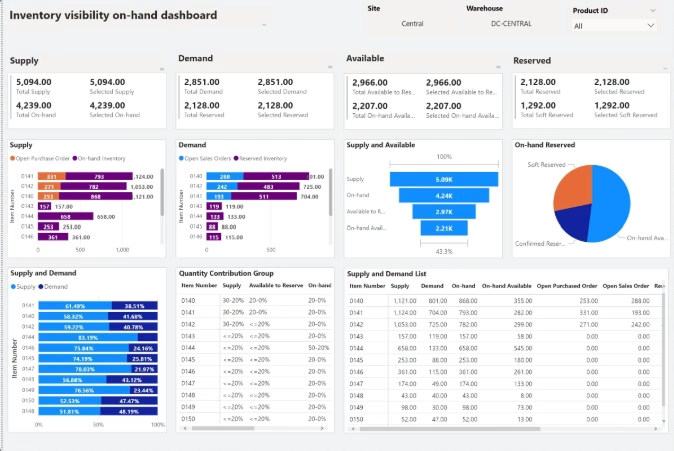
- Creating inventory reporting in Microsoft Power BI
- Connecting inventory availability to order management applications
- Giving sales teams easier access to current inventory information
- Supporting other systems that need inventory availability without requiring users to work directly in Dynamics 365 Supply Chain Management
The right approach depends on whether users need operational inventory queries, analytics, transaction processing, or a combination of these needs.
For example, Power BI may be appropriate for analyzing inventory trends, while an e-commerce application may need an operational query that can determine whether a product is available before a customer places an order. These requirements should not automatically use the same architecture.
Is Inventory Visibility included with Dynamics 365 Supply Chain Management?
Yes. A valid Dynamics 365 Supply Chain Management license includes the Inventory Visibility Add-in.
This is an important distinction because the Inventory Visibility app uses Power Platform technology, but businesses should not assume that a separate Power Apps license automatically determines Inventory Visibility licensing.
Organizations should still consider the Dataverse resources and API usage associated with their specific design. Transaction volumes, integrations, and the Inventory Visibility capabilities being used can influence those requirements.
Businesses with high transaction volumes should review these considerations during solution design rather than waiting until after deployment.
What is required to set up the Inventory Visibility Add-in?
Installing Inventory Visibility involves more than turning on another screen in Dynamics 365 Supply Chain Management.
The setup can include areas such as:
- Linking Dynamics 365 Supply Chain Management with Dataverse
- Registering the required Microsoft Entra application
- Installing the Inventory Visibility Add-in
- Configuring Inventory Visibility integration
- Setting up inventory data sources
- Defining inventory dimensions
- Creating physical and calculated measures
- Configuring optional capabilities such as ATP, soft reservations, allocation, and warehouse inventory
The technical setup is only one part of the project. Businesses also need to decide what inventory information users require, which systems provide it, how availability should be calculated, and how other applications will consume the information.
This design becomes especially important when several systems can affect inventory. If one application considers an order reserved while another still considers the same units available, a technically successful integration can still create poor operational results.

When does the Inventory Visibility Add-in make sense?
Not every Dynamics 365 Supply Chain Management environment needs Inventory Visibility. It becomes more valuable when inventory requirements extend beyond standard ERP inventory inquiries.
The Inventory Visibility Add-in may make sense when your organization:
- Manages inventory across many warehouses, locations, or operational entities.
- Accepts demand through several sales channels.
- Needs external systems to check inventory frequently.
- Needs inventory information from Dynamics 365 and other systems.
- Has multiple channels competing for limited inventory.
- Needs to protect inventory for specific customers or channels.
- Wants more reliable available-to-promise information.
- Needs integrations that should not continuously query transactional ERP data.
For a company with one inventory system, limited locations, and straightforward reporting requirements, standard Dynamics 365 Supply Chain Management inventory management functionality may already meet its needs. The decision should start with the business problem rather than the technology. Adding another service makes sense when it addresses a clear operational, integration, or scalability requirement.
What should you plan before implementing Inventory Visibility?
Inventory Visibility can make inventory easier to access, but its accuracy still depends on good design. Before configuring it, businesses should answer several questions.
- Define what “available” means. Decide whether employees and applications need on-hand, ordered, reserved, in-transit, quarantined, or projected inventory.
- Identify every inventory source. Document which systems create inventory changes and which systems only consume inventory information.
- Standardize dimensions. Sites, warehouses, products, colors, sizes, and other dimensions must map consistently.
- Define the required update speed. Customer ordering may need near real-time availability, while management reporting may not.
- Plan reservation rules. Determine when inventory should be soft reserved and how those reservations will become physical transactions.
- Define allocation priorities. Decide whether specific customers, regions, or channels need protected inventory.
- Separate operational queries from analytics. Determine what users should access through Inventory Visibility versus analytical reporting.
- Test real exceptions. Include returns, transfers, canceled orders, partial shipments, inventory adjustments, and other scenarios in testing.
Teams should also define ownership. Inventory, warehouse, sales, e-commerce, IT, and finance teams may interpret “available inventory” differently. Resolving those differences before configuration helps prevent technology from automating inconsistent business rules.

Evaluate Inventory Visibility for your supply chain
Inventory Visibility should fit into a broader inventory, warehouse, fulfillment, integration, and reporting strategy. Rand Group can help you determine whether Inventory Visibility is the right fit and how it should work within your Dynamics 365 Supply Chain Management environment.
How Rand Group supports your Dynamics 365 Supply Chain Management strategy
Inventory Visibility is one piece of a larger supply chain environment. Decisions about inventory architecture can affect warehouse processes, order fulfillment, reporting, Power Platform, integrations, and how surrounding applications consume Dynamics 365 data.
Rand Group helps organizations evaluate these requirements as part of their broader Dynamics 365 Supply Chain Management strategy. Our team can help determine when standard functionality is enough, where capabilities such as Inventory Visibility add value, and how integrations and reporting should fit into the overall architecture.
That experience is backed by more than 3,000 successful engagements, 1,200+ clients, and a 90% client retention rate. These relationships give our consultants practical experience with the decisions that become important after implementation, including system performance, scalability, adoption, integrations, reporting, and evolving business requirements.
Rather than evaluating a feature in isolation, the goal is to make sure each technology choice supports the business processes and long-term Dynamics 365 environment around it.
Hear what our clients say
“We were growing fast, but our ERP system was slowing us down. We were relying on spreadsheets and messaging just to keep processes moving—something a proper ERP should handle automatically. Today, we have better control of inventory, clear visibility into costs, and a system that supports our growth instead of holding us back.” – Sander Sharp, Vice President, Cirkul
“We have always felt like a top priority when working with Rand Group’s team and have the utmost confidence in their industry and technical knowledge.” – Christa Curette, VP of Engineering & Technology, Conquest Completion Services, LLC
Key takeaways
- The Inventory Visibility Add-in provides a centralized inventory service for Dynamics 365 Supply Chain Management and connected systems.
- It can support inventory visibility across warehouses, channels, locations, and multiple data sources.
- Soft reservations can help prevent multiple order channels from promising the same inventory.
- Inventory allocation can protect stock for important customers, regions, or sales channels.
- Available-to-promise provides a forward-looking view of when inventory may become available.
- Inventory Visibility can reduce the need for downstream applications to rely directly on high-volume ERP transaction data.
- The Inventory Visibility Add-in is included with a valid Dynamics 365 Supply Chain Management license.
Frequently asked questions about the Inventory Visibility Add-in
What is the Inventory Visibility Add-in in Dynamics 365 Supply Chain Management?
The Inventory Visibility Add-in is a Microsoft service that provides near real-time inventory tracking and queries across data sources and channels. It works with Dynamics 365 Supply Chain Management and can also incorporate inventory information from connected systems.
What is the main benefit of the Inventory Visibility Add-in?
The main benefit is giving applications and users a more centralized view of inventory availability across warehouses, locations, channels, and data sources. This is particularly valuable when inventory information needs to be consumed outside the standard Dynamics 365 Supply Chain Management interface.
Is Inventory Visibility included with Dynamics 365 Supply Chain Management?
Yes. A valid Dynamics 365 Supply Chain Management license includes the Inventory Visibility Add-in. Organizations should still review Dataverse resource and API requirements for their specific configuration.
Does Inventory Visibility replace Inventory Management in Dynamics 365 Supply Chain Management?
No. Dynamics 365 Supply Chain Management remains responsible for core inventory transactions and processes. Inventory Visibility provides an additional service for querying, reserving, allocating, and sharing inventory availability across systems and channels.
Can Inventory Visibility show inventory across multiple warehouses and systems?
Yes. Inventory Visibility is designed to bring together inventory information across multiple data sources, warehouses, locations, and channels. Organizations must configure their data sources, dimensions, and inventory measures correctly to create a reliable view.
Can Inventory Visibility data be used with Power BI or Power Apps?
Inventory Visibility works within the Microsoft Power Platform ecosystem and can support integrations with other applications. Organizations should choose the consumption method based on the use case, such as operational inventory inquiries versus analytical reporting.
When should a company consider the Inventory Visibility Add-in?
Companies should consider it when inventory availability needs to be shared across several warehouses, legal entities, channels, or connected systems, or when surrounding applications need frequent access to current inventory information. Businesses with simpler inventory environments may be able to meet their needs with standard Dynamics 365 Supply Chain Management functionality.
Improve inventory visibility with Dynamics 365 Supply Chain Management
Knowing how much inventory you have is only useful when the right people and systems can access that information when they need it. The Inventory Visibility Add-in gives organizations using Dynamics 365 Supply Chain Management a scalable way to make current inventory information available across warehouses, channels, applications, and operational teams.
The key is determining which inventory problems the service needs to solve and designing the data, integrations, reservations, and reporting around those requirements. If your organization is evaluating Inventory Visibility or reviewing its broader supply chain architecture, contact Rand Group to discuss your Dynamics 365 Supply Chain Management environment and goals.

Related Blogs

What is Microsoft Dynamics 365 Supply Chain Management? Features, pricing, and benefits
Read More
Field Service ERP software: How to connect dispatch, parts, job costs, and billing
Read More