Dynamics 365
 Power Platform
 Dynamics
 Cloud & Productivity
Lot and serial number tracking in Dynamics 365 Business Central

Lot and serial number tracking in Business Central helps manufacturers, distributors, and other inventory-based businesses identify products as they move through the supply chain. Businesses can see not only how much inventory is available, but also which batch or individual unit was received, produced, moved, or shipped.
Microsoft Dynamics 365 Business Central includes native item tracking for lot numbers, serial numbers, and package numbers. When configured correctly, this creates a transaction history businesses can use to answer important questions. Which supplier provided a defective component? Which finished products used it? Which customers received products from the affected lot? This level of traceability can improve inventory control and make it easier to investigate quality issues, expiration concerns, customer returns, and product recalls.
Quick answer: How does lot and serial number tracking work in Business Central?
Dynamics 365 Business Central uses item tracking codes to define when and how lot numbers and serial numbers are recorded for an item. Tracking information can follow inventory through inbound and outbound documents, warehouse activity, production, transfers, and returns, giving businesses a history of where tracked inventory came from and where it went. Business Central can then trace posted lot- and serial-tracked transactions backward to their origin or forward to their use. This allows users to investigate an individual item or batch without manually piecing together records from separate systems.
What is item tracking in Dynamics 365 Business Central?
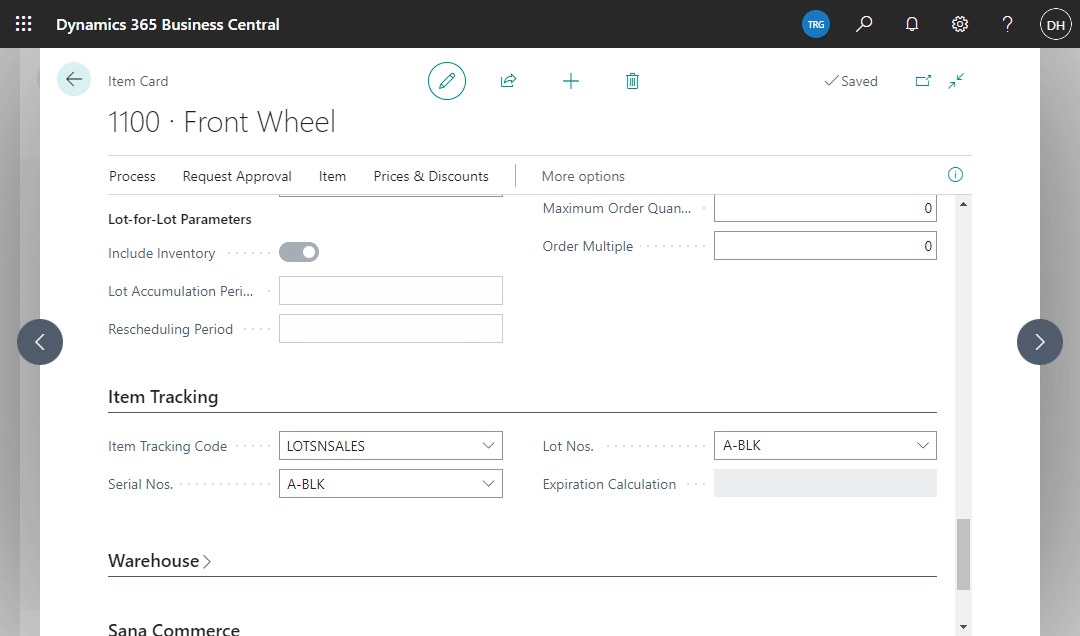
Item tracking is the Business Central framework used to manage lot numbers, serial numbers, and package numbers. Businesses assign an item tracking code to an item to define the tracking rules that apply to it.
For example, an organization can configure an item so that users must record a lot number when inventory is received and again when it leaves inventory. Another item may require a unique serial number for each individual unit.
Item tracking codes can also define whether tracking information is required during warehouse activities and whether the company needs to capture expiration or warranty information. The important distinction is that item tracking does more than show how many units are available. It creates an identity for specific inventory.
If a company has 1,000 units of an item in stock, standard inventory records can show the quantity and location. Lot tracking can divide those units into the batches they came from. Serial number tracking can go further and identify individual units.
That information becomes especially useful when inventory passes through several steps or locations. Businesses using inventory management solutions with Business Central can connect tracked inventory to purchasing, sales, warehouse, and other operational activity rather than maintaining separate lot or serial records in spreadsheets.
Lot numbers vs. serial numbers: What’s the difference?
Lot numbers and serial numbers both improve inventory traceability, but they identify inventory at different levels.
Lot tracking assigns the same identifier to multiple units that belong to a batch. For example, a food manufacturer could assign one lot number to 2,000 units produced during the same production run.
Serial number tracking gives each unit its own identifier. If a manufacturer produces 100 pieces of equipment, each piece can receive a different serial number.
The right method depends on what the business needs to identify later. If a quality issue would affect an entire production batch, lot tracking may provide the required level of detail. If the business needs to know the history of one specific unit for service, warranty, or quality purposes, serial number tracking may be more appropriate.
Some organizations use both. A manufacturer, for example, may consume lot-tracked components to produce finished products that each receive a unique serial number.
How to set up lot and serial number tracking in Business Central
Effective tracking starts with the right configuration. Businesses should decide what they need to trace before assigning tracking requirements to items.
Create an item tracking code
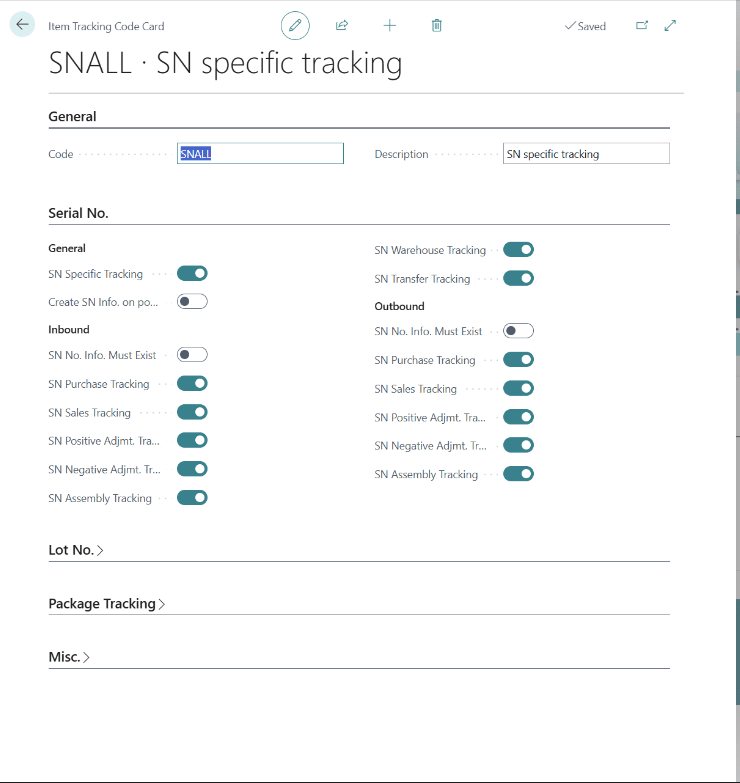
The Item Tracking Code Card defines the tracking rules that Business Central applies to an item. Organizations can configure lot-specific tracking, serial-specific tracking, or both depending on the product. The setup determines when Business Central expects tracking information to be entered during transactions.
Decide when tracking is required
Not every item needs the same rules. A distributor may need to record supplier lot numbers at receipt and identify the lot shipped to a customer. A manufacturer may also need lot information when components are consumed during production and serial numbers when finished goods are created. Businesses should map these requirements before configuring the item tracking code. Making tracking more restrictive than the process requires can create unnecessary data entry, while making it too loose can leave gaps in the traceability history.
Configure warehouse tracking when needed
Businesses that need lot or serial information during warehouse activity should also configure the appropriate warehouse tracking settings. This becomes important when warehouse employees perform activities such as receiving, putting away, moving, picking, or shipping tracked inventory. For a broader look at how these processes fit together, see warehouse management features in Dynamics 365 Business Central.
Configure expiration and warranty requirements
The item tracking code can also define rules for expiration and warranty information. These settings are useful when the company needs more than the tracking number itself. For example, a business can require an expiration date when inventory enters the system or calculate expiration dates according to its setup.
Assign the item tracking code to the item
Once the rules are established, the appropriate item tracking code is assigned to the item. The item can also have number series for lot or serial numbers when the business wants Business Central to help generate identifiers rather than relying only on externally assigned numbers.
How Business Central tracks items across the inventory lifecycle
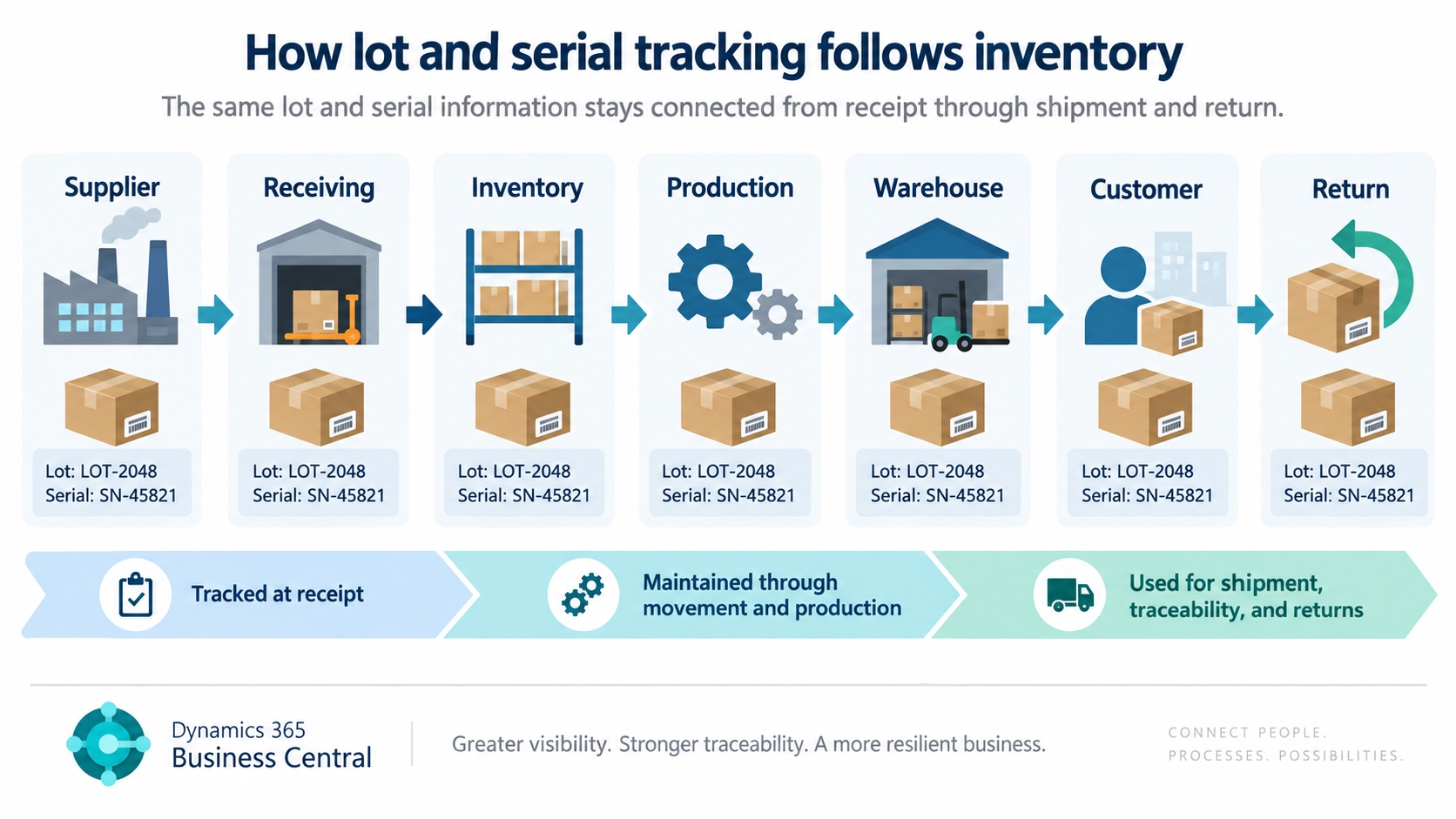
The value of item tracking becomes clearer when a lot or serial number follows inventory across multiple processes. Business Central can maintain that tracking information as items are received, stored, moved, consumed in production, shipped, transferred, or returned.
This creates a connected history of the item throughout its lifecycle. Instead of reviewing separate purchasing, warehouse, production, and sales records, users can trace the same lot or serial number across the transactions where it was used.
Purchasing and receiving
For an inbound purchase, users can record a lot or serial number through the Item Tracking Lines associated with the transaction. The number may originate with the supplier, or the company may assign its own identifier. This creates the starting point for traceability. If a vendor later reports a problem with a specific batch, the organization can investigate what happened to that inventory after receipt.
Inventory and warehouse movements
Tracking information stays connected to inventory as it moves between locations and through applicable warehouse activities. Consistent tracking is important throughout the process. Capturing a lot at receiving provides limited value if the same tracking information is not maintained during later movements, picks, or shipments.
Manufacturing and assembly
Item tracking is especially useful for manufacturers that need to understand both the components consumed and the finished products produced.Business Central manufacturing can use tracked components during production and assign tracking information to finished output.
For example, a manufacturer may purchase a component under lot COMP-100 and use it to build several serialized finished products. If the supplier later reports a defect in COMP-100, the posted tracking history can help identify which finished products used that lot.
Sales, transfers, and returns
On outbound transactions, users identify the lot or serial numbers being shipped, connecting the tracked inventory to the customer who received it.
Tracking can also be maintained as inventory transfers between locations or returns from customers. A lot or serial number gives employees a starting point for investigating where a returned product came from and what occurred before it was shipped.
How expiration dates, warranty dates, and other tracking attributes work
Lot and serial numbers identify inventory, but some businesses need to capture additional information about tracked products.
Expiration dates
Business Central can associate expiration dates with lot- or serial-tracked inventory. Businesses can configure item tracking rules to require an expiration date or calculate one according to their setup.
The Strict Expiration Posting setting can also prevent expired inventory from being posted outbound when configured appropriately.
This is useful for organizations that manage products with limited shelf life because the expiration date stays connected to the specific tracked inventory rather than only to the item in general. For a closer look at the setup and inventory process, see how to manage lot expiration in Business Central.
First-expired, first-out inventory
Business Central can also support first-expired, first-out (FEFO) picking when the required item tracking and location settings are configured.
With FEFO, eligible inventory with the earliest expiration date is prioritized for picking. This can help businesses reduce the risk of newer inventory being consumed or shipped while older stock approaches expiration.
FEFO depends on the warehouse and item tracking configuration. Simply recording an expiration date does not automatically mean every warehouse process will follow FEFO.
Warranty dates
Warranty information can also be recorded for lot- or serial-tracked items.
For serialized equipment, this can help a business identify whether a specific unit remains within its warranty period. Business Central can calculate a warranty date using a date formula or require users to enter one as part of the tracking information.
Package numbers
Business Central’s item tracking framework also supports package numbers. Although package tracking is separate from lot and serial tracking, it can provide another level of identification for businesses that need to follow packaged groups of inventory.
The goal should not be to collect every possible tracking attribute. Businesses should capture the information they need to make operational decisions, support traceability, and meet applicable business requirements.
How lot and serial tracking supports traceability and recalls
Recording tracking numbers has limited value unless employees can use that data when something goes wrong. Business Central includes Item Tracing and Find Entries functionality to help users investigate lot- and serial-tracked inventory.
Trace inventory backward or forward
If a customer reports a defective product, users can trace the product backward through posted transactions. For a manufacturer, the path might look like:
Customer shipment → finished product serial number → production order → component lot → purchase receipt → supplier
Businesses can also start with the source of a problem and trace forward:
Defective supplier lot → production → finished products → sales shipments → customers
These two directions help businesses investigate both where an affected product originated and where potentially affected inventory was used or shipped.
Use Item Tracing to follow posted transactions
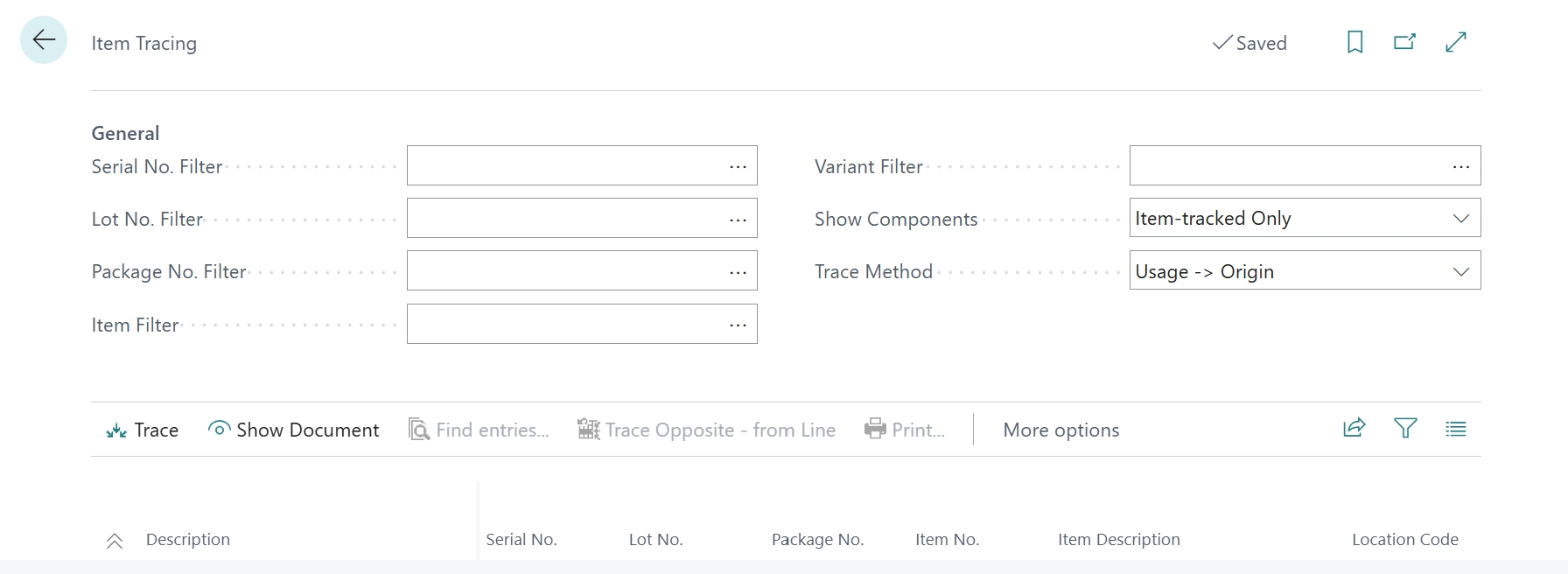
The Item Tracing page can follow item-tracked inventory through a sequence of posted transactions.
Business Central supports tracing from usage to origin, which works backward through the history, or from origin to usage, which works forward. For manufacturers, the trace can also include tracked components consumed during production.
Use Find Entries to identify related activity
Find Entries serves a related but different purpose. While Item Tracing shows the sequence of posted transactions, Find Entries can locate records associated with a lot or serial number, including posted and open records.
For example, a business may trace a defective lot through posted transactions and then check whether that same lot appears on an open sales order that has not yet shipped.
Support product recall investigations
Lot tracking can provide critical information during a product recall. If the organization knows which lot is affected, it can investigate:
- Where the lot originated
- Where the inventory was used
- Which finished products may contain the affected material
- Which customers received affected products
- Whether related inventory remains on hand
- Whether the tracking number appears on open transactions
Business Central provides inventory traceability that can support a recall investigation. However, inventory traceability and complete recall management are not the same thing.
A regulated business may also need formal quality workflows, regulatory documentation, approvals, notifications, corrective actions, or other industry-specific controls. Those requirements should be evaluated separately rather than assuming that lot tracking alone satisfies them.

Improve inventory traceability in Business Central
Need a more reliable way to track inventory from receipt through shipment? Rand Group can help configure Business Central around your inventory, warehouse, and manufacturing processes.
What can Business Central track natively, and when might you need more?
Business Central covers many common lot and serial tracking requirements out of the box. The main question is whether those native capabilities are enough for the complexity of your warehouse, quality, compliance, and reporting processes.
Native functionality should be the starting point. If Business Central can support the process without creating unnecessary work, an add-on may not be needed. More complex warehouse, quality, labeling, regulatory, or reporting requirements may justify an extension, integration, or custom solution. For example, organizations with more advanced scanning requirements should evaluate barcoding and scanning solutions as part of their warehouse design.
What should you plan before implementing item tracking?
Item tracking affects more than configuration. The design needs to reflect how employees receive, move, produce, ship, return, and investigate tracked inventory. Before go-live, plan for:
- Define what actually needs to be tracked. Determine which items need lot-level, serial-level, expiration, warranty, or other traceability. Do not add tracking requirements without a clear operational or reporting reason.
- Map where tracking data enters the process. Decide whether numbers come from suppliers, are generated internally, or both. Identify who captures them during receiving, production, transfers, picking, shipping, and returns.
- Test real operational scenarios. Use the same purchase, production, warehouse, transfer, and return processes employees will use after go-live. A basic receipt-and-shipment test is not enough for a complex operation.
- Plan for exceptions. Define how employees will handle incorrect tracking numbers, expiration-date changes, returns, reclassification, and supplier quality issues.
- Test traceability in both directions. Start with a supplier lot and trace it to affected products and customers. Then start with a customer lot or serial number and trace it back to its source.
- Include migration and end users in the design. Decide which existing lot, serial, expiration, and warranty data must move into Business Central. Have warehouse, production, quality, customer service, and finance users test realistic transactions before go-live.
The goal is not simply to make item tracking work technically. It is to create a process employees can follow consistently while giving the business reliable information when an issue occurs.
Why choose Rand Group as your Dynamics 365 Business Central partner?
Lot and serial tracking is one example of why a Business Central implementation should be designed around the whole business rather than individual features. Decisions in inventory can affect purchasing, manufacturing, warehouse operations, fulfillment, finance, reporting, integrations, and customer service.
Rand Group approaches Business Central implementation by understanding how those processes connect. That includes evaluating configuration as well as Business Central integrations, reporting requirements, and Business Central data migration when they are part of the project.
The impact of connected processes is reflected in the experience of Bartek Ingredients, a Rand Group client:
“Without Business Central and Power Apps, we couldn’t keep up with what our customers expect. Now we can trace anything across the entire ecosystem, reduce waste, and make smarter business decisions quickly.” – Steven Chambers, Chief Financial Officer, Bartek Ingredients
This broader approach helps organizations decide where standard Business Central functionality is sufficient and where an app, integration, or customization provides a stronger fit. Rand Group can support both new implementations and existing Business Central environments that need optimization or additional functionality as requirements change.
Key takeaways
- Dynamics 365 Business Central includes native lot and serial number tracking through item tracking codes.
- Lot numbers identify batches of inventory, while serial numbers identify individual units.
- Tracking information can follow inventory through purchasing, production, warehouse activity, transfers, sales, and returns.
- Item Tracing and Find Entries help users investigate tracked inventory backward to its source or forward to its use.
- Businesses should evaluate warehouse, quality, compliance, scanning, and reporting requirements before deciding whether native Business Central functionality is enough.
Frequently asked questions
Does Dynamics 365 Business Central have lot tracking?
Yes. Business Central includes native lot tracking through item tracking codes. Businesses can record lot numbers as inventory enters, moves through, and leaves the organization, depending on how the tracking rules and warehouse processes are configured. For more information about Business Central’s broader inventory capabilities, see this overview of Dynamics 365 Business Central modules.
Does Business Central support serial number tracking?
Yes. Business Central can assign and track serial numbers for individual inventory units. Serial tracking is useful when a business needs unit-level identification for products such as machinery, equipment, electronics, or medical devices.
What is the difference between lot and serial number tracking in Business Central?
A lot number identifies a group of units, while a serial number identifies one individual unit. Lot tracking works well when products need batch-level traceability. Serial number tracking provides more detailed unit-level history.
Can Business Central trace a lot from a supplier to a customer?
Business Central can trace lot- and serial-tracked inventory backward and forward through posted transactions. Depending on the transactions and tracking configuration, users can follow inventory from receipt or production through its later use and shipment.
Can Business Central help with product recalls?
Yes. Business Central’s item tracking functionality can support recall investigations by helping businesses determine where a tracked item came from and where it was used or shipped. However, Business Central item tracking should not be treated as a complete regulatory recall management system. Businesses with industry-specific requirements may need additional workflows, documentation, reporting, or applications.
Can Business Central track expiration dates?
Yes. Expiration dates can be associated with lot- or serial-tracked inventory. Business Central can also support FEFO picking when the applicable item tracking and location requirements are configured.
Can Business Central track warranties by serial number?
Yes. Item tracking codes can include warranty settings for serial- or lot-tracked inventory. Businesses can use a warranty date formula or require a warranty date to be entered.
Build better inventory traceability with Business Central
Lot and serial number tracking in Dynamics 365 Business Central can create a reliable history of where inventory came from, how it moved through the business, and where it went. When the setup reflects real purchasing, manufacturing, warehouse, and fulfillment processes, that history can support everyday inventory control as well as quality investigations, expiration management, customer questions, and recalls.
The most effective tracking process gives the business the traceability it needs without creating unnecessary work for employees. If you are implementing Business Central or improving an existing environment, contact Rand Group to evaluate how Business Central can support your broader inventory and operational requirements.