Dynamics 365
 Power Platform
 Dynamics
 Cloud & Productivity
Microsoft Dynamics 365 Business Central integration guide

Business Central integration connects your ERP system to the software your organization relies on every day, from CRM and ecommerce platforms to finance, reporting, and operations tools. When systems do not communicate, teams spend more time fixing issues than moving work forward. Data becomes fragmented, reporting loses credibility, and decisions slow down.
This blog is your ultimate guide to Business Central integration, explaining how integration works, what systems Business Central can connect to, and how to avoid the most common risks when building an integrated environment.
- What is Microsoft Dynamics 365 Business Central?
- What does integration mean in ERP?
- Business Central integration benefits
- What can Business Central integrate with?
- Native integration across the Microsoft ecosystem
- Types of Business Central integration approaches
- Common Business Central integration scenarios
- Integration costs and timelines
- Integration challenges and risks
- Choosing the right Business Central integration partner
- Frequently asked questions (FAQs)
What is Microsoft Dynamics 365 Business Central?
Microsoft Dynamics 365 Business Central is a cloud-based ERP system built for small and mid-sized businesses that need better control over their operations. It connects finance, sales, inventory, purchasing, and customer data in one system. Instead of working across disconnected tools, teams manage daily work from a single platform with shared data and consistent processes. This foundation is critical for reliable Business Central integration.
Business Central acts as the system of record for your organization. It tracks financial transactions, manages orders, monitors inventory, and supports project delivery. Because everything runs through one platform, reporting becomes more accurate and operations run more smoothly.
Business Central is part of the Microsoft Dynamics 365 ecosystem. It integrates natively with Microsoft 365, Power Platform, and other Dynamics 365 applications. Users can work in Outlook, analyze data in Power BI, and automate tasks with Power Automate while staying connected to the ERP. This built-in connectivity is a major advantage when designing an effective Business Central integration strategy.
To learn more about what Business Central is, its capabilities, benefits, and more, read our blog on What is Business Central?

What does integration mean in ERP?
Integration is the process of connecting systems so data and processes flow automatically between them instead of being managed in isolation. With effective Business Central integration, information moves automatically between platforms, so teams stop entering the same data in multiple systems. This improves accuracy, speeds up daily work, and gives the business a consistent view of operations.
True integration goes beyond copying data between applications. It connects processes so activity in one system triggers updates in others. For example, when sales enters an order, inventory, accounting, and customer records update together. Integration can move data in one direction or both directions. It can run in real time or on a scheduled basis, depending on how fast the information needs to update. In Business Central, scheduled integrations are often managed through Job Queues, which control when tasks such as data imports, exports, and system updates run in the background.
Every integrated environment also uses a system of record. This is the platform that owns specific data and controls the final version. For example, Business Central may act as the system of record for financial and operational data, while other systems send or receive information. When roles are defined clearly, Business Central integration delivers more reliable reporting, fewer conflicts, and better control over business data.
Business Central integration benefits
Without integration, systems operate in isolation. Teams re-enter data, reconcile reports manually, and work from incomplete information. Over time, this leads to reporting errors, slow processes, and poor visibility across departments. Without reliable Business Central integration, leadership decisions are often based on outdated data, and operations become harder to control.
When systems are integrated, the business operates from one set of data instead of many versions of the truth. Finance, sales, operations, and service all work from the same information. As a result, performance improves, risk decreases, and reporting becomes easier to trust. Business Central integration moves the business from reactive problem-solving to controlled operations.
Key benefits include:
- Reduced manual data entry: Information flows automatically between systems instead of being retyped.
- Fewer errors: Automation removes the risk that comes from manual updates and duplicate records.
- Faster financial close: Transactions post correctly the first time, reducing reconciliation and rework.
- Improved order accuracy: Sales, inventory, and billing stay in sync across platforms.
- Better customer experience: Teams see complete customer data in one place.
- Stronger reporting and analytics: Reports pull from consistent data instead of spreadsheets.
- Reduced data duplication: Each system shares the same records instead of maintaining copies.
- Faster approvals and workflows: Automation removes delays caused by email and handoffs.
- Improved visibility across teams: Departments operate from shared data instead of separate systems.
- Scalable system architecture: New systems connect without breaking existing processes.

Ready to connect your systems?
Find out where your systems are disconnected and how to fix them. A focused integration assessment helps you identify risks, eliminate manual work, and design a cleaner data flow across your technology stack.
What can Business Central integrate with?
Business Central integration allows your ERP system to connect with nearly every platform your business depends on each day. Instead of managing data in separate tools, integration creates a connected environment where information flows automatically. As a result, finance, operations, sales, and service all work from the same data. This improves accuracy, reduces delays, and creates a clear view of the business.
Native integration across the Microsoft ecosystem
Business Central integrates natively with other Microsoft tools, making the Microsoft ecosystem one of the easiest environments to connect and maintain over time. When companies use Business Central with Microsoft 365, Power Platform, and other Dynamics 365 applications, many integrations require little or no custom build. User identity, permissions, data access, and security are already aligned through Microsoft’s cloud infrastructure.
Out of the box, Business Central connects directly with tools such as Outlook, Teams, Excel, Power BI, Power Automate, and other Dynamics 365 apps like Sales and Field Service. These built-in connections reduce integration effort, simplify ongoing maintenance, and lower long-term cost. For organizations already using Microsoft products, this native interoperability is often the fastest path to a connected system.
However, Microsoft-native integrations do not eliminate the need for integration design. Many organizations still require API-based connections, middleware, or custom workflows to support third-party platforms, legacy systems, or industry tools. Native integration provides a strong foundation, but most environments still rely on additional integration methods to build a complete, end-to-end system.
Types of Business Central integration approaches
Business Central integration can be delivered in several ways depending on system complexity, data volume, and how quickly information must move between systems. Some integrations use real-time web services. Others rely on middleware or scheduled file transfers. Microsoft also provides pre-built integrations, such as Business Central and Shopify, but many systems still require API or middleware design. The right approach depends on how critical the data is, how frequently it changes, and how tightly systems must stay aligned.
Web services (API-based integrations)
Business Central supports integration through web services, including REST APIs and OData endpoints, with legacy SOAP services still available for backward compatibility. These services allow external systems to read and write data in Business Central either in real time or on a scheduled basis. At Rand Group, we use Microsoft-supported standards to connect Business Central to cloud platforms, enterprise systems, and on-premise applications securely and reliably.
Microsoft recommends using REST APIs as the primary integration method for new Business Central projects because they are designed for performance, scalability, and modern application architecture. API-based integrations support full create, update, delete, and query operations across business data such as customers, vendors, invoices, inventory, and journals. To protect data integrity, Business Central enforces OAuth 2.0 authentication and role-based permissions for all API access in cloud environments, ensuring deliberate control over who can read and write data.
API-based integrations are best suited for scenarios where systems must stay synchronized. Examples include connecting ecommerce platforms to inventory, syncing CRM data with finance, or posting service transactions automatically. This approach provides the highest level of control and performance, but it also requires development resources, ongoing maintenance, and proper API management to remain stable and scalable over time. When built correctly, it delivers the most reliable and future-proof form of Business Central integration.
Third-party integration tools (middleware)
For organizations that want less custom development, middleware platforms offer a flexible way to connect systems using low-code or no-code tools. These platforms act as a bridge between Business Central and other software, transforming and routing data between systems without heavy custom logic. This keeps integrations flexible without requiring heavy custom development.
Rand Group works with platforms such as TIBCO Cloud Integration (formerly Scribe Online) to deliver reliable system connections when speed matters. These tools offer drag-and-drop configuration, pre-built connectors, and support for databases, APIs, and cloud services. Middleware is a strong option when multiple systems must connect, standard integration patterns exist, internal IT resources are limited, or faster implementation is needed.
Rand Group also built Beehive Integration Manager, our own integration management platform for more advanced use cases. Beehive is designed for environments where multiple systems exchange high volumes of data and where visibility and control matter. It centralizes monitoring, error handling, reconciliation, and rollback in one platform, giving teams confidence that integrations are stable and recoverable.

File-based import and export
File-based integration is the simplest approach. Data is exported from one system and imported into Business Central using files such as spreadsheets or flat files. This method is often used when real-time data is not required.
For example, payroll may only run twice a month. In that case, a scheduled export and import is often enough. File-based integrations are quick to implement and inexpensive. However, they rely on manual processes and do not support automation or continuous synchronization. They also require manual oversight and are more error-prone than automated integrations.
Choosing the right approach
Selecting the right Business Central integration approach is not just a technical decision. It affects data accuracy, daily operations, and how easily your systems can scale. Some integrations must run in real time to support billing, inventory, or customer service. Others only need periodic updates. The greater the business dependency on the data, the stronger and more automated the integration should be.
Microsoft does offer some pre-built integrations, such as Business Central and Shopify, which can simplify setup and reduce development time. However, not every system has a pre-built connector. Many platforms require API-based integration, middleware, or file transfers to move data reliably. The right approach depends on how many systems are involved, how often information changes, and whether your processes can follow standard patterns or require customization.
Common Business Central integration scenarios
Business Central integration is most effective when it directly supports daily operations. These scenarios show how Business Central works alongside other systems to eliminate manual work, improve accuracy, and give teams real-time access to information. Each example reflects real-world use cases where integration delivers measurable business value.
Business Central + Dynamics 365 Sales
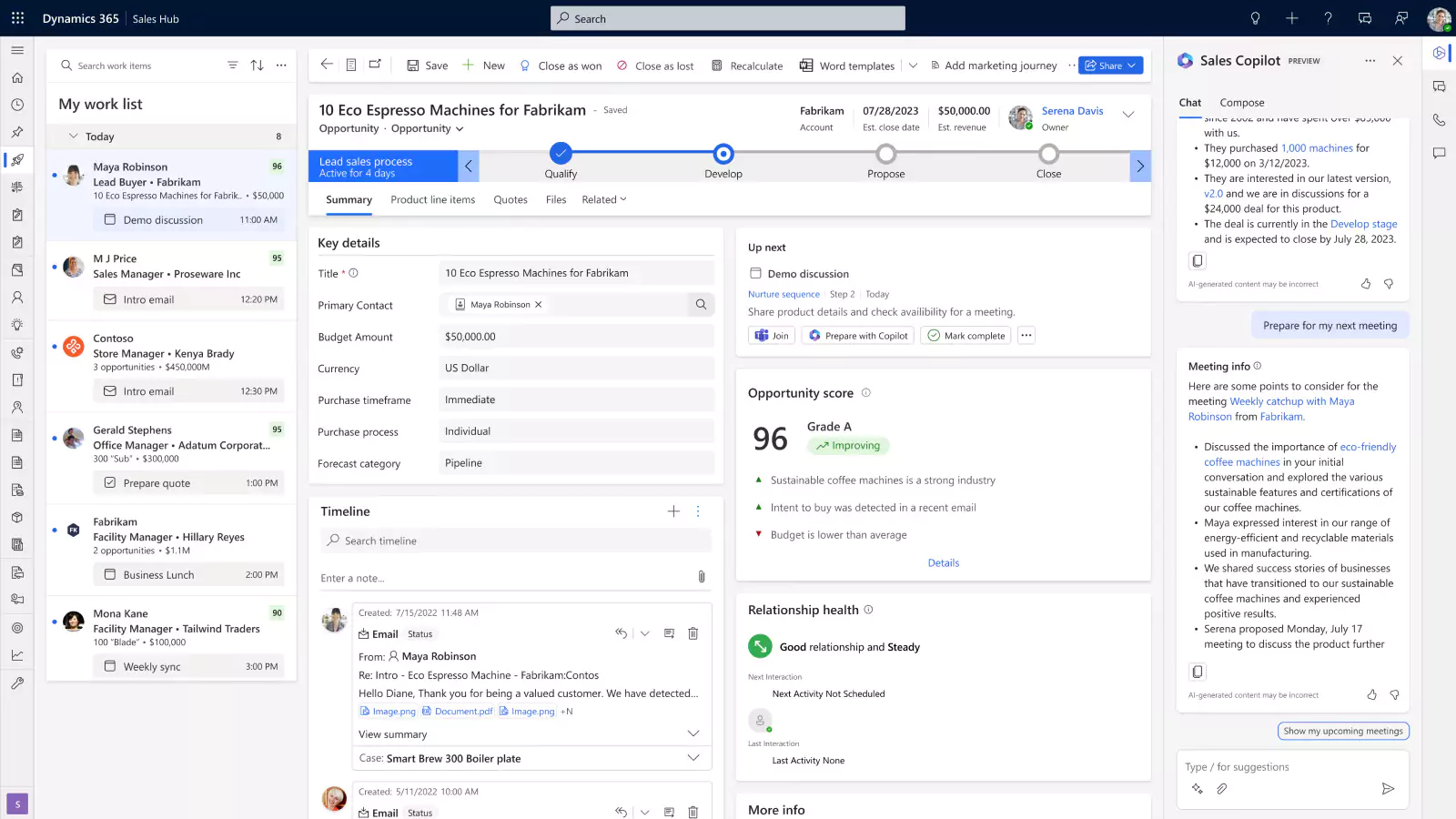
Integrating Business Central with Dynamics 365 Sales connects your ERP and CRM into a single operating model. Customer details, orders, invoices, and inventory data move automatically between systems. As a result, sales and finance teams work from the same information and no longer rely on manual updates or spreadsheets.
Key benefits:
- Real-time visibility into customer history and open orders
- Faster quote-to-cash processes
- Fewer billing and order errors
- Improved collaboration between sales and finance
- More accurate revenue forecasting
Business Central + Dynamics 365 Field Service
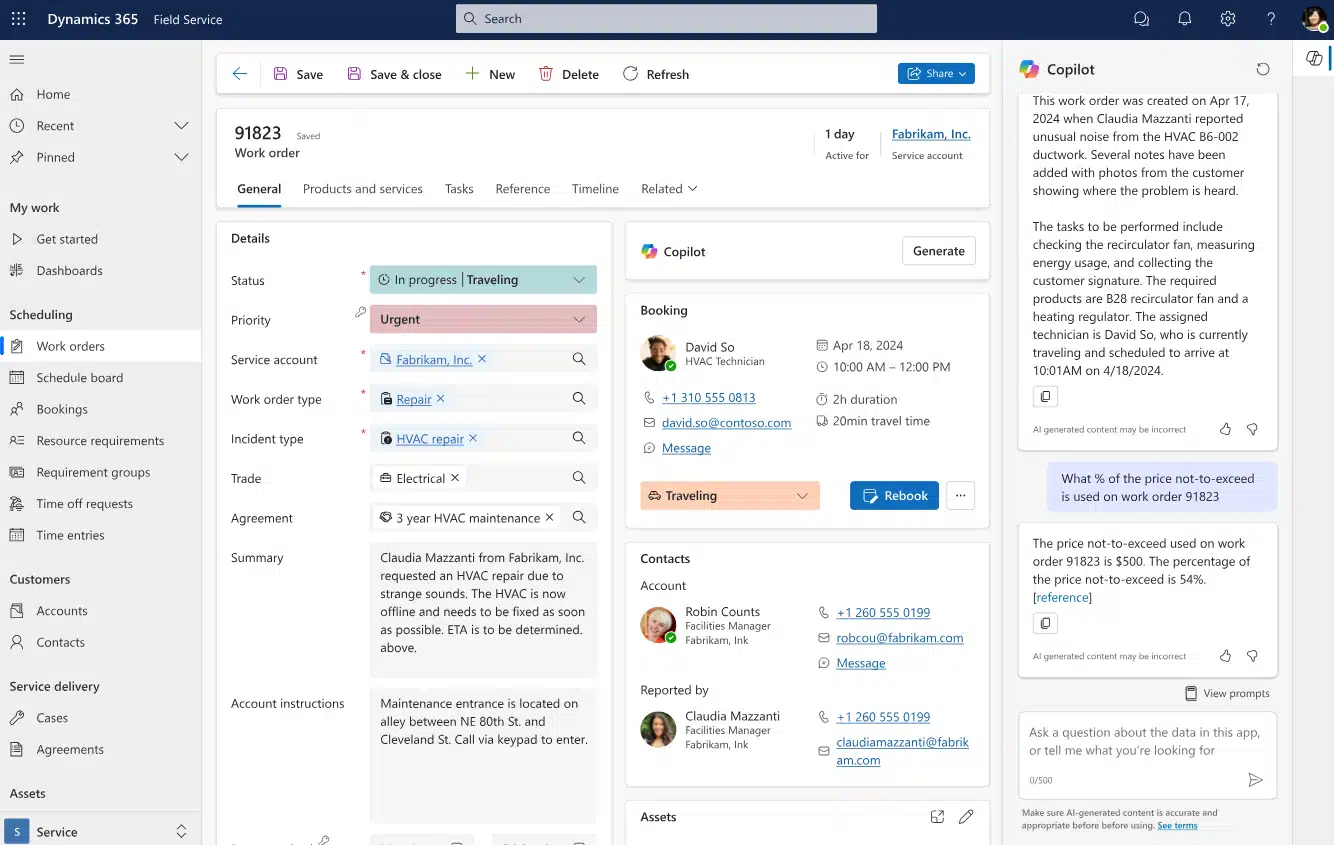
Integrating D365 Field Service with Business Central connects field operations directly to financial systems. When technicians complete work in the field, time, parts, and expenses flow into Business Central immediately. Invoices are generated faster, inventory updates automatically, and job data stays accurate.
Key benefits:
- Faster billing and improved cash flow
- No duplicate entry between field and accounting systems
- Real-time job cost tracking
- Better inventory control
- Higher customer satisfaction
Business Central + Shopify
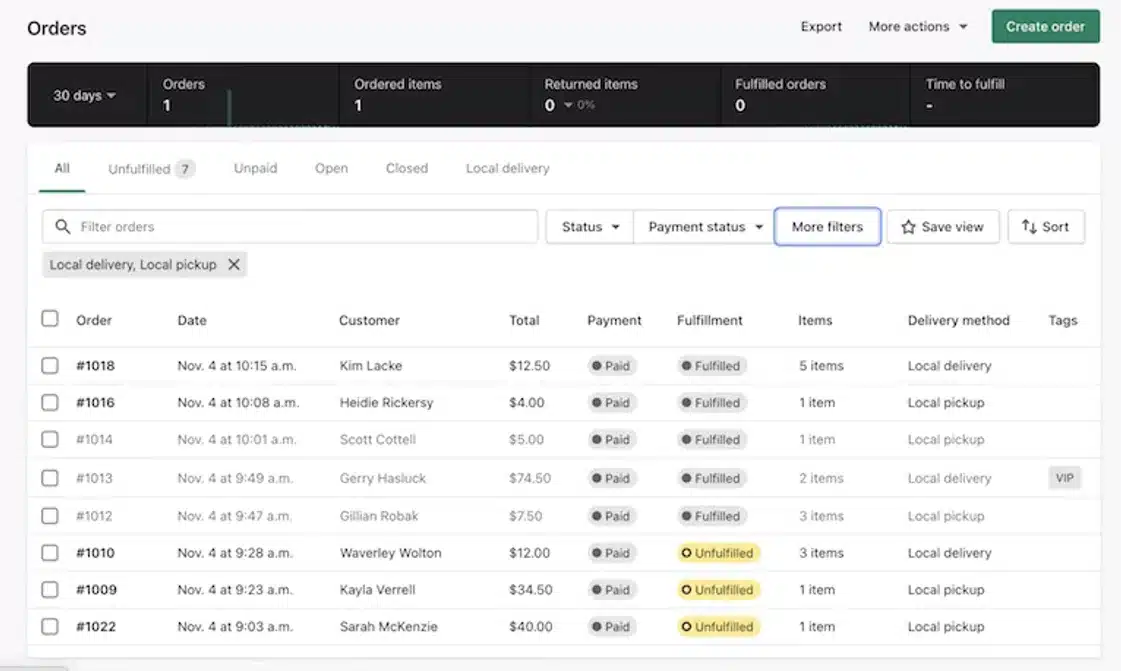
Connecting Shopify to Business Central creates a single system for e-commerce and back-office operations. Orders, inventory, customers, and payments sync automatically. Your storefront and ERP operate as one system instead of two disconnected platforms.
Key benefits:
- Accurate inventory across channels
- Fewer fulfillment errors
- Automated order processing
- Faster shipping
- Improved customer experience
Business Central + Power BI
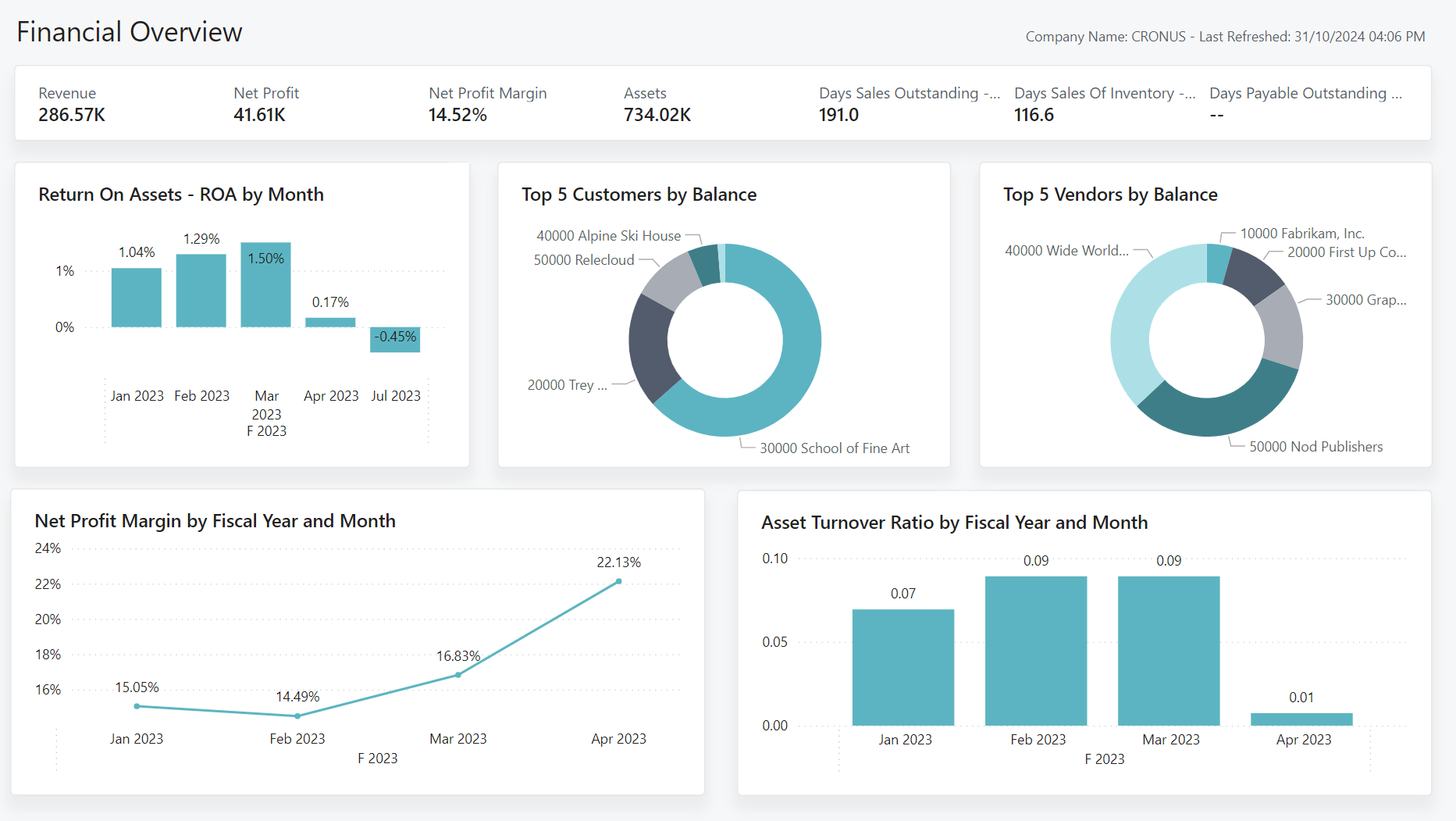
Integrating Power BI with Business Central transforms data into dashboards and real-time reports. Data flows automatically, eliminating manual exports and spreadsheet manipulation. Leaders gain immediate insight into operations, finance, and performance.
Key benefits:
- Real-time reporting
- Clear performance visibility
- Faster decision-making
- Automated reporting processes
- Better use of business data
Integration costs and timelines
The cost and timeline of Business Central integration depend on how complex the connection is, how frequently data moves, and how much customization is required. Some integrations are largely configuration work. Others require custom development, testing, and ongoing monitoring. As complexity increases, so do effort, timeline, and long-term support needs.
Even when a pre-built connector exists, setup, validation, and testing are still required in both systems to ensure data flows correctly. File-based integration is often the fastest and least expensive option, but it does not provide real-time updates and depends on manual oversight to stay reliable. Custom integrations require additional planning and development effort, including requirements review, testing, documentation, and ongoing maintenance to keep data accurate and systems stable.
Below are three common integration examples with typical effort ranges based on real-world projects. These figures are estimates for planning purposes only. Actual effort and cost will vary based on system complexity, data quality, security requirements, and scope.
What drives cost and timeline
Several factors influence where your project lands in these ranges:
- Number of systems: Each additional system increases configuration, testing, and monitoring.
- Data complexity: The more fields and rules involved, the more design is required.
- Real-time requirements: Faster updates require stronger infrastructure and testing.
- Customization level: Custom workflows and logic raise development effort.
- Integration method: Native tools cost less than custom API development.
- Data cleanup needs: Poor data quality adds time and rework.
- Security and compliance: Extra controls require more setup and testing.
- Testing scope: End-to-end testing protects reliability but extends timelines.
- Ongoing maintenance: Updates, monitoring, and support add to total cost of ownership.
- Change planning: Future system upgrades must be considered from day one.
Integration challenges and risks
Even with the right tools, Business Central integration introduces risks if it is not designed carefully. Poor architecture can lead to broken workflows, inaccurate reporting, and unstable systems. When integration fails, teams lose trust in the data and return to spreadsheets and manual work. Over time, the cost of fixing issues increases and performance suffers across the business.
Common challenges include:
- Data mapping errors: Fields do not align correctly between systems.
- Inconsistent data rules: Different platforms store information in different formats.
- API limitations: Some systems restrict what data can be accessed.
- Performance issues: High volumes can slow systems down.
- Security gaps: Weak access controls can expose sensitive data.
- Error handling failures: Issues go unnoticed without monitoring and alerts.
- Upgrade conflicts: Changes can break integrations if not managed properly.
This is why the integration partner matters. Experience determines how well systems scale and how easily issues are resolved. The right partner builds Business Central integration for long-term performance, not just initial setup.
Choosing the right Business Central integration partner
Your integration partner directly affects long-term system performance. Business Central integration is not just about connecting software. It determines how clean your data stays, how stable your system runs, and how easily your business can scale. A weak design leads to broken syncs, reporting errors, and constant rework. A strong design builds reliability, flexibility, and control into daily operations.
Rand Group brings multi-platform integration experience across ERP, CRM, e-commerce, analytics, and industry systems. We work beyond Microsoft to connect Business Central with third-party platforms, proprietary applications, and legacy systems. Our team designs integrations around real business workflows, not vendor limitations. The result is a technology stack that works together instead of fighting itself.
How Rand Group supports Business Central integration:
- Multi-platform expertise: We can integrate Business Central with Microsoft tools, third-party platforms, and proprietary systems within your technology stack.
- Full lifecycle delivery: We manage architecture, development, testing, and deployment so projects remain predictable and controlled.
- Custom engineering: We build and maintain APIs for complex workflows and systems that lack native connectors.
- Data-first architecture: We establish data ownership, transformation rules, and controls to keep information accurate across systems.
- Ongoing optimization: We monitor performance and improve workflows after go-live instead of disappearing at deployment.
- Proven delivery approach: We build structured, reliable integrations built for scale.

Get a Business Central integration assessment
Every business has different integration requirements. Rand Group reviews your current systems and builds a tailored plan for connecting Business Central to the rest of your technology stack. Our specialists identify risks, eliminate inefficiency, and design a path forward that fits your operations.
Frequently asked questions (FAQs)
These answers address the most common integration questions from Business Central users.
What systems does Business Central integrate with?
Business Central can be integrated with any of your business software, including CRM, e-commerce platforms, payment systems, reporting tools, field service software, project management apps, and custom systems. Many companies integrate systems like Dynamics 365, Shopify, Power BI, payroll platforms, and warehouses into one connected environment.
Can Business Central integrate with non-Microsoft systems?
Business Central integration is not limited to Microsoft products. It connects with third-party systems such as Shopify, HubSpot, payment processors, EDI platforms, and proprietary software using APIs, middleware, or custom integrations.
Is Business Central integration real-time?
Integration can be real-time or based on scheduled updates. Operational systems often use real-time integration, while reporting tools may update hourly or overnight. The right method depends on how frequently the data must change.
Can Business Central integrate with legacy systems?
Business Central integration can include older systems using custom APIs, middleware, or file-based connections. This allows companies to modernize without replacing every system at once.
Why work with Rand Group for Business Central integration?
Rand Group supports multi-platform integration across ERP, CRM, e-commerce, analytics, and custom systems. We design integrations to be reliable, maintainable, and flexible as your business grows.
Can Rand Group integrate Business Central with our existing systems?
We specialize in integrating Business Central into real environments that include third-party platforms, internal tools, and legacy systems.
Next steps
Business Central integration plays a direct role in how reliable your systems are and how efficiently your teams work. When integration is poorly designed, data becomes harder to trust and operations slow down. When it is done well, information flows cleanly across the business.
Business Central integration works best when it is planned, tested, and maintained with long-term use in mind. The more systems involved, the greater the need for clean data design and controlled workflows. If you want help assessing your environment or improving your current setup, contact Rand Group to discuss the best next step.