Dynamics 365
 Power Platform
 Dynamics
 Cloud & Productivity
Rebate management in Dynamics 365 Business Central: Discounts, rebates, and app functionality

Rebate management in Business Central can become important for companies that offer customer incentives or earn vendor rebates based on purchasing volume. As rebate programs grow, keeping agreements, qualifying transactions, accruals, and settlements connected becomes harder to manage manually.
Microsoft Dynamics 365 Business Central includes native pricing and discount tools, but it does not include dedicated rebate management functionality. Rand Group’s Rebates app for Dynamics 365 Business Central adds the tools needed to set up rebate programs, calculate and accrue rebate amounts, track activity, and process settlements directly within Business Central.
At a glance
Dynamics 365 Business Central does not include dedicated native rebate management functionality, although it does provide standard pricing and discount tools. Rand Group’s Rebates app extends Business Central with customer and vendor rebate programs, dollar- and volume-based calculations, tiered structures, accruals, settlement processing, and rebate tracking. Rebate programs can be processed by transaction or periodically based on the agreement. For businesses managing rebates in spreadsheets or separate systems, the app brings the rebate lifecycle into the same Business Central environment as the underlying sales, purchasing, and financial activity.
What is rebate management?
Rebate management is the process of defining rebate agreements, determining which transactions qualify, calculating the amount earned or owed, recording the financial impact, and settling the rebate.
A rebate differs from a simple price reduction because the final amount may depend on activity that builds over time.
For example, a distributor might agree to give a customer a rebate after the customer purchases a certain dollar amount during a quarter. A manufacturer may have a vendor agreement that pays a higher rebate once purchasing reaches a defined volume. Finance needs to know how much rebate has been earned or owed, what transactions support the calculation, what has been accrued, and what has already been settled.
The math may be simple for one agreement. The process becomes harder when a company manages many customers, vendors, items, rates, tiers, and settlement periods.
Does Dynamics 365 Business Central include native rebate management functionality?
The direct answer is no. Business Central does not include a dedicated native rebate management module.
Business Central does include native tools for managing sales and purchase prices and discounts. Microsoft documents line discounts, invoice discounts, customer-specific pricing, vendor pricing, quantity-based discounts, and price lists. These tools adjust what a business charges or pays on sales and purchase documents.
Rebate management introduces a different set of requirements. A company may need to:
- Establish customer or vendor rebate programs
- Calculate rebates from dollar or volume thresholds
- Use tiered rebate rates
- Accrue rebate amounts before settlement
- Track rebate status separately from the original invoice
- Connect the qualifying transaction, accrual, and final settlement
For Business Central users, that means more advanced rebate requirements typically need to be handled through an extension, customization, or another purpose-built solution.
What is the difference between rebates and discounts in Business Central?
Rebates and discounts can both lower the effective price of a product or service, but they usually work at different points in the transaction process.
A discount normally changes the price paid or charged on the sales or purchase document. Business Central natively supports line and invoice discounts, including discounts based on factors such as customer, vendor, item, quantity, and invoice value.
A rebate may be based on activity across one or many transactions. The business may need to calculate the rebate, recognize an accrual, and settle it separately from the transaction that generated it.
That difference matters when a rebate agreement cannot be handled simply by lowering the price of an individual transaction.
Why manual rebate management in Business Central creates risk
When rebate agreements and calculations sit outside Business Central, finance teams often have to connect several sources of information manually.
A spreadsheet may contain rebate percentages, dates, and thresholds, while Business Central contains the underlying sales or purchasing transactions. Finance then has to export the activity, apply the agreement terms, record the accrual, and determine whether the rebate has been settled.
This approach may be manageable when a business has only a few agreements. As the number and complexity of rebate programs increase, teams may spend more time verifying that the correct transactions, rates, thresholds, and statuses are being used.
Common challenges include:
- Qualifying transactions being overlooked during manual data gathering
- Rebate rates or thresholds being applied inconsistently
- Extra work to recreate calculations when questions arise
- Accrual and settlement information being maintained in separate places
- More reconciliation work during month-end close
- Limited visibility into which rebates remain open or have already been settled
The underlying problem is not necessarily the rebate formula. It is keeping the agreement, transactions, accounting, and settlement history connected.

Bring rebate management into Business Central
The Rebates app for Dynamics 365 Business Central keeps rebate agreements and their related financial activity inside the same ERP environment as the sales and purchasing transactions that drive them. That gives finance teams a more structured alternative to maintaining calculations and settlement history in a separate rebate system.
How rebate management works in Dynamics 365 Business Central with the Rebates app
Rand Group’s Rebates app connects the terms of a rebate agreement to qualifying sales or purchasing activity and the accounting that follows. Programs can be configured for different calculation methods, transaction timing, accrual accounts, and settlement requirements.
The process can be summarized as:
Create rebate program → Apply rebate program → Record qualifying activity → Calculate and accrue rebate → Track rebate activity → Settle or void rebate
Before looking at each step, it may help to understand where standard Business Central ends and where the Rebates app adds rebate-specific functionality.
Step 1: Create the rebate program
The process starts on the Rebate Program page, where users define how a rebate should be processed. A rebate program can apply to Sales, Purchasing, or Both. This allows companies to manage customer rebates, vendor rebates, or programs that apply across both sides of the business.
Users also select the type and basis for the rebate. The app supports Dollar and Volume rebate types. Rebate calculations can use a percentage of the line amount, a fixed amount per line, or a tiered calculation.
Additional program settings control items such as transaction timing, settlement options, and the general ledger accounts used for accruals and settlements.

Step 2: Configure rebate tiers when rates change with volume
Some rebate agreements use one rate regardless of activity. Others increase the rebate as sales or purchasing reaches higher thresholds.
The Rebates app supports graduated rebate tiers based on quantity or amount ranges. Users define the range and rebate value for each tier and then reference that tier in the applicable rebate program.
For example, a program could provide one rebate value for the first level of purchasing and increase that value when the next threshold is reached.
This structure gives businesses a way to model agreements that reward higher purchasing or sales activity without maintaining the calculations in a separate spreadsheet.

Step 3: Assign and apply the rebate program
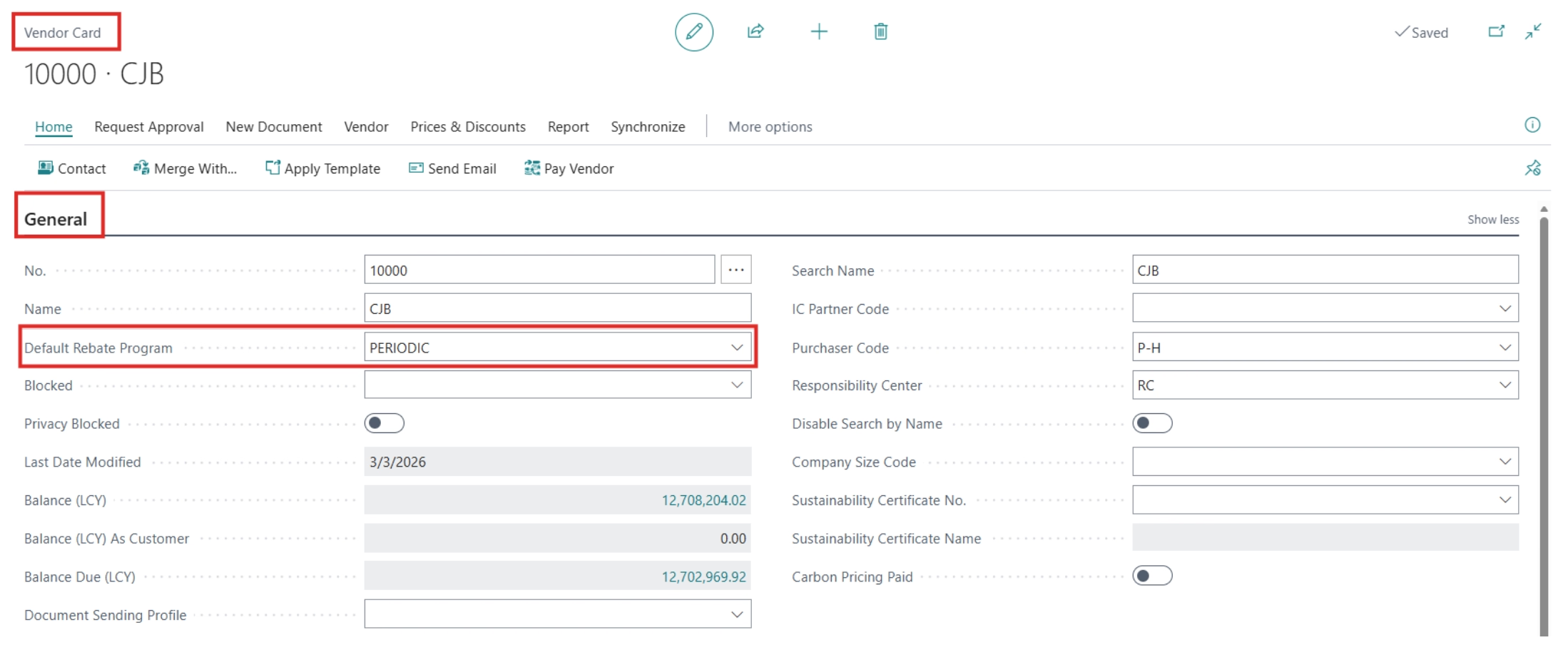
Once the program is configured, a default rebate program can be assigned to a Customer or Vendor master record.
The program selection is limited to programs that apply to the relevant module. When an applicable transaction is created, the rebate program can flow from the customer or vendor record to the document. Users can also change the rebate program on individual lines when a transaction requires different treatment.
This helps keep the agreement associated with the customer or vendor that participates in it rather than relying on employees to identify the correct program outside the ERP.
Step 4: Calculate rebates by transaction or periodically
Not every rebate agreement needs to be calculated on the same schedule.
A Per Transaction program calculates the rebate as qualifying transactions are processed. For these programs, posting an eligible transaction causes the app to calculate and record the rebate accrual based on the program rules.
A Periodic program works differently. Instead of immediately generating the accrual, the app stores the qualifying details in the Rebate Batch Log. Users can then group and calculate those entries periodically.
This approach is useful when the rebate depends on activity accumulated across a period rather than the value of one individual transaction.

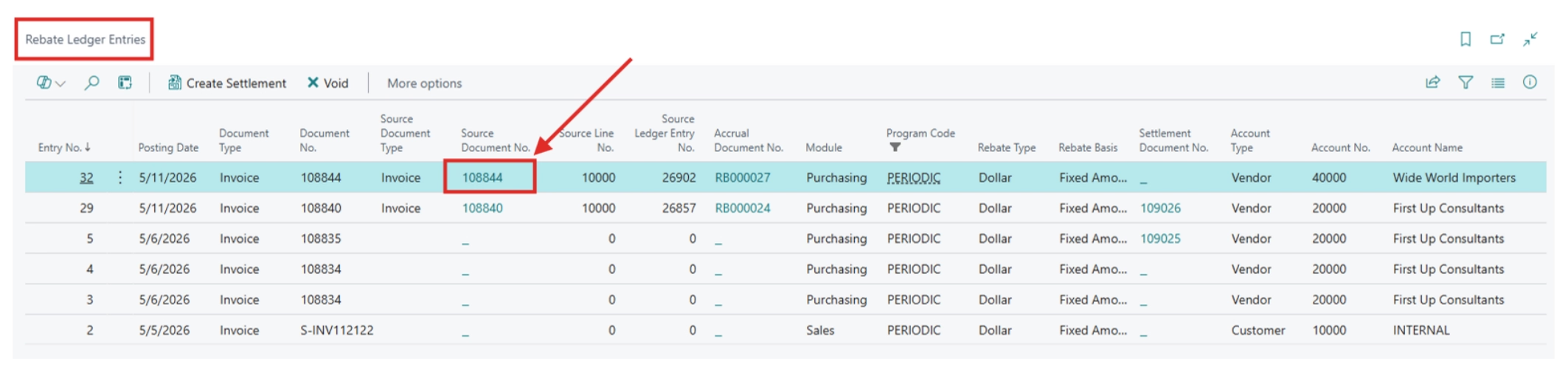
Step 5: Track rebate accruals in the Rebate Ledger
For qualifying rebate activity, the app records information in the Rebate Ledger.
For periodic programs, details first remain in the Rebate Batch Log until the periodic calculation occurs. Those entries are still displayed in the Rebate Ledger.
The Rebate Ledger gives users a centralized view of information such as the:
- Original transaction
- Rebate program
- Accrual amount
- Current status
- Accrual document
- Settlement document
The ledger also provides links back to related documents. Finance teams can therefore trace an entry from the rebate record to the source transaction and supporting accounting activity without recreating the relationship manually.
Step 6: Control eligibility and settle the rebate
Once a rebate is eligible for settlement, users can create the settlement from the Rebate Ledger.
The app can create a credit memo or general journal, based on the settlement method configured for the rebate program. Once the settlement document posts, the rebate status updates and the corresponding debit and credit entries are recorded in the general ledger.
Programs can also use a Paid Invoice Required option. This allows the organization to require the related invoice to be paid before the rebate becomes eligible for settlement.
Rebate entries move through statuses that help users understand where each rebate sits in the process, including Pending, Open, Settlement Created, Settled, and Voided. If an accrued rebate should no longer remain outstanding, the app also includes a process for voiding the rebate and reversing the related accrual.

Which businesses can benefit from rebate management?
The need for rebate management depends more on how a company buys and sells than on its industry. Businesses may benefit when they offer customer incentives, earn supplier rebates, use volume or purchasing thresholds, or manage agreements across multiple transactions.
Industries that commonly use rebate programs include:
- Wholesale distribution: Distributors may earn supplier rebates for reaching purchasing targets while offering incentives to high-volume customers, making rebate visibility important for margin management.
- Food and beverage: Manufacturers, suppliers, and distributors may use volume-based incentives and rebate agreements across complex pricing relationships.
- Manufacturing: Manufacturers may use vendor purchasing incentives or customer rebate programs tied to transaction volume, thresholds, or tiered rates.
If finance regularly needs to determine how much rebate has been earned or accrued, which transactions support it, and whether it has been settled, a more structured rebate process can provide better control and visibility.
Expand beyond rebates with the Revenue & Margin Management Bundle
Rebates may be only one of several processes affecting revenue, margins, and cash flow. Rand Group’s Revenue & Margin Management Bundle for Dynamics 365 Business Central combines five apps for companies that need additional control across related financial and operational processes.
The standalone Rebates app focuses specifically on rebate management. The bundle is designed for organizations that also need tools for commissions, credit, billing relationships, and vendor commitments.

Try rebate management in Business Central for 30 days
See how Rand Group’s Rebates app can help you manage customer and vendor rebate programs, accruals, tracking, and settlement directly within Business Central.
Built for Business Central and supported by Rand Group
Rebate management touches sales, purchasing, customer and vendor records, accounting, and reporting. That makes it important for the rebate solution to work with the ERP processes a company already relies on.
Rand Group developed the Rebates app specifically for Microsoft Dynamics 365 Business Central. The app works within Business Central and includes onboarding assistance, a sandbox environment, upgrades, online training, and support.
Because Rand Group both develops Business Central apps and works with organizations on Dynamics 365 Business Central implementation and optimization, customers can work with the same partner on app deployment, integrations, training, ERP process design, and long-term support.
That combination helps organizations look beyond the rebate calculation itself and consider how rebate management should fit into their wider sales, purchasing, financial, and reporting processes.
Key takeaways
- Dynamics 365 Business Central provides native pricing and discount capabilities, but it does not include a dedicated rebate management module.
- Rand Group's Rebates app adds the program structure, accounting, and settlement processes needed to manage customer and vendor rebates within Business Central.
- Companies can structure rebate programs around dollar amounts, volume, or tiered thresholds and process them by transaction or periodically.
- The Rebate Ledger connects rebate activity with the supporting transaction, accrual, settlement, and status information.
- Companies with broader revenue and margin requirements can also evaluate Rand Group's Revenue & Margin Management Bundle, which includes Rebates and four related Business Central apps.
Frequently asked questions about rebate management in Business Central
Does Dynamics 365 Business Central have rebate management built in?
No. Dynamics 365 Business Central does not include a dedicated native rebate management module. Business Central includes native price lists, line discounts, invoice discounts, and related sales and purchase pricing tools. Rand Group’s Business Central Rebates app adds the rebate-specific program, accounting, tracking, and settlement functionality needed for that workflow.
What is the difference between a rebate and a discount in Business Central?
A discount typically reduces the price directly on a sales or purchase transaction. Business Central natively supports sales and purchase line discounts and invoice discounts. A rebate can be earned based on qualifying activity and may need to be accrued and settled separately. A rebate solution adds the additional program and accounting structure required to manage that process.
Can Business Central manage customer and vendor rebates?
Business Central does not include dedicated customer and vendor rebate management out of the box. Rand Group’s Rebates app supports programs that apply to Sales, Purchasing, or Both, allowing companies to manage customer and vendor rebate processes within Business Central.
Can you create volume-based and tiered rebates in Business Central?
Yes, with Rand Group’s Rebates app. The app supports Dollar and Volume rebate types and graduated rebate tiers based on quantity or amount ranges.
Can Business Central calculate rebates periodically?
Rand Group’s Rebates app supports both Per Transaction and Periodic rebate processing. Per Transaction programs calculate rebates as qualifying transactions are processed. Periodic programs store qualifying details in the Rebate Batch Log so users can group and calculate the rebate on a periodic basis.
Can rebates require an invoice to be paid before settlement?
Yes. The Rebates app includes a Paid Invoice Required setting that can be used when a rebate should not become eligible for settlement until the related invoice meets the payment requirement.
What is included in the Revenue & Margin Management Bundle?
Rand Group’s Revenue & Margin Management Bundle includes five Business Central apps: Rebates, Commission Management, Credit Manager, Bill-To Manager, and Vendor Contract Maintenance. The bundle is designed for companies that need broader control over rebate, commission, customer credit, billing, and vendor commitment processes.
Simplify rebate management in Business Central
Rebate programs become harder to control when agreements, calculations, accruals, and settlements live outside the ERP. Bringing the process into Dynamics 365 Business Central creates a clearer connection between rebate activity and the transactions that support it.
If your organization is managing customer or vendor rebates through spreadsheets or disconnected processes, contact Rand Group to discuss the right Business Central rebate management approach.