Dynamics 365
 Power Platform
 Dynamics
 Cloud & Productivity
Dynamics 365 Field Service 2026 release wave 1: Key updates and features

The Dynamics 365 Field Service 2026 release wave 1 brings a focused set of updates designed to improve scheduling, technician productivity, and service execution. Organizations looking to streamline operations and reduce manual scheduling effort will see immediate value in these D365 Field Service updates. This release builds on Microsoft’s continued investment in AI, automation, and mobile usability, helping service organizations operate more efficiently in real-world conditions.
In this blog, we break down the most important updates in the Dynamics 365 Field Service 2026 release wave 1, including enhancements to scheduling, deeper integration with Dynamics 365 Project Operations, and improvements to the mobile experience.
Improvements to the Scheduling Operations Agent
The Dynamics 365 Field Service 2026 release wave 1 introduces expanded capabilities for the Scheduling Operations Agent (SOA), making AI-driven scheduling more practical for daily operations. This update allows dispatchers to optimize schedules across multiple resources at once, instead of adjusting bookings manually. As a result, teams can respond faster to changes while improving overall resource utilization.
This enhancement builds on Microsoft’s broader investment in AI and AI agents within Dynamics 365 Field Service, where intelligent tools analyze schedules, availability, and requirements to recommend better outcomes. The Scheduling Operations Agent evaluates technician availability, existing bookings, and unscheduled work, then proposes optimized schedules based on defined goals and constraints. Dispatchers can review and compare these recommendations before applying changes, keeping full control while reducing manual effort.
Key capabilities in the D365 Field Service update include:
- Optimize schedules for up to 5 resources directly from the schedule board
- Optimize schedules for up to 30 resources using an optimization plan
- Create custom goals and weighted objectives for scheduling outcomes
- Define custom optimization scopes for more targeted scheduling scenarios

Deeper integration between D365 Project Operations and D365 Field Service
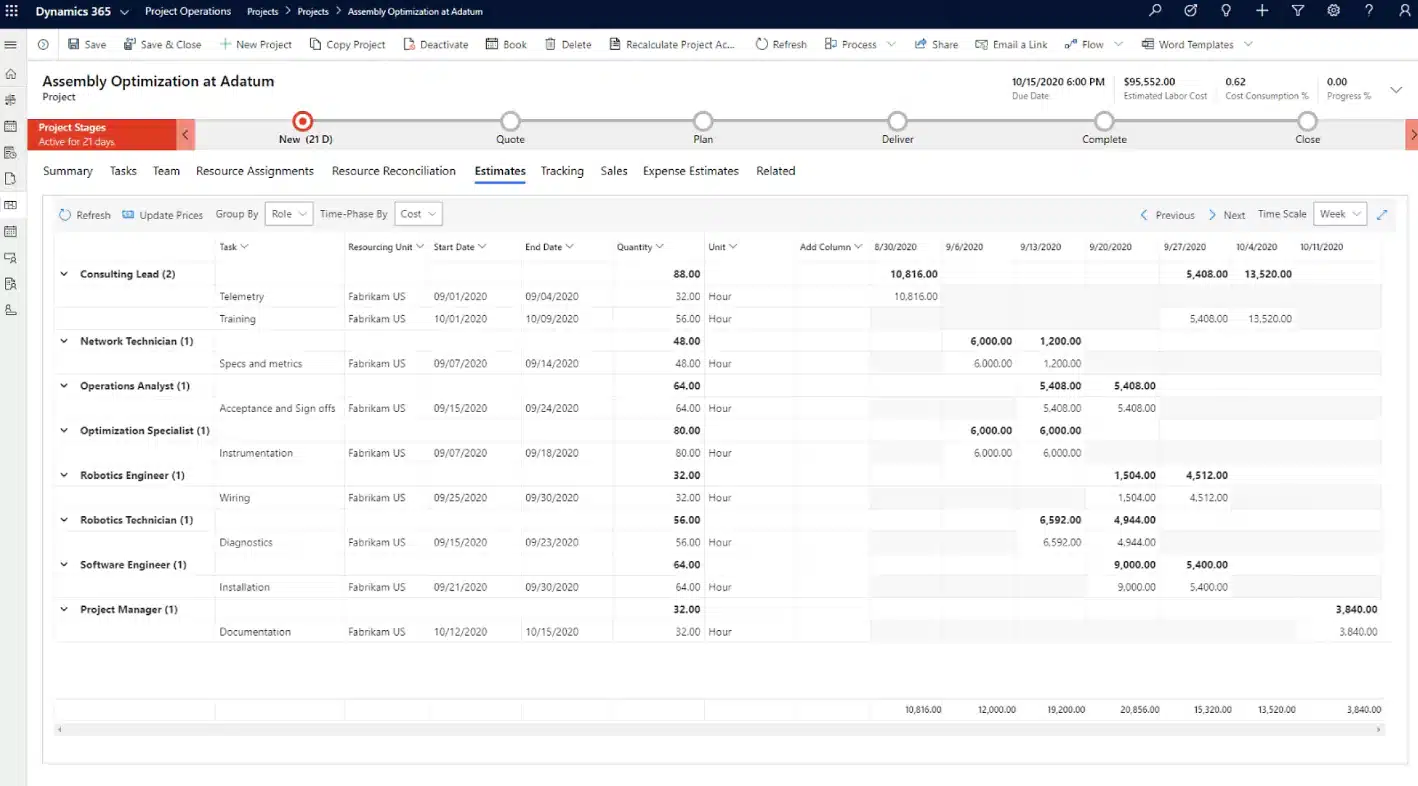
The Dynamics 365 Field Service 2026 release wave 1 introduces tighter integration with Dynamics 365 Project Operations, helping organizations better connect project planning with field execution. These updates reduce the gap between what is planned in a project and what happens in the field, giving teams clearer visibility, better coordination, and more accurate billing. Instead of managing projects and service work separately, organizations can now align timelines, resources, and financials across both systems.
This integration is especially important for project-based service organizations. It ensures that work orders, scheduling decisions, and time tracking all tie back to project scope and financial outcomes. As a result, teams can avoid misalignment, reduce manual reconciliation, and improve delivery consistency from planning through execution.
Key updates in the D365 Field Service 2026 release wave 1 include:
- Create work orders from project tasks: Project tasks can now be converted directly into Dynamics 365 Field Service work orders or linked to existing work orders. This creates a clear connection between project scope and field execution. It also enables task-based billing, so only the work tied to specific project tasks is billed, supporting more accurate and flexible contract structures.
- Show project task context for field scheduling: Work orders now include project-driven context such as timelines, dependencies, and advisory warnings. Dispatchers can see planned start and end dates, understand task dependencies, and identify potential scheduling conflicts. This helps teams avoid out-of-sequence work, reduce rework, and keep projects aligned with delivery timelines.
- Approve field time entries using project rules: Time entries recorded in Dynamics 365 Field Service now flow directly into Dynamics 365 Project Operations. Project managers can review and approve time using project workflows, and approved hours automatically update project costs and billing. This ensures field work is reflected in financials in real time, improving accuracy and reducing manual effort.
Scheduling board and dispatcher experience improvements
The Dynamics 365 Field Service 2026 release wave 1 introduces several updates to the schedule board that improve how dispatchers manage and adjust work. These enhancements focus on reducing manual effort, improving visibility, and helping teams respond faster to changes. Instead of making repetitive updates, dispatchers can now adjust multiple bookings at once and make more informed decisions using clearer scheduling views.
These updates are designed for real-world scenarios where schedules change often. Whether it is a delay, staffing issue, or shift in priorities, dispatchers need tools that allow them to react quickly without introducing errors. The result is a more efficient scheduling process that keeps work aligned with business needs.
Key scheduling board improvements in the D365 Field Service update include:
- Move multiple bookings at once by a set offset: Dispatchers can shift multiple bookings forward or backward by a consistent time interval in one action. This helps teams quickly adjust schedules due to delays, weather, or changing priorities while keeping booking details and durations intact.
- Move multiple bookings at once to a new resource: Multiple bookings can now be reassigned to a different technician or resource in a single step. This makes it easier to handle absences, rebalance workloads, and maintain service coverage without manual updates.
- View full screen map mode on the schedule board: A new full screen map view gives dispatchers better visibility into resource locations and job distribution. This helps with route planning, identifying coverage gaps, and making faster location-based scheduling decisions.
- Show week numbers on the schedule board: Week numbers are now visible directly in the schedule board timeline. This supports organizations that plan by week, making it easier to navigate schedules and align with business planning cycles.
- Cancel segments of a booking in aggregate views: Dispatchers can cancel part of a booking instead of the entire booking. This allows for more precise updates when plans change, while preserving accurate history and reducing the need to recreate bookings.


Unlock the full potential of the 2026 release wave 1
Ready to make the most of the Dynamics 365 Field Service 2026 release wave 1? Our experts can help you understand the latest updates, apply them to your operations, and improve scheduling, productivity, and service delivery.
Mobile and technician productivity enhancements
Mobile performance and usability continue to improve in the Dynamics 365 Field Service 2026 release wave 1, with updates designed to help technicians complete work faster and with less friction. These enhancements focus on reducing delays and simplifying common actions in the mobile app. Because both updates are enabled automatically, organizations can improve technician efficiency right away without additional setup or training.
Key mobile improvements in the D365 Field Service 2026 release wave 1 include:
- Improve Android form loads by at least 25%: Form load times on Android devices are reduced through runtime optimizations. Faster loading helps technicians start work sooner, reduces idle time, and supports better productivity, especially in low-connectivity environments.
- Use enhanced Dynamics 365 Field Service booking status control: The booking status control is redesigned for mobile with larger touch targets and a drawer-style selector. This makes it easier for technicians to update statuses quickly and accurately, reducing errors and improving workflow speed.

Mobile usability and data entry improvements
Simplifying data entry is a key focus in the Dynamics 365 Field Service 2026 release wave 1, with updates designed to reduce clicks, prevent errors, and keep technicians focused on their work. These improvements target common mobile interactions like lookups and note-taking, making forms easier to use in real-world conditions. The result is faster data capture, fewer interruptions, and more accurate information across work orders and service records.
These updates also give administrators more flexibility to tailor the user experience. By adjusting how fields behave and introducing mobile-first controls, organizations can streamline workflows without changing core processes.
Key usability improvements in the D365 Field Service 2026 release wave 1 include:
- Disable clickthrough on lookup values in forms: Lookup values can now be displayed as plain text instead of clickable links. This reduces accidental taps and unnecessary navigation, helping technicians stay focused and complete tasks faster.
- Add simplified lookup control: A new mobile-only lookup control reduces clutter and minimizes taps. It is designed for smaller screens, making it easier for technicians to find and select values quickly while working in the field.
- Add notes with the simplified mobile note-taking control: Technicians can capture notes, images, and videos directly within the form using a new mobile control. Notes are saved to the record timeline, improving documentation quality while keeping users in the flow of work.

Configure offline profiles with FetchXML editor
The Dynamics 365 Field Service 2026 release wave 1 introduces more advanced control over offline data through a new FetchXML editor in Power Apps. This update allows organizations to define exactly what data is synced to mobile devices, helping reduce data volume and improve performance. By creating more precise filters, teams can speed up offline sync times and avoid common issues like slow loading or timeouts in large datasets.
With the FetchXML editor, administrators now have direct access to the query logic behind offline profiles. This enables more advanced filtering that goes beyond the standard Expression Builder, including hierarchy logic, date-based conditions, and more complex query structures. The editor also includes optimization options and built-in validation, helping ensure queries are both efficient and error-free. As a result, organizations can better support technicians working in low-connectivity environments by delivering only the data they need, when they need it.

Frequently asked questions (FAQs)
When will the Dynamics 365 Field Service 2026 release wave 1 features be available?
The Dynamics 365 Field Service 2026 release wave 1 features are rolling out between April 2026 and September 2026. Some features are available earlier in public preview, while others will be released later in the wave.
Are Dynamics 365 Field Service 2026 release wave 1 features automatically enabled?
Many features in the Dynamics 365 Field Service 2026 release wave 1 are enabled automatically, especially user-facing updates like scheduling and mobile improvements. Other features require configuration by admins, makers, or analysts before they can be used.
Do I need to upgrade to access the Dynamics 365 Field Service 2026 release wave 1?
No manual upgrade is required. Dynamics 365 Field Service is a cloud-based application, so updates from the 2026 release wave 1 are delivered automatically as part of Microsoft’s release cycle.
Will all Dynamics 365 Field Service 2026 release wave 1 features be available at the same time?
No, features are released in phases throughout the release wave. Availability depends on the specific feature, with some launching in April 2026 and others becoming available later in the year or in preview first.
What are the key investment areas in the Dynamics 365 Field Service 2026 release wave 1?
The Dynamics 365 Field Service 2026 release wave 1 focuses on three main areas: technician productivity, resource scheduling, and work order management. Key investments include mobile usability improvements, AI-driven scheduling with the Scheduling Operations Agent, and deeper integration with Dynamics 365 Project Operations.
Next steps
The Dynamics 365 Field Service 2026 release wave 1 introduces updates that directly improve scheduling, technician productivity, and service execution. From AI-driven scheduling to better mobile performance and stronger integration with Dynamics 365 Project Operations, these changes help organizations reduce manual effort and operate more efficiently.
If you are planning upgrades or evaluating how these features apply to your workflows, now is the right time to assess your environment and identify where you can gain immediate value. Contact us to walk through the Dynamics 365 Field Service 2026 release wave 1 and see how these updates can be applied to your business.