Dynamics 365
 Power Platform
 Dynamics
 Cloud & Productivity
Intercompany accounting in Dynamics 365 Finance: setup steps, common errors, and best practices

Intercompany accounting in Microsoft Dynamics 365 Finance allows a transaction entered in one legal entity to generate corresponding entries in another configured legal entity. The setup defines the permitted company relationship, due-to and due-from accounts, destination journal, and handling of payment-related supporting amounts.
Without this setup, multi-entity finance can become difficult to manage. Teams may duplicate entries by hand, due-to and due-from balances can drift out of sync, and inconsistent accounts can make eliminations harder at month-end. Staff may also struggle to trace where a transaction started and how it moved between companies.
This guide walks through how intercompany accounting works in Dynamics 365 Finance, when to use it, what to configure before setup, and how to post, trace, and troubleshoot intercompany transactions.
What is intercompany accounting in Dynamics 365 Finance?
Intercompany accounting in Dynamics 365 Finance records financial transactions between legal entities within the same organization. For example, one company may pay an expense, allocate a shared cost, or record activity on behalf of another company. When an intercompany entry is posted, Dynamics 365 Finance creates corresponding entries in both the originating and destination companies so each entity’s ledger remains balanced and the transaction can be traced across companies.
Common examples include:
- Shared-service charges between divisions
- Centralized payments handled by a head office
- Cost allocations pushed down to subsidiaries
- Management or administrative fees between companies
- Expenses one entity pays for another
- Transfers between subsidiaries
Microsoft built this feature for organizations that centralize accounting for subsidiaries or branch offices.
When should you use intercompany accounting?
Use native intercompany accounting when the activity is a financial journal, not a buy-sell flow. For instance, you might allocate shared costs or record a management fee. You may also pay an invoice for another entity or move cash on its behalf. In each case, you need a clean due-to and due-from trail.
However, intercompany accounting is not the same as intercompany trade. Trade covers purchase orders and sales orders between companies. That process uses linked customer and vendor records plus trade policies. Microsoft handles trade setup separately, so confirm which path fits before you start.
The table below makes the difference clear.
Picking the right path early saves rework later. It also helps your team avoid following the wrong setup guide.
What should you configure before setting up intercompany accounting in Dynamics 365 Finance?
A successful intercompany accounting setup starts with clear planning around legal entities, accounts, dimensions, ownership, and controls. Before configuring Dynamics 365 Finance, use the following checklist to confirm the structure and requirements that will guide the setup.
Confirm the legal-entity structure
Start by mapping how your companies transact. Document the following:
- Which entities can originate transactions
- Which entities can receive transactions
- Whether transactions flow one way or both ways
- Whether the entities share compatible fiscal periods and currencies
- Who owns reconciliation and period-end review
Review the chart of accounts
Next, line up your accounts. You will need clear due-from and due-to accounts. Where it helps, use separate accounts for each relationship. Also confirm the balance-sheet classification and your naming rules.
We recommend unique main accounts for each company. This choice simplifies reconciliation and elimination later. Microsoft also directs you to set these intercompany main accounts to the balance sheet account type.
Review financial dimensions
Dimensions keep your intercompany data clean. So decide whether you will use:
- Trading-partner dimensions
- Counterparty dimensions
- Business-unit or cost center dimensions
- Fixed dimensions on intercompany accounts
- Dimension mappings between entities
You can set a trading-partner or counterparty dimension as a fixed dimension on the intercompany main account. This step makes reconciliation easier down the road.
Define ownership and controls
Finally, set your controls before go-live. Decide who enters transactions and who approves and posts them. Also name who investigates out-of-balance issues. Then document your supporting evidence, your period-end steps, and your escalation rules. This planning protects accuracy. It also reflects strong accounting discipline, not just menu clicks.

Need help validating your intercompany setup?
Rand Group can review your legal-entity relationships, due-to/due-from accounts, journal configuration, dimensions, and testing plan before issues show up at month-end. Schedule an intercompany accounting configuration review
How to set up intercompany accounting in Dynamics 365 Finance
Once your planning is done, follow these steps in order. Each step builds on the last.
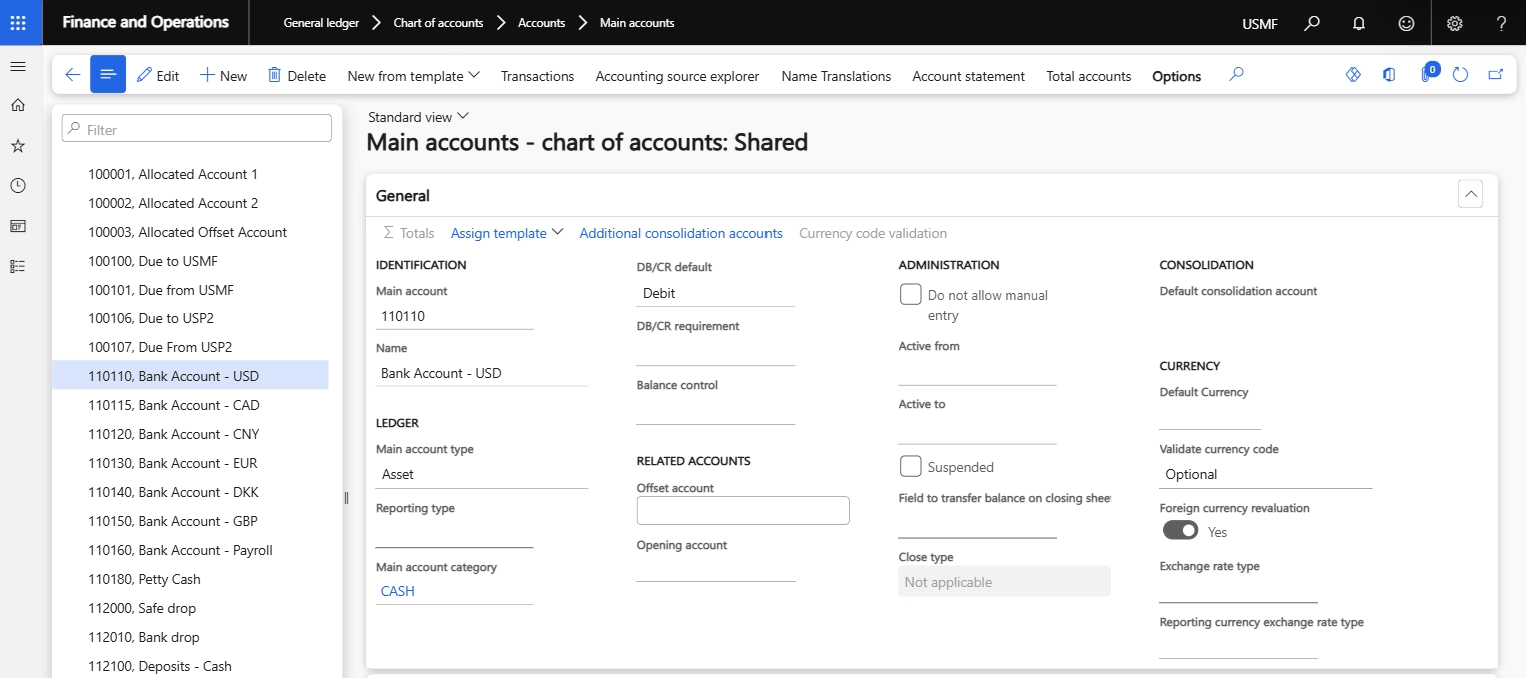
Step 1: Create intercompany main accounts
First, create the main accounts for your due-to and due-from entries. Use unique main accounts for each company. Then set the main account type to balance sheet. This setup keeps reconciliation and elimination simple.
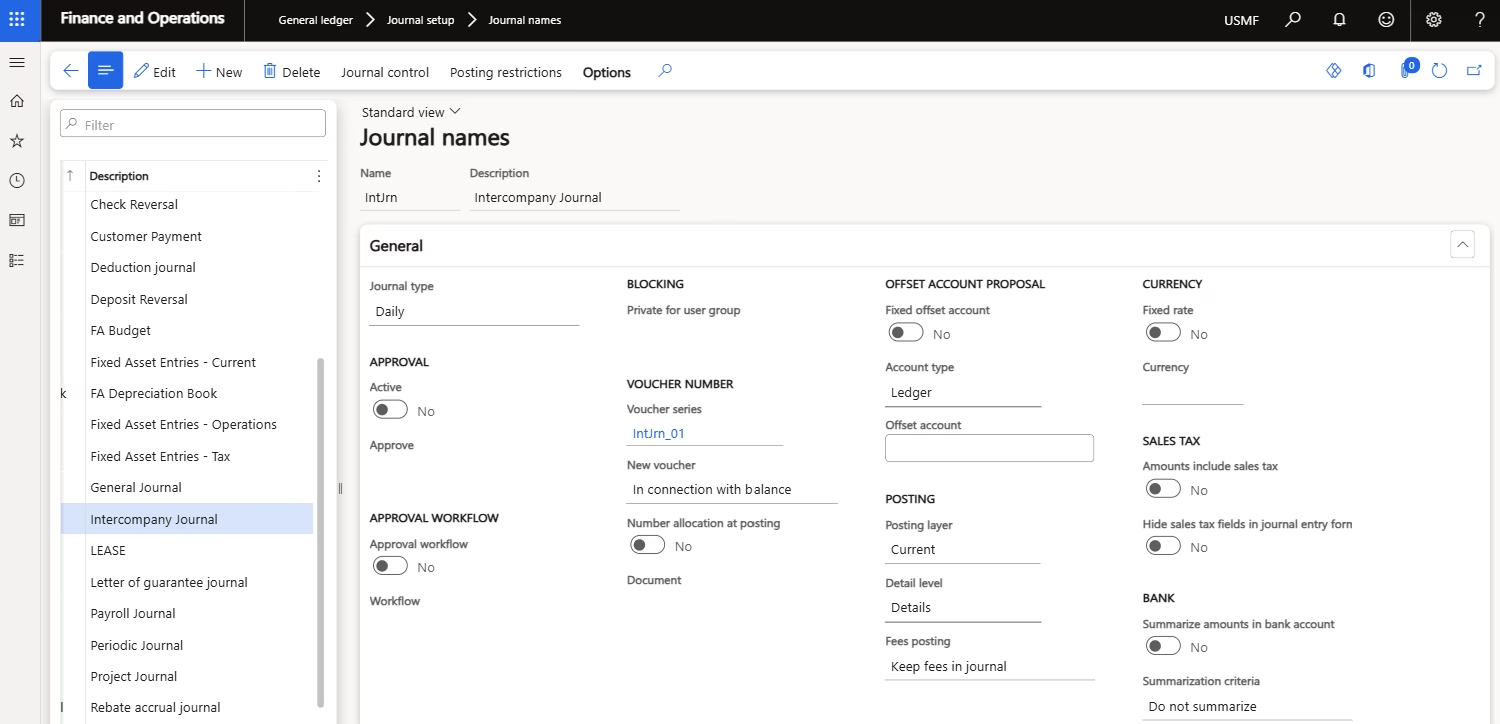
Step 2: Define a journal name
Next, create a journal name and set the journal type to daily. We recommend a dedicated journal name just for intercompany work. Clear naming helps your team spot these entries quickly.
Step 3: Set fixed dimensions (optional)
If you use a trading-partner or counterparty dimension, fix it on the main account now. This step ties each entry to the right counterparty automatically.
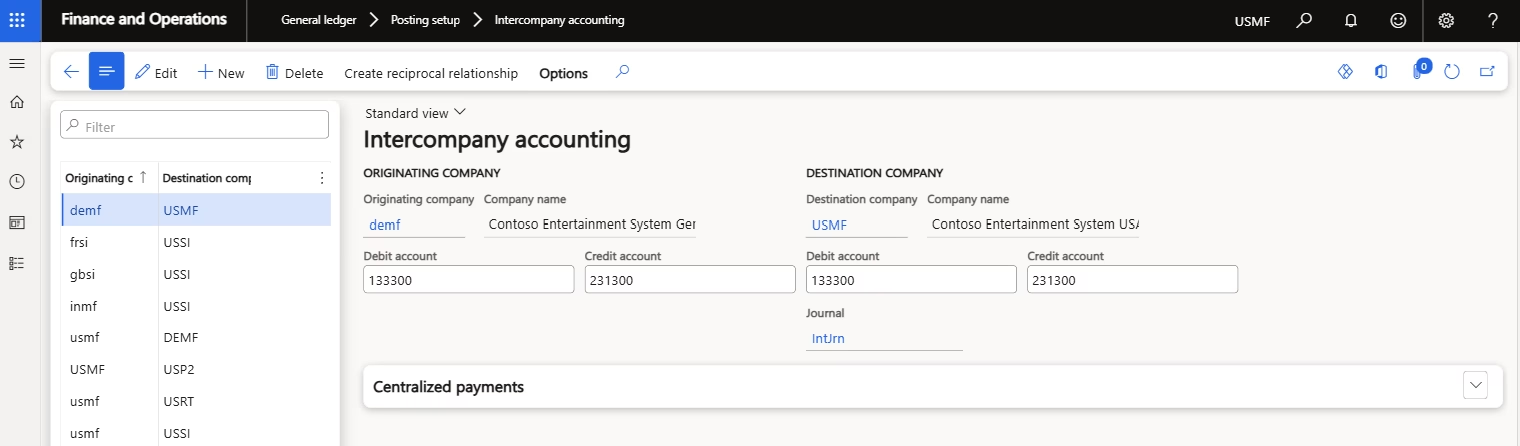
Step 4: Create the legal-entity pairs
Then go to General ledger, Posting setup, and Intercompany accounting. Create a pair by selecting the originating and destination company. After that, select the debit account, or due-from account, and credit account, or due-to account, for both the originating and destination legal entities. Then select the journal name that Finance should use in the destination company.
Step 5: Create the reciprocal relationship
Create a reciprocal relationship when either legal entity needs to originate transactions. Without the reverse relationship, a transaction initiated by the destination company may not post against the original legal-entity pair.
Step 6: Confirm the destination journal and supporting amounts
The intercompany setup is shared across all legal entities, but each relationship still defines a specific originating and destination company. The user selects the journal in the originating company, while the setup determines which journal Finance uses in the destination company.
Confirm that the destination journal exists before posting. Dynamics 365 Finance can display a warning when the configured journal name does not exist in the destination legal entity. For centralized payments, also select which legal entity should record supporting amounts such as cash discounts and realized gains or losses.
Step 7: Test every journal type you plan to use
Do not test only a daily journal. Intercompany accounting can also support ledger allocations, vendor invoice journals, payment journals, and centralized payments.
For each scenario, confirm that the correct journal, accounts, dimensions, currency amounts, and destination entries are created. Also test reciprocal relationships, closed periods, invalid dimensions, reversals, and missing journal names before go-live.
Step 8: Post an intercompany journal
Last, create the journal in the originating legal entity and identify the destination legal entity using the applicable journal fields. Validate the voucher, review the intercompany balancing entries, and post the journal. The system generates and posts the corresponding intercompany entries based on the configured legal-entity relationship.
How to trace an intercompany transaction
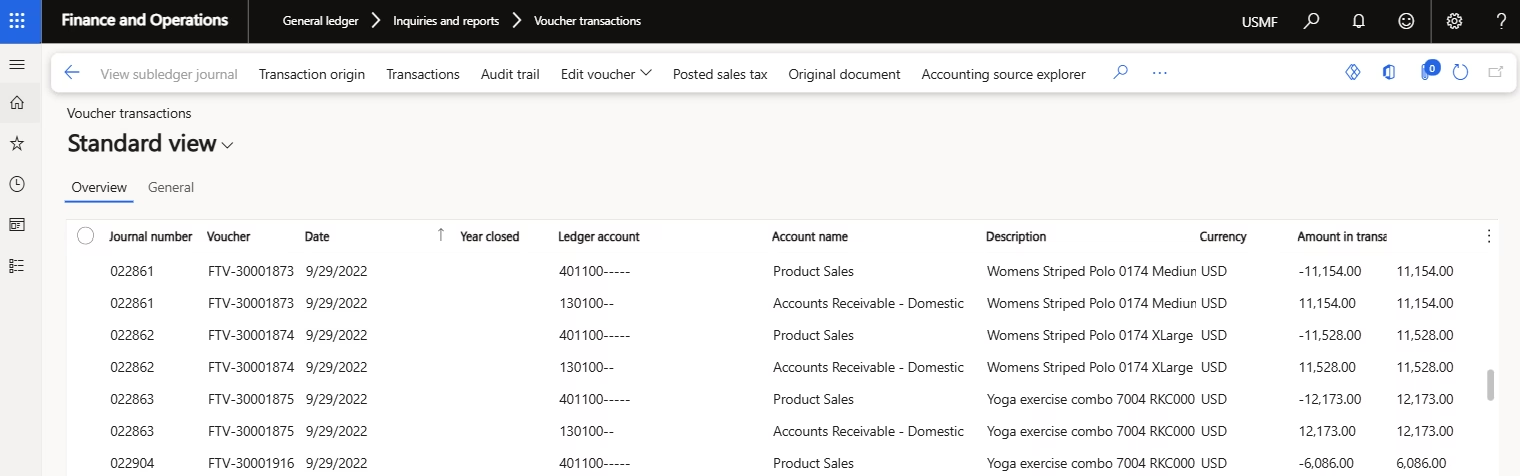
Tracing matters as much as posting. Fortunately, Dynamics 365 Finance keeps a clear audit trail. You can open the posted journal and review the voucher. From there, review the related voucher, journal, and legal-entity references to trace the corresponding entries in the originating and destination companies. This visibility helps you reconcile faster and answer audit questions with confidence.
What are the most common intercompany accounting setup errors?
Setup looks simple in a demo. In real multi-entity rollouts, though, small gaps cause big headaches. Across our Dynamics 365 Finance projects at Rand Group, the same issues come up again and again. Here are the ones to watch, along with quick fixes.
- Only configuring one transaction direction. Many teams set up a one-way relationship by mistake. So create a reciprocal relationship when both entities must originate transactions.
- Using inconsistent journal names. Mismatched names slow everyone down. Therefore, agree on one naming convention and validate the journal in every destination entity.
- Using one unclear clearing account. A single catch-all account hides the counterparty. Instead, use accounts or dimensions that name the counterparty and support reconciliation.
- Forgetting balance-sheet classifications. Incorrect account types can create reporting, reconciliation, and elimination problems. So confirm that due-to and due-from accounts use the balance sheet type, exactly as Microsoft directs.
- Missing or invalid financial dimensions. Bad dimension combos block posting. Because of that, test every combination and fixed-dimension rule in both entities.
- Posting into a closed period. A closed period stops the entry cold. As a result, always confirm the period is open in both companies first.
- Mixing accounting with trade requirements. These two processes are not the same. Before you build anything, decide whether the activity is a financial journal or a buy-sell flow.
- Testing only the source company. One-sided testing hides errors. So validate the entry, distributions, journal, dimensions, voucher, and audit trail in both entities.
A note on growth and currency. As groups expand, month-end gets heavier. Unique accounts per entity pay off here, since they speed up eliminations. In multi-currency groups, revaluation adds another layer. Native tools cover many needs well. Still, high intercompany volume or shared-service structures may call for added functionality. To weigh your options, see Rand Group’s guide to the best multi-entity accounting software and ERP systems.
When to work with a Dynamics 365 Finance consultant?
Native intercompany accounting is powerful. Even so, the setup must match your chart of accounts, your entities, your currencies, and your close process. Small gaps in any of those areas create reconciliation problems later.
That is where Rand Group helps. We implement, configure, and optimize Dynamics 365 Finance & Operations for multi-entity organizations every day. Because we have done this across many complex group structures, we spot risks early. As a result, you avoid rework, close faster, and trust your consolidated numbers.
Frequently asked questions
What is intercompany accounting in Dynamics 365 Finance?
Intercompany accounting in Dynamics 365 Finance lets a transaction entered in one legal entity generate corresponding entries in another legal entity. The system uses the configured intercompany relationship and due-to and due-from accounts to keep both entities balanced.
How do I set up intercompany accounting in Dynamics 365 Finance?
Create due-to and due-from main accounts and set their account type to Balance sheet. Define a Daily journal name, then configure the originating and destination legal-entity pair under General ledger > Posting setup > Intercompany accounting. Assign the debit and credit accounts for both entities, select the destination journal, and create a reciprocal relationship when either entity must be able to originate transactions.
What is the difference between intercompany accounting and intercompany trade in D365 Finance?
Intercompany accounting handles financial journal entries between entities, such as allocations and centralized payments. Intercompany trade handles buying and selling through purchase orders and sales orders. They use different setups, so confirm your scenario first.
What are due-to and due-from accounts?
Due-to and due-from accounts track balances between related companies. The due-from account shows money another entity owes you. The due-to account shows money you owe another entity. Both should sit on the balance sheet.
Does Dynamics 365 Finance handle intercompany eliminations automatically?
Dynamics 365 Finance supports intercompany elimination rules and elimination journals, but eliminations are not performed automatically merely by configuring intercompany accounting. Organizations can process elimination rules during consolidation, generate an elimination proposal, or post manual entries through a designated elimination company.
Can intercompany transactions span different currencies?
Yes. Dynamics 365 Finance can process intercompany transactions involving legal entities with different accounting currencies. Foreign-currency revaluation and consolidation currency translation are separate processes, however, and require appropriate exchange-rate, account, and consolidation configuration.
Is intercompany accounting in Dynamics 365 Finance the same as in Business Central?
No. Both platforms support intercompany work, but the setup and tools differ. Dynamics 365 Finance is generally designed for organizations with more complex global, operational, regulatory, and multi-entity requirements. Business Central is typically used by small and midsized organizations seeking a more streamlined ERP, although the right platform depends on complexity rather than company size alone. Compare the two in our blog titled, What is the difference between D365 F&O and Business Central?.
How do you trace an intercompany transaction in Dynamics 365 Finance?
Open the posted intercompany journal and review the voucher. From there, you can see the linked entries in both the originating and destination companies. This audit trail makes reconciliation and audit reviews much easier.
Do I need a reciprocal intercompany relationship in Dynamics 365 Finance?
A reciprocal relationship is required when both legal entities need to originate intercompany transactions. A relationship configured from Company A to Company B does not automatically permit Company B to initiate transactions with Company A.
Next steps
Intercompany accounting works best when the setup fits your business. So plan your accounts, entities, and controls first. Then test every entry in both companies before go-live. If you want expert support, our Dynamics 365 Finance team is ready to help. Contact us today to scope your intercompany setup.