Dynamics 365
 Power Platform
 Dynamics
 Cloud & Productivity
Project accounting in Dynamics 365 Project Operations

Project-based organizations need to know whether each engagement is financially on track, not just whether the work is getting done. As projects become more complex, disconnected time, expense, billing, and accounting processes can make it difficult to understand costs, control budgets, recognize revenue, and measure profitability before a project is complete.
Microsoft Dynamics 365 Project Operations brings project delivery and financial management together. This guide explains how project accounting works in Dynamics 365 Project Operations, how it differs from financial accounting, when it becomes important, and how organizations can use it to improve control over project financial performance.
At a glance:
Project accounting in Dynamics 365 Project Operations helps organizations manage the financial performance of individual projects from planning through completion. It brings together project costs, actuals, budgets, forecasts, time, expenses, materials, billing, and profitability, while connecting project activity with a broader ERP or financial system for general ledger, financial reporting, tax, accounts payable and receivable, and close processes.
What is Dynamics 365 Project Operations?
Microsoft Dynamics 365 Project Operations is a cloud-based business application designed to manage the full lifecycle of project-based work. It connects project sales, estimating, planning, resource management, project delivery, time and expense, billing, and financial management so teams can manage projects through one connected process.
D365 Project Operations is designed for organizations where projects are central to how work is sold and delivered. Within the core project system, Dynamics 365 Project Operations manages projects, contracts, budgets, forecasts, time, expenses, materials, actuals, billing, and project profitability.
Sales teams can structure project deals, project managers can plan and deliver the work, resource managers can assign people, and finance teams can monitor project financial performance. Project accounting provides the financial foundation that connects this operational activity with financial performance.
To learn more, read our What is Dynamics 365 Project Operations? blog.

What is project accounting?
Project accounting is the practice of tracking and managing the costs, revenue, budgets, and financial performance of an individual project from start to finish. Sometimes called project cost accounting, it gives organizations a clear view of how money is being earned and spent throughout the project lifecycle.
Project accounting helps teams monitor budget versus actual performance, understand project costs, track billable work and revenue, and measure margins and profitability. This gives project managers and finance teams the financial detail they need to evaluate performance while a project is still underway.
In Dynamics 365 Project Operations, project accounting connects financial information with the work being delivered. Time, expenses, materials, contracts, budgets, and other project data come together to give teams a more complete view of each project’s financial performance.
Project accounting vs financial accounting
Project accounting and financial accounting serve different purposes but work together. Project accounting tracks the financial performance of individual projects, while financial accounting tracks the financial performance and position of the organization as a whole. Project accounting provides more detailed insight into project costs, revenue, budgets, billing, and profitability.
When does project accounting become important?
Project accounting becomes important when a business needs more financial detail than the general ledger or spreadsheets can provide for individual projects. This often happens as projects become larger, budgets become harder to control, billing grows more complex, or leadership needs a clearer view of project costs, revenue, and profitability while work is still underway.
Common signs that an organization needs stronger project accounting include:
- Project profitability is difficult to calculate: Teams can see overall company performance but struggle to determine which projects are profitable or losing margin.
- Projects have dedicated budgets: Managers need to know how much has been budgeted, spent, committed, and remains available for each project.
- Time and expenses are tracked separately: Project and finance teams rely on spreadsheets or disconnected systems to combine labor and expense data with financial results.
- Customer billing is becoming more complex: Contracts may include time-and-material, fixed-price, milestone, progress-based, or other billing structures.
- Billing and revenue recognition happen at different times: Finance needs to recognize revenue according to accounting rules rather than simply when a customer is invoiced.
- Internal projects need financial oversight: Product development, internal initiatives, presales work, and other nonbillable projects require their own cost tracking.
- Projects cross business or financial structures: Multiple legal entities, departments, currencies, or cost centers make project-level financial tracking more difficult.
- Project reporting requires manual analysis: Leadership depends on spreadsheets to compare budgets, actual costs, margins, and financial performance across projects.
How does project accounting work in Dynamics 365 Project Operations?
Project accounting in Dynamics 365 Project Operations connects project activity with the financial processes used to track costs, billing, revenue, and profitability. Within D365 Project Operations, teams can manage projects, contracts, budgets, forecasts, time, expenses, materials, actuals, billing, and project-level financial performance.
Project activity can then connect with a broader ERP or financial system for general ledger accounting, financial reporting, period close, tax, accounts payable and receivable, and other company-wide accounting processes. Dynamics 365 Finance provides the tightest Microsoft ERP integration for advanced project accounting scenarios, while Dynamics 365 Business Central can also be integrated when it better fits the organization’s architecture and requirements.
The project accounting process typically works like this:
- Establish the project and financial terms. Set up the project, customer contract, pricing, budget, billing method, and other financial requirements.
- Plan the project and resources. Estimate the work, labor, expenses, materials, and resources needed to deliver the project.
- Capture project activity. Record time, expenses, materials, fees, and other activity as work is completed.
- Create project actuals. Approved project activity becomes actuals that represent completed work and its financial impact on the project.
- Connect project activity with financial accounting. Relevant project transactions and accounting information flow to the connected ERP based on the organization’s integration design.
- Bill customers and manage revenue recognition. Customer billing follows the project contract, while revenue recognition follows the organization’s accounting rules and financial system architecture.
- Monitor project financial performance. Project managers and finance teams compare budgets, forecasts, actual costs, revenue, and margins to understand how the project is performing.
What are the benefits of project accounting in Dynamics 365 Project Operations?
Project accounting in Dynamics 365 Project Operations gives project and finance teams a clearer view of financial performance while work is still underway. By connecting project activity with costs, budgets, billing, revenue, and margins, teams can make better decisions before financial issues affect the outcome of a project.
- Improve visibility into project profitability: See how project costs, revenue, and margins are changing throughout the project lifecycle.
- Track budget performance: Compare budgets with actual project activity to identify overruns and other variances earlier.
- Improve cost control: Track labor, expenses, materials, and other costs against the projects that generated them.
- Support accurate billing: Connect billable project activity with customer contracts and invoicing requirements.
- Improve revenue management: Align project revenue with the appropriate accounting rules instead of relying only on invoice timing.
- Connect project and finance teams: Give both teams access to consistent project financial information instead of separate records and spreadsheets.
- Identify financial issues earlier: Spot rising costs, margin pressure, billing delays, and other risks while there is still time to respond.
- Strengthen financial control: Create a more consistent connection between project activity, accounting, and financial reporting.

Improve your project accounting processes
If project costs, billing, revenue recognition, or profitability are difficult to manage, Rand Group can help. Our Dynamics 365 consultants can help you configure and optimize Project Operations around your financial and operational requirements.
Capabilities of project accounting in Dynamics 365 Project Operations
Dynamics 365 Project Operations provides capabilities for managing project financial activity across contracts, budgets, forecasts, time, expenses, materials, actuals, billing, and project profitability. These capabilities help project and finance teams manage project performance from planning through completion.
Broader accounting processes, including general ledger posting, work in progress (WIP), and revenue recognition, can depend on the connected ERP and integration architecture.
Project contracts, billing, and invoicing
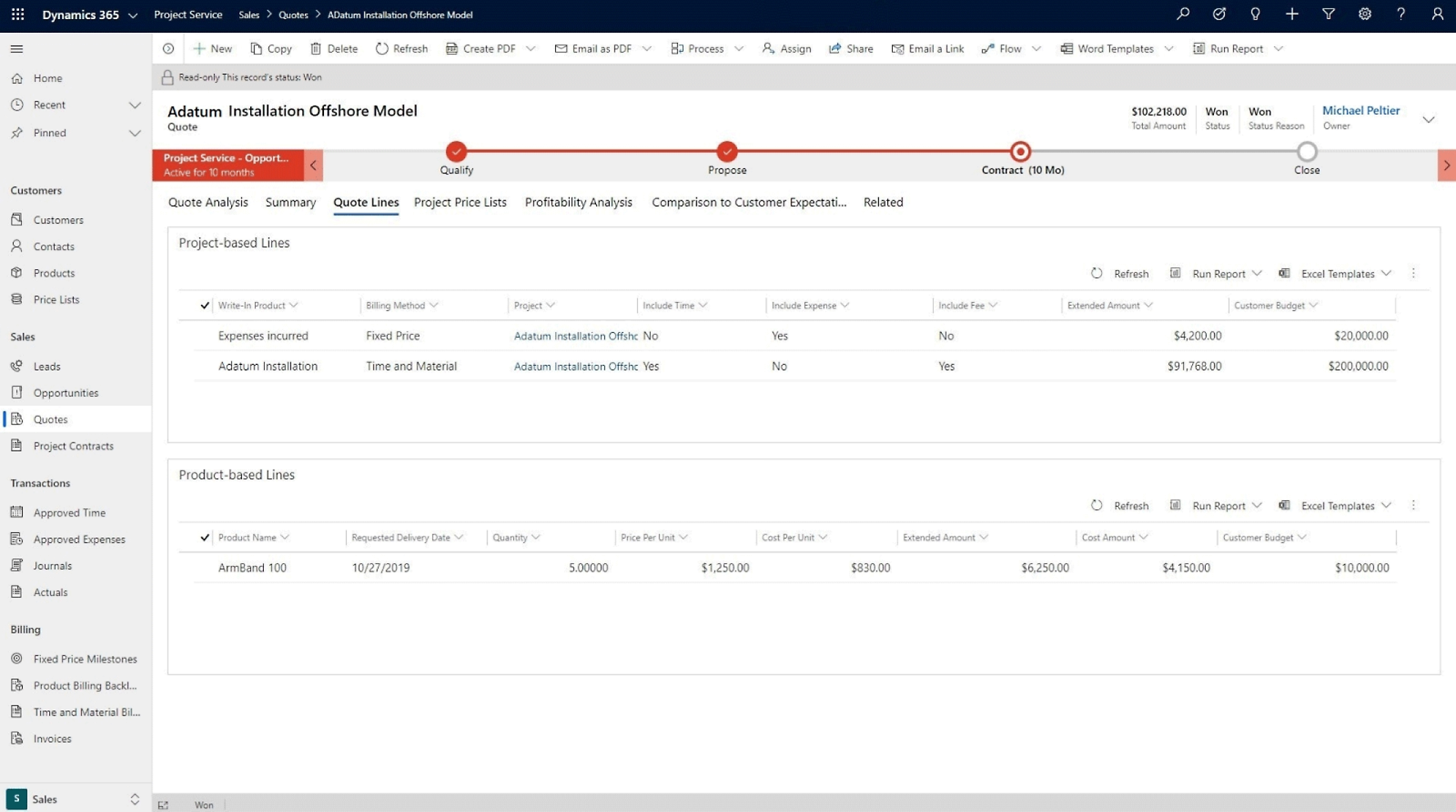
Project contracts define the financial terms of customer work. They connect a project with the customer or funding source and establish how the work will be priced and billed.
Dynamics 365 Project Operations supports time-and-material and fixed-price billing. Time-and-material projects are billed based on project activity, while fixed-price projects follow an agreed billing schedule. Finance teams can review invoice proposals before the final project invoice is posted.
Key capabilities include:
- Create project contracts and contract lines.
- Define customers, funding sources, and billing terms.
- Support time-and-material and fixed-price billing.
- Establish billing schedules and milestones for fixed-price work.
- Select eligible project activity for customer billing.
- Review invoice proposals before posting the project invoice.
Project costs and actuals
Project costs show the financial impact of the resources consumed while work is being delivered. Dynamics 365 Project Operations can track costs associated with labor, expenses, materials, and other project transactions.
Completed project activity also creates financial records that can be used throughout the accounting process. For example, time and expense entries can create actual transactions that represent work completed against the project.
Key capabilities include:
- Track labor costs from project time.
- Record project-related expenses.
- Track materials and other project costs.
- Apply cost prices to project transactions.
- Capture completed project activity as actuals.
- Review and adjust project transactions when required.
AI agents can help automate project transaction processing. The Expense Agent can create expenses from receipts, while the Approvals Agent can review time, expense, and material entries against company policies.

Project budgets and forecasts
Project budgets establish the financial baseline for expected project costs and revenue. Teams can compare that plan with actual and committed costs to see whether the project remains within budget.
Forecasts provide a forward-looking view of project performance. As work progresses, teams can revise expected costs and remaining work to estimate what the project may cost at completion.
- Establish project budgets.
- Forecast expected project costs and revenue.
- Compare budgeted amounts with actual costs.
- Include committed costs in project cost analysis.
- Track remaining budget and financial variances.
- Estimate the cost required to complete the project.

Revenue recognition and WIP
Revenue recognition determines when project revenue should appear in the financial statements. Dynamics 365 Project Operations applies revenue recognition rules based on the project’s billing method and project cost and revenue profile.
Work in progress, or WIP, is used when project costs or revenue need to remain on the balance sheet before they are recognized. For fixed-price work, D365 Project Operations can support completed-contract and percentage-completion approaches. For time-and-material work, revenue can also be accrued before invoicing when configured.
- Configure accounting rules through project cost and revenue profiles.
- Accrue unbilled revenue when appropriate.
- Track applicable project amounts in WIP.
- Recognize time-and-material revenue through invoicing.
- Support completed-contract accounting for fixed-price projects.
- Recognize fixed-price revenue based on percentage completion.
- Reverse accrued revenue when the related amount is invoiced.

Financial posting and accounting
Project activity must eventually become formal accounting information. Dynamics 365 Project Operations uses project categories, financial dimensions, and other accounting attributes to classify transactions before they are posted.
Project accountants can review applicable transactions before they move through the Dynamics 365 Project Operations Integration journal. Once posted, the financial activity flows into the project subledger and general ledger, connecting detailed project records with company-wide financial accounting.
- Categorize project costs and revenue.
- Apply financial dimensions for detailed reporting.
- Review accounting attributes before posting.
- Process project activity through the integration journal.
- Post transactions to the project subledger.
- Create corresponding general ledger entries.

Project reporting and profitability
Project accounting data gives organizations a financial view of each project while work is still underway. Project managers and finance teams can review revenue, costs, budgets, forecasts, and margins to understand whether financial performance is meeting expectations.
Dynamics 365 Project Operations also supports project financial reporting and analysis across individual projects and broader portfolios. Organizations can extend this analysis through Microsoft Power BI when they need additional dashboards and visualizations.
- Compare project revenue with costs.
- Review budget versus actual performance.
- Monitor project margins and profitability.
- Analyze billed and unbilled activity.
- Review forecasts, utilization, and project cash flow.
- Use project statements, dashboards, and Power BI for deeper analysis.

Who benefits most from project accounting in Dynamics 365 Project Operations?
Project accounting in Dynamics 365 Project Operations is most useful for organizations where projects are a major source of revenue, cost, or resource use. It is especially valuable when teams need detailed project cost and margin tracking, complex billing or revenue recognition, or visibility across entities, currencies, and regions.
Organizations that commonly benefit include:
- Professional services firms that need to connect employee time, expenses, billing, and project profitability.
- Consulting firms that manage resource-based engagements across multiple clients and projects.
- Engineering firms that need to track labor, materials, budgets, and financial performance across complex projects.
- Architecture firms that manage project phases, resources, budgets, and billing schedules.
- Technology and IT services firms that deliver implementations, development projects, and consulting engagements.
- Project-based contractors that need visibility into contract terms, costs, billing, and margins.
- Multi-entity organizations that manage projects across legal entities, currencies, departments, or regions.
Optimize project accounting with Rand Group
Getting the most from Dynamics 365 Project Operations requires both application knowledge and an understanding of project-based financial processes. Rand Group helps organizations implement and optimize Dynamics 365 Project Operations around project delivery, resource planning, billing, project financials, reporting, and the broader Microsoft ecosystem. Our team can also connect Dynamics 365 Project Operations with Dynamics 365 Finance, Dynamics 365 Business Central, or other ERP systems based on your financial, operational, and architecture requirements.
Rand Group brings more than two decades of business application experience, 3,000+ successful engagements, 1,200+ clients, and a 90% client retention rate. We were also named the 2025 Microsoft Americas Channel Emerging Partner of the Year, recognizing our work delivering Microsoft cloud and business application solutions across the Americas.
Our Dynamics 365 Project Operations services include:
- Implementation: Design, configure, test, migrate, and deploy D365 Project Operations around your project and financial requirements.
- Project accounting optimization: Improve project costing, billing, budgeting, financial workflows, and project visibility.
- Integrations: Connect Dynamics 365 Project Operations with Dynamics 365 Finance, Dynamics 365 Business Central, other Dynamics 365 applications, Power Platform, ERP systems, and third-party applications.
- Customization and development: Extend standard D365 Project Operations capabilities to support unique project, approval, reporting, or operational requirements.
- Training and user adoption: Give project managers, finance teams, resource managers, and end users role-based guidance for the processes they manage.
- Ongoing support: Resolve issues, enable new features, improve workflows, and continue optimizing D365 Project Operations after go-live.
What our clients say about Rand Group
“Rand Group has been top-notch—professional, responsive, and very proactive. You can tell their internal processes are really sound, especially in how they manage and follow up on support requests. We come up with ideas, and they help us figure out what will actually work in the system, whether it’s configuration, reporting, or technical support.”
– Derek Atwood, Subs for Pools
“I have very high expectations, and to-date what impresses me the most about Rand Group is their attention to detail and subject matter expertise.”
Marty Resweber, IT Director, Aegis Chemical Solutions
“Rand Group cares, and that shows in every interaction. No matter what I throw at them, they always have someone on the team who truly knows how to solve it. That consistency and depth of expertise is why we’ve partnered with them for so many years.”
– Amy Washek, ERP Manager, Peak Rentals
Key takeaways
- Project accounting tracks the costs, revenue, budgets, billing, and profitability of individual projects from start to finish.
- Dynamics 365 Project Operations connects project delivery with financial management so project and finance teams can work from consistent project data.
- Dynamics 365 Project Operations manages project-level financial activity, while a connected ERP supports broader accounting processes such as the general ledger, financial reporting, tax, AP/AR, and close.
- Dynamics 365 Project Operations supports both time-and-material and fixed-price project billing, including billing schedules and milestones.
- Project actuals turn completed project activity into financial records that can flow into the broader accounting environment.
- Project budgets, forecasts, revenue recognition, and profitability reporting help teams identify financial risks and understand project performance before work is complete.
Frequently asked questions
What is project accounting in Dynamics 365 Project Operations?
Project accounting in Dynamics 365 Project Operations tracks the costs, revenue, budgets, billing, and profitability of individual projects. It connects financial information with project activity such as time, expenses, materials, contracts, and actuals.
How does project accounting work in Dynamics 365 Project Operations?
Project accounting in Dynamics 365 Project Operations connects project activity with financial processes for costing, budgeting, billing, and profitability. Projects, contracts, forecasts, time, expenses, materials, and actuals are managed within Project Operations, while integration with an ERP can extend that activity into broader and more advanced accounting processes such as general ledger posting, financial reporting, tax, AP/AR, and financial close.
How does Dynamics 365 Project Operations integrate with an ERP?
Dynamics 365 Project Operations can integrate with an ERP to connect project activity with broader financial processes such as general ledger accounting, financial reporting, tax, accounts payable and receivable, and financial close. Dynamics 365 Finance provides the tightest Microsoft ERP integration for advanced project accounting scenarios, while Dynamics 365 Business Central or other ERP systems may also be appropriate depending on the organization’s architecture and requirements.
What is the difference between project accounting and financial accounting?
Project accounting tracks the financial performance of individual projects, while financial accounting tracks the organization as a whole. Project accounting provides more detail around project costs, revenue, budgets, billing, margins, and profitability.
Can Dynamics 365 Project Operations track project costs and profitability?
Yes. Dynamics 365 Project Operations can track labor, expenses, materials, project revenue, budgets, forecasts, and margins to help teams understand project profitability while work is still underway.
Does Dynamics 365 Project Operations support fixed-price and time-and-material projects?
Yes. Dynamics 365 Project Operations supports both fixed-price and time-and-material billing. Time-and-material projects are generally billed based on project activity, while fixed-price projects can follow agreed billing schedules and milestones.
How does revenue recognition work in Dynamics 365 Project Operations?
Revenue recognition in Dynamics 365 Project Operations determines when project revenue should appear in the financial statements. The system can support WIP, revenue accruals, completed-contract accounting, and percentage-completion approaches based on the project and accounting configuration.
How does AI support project accounting in Dynamics 365 Project Operations?
AI in Dynamics 365 Project Operations can help automate project-related tasks such as expense entry and transaction approvals. AI agents can process receipts, create expense records, and review time, expense, and material entries against defined policies before approval.
Who should use Dynamics 365 Project Operations for project accounting?
Project accounting in Dynamics 365 Project Operations is best suited for organizations where projects are a major source of revenue, cost, or resource use. Common examples include professional services, consulting, engineering, architecture, technology services, project-based contracting, and multi-entity project organizations.
Improve project accounting with Dynamics 365 Project Operations
Effective project accounting gives organizations financial visibility while there is still time to act. Dynamics 365 Project Operations connects project delivery with project financial management and broader accounting processes so project managers and finance teams can better understand project performance throughout the lifecycle.
The right setup depends on how your organization structures projects, prices work, bills customers, recognizes revenue, and measures profitability. Contact Rand Group to discuss your project accounting requirements and learn how we can help you implement or optimize Dynamics 365 Project Operations around your financial and operational processes.