Dynamics 365
 Power Platform
 Dynamics
 Cloud & Productivity
Your Dynamics NAV to Business Central upgrade guide

A Dynamics NAV to Business Central upgrade is the natural next step for organizations still running Microsoft Dynamics NAV. Microsoft has discontinued NAV, no longer sells new licenses, and all versions are now out of mainstream support. As a result, businesses must begin evaluating their upgrade options to reduce risk and ensure long-term system stability.
Dynamics 365 Business Central is Microsoft’s strategic ERP platform moving forward. It delivers a modern, cloud-based system with continuous updates, built-in AI capabilities, and seamless integration across Microsoft 365, Power BI, and the Power Platform. In this guide, we explain what a Dynamics NAV to Business Central upgrade involves, including upgrade paths, timelines, costs, common challenges, and how to plan a successful transition.
Current state of Microsoft Dynamics NAV
Microsoft Dynamics NAV has been discontinued and is no longer sold by Microsoft. New NAV licenses are not available, and the product is no longer part of Microsoft’s active ERP roadmap. Organizations still running NAV today are existing customers who purchased licenses before sales ended. While these systems can continue to operate, they no longer receive innovation, new features, or long-term strategic investment from Microsoft. For many companies, this reality is what drives the need for a Dynamics NAV to Business Central upgrade.
Microsoft Dynamics NAV follows a defined support lifecycle with two phases: mainstream support and extended support. During mainstream support, Microsoft provides feature updates, enhancements, security fixes, and full technical support. Once a version enters extended support, feature updates stop, and support is limited to security patches and critical fixes. All versions of NAV are now out of mainstream support. NAV 2016, NAV 2017, and NAV 2018 remain in extended support, while earlier versions are fully out of support. Extended support is intended to give organizations time to plan a transition, not to serve as a long-term operating model. This is why many businesses are actively planning their upgrade from Dynamics NAV to Business Central.
The table below summarizes the current Dynamics NAV support lifecycle status:
Dynamics NAV vs Dynamics 365 Business Central
Understanding the differences between Dynamics NAV and Dynamics 365 Business Central is essential when planning a Dynamics NAV to Business Central upgrade. Dynamics NAV is a legacy, primarily on-premises ERP system that many organizations customized heavily over time. While it delivered strong financial and operational functionality, it relies on perpetual licensing, manual upgrades, and internal infrastructure. It no longer receives new features and is not part of Microsoft’s future ERP roadmap.
Dynamics 365 Business Central is the modern successor to NAV and Microsoft’s strategic ERP platform for small and mid-sized businesses. It retains the core functionality NAV users are familiar with, including financials, supply chain, manufacturing, and project management, but delivers it through a cloud-based, continuously updated model. Business Central introduces automatic updates, subscription licensing, built-in AI with Copilot, modern integrations with Microsoft 365 and Power Platform, and a more intuitive user experience. For organizations evaluating a Dynamics NAV to Business Central upgrade, the shift is not just technical. It is a move from legacy infrastructure to a scalable, future-ready ERP platform.
To explore the differences in more detail, read our full Dynamics NAV vs Business Central comparison blog.

Upgrade to Business Central today
Ready to move forward with your Dynamics NAV to Business Central upgrade? Our team will assess your environment and define a clear, low-risk upgrade strategy aligned with your business goals.
Total cost of ownership: Dynamics NAV vs Business Central
The total cost of ownership for a Dynamics NAV to Business Central upgrade depends on infrastructure, upgrade cycles, IT overhead, and long-term support risk. While license pricing is important, the broader cost impact comes from how your ERP system is hosted, maintained, upgraded, and supported over time.
Dynamics NAV is primarily an on-premises system, which means organizations are responsible for servers, SQL licensing, backups, upgrades, and ongoing maintenance. Business Central, by contrast, is designed for the cloud and delivered through a subscription model that includes infrastructure, updates, and security. Over time, many organizations find that moving from NAV to Business Central reduces operational burden and improves cost predictability.
Key TCO considerations when comparing Dynamics NAV vs Business Central include:
- Infrastructure and hardware costs: Dynamics NAV requires servers, storage, networking, SQL Server licensing, backup systems, and disaster recovery planning. Hardware must be maintained and periodically replaced. Business Central SaaS eliminates most infrastructure expenses because Microsoft hosts and manages the environment in Azure.
- Upgrade and maintenance costs: NAV upgrades are project-based and often require technical consultants, testing cycles, and downtime. Customizations can make upgrades more complex and expensive. Business Central includes automatic updates as part of the subscription, reducing the need for major upgrade projects.
- IT overhead: Maintaining Dynamics NAV requires internal or outsourced IT resources to manage servers, security patches, performance tuning, and integrations. With Business Central, Microsoft manages infrastructure, security, and platform updates, reducing internal IT workload.
- Long-term cost predictability: NAV operates on a perpetual licensing model with variable costs for upgrades, hardware refreshes, and support. Business Central uses a subscription-based model, which spreads costs monthly and includes hosting and updates, improving budget forecasting.
- Risk and cost of unsupported software: As NAV versions move further from mainstream support, organizations face increased risk. Security exposure, compliance issues, and compatibility problems with newer Microsoft technologies can lead to unplanned expenses. A Dynamics NAV to Business Central upgrade reduces these risks by moving to a fully supported, continuously updated platform.
When comparing Dynamics NAV vs Business Central, the financial conversation should extend beyond licensing. It should focus on infrastructure burden, upgrade cycles, IT dependency, and long-term risk exposure. For many organizations, upgrading from Dynamics NAV to Business Central improves both operational efficiency and total cost visibility over time.

Benefits of upgrading from Dynamics NAV to Business Central
A Dynamics NAV to Business Central upgrade is more than a technical migration. It is an opportunity to modernize your ERP system and align with Microsoft’s long-term strategy. While Dynamics NAV provided strong financial and operational capabilities for many years, Business Central builds on that foundation with cloud flexibility, built-in AI, modern integrations, and continuous updates. Upgrading from Dynamics NAV to Business Central helps reduce risk, improve efficiency, and support future growth.
To learn more, read our full guide on the Top 10 reasons to upgrade from Microsoft Dynamics NAV to Dynamics 365 Business Central.
Key benefits of a Dynamics NAV to Business Central upgrade include:
- Risk mitigation and ongoing support: Move from a discontinued platform to a fully supported ERP system with continuous security updates and Microsoft backing.
- Cloud flexibility and remote access: Access your system anytime, anywhere through a browser without managing on-premises servers or remote desktop solutions.
- Seamless Microsoft integration: Connect natively with Microsoft 365, Teams, Power BI, and the Power Platform to eliminate data silos and improve collaboration.
- Modern, intuitive user experience: Improve user adoption with a responsive interface, customizable dashboards, and powerful search capabilities.
- Enhanced security and compliance: Benefit from enterprise-grade security, automatic updates, and compliance standards managed in Microsoft Azure.
- Scalable, subscription-based model: Adjust users and capacity as your business grows without investing in new infrastructure.
- Improved automation and workflows: Automate approvals, notifications, and business processes with built-in workflows and Power Automate integration.
- Automatic updates and reduced maintenance: Stay current with twice-yearly updates from Microsoft without major upgrade projects.
- Better reporting and real-time visibility: Leverage built-in Power BI integration and interactive dashboards for deeper financial and operational insight.

Unlock AI, Copilot, and intelligent automation in Business Central
One of the most significant advantages of a Dynamics NAV to Business Central upgrade is access to built-in artificial intelligence. Dynamics NAV does not include native AI capabilities. Business Central, by contrast, embeds Microsoft Copilot and AI agents directly into daily workflows. These tools go beyond basic automation. They analyze data, generate insights, assist with decisions, and complete tasks across finance, sales, and operations. For organizations planning a Dynamics NAV to Business Central upgrade, AI is a strategic differentiator that improves productivity, accuracy, and decision-making at scale.
Business Central AI capabilities include:
- Copilot analysis assist for natural language reporting and instant answers from your ERP data
- Sales order agent automation that reads emails, creates quotes, and accelerates the order-to-cash cycle
- Payables agent for intelligent invoice matching using historical patterns
- AI-powered bank reconciliation to automatically match transactions and reduce manual effort
- Autofill data entry automation that suggests values and reduces typing time
- Record summarization to quickly review customer, vendor, or transaction details
- AI-generated marketing text for product descriptions and catalog content
- Conversational chat with ERP data to ask complex business questions in plain language
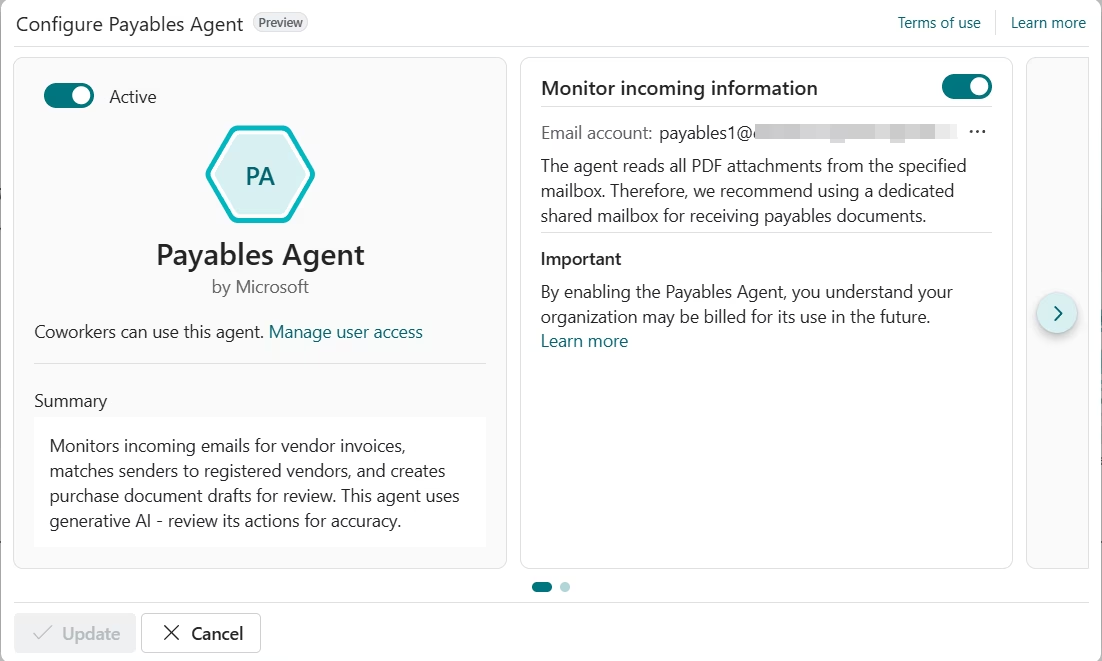
These capabilities help teams save time, reduce errors, and focus on higher-value work instead of repetitive tasks. To learn more, read our blog on the top Copilot capabilities in Business Central or our guide on AI agents in Business Central.
Dynamics NAV to Business Central upgrade options
There are two primary ways to complete a Dynamics NAV to Business Central upgrade: a direct upgrade or a reimplementation. The right approach depends on your current NAV version, level of customization, data requirements, and long-term business goals. Selecting the correct strategy early reduces risk, controls scope, and improves long-term system stability.
Direct upgrade from Dynamics NAV to Business Central
A direct upgrade moves your existing Dynamics NAV system and full historical data into Dynamics 365 Business Central with minimal structural change. This approach focuses on preserving your current configuration and bringing your NAV database forward into the modern Business Central platform. It is generally best suited for organizations running newer versions of NAV, such as NAV 2017 or NAV 2018, with limited customizations and stable business processes.
However, many organizations still running NAV today have heavily customized environments. Over time, source code modifications and layered customizations were common in NAV. In these cases, a direct Dynamics NAV to Business Central upgrade can become more complex, as legacy design decisions and technical debt may be carried forward.
While this path preserves historical data inside Business Central and may reduce short-term disruption, it offers limited opportunity to modernize or optimize business processes.
Reimplement on Business Central
A reimplementation rebuilds your ERP system in Business Central based on current business requirements rather than replicating your NAV environment exactly. Instead of copying your NAV configuration, Business Central is configured to reflect current operational needs and future goals. Core data such as master records, opening balances, and open transactions are migrated into the new system. Historical NAV data is typically retained separately for reference and reporting.
This approach is often recommended for heavily customized NAV environments or organizations looking to modernize outdated processes. A reimplementation allows you to remove technical debt, reduce dependency on legacy modifications, and adopt standard Business Central functionality.
While it requires structured discovery and planning, it often results in a cleaner, more scalable ERP foundation aligned with Microsoft’s long-term roadmap.
Pros and cons: Upgrade vs reimplementation
Below is a high-level comparison to help guide your Dynamics NAV to Business Central upgrade decision.
Why reimplementation is often the better long-term strategy
For many organizations, reimplementation provides a stronger foundation for long-term success after a Dynamics NAV to Business Central upgrade. Key reasons include:
- Most NAV environments were heavily customized over time, making a clean rebuild more sustainable
- Business Central’s extensions model favors configuration and controlled customization rather than direct source code changes
- Reduces technical debt accumulated from years of NAV modifications
- Simplifies future updates and minimizes upgrade complexity
- Creates an opportunity to streamline and modernize business processes
- Aligns your ERP with Microsoft’s long-term product roadmap
A Dynamics NAV to Business Central upgrade is not only a system change. It is a strategic opportunity. For many organizations, reimplementation enables modernization, scalability, and lower long-term risk compared to carrying legacy architecture forward.
How long does it take and how much does an upgrade cost?
The timeline for a Dynamics NAV to Business Central upgrade depends on several factors, including your current NAV version, level of customization, number of users, integrations, and whether you choose a direct upgrade or reimplementation. For lightly customized environments, an upgrade from Dynamics NAV to Business Central can take a few months. More complex or heavily customized systems may require additional time for discovery, redesign, testing, and data validation. Projects that include manufacturing, advanced reporting, or multiple integrations typically require a longer timeline to ensure accuracy and stability.
The cost of a Dynamics NAV to Business Central upgrade varies based on scope and complexity. Direct upgrades may require technical conversion work, while reimplementations often include process redesign and configuration. Other cost drivers include data migration strategy, integration rebuilds, user training, and post-go-live support. Licensing is subscription-based and depends on user type and functionality required. When evaluating cost, organizations should consider both implementation services and the long-term operational impact. A successful Dynamics NAV to Business Central upgrade focuses on stability, scalability, and long-term value rather than short-term cost alone.
Common challenges when upgrading from Dynamics NAV
A Dynamics NAV to Business Central upgrade can deliver significant benefits, but it also requires careful planning. Many NAV environments have evolved over the years with custom code, unique workflows, and third-party integrations. Without a structured approach, upgrading from Dynamics NAV to Business Central can introduce delays, unexpected complexity, or user adoption issues. Understanding common challenges early helps reduce risk and improve project outcomes.
Common challenges during a Dynamics NAV to Business Central upgrade include:
- Converting or replacing heavily customized NAV source code
- Deciding how much historical data to migrate versus archive
- Rebuilding or reconfiguring third-party integrations
- Aligning legacy workflows with Business Central’s standard functionality
- Managing change and user adoption across departments
- Training users on the modern Business Central interface
- Testing data accuracy and validating financial balances
- Controlling scope and avoiding feature creep during redesign
Working with an experienced Microsoft partner helps mitigate these risks. A structured assessment, clear data migration strategy, and proven implementation methodology can significantly improve the success of your Dynamics NAV to Business Central upgrade while minimizing disruption to daily operations.
How Rand Group guides your NAV to Business Central upgrade
A successful Dynamics NAV to Business Central upgrade requires more than technical conversion. It requires strategic planning, functional expertise, and deep knowledge of both platforms. Rand Group has extensive experience supporting organizations through ERP transitions, including complex NAV environments with customizations, integrations, and industry-specific requirements. Our team understands the differences between legacy NAV architecture and the modern Business Central extensions model, ensuring your upgrade aligns with Microsoft’s long-term roadmap.
Through our structured Dynamics NAV to Business Central migration approach, we guide organizations through every stage of the upgrade process. From technical assessment to go-live support, our methodology is designed to reduce risk, control scope, and deliver long-term value from your upgrade from Dynamics NAV to Business Central.
Our services include:
- NAV environment assessment: We conduct a detailed review of your current NAV system, including version, modules, customizations, integrations, and data structure. This assessment identifies risks, upgrade complexity, and the most appropriate upgrade path.
- Customization development & integration: We evaluate existing NAV custom code and determine whether it should be rebuilt using Business Central extensions or replaced with standard functionality. Our team also redesigns integrations to ensure seamless connectivity with your broader technology ecosystem.
- Data strategy planning: We define what data should be migrated, archived, or transformed during your Dynamics NAV to Business Central upgrade. This includes financial balances, open transactions, master data, and historical reporting requirements.
- Implementation roadmap: We develop a structured project plan outlining timeline, milestones, responsibilities, and testing phases. This roadmap provides clarity and accountability throughout your upgrade from Dynamics NAV to Business Central.
- Validation and go-live support: We support user acceptance testing, financial reconciliation, and system validation prior to launch. During go-live, our team provides hands-on support to ensure a smooth transition and minimize business disruption.
Frequently asked questions about upgrading from Dynamics NAV
What is a Dynamics NAV to Business Central upgrade?
A Dynamics NAV to Business Central upgrade is the process of moving from Microsoft Dynamics NAV to Dynamics 365 Business Central, Microsoft’s modern ERP platform. The upgrade can be completed through a direct technical upgrade or a full reimplementation, depending on system complexity. The goal is to transition from a discontinued, legacy ERP system to a fully supported, continuously updated platform aligned with Microsoft’s long-term roadmap.
Is Dynamics NAV still supported?
All versions of Dynamics NAV are out of mainstream support. NAV 2016, NAV 2017, and NAV 2018 remain in extended support for a limited time, while earlier versions are fully out of support. Extended support only includes security patches and critical fixes, not new features or product enhancements. This limited support model is a key reason organizations begin planning a Dynamics NAV to Business Central upgrade.
What are my Dynamics NAV to Business Central upgrade options?
There are two primary Dynamics NAV to Business Central upgrade options: a direct upgrade or a reimplementation. A direct upgrade moves your existing NAV system and historical data into Business Central with minimal structural change. A reimplementation rebuilds your system in Business Central based on current business requirements, migrating core data while redesigning processes. The right option depends on your NAV version, customization level, and modernization goals.
What is the difference between Dynamics NAV and Business Central?
Dynamics NAV is a legacy, primarily on-premises ERP system that uses perpetual licensing and manual upgrade cycles. Dynamics 365 Business Central is Microsoft’s modern successor, delivered through a subscription model with automatic updates, built-in AI, and native integration with Microsoft 365 and Power Platform. A Dynamics NAV to Business Central upgrade shifts your organization from maintaining legacy infrastructure to operating on a scalable, cloud-ready ERP platform.
What happens to my NAV customizations during the upgrade?
NAV customizations must be reviewed during a Dynamics NAV to Business Central upgrade. Many custom code modifications are rebuilt using Business Central’s extensions-based model or replaced with standard functionality. In heavily customized environments, a reimplementation often reduces technical debt and simplifies future upgrades.
Do I need to move to the cloud to upgrade to Business Central?
No. A Dynamics NAV to Business Central upgrade does not require moving to the cloud. Business Central is available as both a cloud (SaaS) solution and an on-premises deployment. However, the cloud version provides automatic updates, reduced infrastructure management, and embedded AI capabilities that many organizations prefer.
Does Business Central include AI capabilities?
Yes. One of the major benefits of a Dynamics NAV to Business Central upgrade is access to built-in AI functionality. Business Central includes Microsoft Copilot and AI agents that support natural language reporting, automation, predictive insights, and intelligent workflows. These capabilities are not available in Dynamics NAV and represent a significant modernization advantage.
Next steps: Plan your Dynamics NAV to Business Central upgrade
A Dynamics NAV to Business Central upgrade is not just a system replacement. It is a strategic decision that impacts security, scalability, and long-term operational stability. With all versions of Dynamics NAV out of mainstream support and no longer part of Microsoft’s active roadmap, now is the time to evaluate your upgrade options. Moving to Business Central positions your organization on a modern ERP platform with continuous updates, built-in AI, and full alignment with Microsoft’s long-term product strategy.
The right upgrade approach starts with a structured assessment of your current NAV environment, customization footprint, data requirements, and business goals. Whether you choose a direct upgrade or a reimplementation, planning early reduces risk and improves outcomes. Contact us today to evaluate your Dynamics NAV to Business Central upgrade path and define a clear, practical roadmap forward.