Dynamics 365
 Power Platform
 Dynamics
 Cloud & Productivity
The ultimate guide to Microsoft Dynamics GP

Microsoft Dynamics GP, formerly known as Great Plains, has supported small and midsized organizations for more than three decades. The ERP became widely used for financial management, purchasing, inventory, manufacturing, project accounting, payroll, reporting, and other core business processes.
Dynamics GP is now approaching end of life, making long-term planning increasingly important for organizations still using the platform. This guide explains what Dynamics GP is, how it evolved, its capabilities and benefits, Microsoft’s support timeline, the risks of waiting to migrate, and the leading ERP replacement options.
At a glance:
Microsoft Dynamics GP is a legacy ERP platform for small and midsized organizations that has been in use since the early 1990s. Microsoft no longer sells Dynamics GP to new customers. Product enhancements, regulatory and tax updates, and technical support end December 31, 2029, followed by final security updates on April 30, 2031. Organizations can continue using Dynamics GP in the near term, but rising ownership costs, shrinking migration incentives, limited partner capacity, and reduced access to modern cloud, automation, and AI capabilities make early migration planning important. Common replacement options include Dynamics 365 Business Central, Dynamics 365 Finance and Operations, NetSuite, and Sage Intacct.
What is Dynamics GP?
Microsoft Dynamics GP is an enterprise resource planning (ERP) system designed for small and midsized organizations. Formerly known as Great Plains, Dynamics GP has financial management at its core, with additional capabilities for purchasing, sales, inventory, manufacturing, project accounting, payroll, human resources, and reporting.
Dynamics GP is most commonly deployed on-premises or hosted on virtual infrastructure and uses Microsoft SQL Server as its database platform. The system helps organizations manage and automate financial and operational processes within a centralized ERP environment.
Dynamics GP is now a legacy Microsoft ERP product approaching end of life. Microsoft no longer sells Dynamics GP to new customers and is phasing out support, with product enhancements, regulatory updates, and technical support ending in 2029 and final security updates ending in 2031.

Core capabilities of Dynamics GP
Dynamics GP supports a broad range of financial and operational processes. Exact functionality varies by version, licensed modules, and third-party applications, but organizations can use Dynamics GP to manage core processes across finance, distribution, manufacturing, projects, payroll, and reporting.
Core Dynamics GP capabilities include:
- Financial management: General ledger, budgeting, multicurrency accounting, financial reporting, and financial controls
- Accounts payable and accounts receivable: Vendor invoices, customer billing, collections, payments, and receivables management
- Cash and bank management: Bank transactions, cash activity, and account reconciliation
- Fixed assets: Asset acquisition, depreciation, transfers, retirement, and reporting
- Distribution and inventory management: Inventory tracking, item management, stock control, and order fulfillment
- Purchasing and sales order processing: Purchase orders, sales orders, invoicing, and related workflows
- Manufacturing: Bills of materials, production orders, material planning, and manufacturing processes
- Project accounting: Project costs, billing, time and expenses, and profitability tracking
- Payroll and human resources: Payroll processing, employee records, benefits, and HR administration
- Reporting and analytics: Financial and operational reporting through native tools, Management Reporter, SQL-based reporting, and third-party solutions
Benefits of Dynamics GP
Dynamics GP has provided organizations with strong financial management, flexible configuration, and the ability to adapt the ERP to specific business requirements. Its mature functionality, customization options, and broad partner ecosystem helped make it a widely used ERP platform for small and midsized organizations.
Dynamics GP has historically been valued for:
- Strong financial controls: Supports detailed accounting, budgeting, approvals, audit trails, and financial reporting.
- Customization flexibility: Allows organizations to tailor workflows, reports, screens, and business logic around specific processes.
- Extensive third-party ecosystem: Supports add-on applications that extend Dynamics GP for specialized functional and industry requirements.
- Industry adaptability: Has been used across manufacturing, distribution, professional services, nonprofit, healthcare, and other industries.
- Mature functionality: Decades of development created established processes and functionality across core financial and operational areas.
- Familiar Microsoft environment: Works with Microsoft technologies commonly used by finance and operations teams.
- Established partner ecosystem: Benefits from a network of consultants and solution providers with deep Dynamics GP experience.
Dynamics GP evolution and history
Dynamics GP has evolved over more than three decades. The product began as Great Plains Dynamics and grew into a widely used Microsoft ERP platform for small and midsized organizations. Its history reflects major changes in ERP technology, from Windows-based accounting software to web access, expanded reporting, and more frequent product updates.
From Great Plains to Microsoft Dynamics GP
Great Plains Software released Dynamics Release 1.0 in February 1993, establishing the product line that eventually became Microsoft Dynamics GP. Microsoft announced plans to acquire Great Plains Software in December 2000 and completed the acquisition on April 5, 2001. The Great Plains business and products then became part of Microsoft’s business applications portfolio.
In 2005, Microsoft introduced Dynamics GP 9.0 as part of the new Microsoft Dynamics product family. This release replaced the Great Plains product branding with Microsoft Dynamics GP and more closely connected the ERP with technologies such as Microsoft Office, SQL Server, SharePoint, and Dynamics CRM.
Key version milestones
Microsoft released many versions of Dynamics GP over its history. Several releases stand out because they changed how the platform was used, accessed, or supported.
Notable Dynamics GP milestones include:
- 1993: Great Plains Software releases Dynamics Release 1.0, establishing the product line that would later become Dynamics GP.
- 2001: Microsoft completes its acquisition of Great Plains Software, bringing Dynamics and other Great Plains business applications into the Microsoft portfolio.
- 2005: Microsoft Dynamics GP 9.0 introduces the Dynamics GP name and expands integration with Microsoft Office, SharePoint, SQL Server, and Dynamics CRM.
- 2010: Dynamics GP 2010 expands business intelligence and interoperability with new role centers, built-in SQL Server Reporting Services and Excel reports, Web services, and deeper integration with Microsoft technologies.
- 2012: Dynamics GP 2013 is released with a new Web Client, improved hosting capabilities, Office 365 interoperability, and more than 125 product enhancements.
- 2017: Dynamics GP 2018 is released with expanded workflows, financial and distribution enhancements, reporting improvements, and user experience updates.
- 2019: Microsoft introduces the Modern Lifecycle Policy for Dynamics GP with the October 2019 release. The product moves away from year-based version names and into a continuous servicing model for the Dynamics GP 18.x product line.
- 2024: Microsoft announces the end of support for Dynamics GP, initially setting September 30, 2029, as the end of product support and April 30, 2031, as the end of security updates.
- 2025: Microsoft extends product enhancements, regulatory updates, and technical support through December 31, 2029 so customers are supported through the full tax year. The April 30, 2031, security update deadline remains unchanged.
Microsoft’s shift toward cloud ERP
Microsoft’s ERP strategy gradually shifted from traditional on-premises applications toward cloud-based Dynamics 365 solutions. Dynamics GP continued receiving updates and support, but Microsoft’s long-term investment increasingly focused on cloud platforms that support continuous updates, modern integrations, automation, Copilot, and AI.
That shift now defines the final stage of the Dynamics GP lifecycle. Microsoft has stated that it is expanding investment in Dynamics 365 cloud solutions and encourages Dynamics GP customers to plan their transition to modern cloud offerings. Dynamics 365 Business Central is a common Microsoft path for GP customers, although the right replacement depends on each organization’s requirements.
Current state of Dynamics GP
Microsoft Dynamics GP is approaching the end of its product lifecycle. Microsoft no longer sells Dynamics GP to new customers and has established final dates for product support and security updates. Existing customers can continue using supported Dynamics GP environments while they plan their long-term ERP strategy.
For a more detailed breakdown of the retirement roadmap, read our guide to Microsoft Dynamics GP end of life.

Plan your Dynamics GP next steps
Whether you plan to stay on Dynamics GP for now or begin preparing for a migration, it helps to have a clear roadmap. Rand Group can help you assess your current environment, understand your options, and define the right next steps for your business.
Does Microsoft still sell Dynamics GP?
No. Microsoft no longer sells Dynamics GP to new customers. New customers could no longer purchase Dynamics GP perpetual licenses after April 1, 2025, and new Dynamics GP subscription sales ended April 1, 2026.
Existing Dynamics GP customers have different options depending on their licensing model. Certain existing customers can continue subscriptions or add perpetual users through April 30, 2031. On that date, Service Plan coverage ends, subscription renewals and additional perpetual user purchases end, and Dynamics GP use through SPLA licensing also ends.
Dynamics GP support lifecycle status
The current Dynamics GP 18.x product line follows Microsoft’s Modern Lifecycle Policy. Microsoft will continue supporting Dynamics GP through a phased retirement that ends with final security updates in 2031.
Key Dynamics GP lifecycle dates include:
- April 1, 2025: Microsoft ended sales of new Dynamics GP perpetual licenses to new customers.
- April 1, 2026: Microsoft ended new Dynamics GP subscription sales to new customers.
- December 31, 2029: Product enhancements, regulatory and tax updates, service packs, and technical support end, including the final year-end update.
- April 30, 2031: Security updates end, Service Plan coverage ends, subscription renewals and additional perpetual user purchases end, and Dynamics GP use through SPLA licensing ends.
Older Dynamics GP releases follow Microsoft’s Fixed Lifecycle Policy and have separate mainstream and extended support dates. Under this model, mainstream support includes broader product support and updates, while extended support is more limited and primarily provides security updates.

Several older Dynamics GP versions have already reached end of support. Dynamics GP 2016 and Dynamics GP 2016 R2 reached the end of extended support in July 2026. Dynamics GP 2018 and Dynamics GP 2018 R2 remain under extended support through January 2028. Organizations running an older version should consider both the lifecycle of their specific release and Microsoft’s overall Dynamics GP retirement timeline.
For additional detail by version, read our article on how long Microsoft will support Dynamics GP.
What end of support actually means
Dynamics GP will not simply stop working when Microsoft support ends. The larger concern is that the ERP will no longer receive the updates and Microsoft support needed to keep pace with changing regulatory, security, and technology requirements.
The loss of regulatory and tax updates can have a direct business impact. If payroll tax rules or other regulatory requirements change after support ends, Dynamics GP will no longer be updated by Microsoft to address those changes. Organizations may need to rely on manual processes, third-party solutions, or other workarounds to remain current.
Security risk also increases after April 30, 2031. Once Microsoft stops releasing security updates, newly discovered Dynamics GP vulnerabilities may remain unpatched. Organizations may also face added risk when the operating systems, SQL Server versions, integrations, or other technologies surrounding GP reach their own support deadlines.
In practical terms, Dynamics GP end of support can lead to:
- No regulatory or tax updates: Changes to tax and regulatory requirements may require manual processes or third-party solutions.
- No Microsoft technical support: Organizations can no longer escalate Dynamics GP product issues to Microsoft for resolution.
- No new product enhancements: Business requirements may continue to change while the Dynamics GP platform remains static.
- No security updates after 2031: Newly discovered vulnerabilities may no longer receive Microsoft patches.
- Growing compatibility challenges: New operating systems, SQL Server versions, Microsoft applications, and third-party products may not remain compatible with Dynamics GP.
- Greater dependence on partner support: Experienced partners can continue helping maintain GP, but they cannot replace Microsoft security patches, regulatory updates, or product fixes.
- Increased audit and compliance risk: Unsupported business-critical software may create concerns for auditors, regulators, insurers, or internal security teams.
For organizations still relying on Dynamics GP, these risks do not necessarily require an immediate migration. They do make it important to determine how long maintaining the current environment remains practical and to establish a transition plan before the support deadlines become a constraint.
Options for organizations still running Dynamics GP
Organizations still running Dynamics GP generally have two paths: maintain the current system for a defined period or begin planning a migration to another ERP platform. The right approach depends on how well GP still supports the business, the condition of the current environment, available resources, budget, and the organization’s long-term technology strategy.
Option 1: Maintain and support Dynamics GP
For some organizations, continuing to use Dynamics GP in the near term can still make sense. A stable environment may continue supporting core business processes while the organization evaluates its next steps. An experienced partner can provide troubleshooting, year-end support, SQL Server assistance, reporting, system maintenance, configuration, and other ongoing services. Rand Group continues to provide Dynamics GP support for organizations that are not ready to migrate.
However, maintaining Dynamics GP should be treated as a bridge strategy rather than an indefinite plan. Microsoft has established final support dates, and the surrounding infrastructure, integrations, customizations, and third-party applications may become harder to maintain over time. Hosting Dynamics GP in Azure can reduce dependence on physical servers, but it does not change the Dynamics GP lifecycle or convert GP into a modern cloud ERP.
Option 2: Migrate off Dynamics GP
The long-term alternative is to migrate from Dynamics GP to a new ERP platform. A migration is also an opportunity to evaluate how the business operates today instead of simply recreating the existing GP environment. Organizations can review processes, reporting, integrations, customizations, data, and system requirements as part of the transition.
Planning early gives organizations more control over the Dynamics GP migration. It provides time to define requirements, evaluate ERP options, prepare data, identify replacement applications, reserve internal resources, and select an implementation partner. This reduces the risk of making a major ERP decision under pressure as Dynamics GP approaches its final support deadlines.
Why migrate off Dynamics GP now?
Microsoft has provided Dynamics GP customers with several years to plan, so the lifecycle announcement does not mean every organization needs to migrate immediately. However, waiting until 2029 or 2031 can change both the cost and risk of the transition. The decision should consider what it costs to keep GP running during the remaining years, not just the cost of implementing a replacement.
Dynamics GP total cost of ownership continues to rise
The cost of staying on Dynamics GP extends beyond software maintenance. Rand Group’s analysis found that the Dynamics GP Enhancement Plan increased from 16% of license value in 2021 to 20% in 2026, while the Advantage Plan increased from 18% to 22%.
Organizations must also maintain the infrastructure and technology required to run Dynamics GP. These costs matter when comparing the total cost of staying on GP with moving to a modern ERP.
Dynamics GP total cost of ownership can include:
- Annual maintenance plans: Enhancement or Advantage Plan fees
- Infrastructure: Physical servers, hosted environments, or Azure resources
- Supporting software: SQL Server, Windows Server, and related technology
- IT resources: Backups, security, patches, troubleshooting, and performance management
- Remote access: VPN, Citrix, Remote Desktop, and similar tools
- Periodic upgrades: Consulting, testing, and internal resource costs
To explore these costs in more detail, read our analysis of the total cost of ownership of Dynamics GP vs. cloud solutions.
Microsoft migration incentives are getting smaller
Microsoft’s incentives for moving Dynamics GP customers to the cloud have decreased over time. Eligible customers could receive a 60% discount on Dynamics 365 Business Central licenses through earlier programs in 2021. That later dropped to 40%, while the current Bridge to the Cloud 3 promotion provides eligible customers with a 30% discount on qualifying three-year Dynamics 365 subscriptions.
Bridge to the Cloud 3 is available for eligible customers enrolling through December 31, 2027. Future programs may change, but there is no guarantee that waiting will result in a better incentive.
For a broader analysis of licensing, maintenance, opportunity costs, and migration timing, read our article on the economic impact of staying on Dynamics GP.
Dynamics GP migration demand can create a bottleneck
Dynamics GP customers are working toward the same Microsoft support deadlines. As those dates approach, more organizations are likely to evaluate and migrate to new ERP systems at the same time. Access to experienced migration resources could become a bigger constraint than the remaining time on Microsoft’s support calendar.
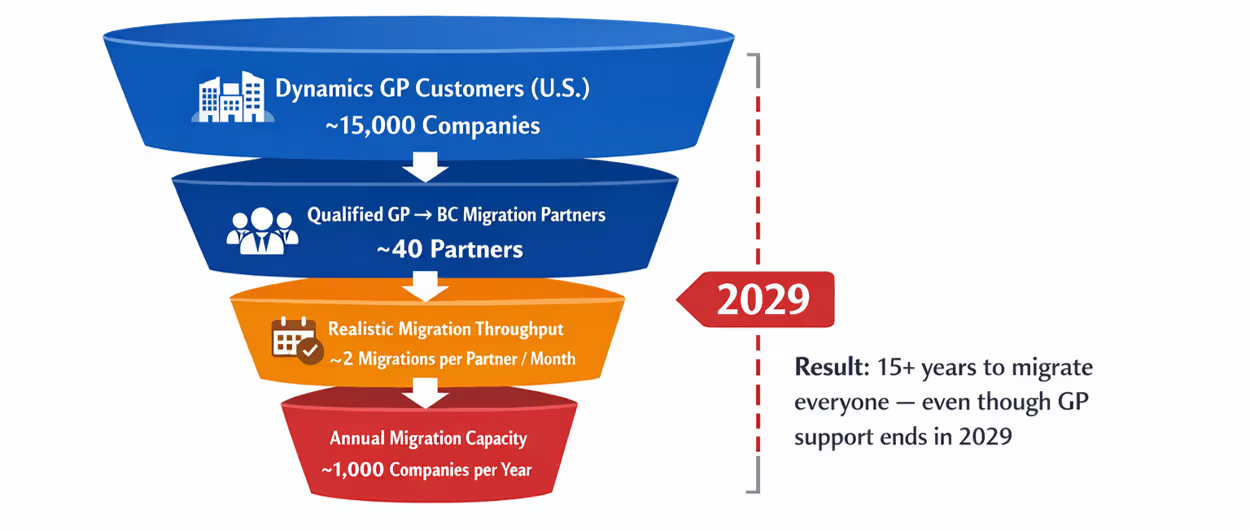
Rand Group’s research identified partner capacity as a significant risk. For example, Microsoft estimates that about 15,000 U.S. organizations still run Dynamics GP. For customers following the common Microsoft path to Dynamics 365 Business Central, Rand Group estimates that about 40 qualified partners have deep GP migration experience, with total capacity of roughly 1,000 migrations per year. At that estimated capacity, migrating 15,000 organizations would take about 15 years.
Waiting until migration demand peaks can result in:
- Reduced partner availability: Experienced Dynamics GP migration teams may be booked further in advance.
- Longer project lead times: Organizations may need to wait for the right implementation resources.
- Greater pricing pressure: Scarce consulting capacity can increase the cost of securing experienced resources.
- Compressed project schedules: Less time may be available for discovery, testing, training, and change management.
- Higher risk for complex environments: Highly customized GP systems generally require more planning and specialized expertise.
Staying on Dynamics GP delays access to modern ERP capabilities
The cost of waiting is not limited to what an organization spends maintaining Dynamics GP. There is also an opportunity cost when teams continue using a platform that does not receive the same innovation as modern cloud ERP systems. Dynamics GP does not include native AI capabilities, while modern ERP platforms continue to add embedded AI, automation, analytics, and connected workflows. As competitors adopt modern ERP platforms, they can gain access to newer capabilities and efficiencies that organizations staying on Dynamics GP may not be able to match.
Moving to a modern ERP can provide access to capabilities such as:
- Embedded AI: AI assistants and agents that support or automate routine ERP work
- Workflow automation: Automated approvals, notifications, document routing, and other repetitive processes
- Modern integrations: Easier connections between ERP data and productivity, reporting, and business applications
- Cloud accessibility: Browser and mobile access without maintaining the same remote-access infrastructure required by GP
- Continuous innovation: Regular product updates that introduce new functionality without traditional major-version upgrade projects
- Modern analytics: More accessible dashboards, reporting, and real-time business insights

Download the ultimate guide to Dynamics GP migration
Planning a Dynamics GP migration involves more than choosing a new ERP. Download our guide to assess your current environment, compare ERP options, build a migration roadmap, and prepare for a smoother transition.
What are the Dynamics GP replacement options?
There is no single ERP platform that is the right Dynamics GP replacement for every organization. Microsoft positions Dynamics 365 Business Central as the primary cloud path for many small and midsized GP customers, but larger organizations or businesses with more complex manufacturing, supply chain, multi-entity, or reporting requirements may need a different solution.
Common Dynamics GP replacement options include Dynamics 365 Business Central, Dynamics 365 Finance and Operations, Oracle NetSuite, and Sage Intacct. The right choice depends on the organization’s size, operational complexity, industry requirements, existing technology, and long-term growth plans.
At a high level:
- Dynamics 365 Business Central: A common Microsoft path for small and midsized organizations that need financial management plus distribution, projects, manufacturing, service, and Microsoft ecosystem integration.
- Dynamics 365 Finance and Operations: Designed for medium to large organizations with more complex financial, manufacturing, supply chain, warehouse, global, or multi-entity requirements.
- Oracle NetSuite: A cloud-native ERP for growing organizations that need broad financial and operational functionality, multi-entity management, and scalability outside the Microsoft ERP ecosystem.
- Sage Intacct: A finance-focused cloud ERP for small and midsized organizations that prioritize accounting, reporting, multi-entity consolidation, dashboards, and financial automation.
Dynamics GP replacement options compared
Each Dynamics GP replacement option offers a different mix of financial, operational, manufacturing, and cloud capabilities. The table below provides a high-level comparison of the four platforms commonly evaluated by organizations moving off Dynamics GP.
Selecting a Dynamics GP replacement should start with business requirements rather than a preferred software brand. Evaluate how each ERP supports current processes as well as future growth, reporting, integrations, automation, AI, implementation effort, and total cost of ownership.
For a deeper look at each Dynamics GP migration path, explore these resources:
- Dynamics GP to Business Central migration
- Dynamics GP to Finance & Operations migration
- Dynamics GP to NetSuite migration
- Dynamics GP to Sage Intacct migration
For more case studies, guides, comparisons, and resources, explore our Dynamics GP Migration Center.

Find the right ERP for your business
Choosing a Dynamics GP replacement starts with understanding your business requirements, priorities, and long-term goals. Rand Group can help you evaluate ERP options, compare the tradeoffs, and select the solution that best fits your organization.
Partner with Rand Group for Dynamics GP migration
Rand Group has supported Dynamics GP clients since 2003, giving our team more than two decades of experience with the platform and the businesses that depend on it. We have completed more than 1,000 successful ERP implementations and maintain a 90% client retention rate. As Dynamics GP approaches end of life, we are helping many long-term GP clients maintain their current systems while planning and executing migrations to modern ERP platforms.
Our multi-platform ERP expertise across Microsoft, Oracle NetSuite, and Sage allows us to evaluate the best solution based on your requirements rather than assuming every Dynamics GP customer should follow the same migration path. Rand Group can support the entire transition, from evaluating replacement options and preparing your Dynamics GP environment through implementation, go-live, and long-term support of the new ERP.
Our Dynamics GP migration services include:
- Dynamics GP support: Maintain, troubleshoot, and optimize your existing GP environment while you prepare for migration.
- ERP evaluation and selection: Compare ERP options against your requirements and select the best system for your needs.
- ERP implementation: Configure, test, migrate data, train users, and deploy the selected ERP using a structured implementation methodology.
- Customization and development: Build extensions, workflows, reports, and other functionality required to support your business processes.
- System integration: Connect the new ERP with business applications, data sources, and third-party systems.
- Post-go-live support: Provide ongoing ERP support, optimization, enhancements, and strategic guidance after implementation.
Dynamics GP migration case studies
Rand Group has helped organizations move from Dynamics GP to modern cloud ERP platforms based on their business requirements, operational complexity, and long-term goals. The following examples show how two clients approached their Dynamics GP migrations and the results they achieved.
M&H Enterprises: Dynamics GP to Dynamics 365 Business Central
M&H Enterprises partnered with Rand Group to migrate from an aging on-premises Dynamics GP environment to Dynamics 365 Business Central. Rand Group helped move M&H’s financial management, project accounting, time entry, invoicing, and reporting processes to the cloud while maintaining business continuity. M&H went live with zero business disruption, kept billing on schedule with invoices issued by the 10th of the following month, and now supports 100 to 200 invoices per month with a more efficient process. The company also gave Rand Group’s post-go-live support a 10/10 rating.
Mann Eye Institute: Dynamics GP to NetSuite
Mann Eye Institute worked with Rand Group to replace Dynamics GP with NetSuite as the organization expanded across 17 locations. Rand Group implemented the cloud ERP and integrated tools to automate accounts payable, improve reporting, and support continued growth. After the migration, Mann Eye reduced AP report generation time by 95%, reduced manual AP data entry by 60%, moved invoice processing from multi-day cycles to same-day approvals, and supported 40% to 50% revenue growth without adding accounting headcount.
What our clients say
Our clients have experienced firsthand what it takes to move from Dynamics GP to a modern ERP platform. Their experiences reflect the importance of careful migration planning, the right implementation partner, and a system that can support the business after go-live.
“Migrating from a system like Dynamics GP can be a huge disaster if it does not go well. The timing, the mapping, and getting the numbers right all matter, and there is a lot of trust involved. Once the Rand Group team came together, I was much more relieved.”
– Lisa Costello, President & Chief Operating Officer, M&H Enterprises
“We’ve grown significantly since moving to NetSuite, and the system has scaled with us every step of the way.”
– Joseph Lo, Head of Accounting, Mann Eye Institute
Key takeaways
- Microsoft Dynamics GP, formerly known as Great Plains, is an ERP system for small and midsized organizations with financial management at its core.
- The Dynamics GP product line dates back to 1993, giving the platform more than three decades of use and development.
- Dynamics GP supports accounting, purchasing, inventory, manufacturing, project accounting, payroll, reporting, and other business processes.
- Microsoft no longer sells Dynamics GP to new customers, and product support ends December 31, 2029, followed by final security updates on April 30, 2031.
- Organizations can continue running Dynamics GP in the near term, but rising costs, aging technology, and support risks make long-term planning increasingly important.
- Waiting to migrate can reduce access to experienced partners, increase project pressure, and limit available Microsoft migration incentives.
- Common Dynamics GP replacement options include Dynamics 365 Business Central, Dynamics 365 Finance and Operations, NetSuite, and Sage Intacct.
- The right Dynamics GP replacement depends on company size, operational complexity, industry requirements, integrations, scalability, and total cost of ownership.
- Moving from Dynamics GP to a modern ERP can provide cloud access, automation, AI, modern analytics, and stronger integration capabilities.
- Starting migration planning early gives organizations more time to evaluate systems, prepare data, address customizations, and choose the right implementation partner.
Frequently asked questions
What is Microsoft Dynamics GP and what is it used for?
Microsoft Dynamics GP is an ERP system for small and midsized organizations with financial management at its core. Businesses use Dynamics GP for accounting, purchasing, inventory, manufacturing, project accounting, payroll, reporting, and other financial and operational processes.
Is Microsoft Dynamics GP being discontinued?
Yes, Microsoft Dynamics GP is approaching end of life and is no longer sold to new customers. Microsoft has established final dates for product support, regulatory updates, technical support, and security updates.
When does Microsoft support for Dynamics GP end?
Microsoft Dynamics GP product enhancements, regulatory and tax updates, and technical support end on December 31, 2029. Final security updates and patches will end on April 30, 2031.
Can organizations continue using Dynamics GP after support ends?
Yes, Dynamics GP will not automatically stop working when Microsoft support ends. However, organizations will no longer receive Microsoft security updates, regulatory updates, product enhancements, or technical support, which can increase security, compliance, compatibility, and operational risks.
What is replacing Microsoft Dynamics GP?
Dynamics 365 Business Central is a common Microsoft replacement path for small and midsized Dynamics GP customers, but it is not the only option. Other Dynamics GP replacement options include Dynamics 365 Finance and Operations, Oracle NetSuite, and Sage Intacct.
Is Dynamics 365 Business Central a direct upgrade from Dynamics GP?
No, moving from Dynamics GP to Dynamics 365 Business Central is a migration to a different ERP platform rather than a traditional version upgrade. Organizations still need to evaluate and map data, customizations, integrations, reports, and business processes to the new system.
When should organizations start planning a Dynamics GP migration?
Organizations should begin Dynamics GP migration planning before the final support deadlines create unnecessary time or resource pressure. Starting early provides more time to evaluate ERP options, prepare data, address customizations, secure experienced migration resources, and take advantage of available Microsoft incentives.
How should an organization choose the right Dynamics GP replacement?
The right Dynamics GP replacement should be selected based on business requirements rather than software brand alone. Key factors include company size, financial and operational complexity, industry needs, manufacturing and supply chain requirements, integrations, reporting, scalability, implementation effort, and total cost of ownership.
Plan your Dynamics GP next steps
Dynamics GP can continue supporting many organizations in the near term, but Microsoft’s final support dates make long-term planning necessary. Starting early gives your organization more time to evaluate replacement options, understand costs, prepare data, address customizations and integrations, and choose a migration timeline that fits the business.
Rand Group can support your Dynamics GP environment today and help you plan the transition to the ERP platform that best fits your future requirements. Our multi-platform expertise across Microsoft, Oracle NetSuite, and Sage allows us to evaluate your options without assuming one solution is right for every organization. Contact us to discuss your Dynamics GP support needs, replacement options, and migration strategy.